Guide to the Visual Paradigm Ecosystem

Guide to the Visual Paradigm Ecosystem

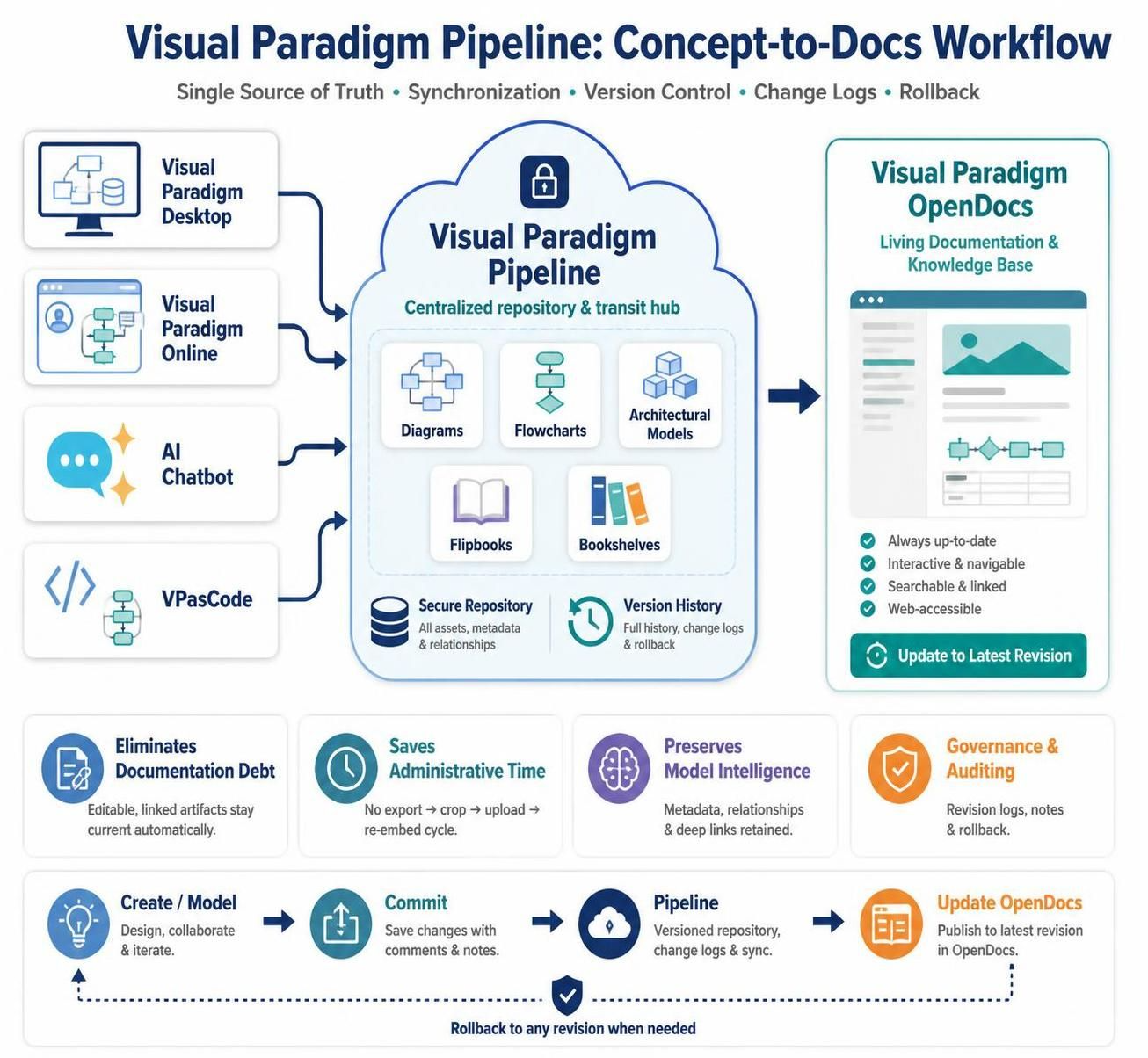
Visual Paradigm’s ecosystem provides an integrated environment for moving from early ideas to validated software architectures, executable specifications, implementation planning, and continuously updated technical documentation. Its central strength is the connection between traditional desktop modeling, browser-based Diagram-as-Code workflows, AI-assisted generation, cloud repositories, and living documentation. Teams can begin with an informal requirement, transform it into diagrams or structured models, refine it using enterprise-grade tools, and publish the results without repeatedly exporting and re-importing static files. 1. Ecosystem Overview The ecosystem is organized around several specialized components connected through a centralized orchestration layer: Unified…continue reading →
From Text to Visuals: Mastering Diagram-as-Code with VPasCode

From Text to Visuals: Mastering Diagram-as-Code with VPasCode

Introduction In the fast-paced world of software development and product management, clarity is currency. Traditional diagramming tools often rely on manual drag-and-drop interfaces that can become cumbersome when iterating on complex architectures or maintaining documentation alongside code. Enter VPasCode, Visual Paradigm’s browser-based, multi-engine Diagram-as-Code (DaC) platform. VPasCode represents a paradigm shift in how we create visual representations of systems. By allowing users to build, render, and refine diagrams using text markup scripts rather than graphical manipulation, it bridges the gap between conceptual brainstorming and code-level precision. This guide explores how VPasCode leverages multiple rendering…continue reading →

Breaking Down Silos: A Comprehensive Guide to the Visual Paradigm Unified Platform

Introduction In modern enterprise environments, product managers, architects, and business analysts often find themselves juggling multiple tools. You might design a complex ArchiMate model on your desktop, manage user stories in a cloud-based agile tool, and draft documentation in a separate wiki. This fragmentation creates friction, version control nightmares, and significant context-switching costs. The Visual Paradigm Unified Platform emerges as the solution to this disjointed workflow. It is not just another tool; it is a central workspace and coordination layer designed to connect fragmented tools, files, and workflows into a cohesive ecosystem. Acting as the…continue reading →

From Prompt to Publication: Mastering AI-Driven UML Modeling using Diagram-as-Code with Visual Paradigm

Introduction In modern software development, documentation often becomes the bottleneck. Traditional diagramming tools require manual drag-and-drop efforts, resulting in static images that quickly become outdated as systems evolve. Meanwhile, engineering teams increasingly prefer code-centric workflows where everything—from infrastructure to application logic—is version-controlled and reproducible. Visual Paradigm bridges this gap by combining three powerful capabilities: AI-assisted diagram generation, VPasCode (Diagram-as-Code), and OpenDocs (Living Documentation). This integrated ecosystem enables teams to generate architecture diagrams from natural language prompts, refine them using text-based syntax like PlantUML, and publish them as living, always-up-to-date documentation. This guide explores how to leverage…continue reading →

Visual Paradigm OpenDocs: Comprehensive Guide

Visual Paradigm OpenDocs is a documentation and knowledge-management workspace within the Visual Paradigm ecosystem. Its purpose is to turn diagrams, models, project information, and written explanations into structured, shareable, maintainable documentation. Rather than treating diagrams as isolated images, OpenDocs provides a place where diagrams can be organized with context: descriptions, requirements, decisions, procedures, architecture explanations, project notes, and other supporting material. It is especially useful for teams that need documentation to remain connected to the analysis and design work from which it was created. Visual Paradigm positions OpenDocs as part of a broader…continue reading →
Visual Paradigm Unified Platform: Comprehensive Guide

Visual Paradigm Unified Platform: Comprehensive Guide

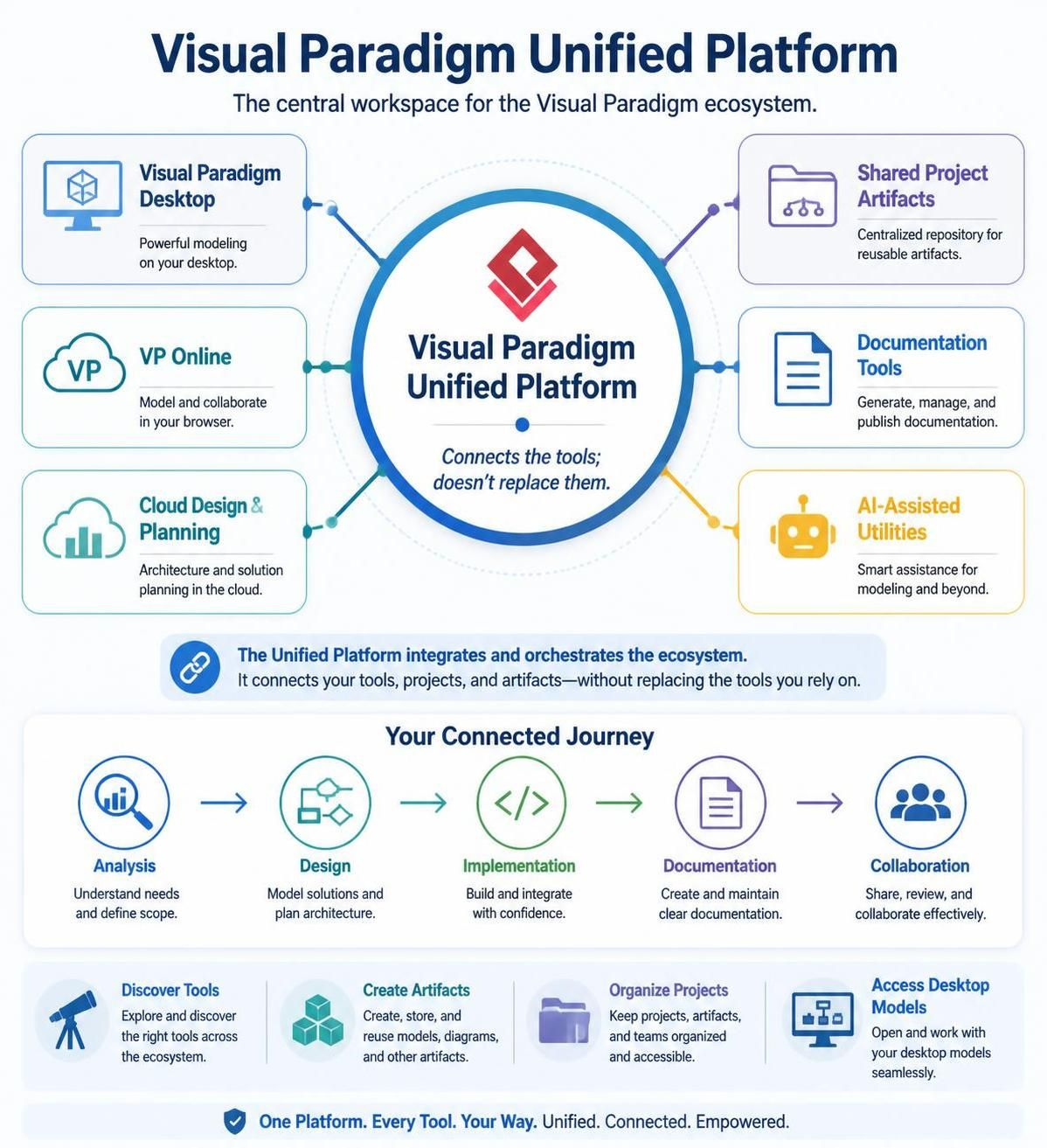
The Visual Paradigm Unified Platform is the central workspace for the Visual Paradigm ecosystem. It connects Visual Paradigm Desktop, VP Online, cloud-based design and planning applications, shared project artifacts, documentation tools, and AI-assisted utilities through one interface. Its primary role is not to replace Visual Paradigm Desktop or VP Online. Instead, it acts as an integration and orchestration layer: a common home where users can discover tools, create artifacts, organize projects, access desktop models, and move from analysis to design, implementation, documentation, and collaboration. 1. What problem does it solve? Visual Paradigm has historically consisted of…continue reading →

Pairing VPasCode with OpenDocs: A Comprehensive Guide

The VPasCode–OpenDocs workflow connects diagram creation with documentation publishing: Textual Diagram: Write diagram code ↓ Preview and refine in VPasCode ↓ Send through the OpenDocs Pipeline ↓ Insert into an OpenDocs page ↓ Publish a living document VPasCode is Visual Paradigm’s browser-based diagram-as-code editor. It supports text-based formats such as PlantUML, Mermaid, Graphviz, D2, and other diagram syntaxes. OpenDocs is the documentation and knowledge-management workspace where those diagrams can be organized, explained, shared, and maintained. The integration allows a diagram and its source code to move from VPasCode into OpenDocs without manually exporting, downloading, and re-uploading image…continue reading →
Visual Paradigm VPasCode: Comprehensive Guide

Visual Paradigm VPasCode: Comprehensive Guide

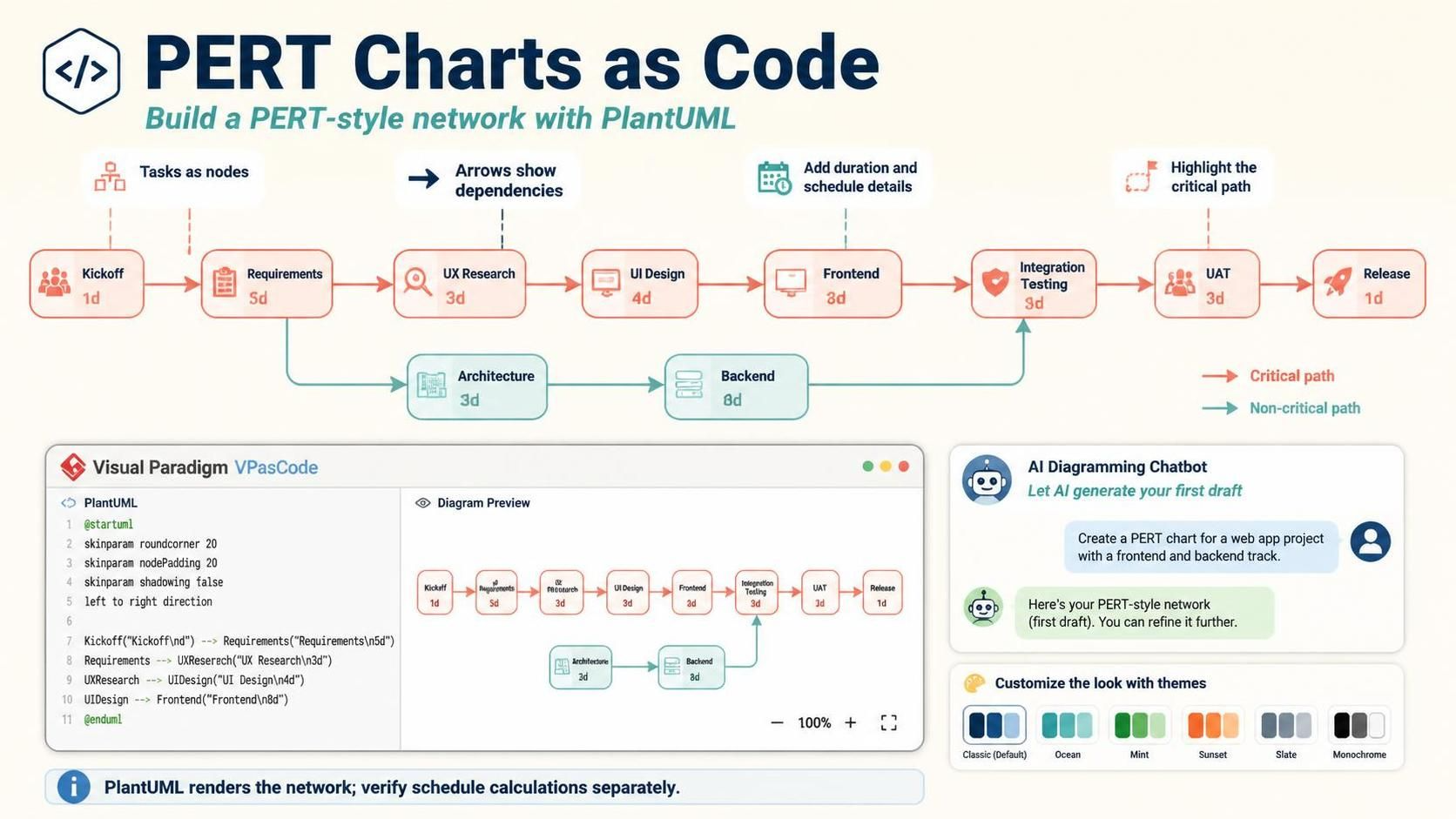
VPasCode is Visual Paradigm’s browser-based, text-to-diagram platform. It lets users create diagrams by writing diagram code, generating code with AI, or starting with a natural-language description. The diagram is rendered in real time beside the source code, allowing users to move quickly between requirements, code, and visual documentation. VPasCode supports diagram technologies including PlantUML, Mermaid, Graphviz, and other text-based formats. What Is VPasCode? VPasCode applies the diagram-as-code approach to visual modeling. Instead of drawing every shape manually, you describe the diagram using text. The platform converts the text into a visual diagram. For example, a…continue reading →
BPMN for Beginners: A Practical Guide to Business Process Modeling

BPMN for Beginners: A Practical Guide to Business Process Modeling

Business processes often involve many people, decisions, activities, and communication steps. Without a clear way to represent these elements, it can be difficult to understand how work moves through an organization. Business Process Model and Notation, commonly called BPMN, provides a standardized visual language for describing business processes. It uses familiar diagram symbols to show what happens, who is responsible, when decisions are made, and how different participants interact. What Is BPMN? BPMN is a graphical notation used to represent the logic and sequence of activities in a business process. A BPMN diagram works…continue reading →

BPMN Tutorial: Visual Paradigm Tooling, AI Chatbot & Ecosystem

This guide provides a comprehensive overview of Business Process Model and Notation (BPMN), focusing on the Visual Paradigm ecosystem, its AI-powered chatbot capabilities, and practical modeling techniques. Key Concepts 1. BPMN Basics and Core Elements BPMN is a graphical standard for specifying business processes, developed by the Business Process Management Initiative (BPMI) and later adopted by the Object Management Group (OMG) [1]. Its primary goal is to provide a notation understandable by business users while supporting complex technical implementation [2]. The core elements of BPMN are categorized into four groups: Flow Objects: Events, Activities,…continue reading →