


Chapter 1: Welcome to OpenDocs
In an era defined by rapid technological iteration, traditional documentation frameworks fail to scale. Software architectures change daily, deployment strategies adapt instantly, and cross-functional teams constantly refine their approaches. Treating documentation as a static after-thought or a decoupled text file inevitably yields outdated, untrusted reference material.
Visual Paradigm OpenDocs solves this systemic challenge by delivering a modern, cloud-native engineering repository. It is a workspace where system modeling, AI-assisted text authoring, and lifecycle management converge into a single, cohesive interface.
🛠️ The Core OpenDocs Philosophy
OpenDocs is built around a simple directive: Documentation must mirror engineering reality. To fulfill this promise, the platform abandons the isolated “text editor” concept and organizes your workspace around three architectural pillars:
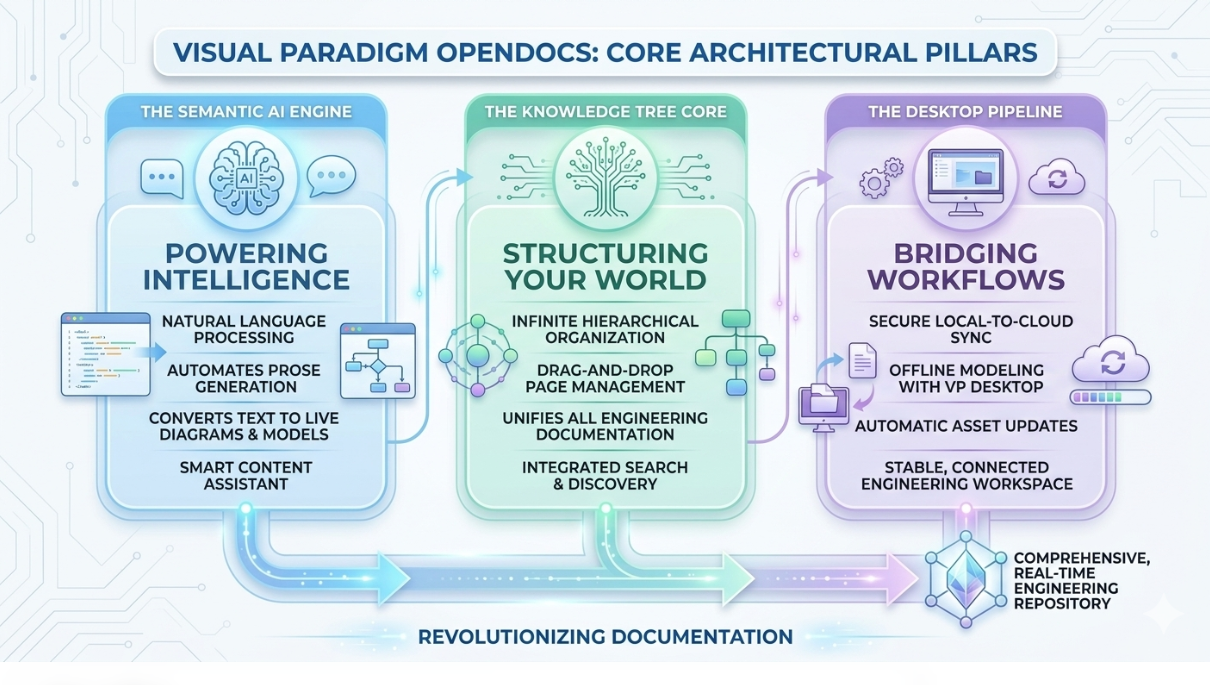
The Semantic AI Engine: A built-in natural language engine that processes text commands. It can generate descriptive software explanations or convert conversational prose into live, structural engineering diagrams.
- The Knowledge Tree Core: A structural paradigm that completely replaces messy file folders. It uses an infinitely scalable, drag-and-drop page hierarchy to organize engineering systems cleanly.
- The Desktop Pipeline: A secure bridge that links offline Visual Paradigm Desktop modeling tools directly to online OpenDocs spaces. This channel eliminates manual exporting and ensures visual assets stay automatically updated.
🏗️ Under the Hood: Cloud Workspace & Multi-Tenant Security
OpenDocs is deployed as a highly secure, distributed software-as-a-service (SaaS) or private cloud environment. It is engineered specifically to meet stringent corporate compliance standards while enabling real-time collaboration.
Isolation and Data Sovereignty
The core cloud infrastructure uses isolated database logic to enforce strict data separation between corporate tenants. Your proprietary software specifications, trade secrets, and API designs are securely containerized at rest and encrypted using advanced cryptographic protocols (AES-256).
Granular Identity Management
Workspace security utilizes precise Identity and Access Management (IAM) permissions. Access can be restricted at three distinct levels:
- Workspace Level: Controls global settings, billing configurations, and developer API integrations.
- Space Level: Isolates specific product lines or system domains (e.g., restricting QA teams to the Testing Space while granting DevOps exclusive access to Infrastructure Docs).
- Page Level: Locks down individual documents or sensitive child nodes to specific user roles or individual emails.
⚙️ Initial Provisioning & Workspace Initialization
Setting up an optimized OpenDocs environment requires completing three foundational steps:
1. Workspace Allocation
When an administrator provisions an account, they establish a primary organization domain (e.g.,
://vpodocs.com). This acts as the centralized root for all underlying spaces.2. Space Provisioning
Rather than building a single massive directory, administrators create isolated Spaces based on distinct corporate boundaries. For example, a standard tech firm might structure its spaces as follows:
| Space Name | Primary Purpose | Key Stakeholders |
|---|---|---|
| Product-Specs | User stories, feature definitions, wireframes | Product Managers, Designers |
| Architecture-Wiki | System models, UML sequences, API schemas | Software Engineers, Architects |
| Operations-Playbook | Deployment runbooks, network layout, CI/CD | DevOps, Site Reliability Engineers |
3. User & Group Mapping
Instead of managing permissions user-by-user, administrators map users to centralized functional groups (e.g.,
Engineering-Lead, Technical-Writer, External-Stakeholder). This group-based control ensures that onboarding an engineer immediately grants them automated, read/write access to the exact repositories required for their role.With the core cloud architecture provisioned, the next step is interacting with the physical environment. Let me know how you would like to proceed:
- Generate Chapter 2: Navigating the Interface to break down the dual editor mode and dashboard.
- Skip to Chapter 5: Unleashing the AI Prompt Assistant to learn the mechanical execution of
/text automation commands. - Detail an Enterprise Security Deployment Checklist to append to the end of this chapter.
