




The Ultimate Guide to C4-PlantUML Studio: Revolutionizing Software Architecture Design
Introduction: Why C4-PlantUML Studio Matters
Software architecture documentation is often a bottleneck—time-consuming, error-prone, and quickly outdated. The C4-PlantUML Studio, developed by Visual Paradigm, changes this by combining , the , and into a single, powerful tool.
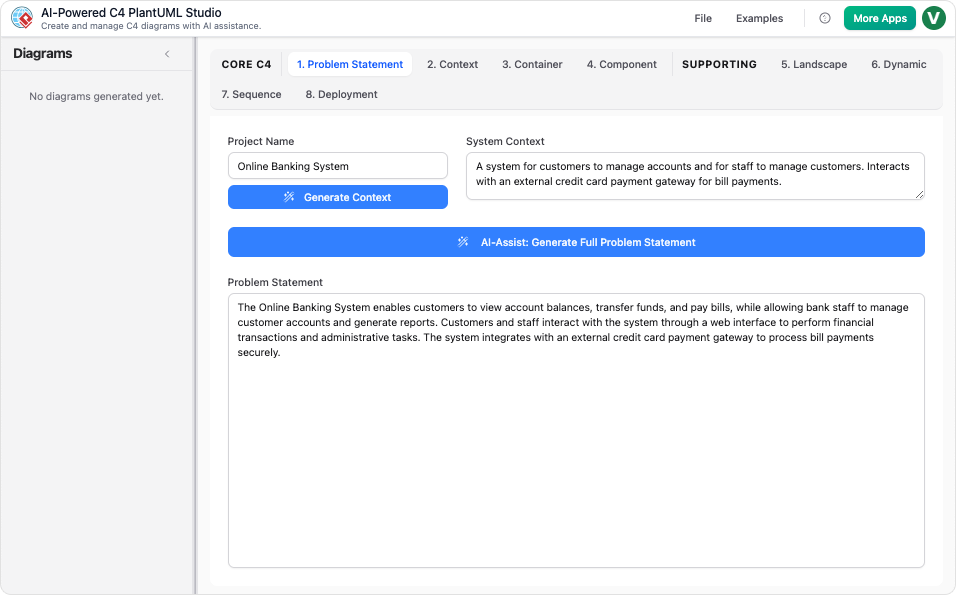
This guide will walk you through:
- What the C4 model is and why it’s essential
- How C4-PlantUML Studio automates and simplifies architecture diagramming
- Step-by-step workflows for creating, refining, and sharing diagrams
- Real-world use cases and best practices
- Why Visual Paradigm leads the market in 2025
1. Understanding the C4 Model: The Foundation
The C4 model, created by Simon Brown, is a hierarchical approach to visualizing software architecture. It breaks down complex systems into four levels:
| Layer | Purpose | Example |
|---|---|---|
| Context | Shows the system in its environment, including users and external systems. | “E-commerce platform interacting with users, payment gateways, and inventory systems.” |
| Container | Breaks the system into deployable units (apps, databases, microservices). | “Frontend (React), Backend (Node.js), Database (PostgreSQL).” |
| Component | Details internal modules and their interactions. | “User Service, Order Service, Payment Processor.” |
| Code (Optional) | Dives into class-level details (less common in high-level docs). | “UserRepository, OrderController.” |
(e.g., Sequence, Deployment) complement the static structure, showing runtime behavior and infrastructure.
2. The Power of C4-PlantUML Studio
Core Features
- AI-Powered Generation: Converts natural language descriptions into accurate PlantUML code and diagrams.
- Interactive Editing: Drag-and-drop or text-based edits with real-time previews.
- Version Control & Collaboration: Cloud-based projects with sharing, versioning, and export options (PNG, SVG, PDF, PlantUML).
- Standardization: Enforces C4 best practices, ensuring consistency across teams.
Why It Stands Out
- Speed: Generate a full C4 diagram set in under 10 minutes—no PlantUML expertise required.
- Accuracy: and enforces C4 conventions.
- Flexibility: Export diagrams as code (PlantUML) or visuals, integrating with tools like Confluence, GitHub, and Jira.
3. Step-by-Step Workflow
Step 1: Define Your System
- Start a new project and name your system (e.g., “Inventory Management App”).
- Input a natural language description (e.g., “Users browse products, admins manage inventory, payments via Stripe”).
- Use AI-Assist to refine the problem statement, capturing actors, boundaries, and goals.
Step 2: AI-Generated Diagrams
- The AI parses your description and generates:
- : High-level system overview.
- : Deployable units.
- : Internal modules.
- Dynamic Views: Sequence, Deployment, and Landscape diagrams.
- Review and edit the PlantUML code or use the visual editor for tweaks.
Step 3: Refine and Iterate
- Use the to drill down between layers.
- Update descriptions or code—.
- Switch between text input, visuals, and details tabs for focused editing.
- Save to the cloud for versioning.
- Export as interactive HTML, static images, or PlantUML code.
- Share editable links with your team.
4. Real-World Use Cases
| Role | Use Case |
|---|---|
| Software Architects | Rapidly prototype and communicate system designs. |
| Developers | Sync diagrams with code changes for onboarding/debugging. |
| Business Analysts | Map requirements to technical architecture. |
| Educators | Teach C4 principles with real-world templates. |
5. Best Practices for Success
- Start with AI-Assist: Use it to scaffold your problem statement.
- Iterate Holistically: Alternate between text and visual refinements.
- Leverage the Gallery: Adapt pre-built examples to your domain.
- Version Control: Treat your project as a living document—branch, merge, and evolve.
6. Why Visual Paradigm Leads the Market (2025)
Unmatched AI Integration
- from natural language.
- AI Chatbot for targeted refinements (e.g., “Add a Kubernetes deployment view”).
Hybrid Textual and Visual Editing
- Edit as PlantUML code (for version control) or visually (for precision).
- Auto-sync between text and visuals.
Full C4 Ecosystem Support
- Covers all C4 diagram types with live navigation.
- Cloud-based collaboration, versioning, and .
Market Positioning
- Vs. Free Tools (PlantUML, Mermaid): Adds AI, interactivity, and collaboration.
- Vs. Competitors (Lucidchart, IcePanel): Faster, more reliable, and better ROI.
7. Getting Started
- Sign up for Visual Paradigm’s .
- Launch a new project and describe your system in plain English.
- Use AI-Assist to generate your first C4 diagrams.
- Refine, export, and share with your team.
Conclusion: The Future of Architecture Documentation
C4-PlantUML Studio transforms architecture design from a chore into a collaborative, AI-augmented conversation. Whether you’re a seasoned architect or a developer new to C4, this tool makes high-quality documentation fast, accurate, and maintainable.
Ready to revolutionize your workflow? Try C4-PlantUML Studio today and experience the future of software architecture design.
This post is also available in Deutsche, Español, فارسی, Français, English, Bahasa Indonesia, 日本語, Polski, Portuguese, Ру́сский, Việt Nam, 简体中文 and 繁體中文.
