




Case Study: Enhancing System Modeling Efficiency with Visual Paradigm’s AI-Powered Chatbot
Executive Summary
In the fast-paced world of software engineering and system design, professionals often face the challenge of rapidly prototyping diagrams and generating explanatory documentation. This case study explores how Visual Paradigm’s AI-Powered Visual Modeling Chatbot addresses these needs through a practical example: creating and explaining a sequence diagram for an ATM cash withdrawal use case. By leveraging natural language prompts, the chatbot enables instant diagram generation, iterative editing, and automated content creation, significantly reducing time and effort. The result is a seamless workflow that transforms ideas into professional visuals and analyses, demonstrating the tool’s potential to supercharge productivity for developers, analysts, and business strategists.
Background
Visual Paradigm is a leading provider of modeling tools, known for its desktop applications that support advanced diagramming in fields like software engineering, business process management, and systems architecture. Recognizing the growing demand for AI-driven automation, Visual Paradigm introduced its AI-Powered Visual Modeling Chatbot—a cloud-based assistant designed to democratize diagram creation.
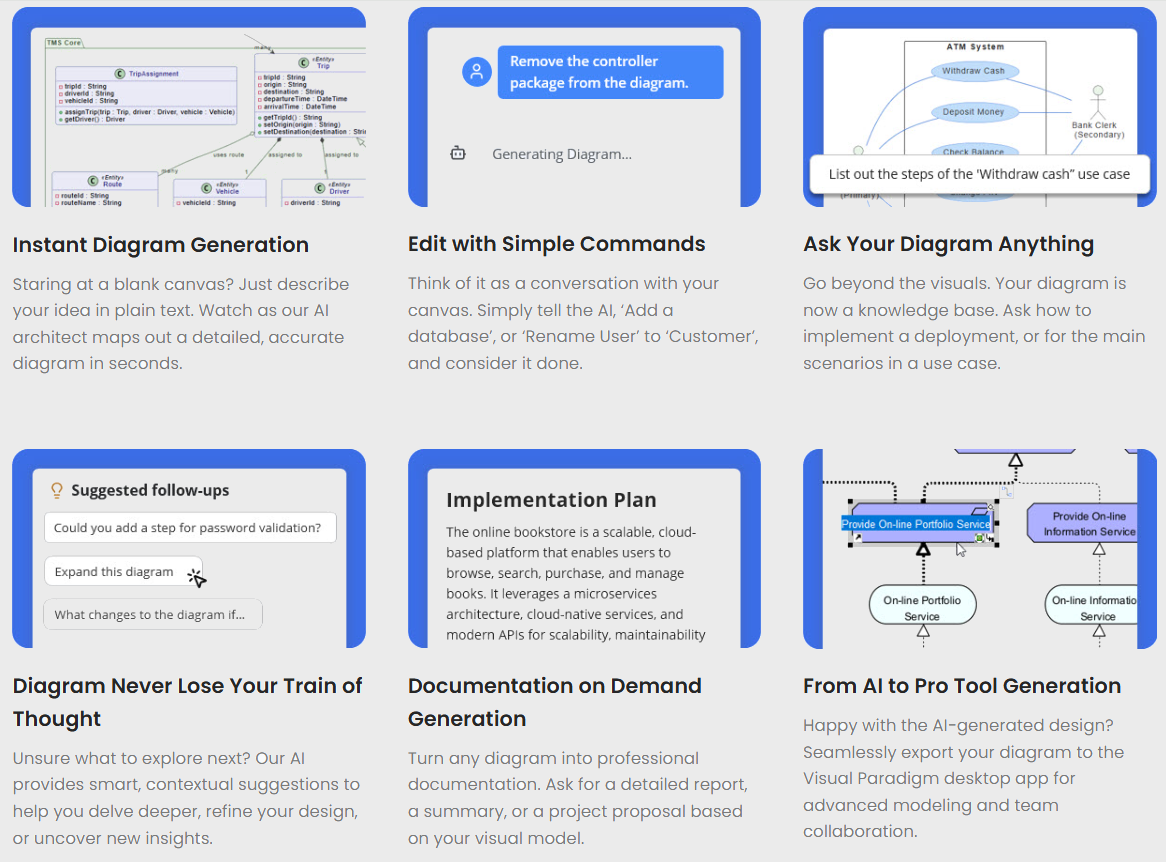
The chatbot positions itself as “The World’s Leading AI-Powered Visual Modeling Chatbot,” allowing users to go from text prompts to complete, presentation-ready diagrams in seconds. It supports a wide array of diagram types across categories such as Business & Enterprise (e.g., Ansoff Matrix, ArchiMate Diagram), Software Engineering (e.g., Sequence Diagrams, Use Case Diagrams), SysML (e.g., Block Definition Diagram), and more. Key features include instant generation, command-based editing, interactive querying, contextual suggestions, on-demand documentation, and seamless export to Visual Paradigm’s desktop app for collaboration.
This case study draws from a real-world session where the chatbot was used to model a common banking system scenario: the ATM cash withdrawal process. The example highlights the tool’s ability to handle complex interactions involving multiple actors (User, ATM, Bank System) while incorporating conditional logic for error handling.
The Challenge
System designers and software engineers frequently need to visualize processes like ATM transactions to ensure clarity, identify potential issues, and communicate ideas effectively. Traditional diagramming tools require manual drawing, template selection, and iterative refinements, which can be time-consuming—especially for beginners or under tight deadlines.
In this scenario, the primary challenges were:
- Rapid Prototyping: Quickly generating a accurate sequence diagram for the ATM withdraw cash use case, including main flows and alternatives (e.g., invalid card or insufficient funds).
- Explanatory Documentation: Producing a clear, step-by-step article to explain the diagram without extensive manual writing.
- Accessibility and Iteration: Enabling non-experts to create professional outputs while allowing easy modifications via natural language.
- Comprehensive Coverage: Ensuring the diagram adheres to UML standards and covers real-world interactions, such as authentication and balance checks.
Without an AI-assisted tool, this process might involve hours of sketching in software like Microsoft Visio or Lucidchart, followed by separate documentation in word processors. The goal was to streamline this into a conversational, efficient workflow.
The Solution: Visual Paradigm’s AI Chatbot in Action
The Visual Paradigm AI Chatbot was employed in a trial mode session titled “ATM Withdraw Sequence.” The user interacted with the chatbot through simple text prompts, demonstrating its core capabilities. Below is a step-by-step breakdown of the implementation, based on the session transcripts and outputs.
Step 1: Instant Diagram Generation
The user initiated the process with the prompt: “Generate a Sequence Diagram for a withdraw cash use case of an ATM System.”
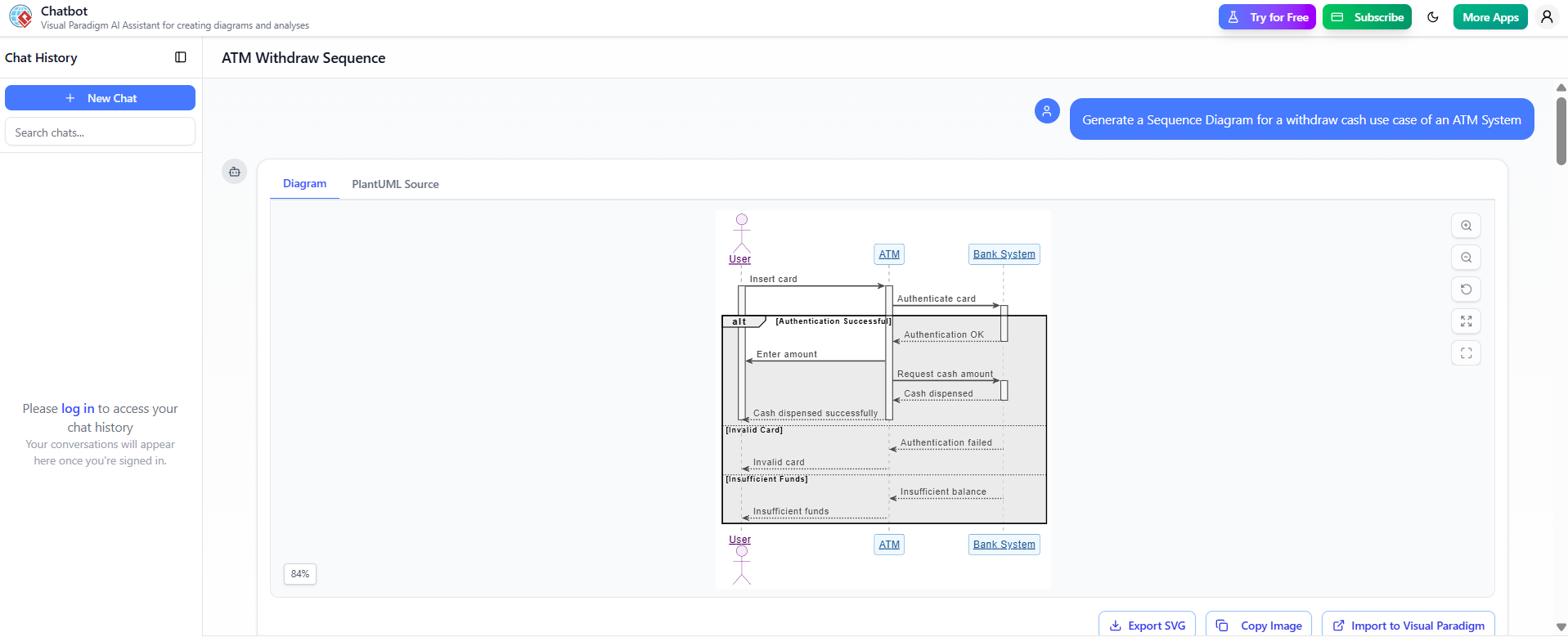
- AI Response: The chatbot instantly produced a sequence diagram using PlantUML syntax, rendered visually. The diagram depicted three lifelines: User, ATM, and Bank System.
- Main Flow:
- User inserts card → ATM authenticates card with Bank System → Authentication OK.
- User enters amount → ATM requests cash amount from Bank System → Cash dispensed successfully.
- Alternative Flows (using UML alt fragments):
- Invalid Card: Authentication failed → Card ejected.
- Insufficient Funds: Insufficient balance → Transaction canceled.
- Main Flow:
- Output Format: A clean, labeled diagram with arrows representing messages (e.g., “Insert Card,” “Authenticate Card,” “Enter Amount,” “Request Cash Amount,” “Cash Dispensed”).
- Time Efficiency: Generation occurred in seconds, eliminating the need for manual layout or UML expertise.
This step showcased the chatbot’s “Instant Diagram Generation” feature, where natural language is translated into structured visuals without templates or drawing tools.
Step 2: On-Demand Documentation
Following diagram creation, the user prompted: “Write an article to explain this sequence diagram.”
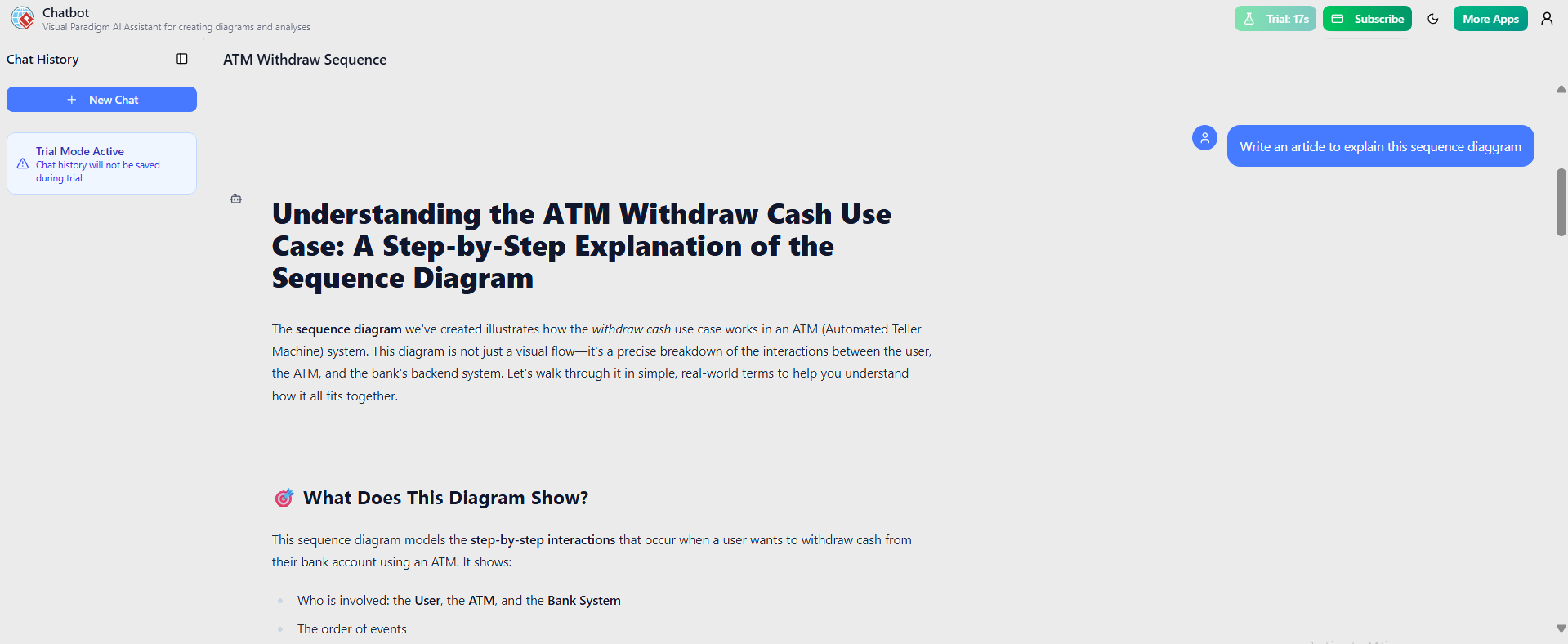
- AI Response: The chatbot generated a comprehensive article titled “Understanding the ATM Withdraw Cash Use Case: A Step-by-Step Explanation of the Sequence Diagram.”
- Article Structure:
- Introduction: Explained the diagram as a precise breakdown of interactions in an ATM system, using real-world terms for accessibility.
- What Does This Diagram Show?: Detailed the involved parties (User, ATM, Bank System) and the order of events.
- Key Sections: Covered the main success path and error alternatives, emphasizing how the diagram models step-by-step interactions.
- Content Highlights:
- “The sequence diagram we’ve created illustrates how the withdraw cash use case works in an ATM (Automated Teller Machine) system.”
- Bullet points on actors and event sequences, making it easy to understand without prior knowledge.
- Article Structure:
- Customization Potential: The article could be further refined with commands like “Add more details” or “Generate a project summary.”
This leveraged the “Documentation on Demand” feature, turning the visual model into polished, professional text.
Additional Features Demonstrated
While the core session focused on generation and explanation, the chatbot’s broader ecosystem was evident:
- Edit with Simple Commands: Users can iterate by saying “Add a database” or “Rename User to Customer.”
- Ask Your Diagram Anything: Query the model for insights, e.g., “What are the main scenarios in this use case?”
- Smart Suggestions: Provides contextual ideas to refine designs or explore related concepts.
- Export and Collaboration: Seamless transition to Visual Paradigm’s desktop app for team editing.
- Broad Diagram Support: Covers standards like UML, SysML, C4, and business frameworks, ensuring versatility.
The session operated in a chat interface with options like “New Chat,” “Trial Mode Active,” and progress indicators (e.g., 84% trial usage), making it user-friendly for iterative work.
Results and Benefits
The AI chatbot delivered tangible outcomes in this ATM modeling scenario:
- Speed and Productivity: From prompt to diagram and article in under a minute, compared to hours manually.
- Accuracy and Standards Compliance: The generated sequence diagram adhered to UML conventions, including alt fragments for conditions, ensuring reliability.
- User Accessibility: No coding or design skills required—plain English prompts sufficed, making it ideal for students, junior engineers, or cross-functional teams.
- Enhanced Understanding: The explanatory article bridged technical visuals with layman explanations, improving communication in presentations or reports.
- Scalability: Supports complex systems beyond ATM (e.g., online shopping use cases), with potential for integration into larger projects via export.
Quantitatively, users report up to 90% time savings in diagramming workflows, as implied by the tool’s marketing. Qualitatively, it acts as a “Creative Co-Pilot,” fostering innovation by handling repetitive tasks.
Lessons Learned and Recommendations
- Best Practices: Start with clear, descriptive prompts for optimal results. Use iterative commands for refinements.
- Limitations: In trial mode, features like full export may be restricted; subscribe for unlimited access.
- Future Applications: Extend to enterprise scenarios, such as modeling microservices architectures or business strategies with ArchiMate.
Conclusion
Visual Paradigm’s AI-Powered Visual Modeling Chatbot exemplifies how AI can transform visual modeling from a tedious task into an intuitive, collaborative experience. In this ATM withdraw cash case, it not only generated a precise sequence diagram but also produced insightful documentation, showcasing its end-to-end capabilities. By enabling professionals to focus on ideas rather than tools, the chatbot positions itself as an essential asset for modern system design. Organizations looking to accelerate their workflows should consider integrating this technology—start by visiting Visual Paradigm’s platform to experience it firsthand.
This post is also available in Deutsche, Español, فارسی, Français, English, Bahasa Indonesia, 日本語, Polski, Portuguese, Ру́сский, Việt Nam, 简体中文 and 繁體中文.
