




From Strategy to Execution: Accelerating Enterprise Architecture with AI-Powered ArchiMate Modeling
Introduction
In today’s rapidly evolving digital landscape, organizations face unprecedented complexity in aligning business strategy with technology execution. Enterprise Architecture (EA) has emerged as a critical discipline for navigating this complexity, providing the frameworks and tools needed to visualize, analyze, and communicate how different organizational domains interconnect. At the heart of modern EA practice lies ArchiMate—the open, vendor-independent modeling language standardized by The Open Group.
This case study explores how ArchiMate, particularly when empowered by AI-driven tooling like Visual Paradigm, transforms enterprise architecture from a theoretical exercise into a dynamic, actionable practice. We examine the language’s core principles, its structural framework, real-world application examples, and how next-generation automation is accelerating the journey from strategic vision to operational reality.
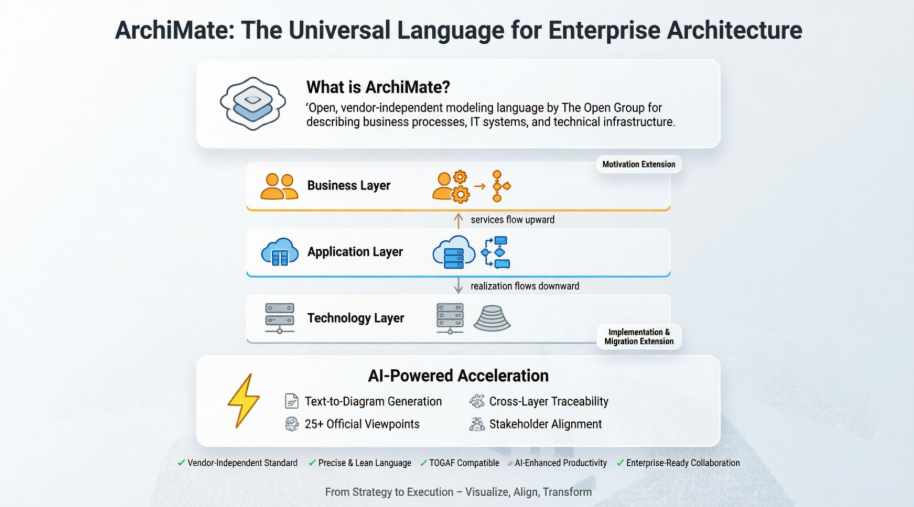
What is ArchiMate?
ArchiMate is The Open Group ‘s open and independent modelling language for enterprise architecture, supported by different tool vendors and consulting firms. ArchiMate provides instruments to support enterprise architects in describing, analyzing and visualizing the relationships among different architecture domains in an unambiguous way, similar to those well-established disciplines like civil engineering or building and construction using internationally accepted standards for describing their designs.
ArchiMate is a modelling technique (“language”) for describing enterprise architectures. It presents a clear set of concepts within and relationships between architecture domains, and offers a simple and uniform structure for describing the contents of these domains. Just like an architectural drawing in classical building architecture describes the various aspects of the construction and use of a building, ArchiMate offers a common language for describing the construction and operation of:
-
Business processes
-
Organizational structures
-
Information flows
-
IT systems
-
Technical infrastructure.
This insight helps stakeholders to design, assess, and communicate the consequences of decisions and changes within and between these business domains.
| Draw ArchiMate with a Certified Archimate Tool |
|---|
| Visual Paradigm Enterprise Edition is a certified ArchiMate 3 enterprise architecture tool. It supports all ArcihMate 3 vocabulary, notation, syntax, and semantics. |
| Download Now |
Why ArchiMate?
Models have played an important role in business for a long time. Process models, information- and data models, application landscapes, strategic models, operational models. Organizations try to connect their models, to gain insight in the way the enterprise works from many different perspectives. Typically, models become more high-level, focusing on the essence of the organization. These developments have led to the development of the ArchiMate language, which allows high-level modeling within a domain, but allows modeling the relations between domains.
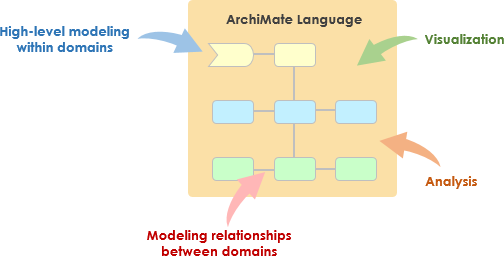
As shown the Figure above, the main reasons for enterprise architect to adopt ArchiMate are as follows:
-
Capture stakeholder concerns
-
Address concerns by identifying and refining requirements
-
Create EA models
-
Create views of the model for stakeholders
-
show how concerns and requirements will be addressed
-
show trade-offs arising from conflicting concerns
-
Benefits of ArchiMate
The main benefits of ArchiMate for modeling your enterprise architectures are:
-
It is an international, vendor-independent standard of The Open Group, liberating you from the lock-in of vendor-specific tools and frameworks. There is active support from the ArchiMate Forum of The Open Group.
-
Its well-founded concepts and models provide precision. It helps you get away from the ‘fuzzy pictures’ image of architecture.
-
It is a lean and simple language. It contains just enough concepts for modeling enterprise architecture and is not bloated to include everything possible. Its uniform structure makes it easy to learn and apply.
-
It has clear links to existing approaches for specific architecture areas such as software or business processes. Several concepts in ArchiMate have deliberately been borrowed from other languages such as UML or BPMN, to provide an easy bridge.
-
It does not prescribe a way of working, but it is easily combined with existing methods such as TOGAF.
-
It has been tried and tested by many different user organizations and is supported by numerous consultancies and software tools.
Latest ArchiMate 3 Specification
The latest version of the language is the ArchiMate 3.0 Specification, which was published in June 2016. ArchiMate 3.0 is a major update to the standard, with many new concepts.
New features included in Version 3.0 include:
-
Elements for modeling the enterprise at a strategic level, such as capability, resource, and outcome.
-
It also includes support to model the physical world of materials and equipment.
-
Furthermore, the consistency and structure of the language have been improved, definitions have been aligned with other standards, and its usability has been enhanced in various other ways.
The new version of the language has been created to respond to a number of requirements:
-
Increasing demand for relating business strategy with business and IT operations
-
Technology innovations that mix IT and the physical world
-
Usage in new domains; e.g., manufacturing, logistics
-
Improved consistency and comprehensibility
-
Improved alignment between Open Group standards, notably with the TOGAF Framework
Related Resources:
The ArchiMate specification can be downloaded from The Open Group’s ArchiMate Forum.
The ArchiMate Core Framework
The aspects and layers of the core, as defined by the business, application and technology elements, can be organized as a framework of nine cells, as illustrated in Figure below.
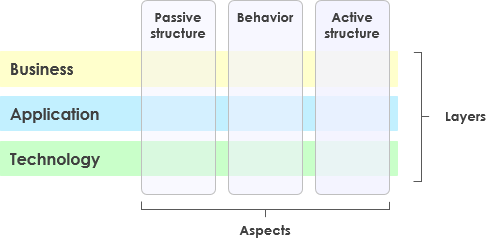
The structure of the framework allows for modeling of the enterprise from different viewpoints, where the position within the cells highlights the concerns of the stakeholder. A stakeholder typically can have concerns that cover multiple cells.
Aspects and Layers
The main concepts and relationships of the ArchiMate language can be seen as a framework, the so-called ArchiMate Full Framework.
It divides the enterprise architecture into a business, application and technology layer.
In each layer, three aspects are considered: active elements that exhibit behavior (e.g. Process and Function), an internal structure and elements that define use or communicate information.
Aspects
-
The active structure aspect represents the structural concepts (the business actors, application components, and devices that display actual behavior; i.e., the “subjects” of activity).
-
The behavior aspect represents the behavior (processes, functions, events, and services) performed by the actors. Behavioral concepts are assigned to structural concepts, to show who or what displays the behavior.
-
The passive structure aspect (information) represents the objects on which behavior is performed. These are usually information objects in the business layer and data objects in the application layer, but they may also be used to represent physical objects.
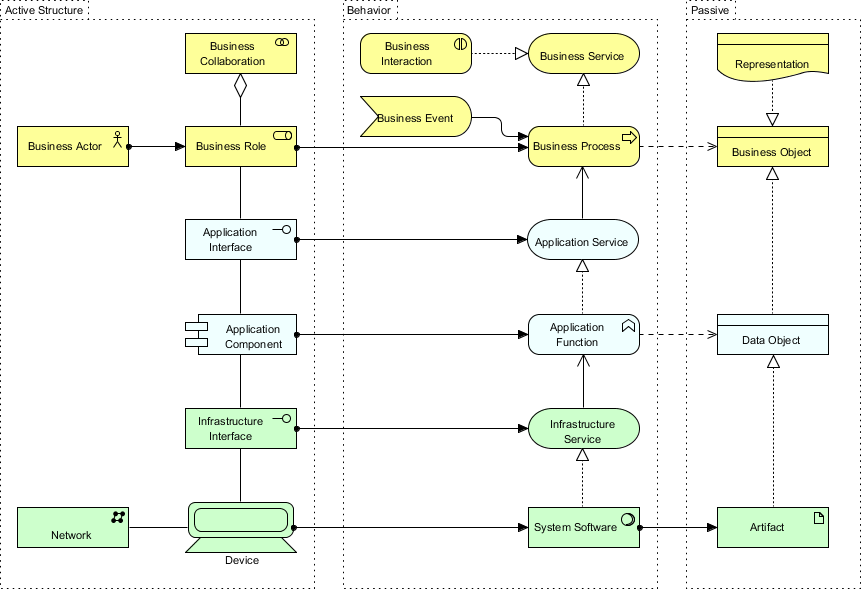
Layers
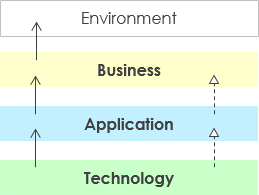
Higher layers use services provided by lower layers. The Business layer offers products and services to external customers which are realised by business processes performed by business actors. Application layer supports the business layer with application services which are realised by (software) applications. Technology layer offers infrastructural services (e.g., processing, storage and communication services) needed to run applications, realised by computer and communication hardware and system software.
The ArchiMate Full Framework
The full ArchiMate language adds several layers and an aspect to the core framework. The physical elements are added to the Technology layer for modeling physical facilities and equipment, distribution networks, and materials. Besides, an additional motivation aspect and the implementation and migration elements are added. The resulting full ArchiMate framework is the figure below.
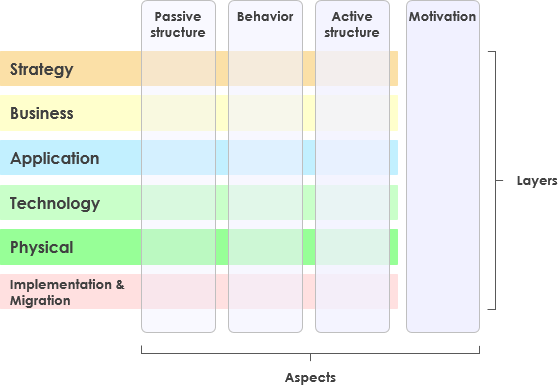
Core Layers:
-
ArchiMate Core – Enables modeling of the architecture domains defined by TOGAF
Extensions:
-
Motivation Extension – Enables modeling of stakeholders, drivers for change, business goals, principles and requirements
-
Implementation and Migration Extension – Enables modeling of project portfolio management, gap analysis and transition and migration planning
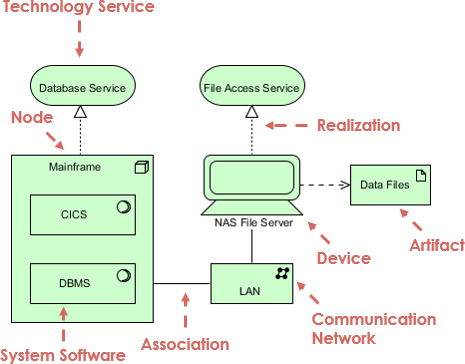
The most important concepts of ArchiMate are shown below. You can clearly see the uniform approach across layers.
Core Layers (Business, Application, Technology)
A layered view provides a natural way to look at service-oriented models. The higher layers use services that are provided by the lower layers. ArchiMate distinguishes three main (Core) layers:
-
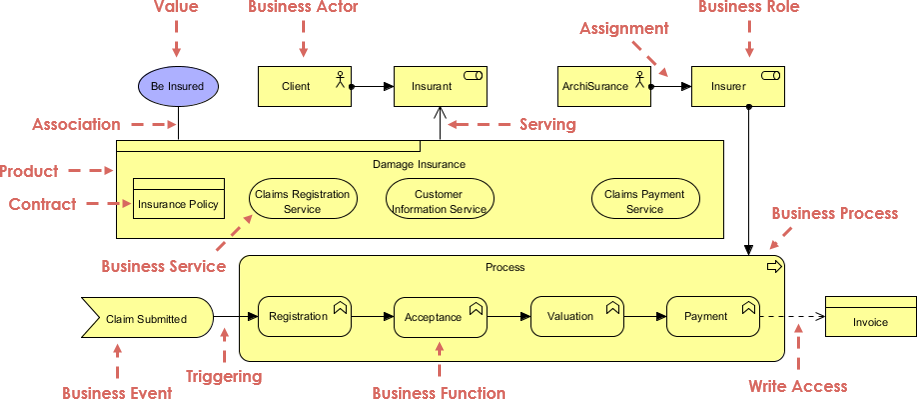
The Business layer offers products and services to external customers, which are realized in the organization by business processes performed by business actors and roles.
-
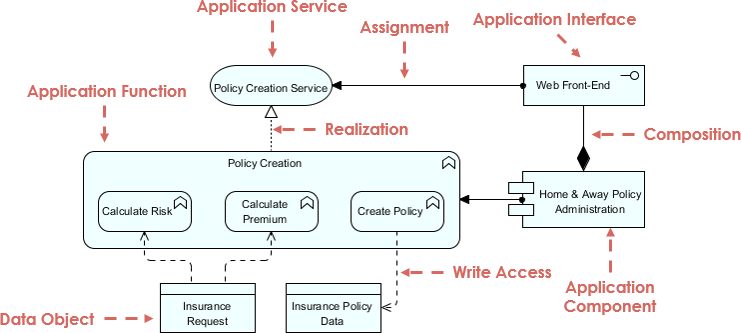
The Application layer supports the business layer with application services which are realized by (software) application components.
-
The Technology layer offers infrastructural services (e.g., processing, storage and communication services) needed to run applications, realized by computer and communication hardware and system software.
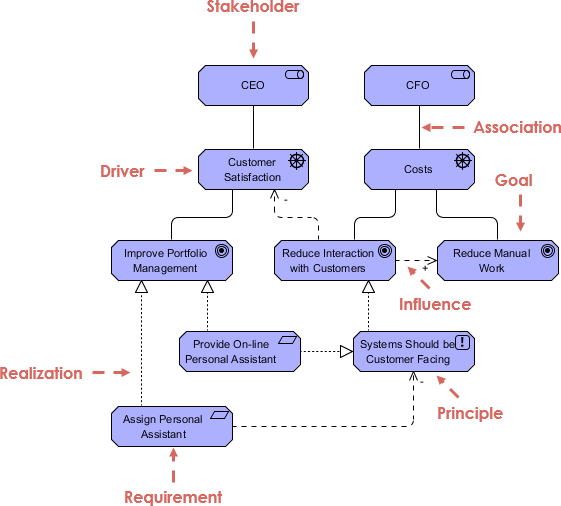
Motivation Extension
The ArchiMate Motivation elements enable the modeling of stakeholders, drivers for change, business goals, principles and requirements.
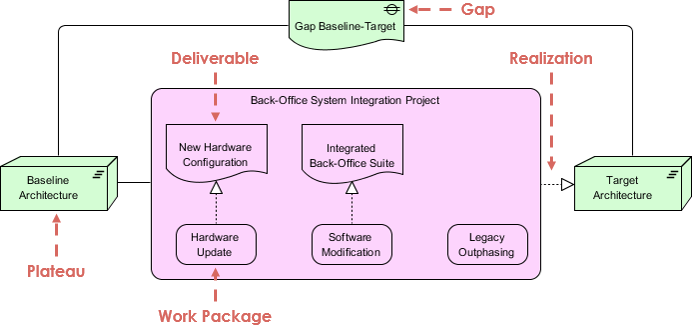
Implementation and Migration Extension
The ArchiMate Implementation and Migration elements enable the modeling of project portfolio management, gap analysis and transition and migration planning.
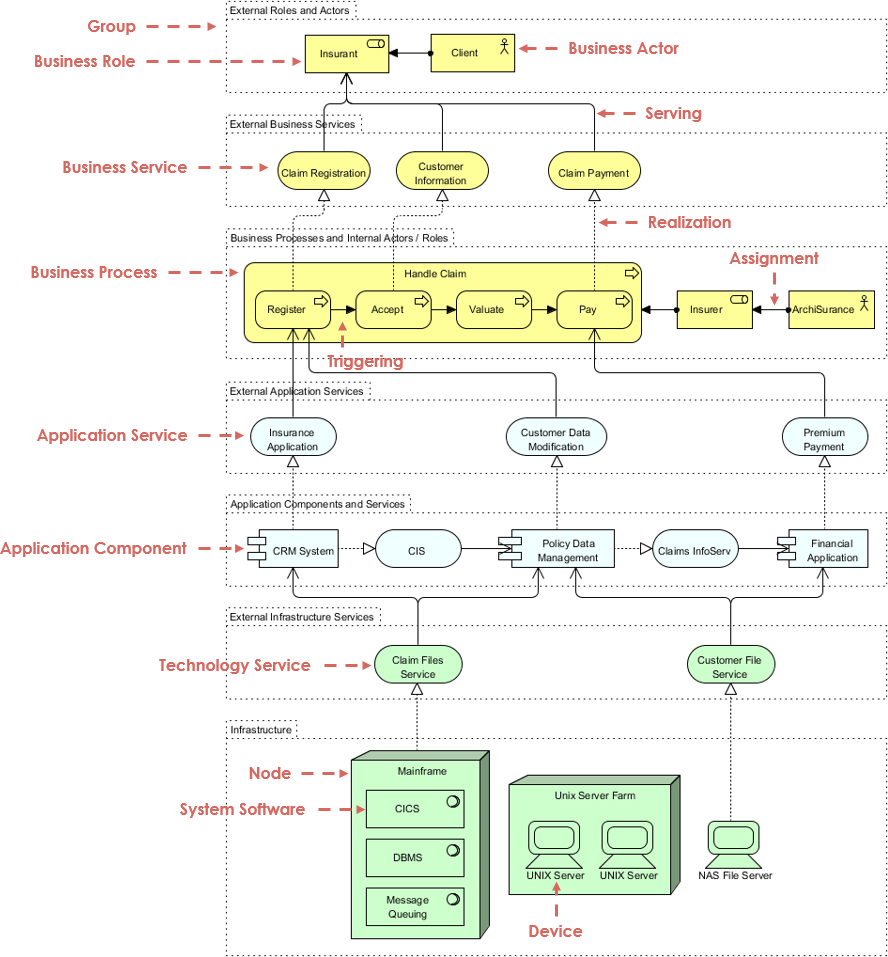
ArchiMate Example – Core Layers
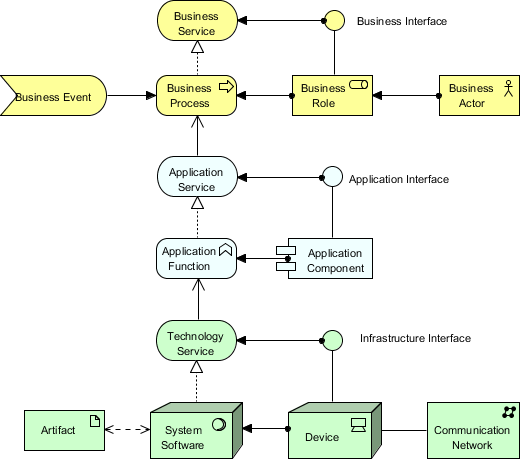
ArchiMate Example – All Layers
In the example ArchiMate model below, you can see the integration of the various ArchiMate layers.
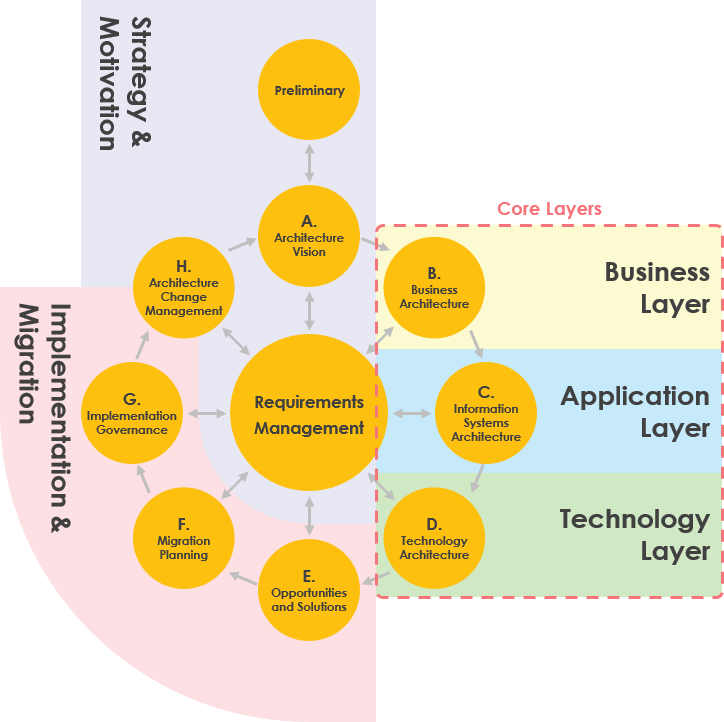
ArchiMate and the TOGAF ADM
The ArchiMate language, as described in this Technical Standard, complements TOGAF in that it provides a vendor-independent set of concepts, including a graphical representation, that helps to create a consistent, integrated model “below the waterline”, which can be depicted in the form of TOGAF views.
| Want to create ArchiMate diagrams? |
|---|
| Try Visual Paradigm Enterprise Edition, an enterprise architecture software that features a powerful ArchiMate drawing tool, ArchiMate viewpoint management tool and TOGAF Guide-through Process. |
| Full ArchiMate Viewpoints Guide (Examples Included) |
ArchiMate Tool
Enterprise Architecture with a certified ArchiMate modeling tool.
Streamline Enterprise Architecture Design with ArchiMate 4
Accelerate the creation of professional enterprise architecture blueprints and foster seamless collaboration with Visual Paradigm-the preferred ArchiMate software for global organizations.
As a solution certified by The Open Group, our ArchiMate modeling tools empower enterprise architects and modelers of all levels.
Stay ahead of industry standards with the support for the ArchiMate 4 specification, providing the complete vocabulary, notation, syntax, and semantics required for modern digital transformation.
Latest Update: ArchiMate 4 Support
Visual Paradigm now supports the ArchiMate 4 standard. Enhance your architecture models with the newest elements and relationship enhancements introduced by The Open Group.
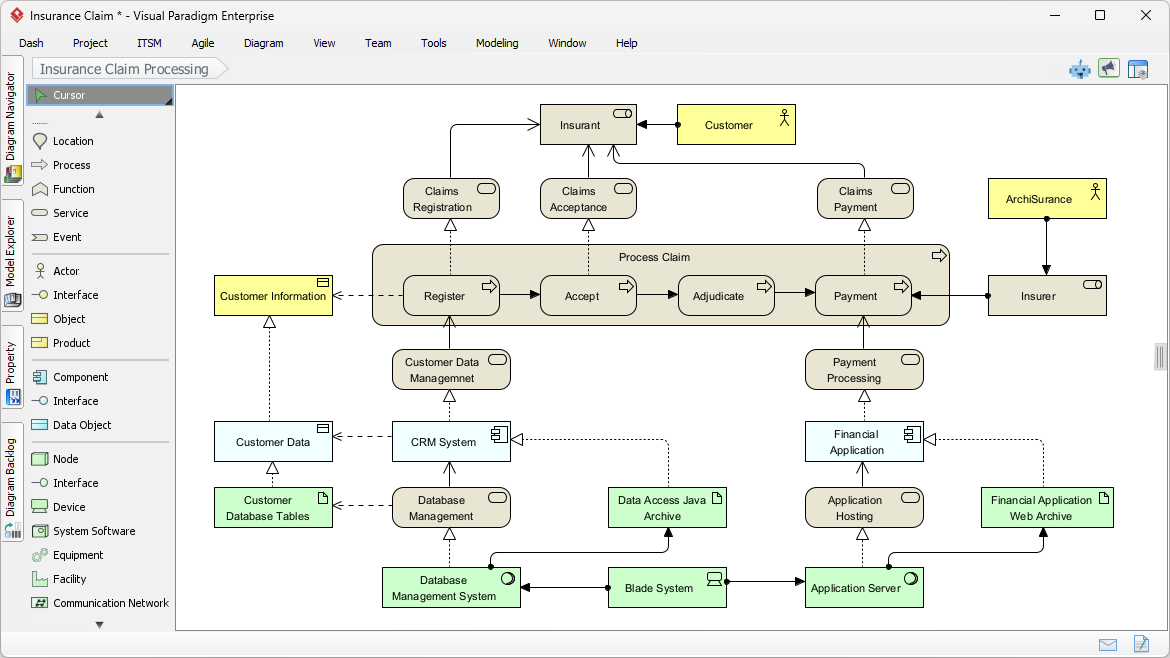
Drag. Drop. Done.
Enterprise architecture design has never been easier. With ArchiMate software, building professional enterprise architecture models is a breeze.
Powerful and intuitive ArchiMate diagram tool
-
Drag-and-drop editing interface
-
Precise shape positioning with alignment guide
-
Many formatting options for shapes and connectors
-
Categorize shapes with different colors, using Color Legend.

Strategy Meets Automation: AI-Powered ArchiMate & Viewpoint Generation
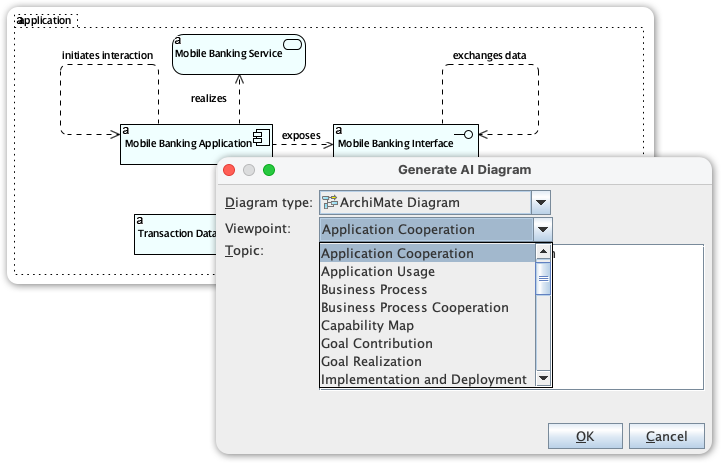
Visual Paradigm’s ArchiMate editor is a powerful tool for enterprise architects, providing the specialized environment needed to map complex business, application, and technology layers. We are now elevating this experience by integrating full ArchiMate support into our AI Diagram Generator, transforming how you visualize enterprise complexity.
This new capability allows you to instantly produce ArchiMate diagrams from simple strategic descriptions, entirely skipping the manual drafting phase. By leveraging AI to automatically select the correct elements and organize them according to official ArchiMate Viewpoints, the tool delivers a complete, structurally sound model that allows you to focus on architectural strategy and stakeholder validation rather than manual drawing.
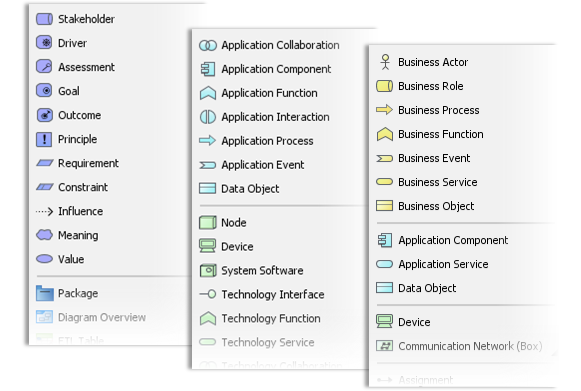
Custom Viewpoint.
Create ArchiMate diagrams with a particular viewpoint. You can apply a pre-defined viewpoint or define your own.
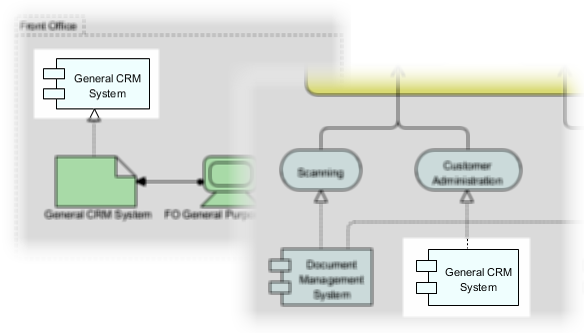
Reuse elements in diagrams
. Keep your design consistent by reusing the same elements in different diagrams. Any changes made to one instance will be synchronized to all other instances.
Define custom properties ad-hoc.
Document the specific information you need for your project. Refine your model with user-defined attributes through ETL tables.


Team collaboration.
Increase productivity and design faster in a distributed EA team. Our cloud workspace lets your team develop architectural models faster, better, and together.
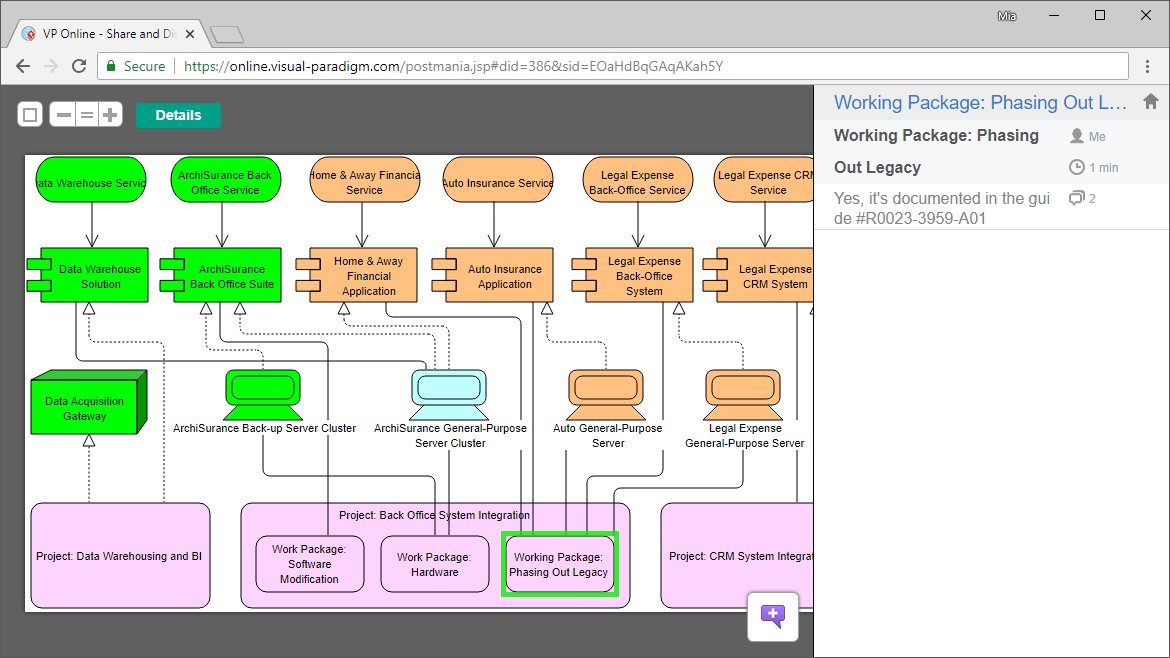
View diagrams online.
Let stakeholders and teammates view your designs by sharing them online. Anyone with a shared link can view the diagram online through an interactive diagram viewer.
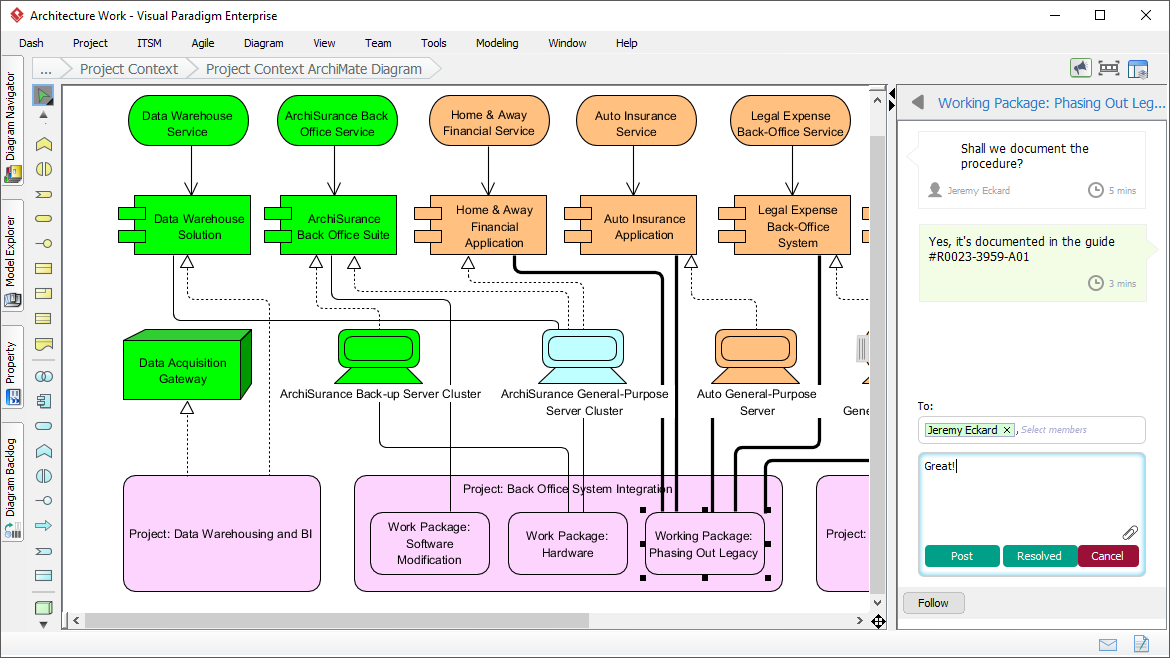
Gather feedback.
Communicate architectural designs online with stakeholders and EA team members, gather feedback, and refine designs in ArchiMate tools.

More than an ArchiMate tool.
Model business processes with BPMN and design IT solutions with UML. There are hundreds of diagrams to choose from. Create the diagrams you need and link them to ArchiMate’s diagrams for better traceability.
Enterprises’ choice.
Businesses from around the world, the ones you know and love use Visual Paradigm for fast and collaborative EA modeling. Our customers include Fortune 500 companies, startups, and government entities.

Generate ArchiMate Diagrams and Viewpoints Instantly with AI
Instantly Generate ArchiMate Diagrams and Official Viewpoints with AI. We’re excited to announce a major expansion to Visual Paradigm Desktop’s AI Diagram Generator: full support for the ArchiMate modeling language and all its official Viewpoints. Enterprise Architecture (EA) is essential for business-IT alignment, but creating complex models is time-consuming. Now, you can use the power of generative AI to instantly create fully compliant ArchiMate diagrams, allowing you to visualize intricate relationships across your business processes, IT systems, and technical infrastructure faster than ever before.
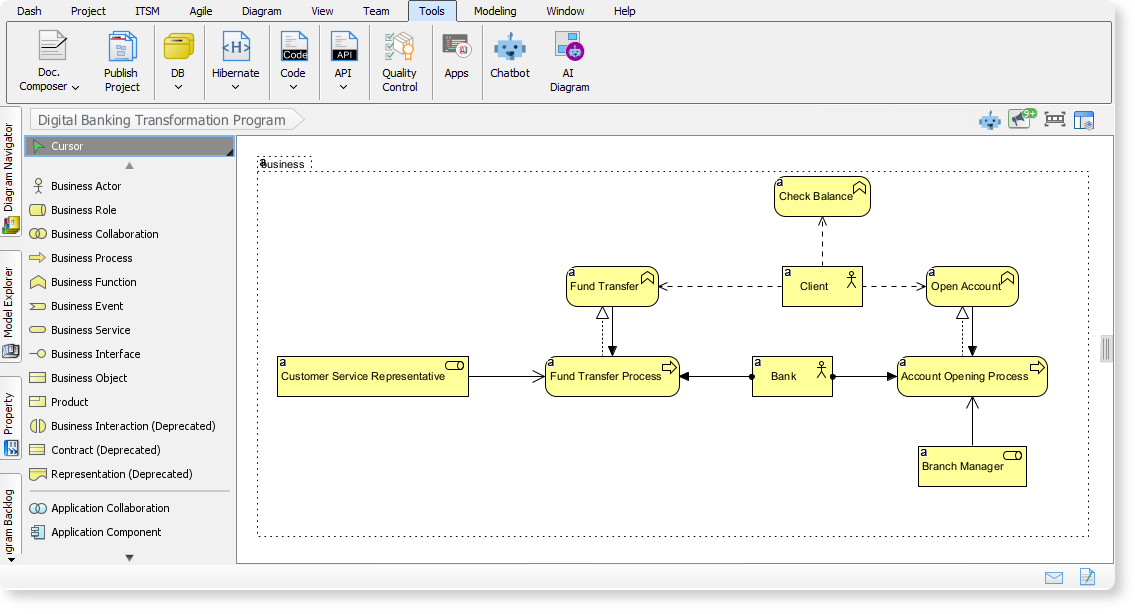
Download Visual Paradigm Desktop
📉 Addressing the Challenge of Manual EA Modeling
Before this release, creating a comprehensive Enterprise Architecture model often meant starting from a blank canvas. Architects and analysts faced the difficult task of translating high-level business requirements into detailed, structured diagrams. This required deep knowledge of the ArchiMate specification, careful selection of viewpoints, and laborious manual drawing, which often slowed down project kickoffs and strategic communication.
This challenge is amplified when needing to communicate the architecture to different stakeholders, as each group requires a specific, tailored view—the ArchiMate Viewpoint. Generating dozens of these specialized views by hand was simply not practical for agile teams.
🤖 Introducing AI ArchiMate & Viewpoints Generation: Instant Alignment
We built this feature to dramatically accelerate the initial stages of EA modeling and improve stakeholder communication. By automating the creation of ArchiMate elements and structuring them according to official Viewpoints, Visual Paradigm frees you to focus on strategy and validation, not on manual diagramming.
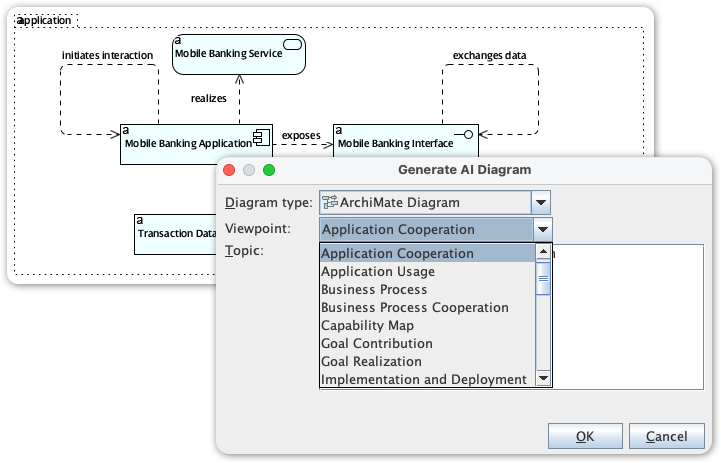
The new AI ArchiMate Generator and Viewpoints feature allows you to:
-
Generate a Complete Diagram: Simply type a topic or a high-level requirement, and the AI drafts a comprehensive ArchiMate model.
-
Access All Official Viewpoints: Instantly structure the output to fit any of the official ArchiMate viewpoints, ensuring the model is tailored for the intended audience. Supported viewpoints include:
-
Application Cooperation
-
Application Usage
-
Business Process
-
Business Process Cooperation
-
Capability Map
-
Goal Contribution
-
Goal Realization
-
Implementation and Deployment
-
Implementation Migration
-
Information Structure
-
Introductory
-
Migration
-
Motivation
-
Organization
-
Outcome Realization
-
Physical
-
Principles
-
Product
-
Project
-
Requirements Realization
-
Resource Map
-
Service Realization
-
Stakeholder
-
Technology
-
Technology Usage
-
-
Customize the Output: Define the desired audience (e.g., engineers, product managers) and tone (e.g., formal, technical) to ensure the generated model and accompanying explanation are perfectly tailored.
-
Maintain Quality Control: Receive a generated, editable draft that you can refine and fact-check, ensuring the model aligns with your organizational standards while drastically reducing drawing time.
💡 How to Access and Use the New Feature
Getting started with your first AI-generated ArchiMate model takes only a few simple steps:
-
Click on Tools.
-
Select AI Diagram
-
Select a specific ArchiMate Viewpoint from the dropdown menu (e.g., Product Viewpoint).
-
Enter a topic
-
Hit OK
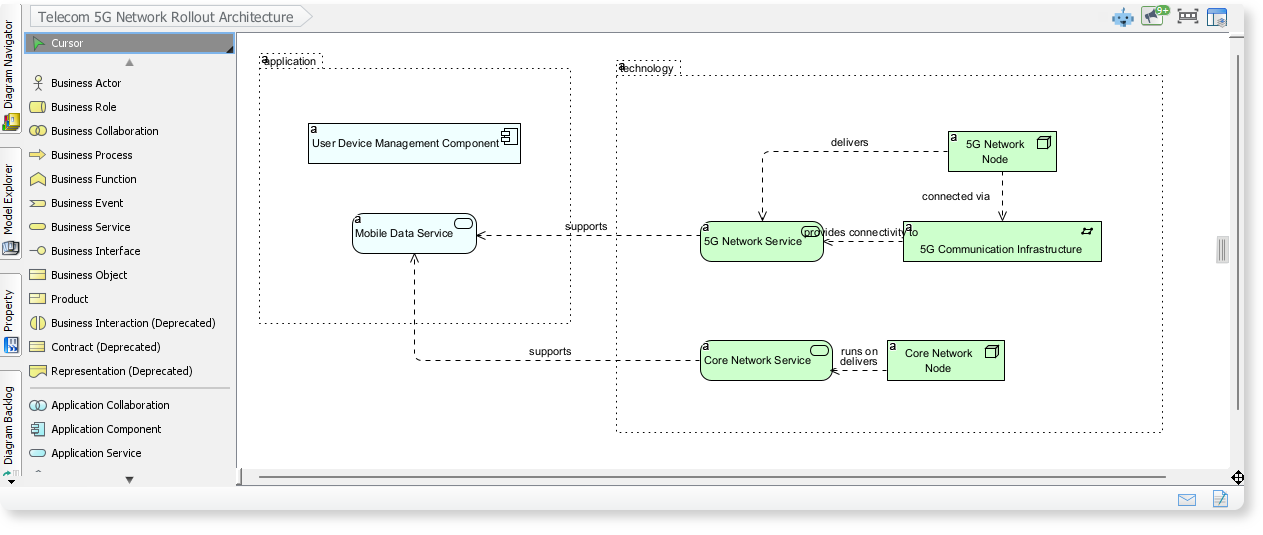
ArchiMate Example: Telecom 5G Network Rollout Architecture
Here is an ArchiMate diagram generated with VP AI Diagram Tool, outlines the core components involved in rolling out a 5G network. It shows how application services, network services, and infrastructure elements work together to deliver mobile data and 5G connectivity.
ArchiMate Example: Digital Banking Transformation Program
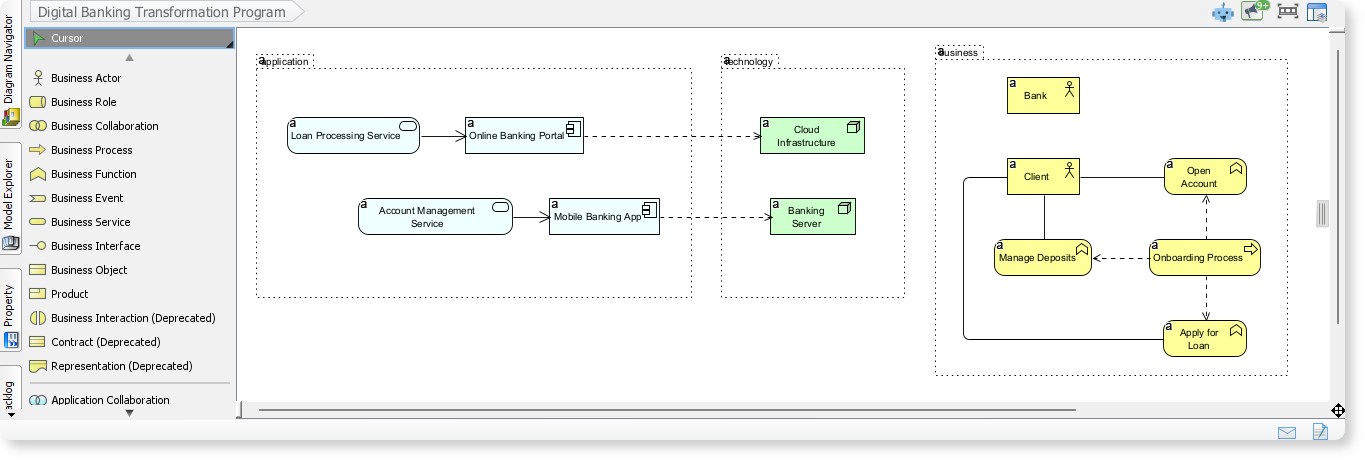
By entering “Digital Banking Transformation Program” into the AI Diagram Tool, an ArchiMate diagram is generated to illustrate how business processes, application services, and technology components interact in a modern digital banking environment are generated. ArchiMate diagrams help you understand how different layers of an enterprise architecture work together to deliver seamless digital banking experiences.
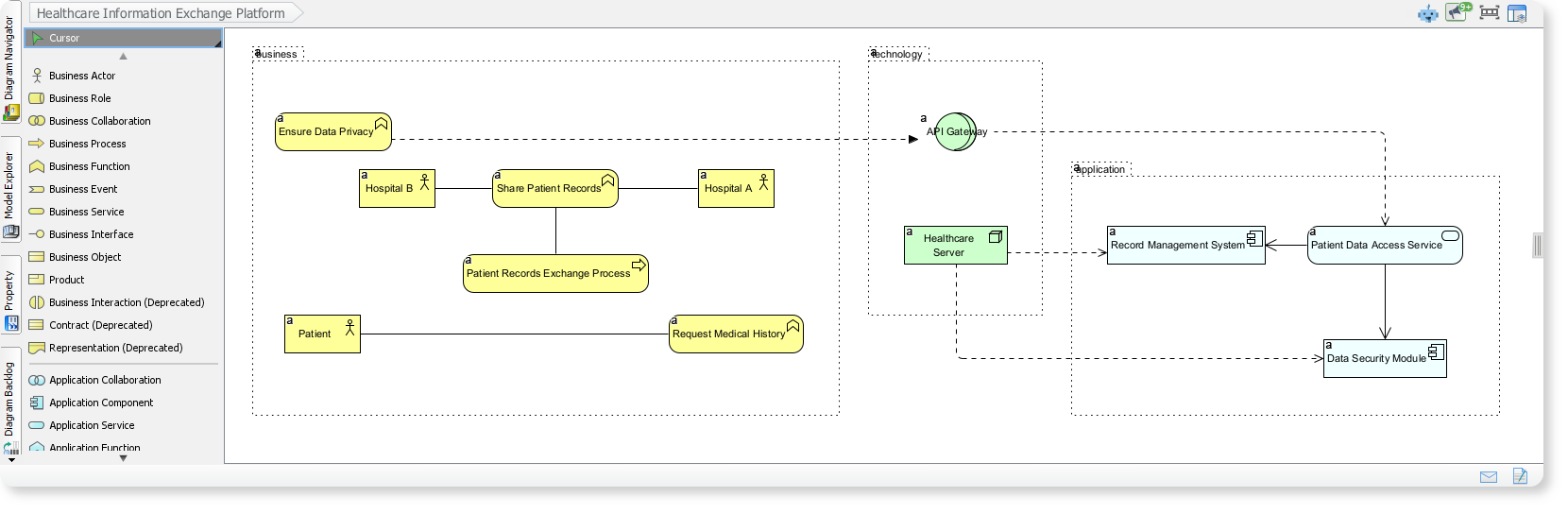
ArchiMate Example: Healthcare Information Exchange Platform
This ArchiMate diagram illustrates how hospitals, patients, and supporting applications collaborate to exchange medical records securely across a healthcare network. The AI-generated ArchiMate diagrams provide complete structure, help you visualize how business workflows, application layers, and technology components align to deliver a unified and secure healthcare information exchange.
✅ Ready to Achieve Business-IT Alignment Faster?
This powerful update elevates your Enterprise Architecture practice by removing the manual effort from diagramming. Whether you need to quickly sketch out a capability map for executives or detail a physical infrastructure view for the operations team, the AI ArchiMate Generator is your new essential tool.
Upgrade to the latest version of Visual Paradigm Desktop today and experience the future of professional, AI-assisted ArchiMate diagram creation.
As an enterprise architecture tool certified by The Open Group, Visual Paradigm provides complete, multi-layered support for ArchiMate, fully embracing the ArchiMate 4 specification.
The platform treats ArchiMate elements as an interconnected semantic database rather than flat visual shapes, ensuring strict conformance to official vocabulary, notation syntax, and relationship rules.
1. Strategy Meets Automation: AI-Powered ArchiMate Co-Pilot
Visual Paradigm features a native AI ArchiMate and Viewpoint Generator integrated directly into the modeling canvas. This replaces manual drafting with natural language processing:
-
Text-to-Architecture Generation: You can input a high-level corporate objective or a cloud narrative into the prompt window (e.g., “Model a cloud migration strategy transitioning from local servers to AWS microservices, aligning business drivers with infrastructure changes”). The AI automatically interprets the semantic layers and builds a syntactically correct multi-layer diagram.
-
Conversational Refactoring: Using the Visual Paradigm AI Chatbot panel, you can direct updates verbally. Commands like “Inject a new risk factor called ‘Data Compliance’ under the Strategy layer” or “Link the Billing Service to a required Kafka streaming node” will automatically alter the visual canvas layout.
-
Automatic Viewpoint Restructuring: The AI understands audience targeting. You can request it to transform or segment your diagram into any of the 25+ official ArchiMate Viewpoints (e.g., Application Cooperation, Goal Realization, or Technology Usage), and the engine immediately hides irrelevant shapes to match stakeholder concerns.
2. Full ArchiMate 4 Engine & Unified Domains
Visual Paradigm (v18.0+) natively implements the modern paradigms of the ArchiMate 4 standard:
-
Hexagonian Structure: Shifting from rigid stacked grids, it supports the centralized Common/Motivation Domain structure, emphasizing goal-driven architecture where strategy and goals sit at the core and radiate outwards to the core tech stack.
-
Multiplicity on Connectors: Visual Paradigm supports native cardinality constraints directly on relationship connectors, allowing architects to model precisely how many instances interact across structural boundaries.
-
Streamlined Clean Environment: It removes retired ArchiMate elements to prevent workspace clutter while maintaining flawless backward compatibility—allowing old ArchiMate 3.2 diagrams to be edited safely alongside new frameworks without forced migrations.
3. Core Enterprise Architecture Capabilities
Cross-Layer Traceability & Semantic Integrity
Because the tool relies on a true model repository, an element exists independently of the canvas. If you drop a Business Actor onto a canvas, you can trace its structural realization down to an Application Component and further down to a physical Device node using the Traceability Matrix or Impact Analysis tool. If you rename an application element, that change instantly propagates across all associated viewpoint diagrams.
Comprehensive Viewpoint Mechanism
Architects can toggle through standard example viewpoints:
-
Strategy Layer: Model Capabilities, Resources, Value Streams, and Course of Action.
-
Motivation Aspect: Track Stakeholders, Drivers, Goals, Assessment matrices, Outcomes, and Principles.
-
Core Layers: Model traditional Business (processes/functions), Application (components/interfaces), and Technology/Physical assets.
-
Implementation and Migration: Build visual Roadmaps, Work Packages, Deliverables, and Plateaus for project execution.
4. Framework and Platform Ecosystem Integration
-
The TOGAF ADM Guide-Through: ArchiMate is seamlessly embedded into Visual Paradigm’s interactive TOGAF ADM wheel. When executing Phase B, C, or D of an enterprise architecture audit, the tool opens pre-configured ArchiMate palettes matching that phase’s exact compliance workflow.
-
Interoperability (Model Exchange File Format): Visual Paradigm fully implements The Open Group ArchiMate Model Exchange File Format (XML). This ensures complete portability; you can easily import open-source models directly from tools like Archi, or export them to third-party enterprise tools without data loss.
Are you using ArchiMate to map out an IT portfolio modernization, or are you focusing on a business transformation strategy? Let me know, and I can provide an AI prompt to jumpstart your multi-layer architecture blueprint!
Conclusion
ArchiMate has established itself as the universal language for enterprise architecture, providing the structure, clarity, and interoperability needed to navigate organizational complexity. When paired with a certified, AI-enhanced platform like Visual Paradigm, ArchiMate transforms from a modeling standard into a strategic accelerator—enabling architects to rapidly translate vision into executable blueprints, align stakeholders through tailored viewpoints, and adapt to change with confidence.
The integration of generative AI marks a pivotal evolution: where manual diagramming once consumed valuable time, intelligent automation now delivers standards-compliant models in seconds. This shift empowers teams to focus on what matters most—strategic thinking, stakeholder engagement, and value-driven decision-making.
As enterprises continue to confront digital disruption, regulatory complexity, and accelerating innovation cycles, the ability to visualize, analyze, and communicate architecture at scale becomes not just advantageous, but essential. ArchiMate, powered by modern tooling and AI, provides that capability—turning enterprise architecture from a documentation exercise into a dynamic engine for transformation.
Whether you are modernizing an IT portfolio, designing a customer-centric digital experience, or orchestrating a multi-year business transformation, ArchiMate offers the framework. With the right tools and approach, it also offers the speed, clarity, and confidence to succeed.
Reference
- ArchiMate Tools : Overview of Visual Paradigm’s certified ArchiMate modeling capabilities, including AI-powered diagram generation, viewpoint management, and enterprise collaboration features.
- ArchiMate 3 Update Guide: Detailed documentation on ArchiMate 3 specification updates, new modeling elements, and implementation guidance for enterprise architects.
- ArchiMate 4 Features Overview (Video): Video demonstration highlighting ArchiMate 4 standard enhancements, including Hexagonian structure, multiplicity constraints, and streamlined modeling workflows.
- AI ArchiMate & Viewpoints Generator Release Notes: Announcement and technical details of Visual Paradigm’s AI-powered ArchiMate diagram and viewpoint generation feature.
- TOGAF Standard 10th Edition Adoption Case Study: Real-world case study demonstrating integrated use of ArchiMate and TOGAF for enterprise transformation initiatives.
- Strategy View Documentation: User guide section covering ArchiMate Strategy Layer modeling, including capabilities, resources, value streams, and courses of action.
- What is ArchiMate? – Complete Guide: Comprehensive introduction to ArchiMate language fundamentals, framework structure, core layers, extensions, and practical modeling examples.
- ArchiMate and the TOGAF ADM – Integration Guide: In-depth exploration of how ArchiMate complements TOGAF’s Architecture Development Method across all phases.
- ArchiMate Community & Resources Hub: Curated collection of ArchiMate tutorials, templates, best practices, and community discussions for enterprise architecture practitioners.
- ArchiMate Model Exchange & Interoperability Guide: Technical documentation on ArchiMate Model Exchange File Format (XML) support, enabling seamless model portability between Visual Paradigm and other EA tools.
This post is also available in Deutsche, Español, Français, Bahasa Indonesia and 繁體中文.
