




How Visual Paradigm’s AI Chatbot Revolutionizes Diagram Creation
Introduction
In an era where digital transformation accelerates business innovation, the ability to quickly visualize complex ideas has become a critical competitive advantage. Teams across software development, business analysis, and enterprise architecture constantly face the challenge of translating abstract concepts into clear, actionable diagrams. Traditional diagramming tools, while powerful, often require significant time investment in manual layout, syntax compliance, and iterative refinement.
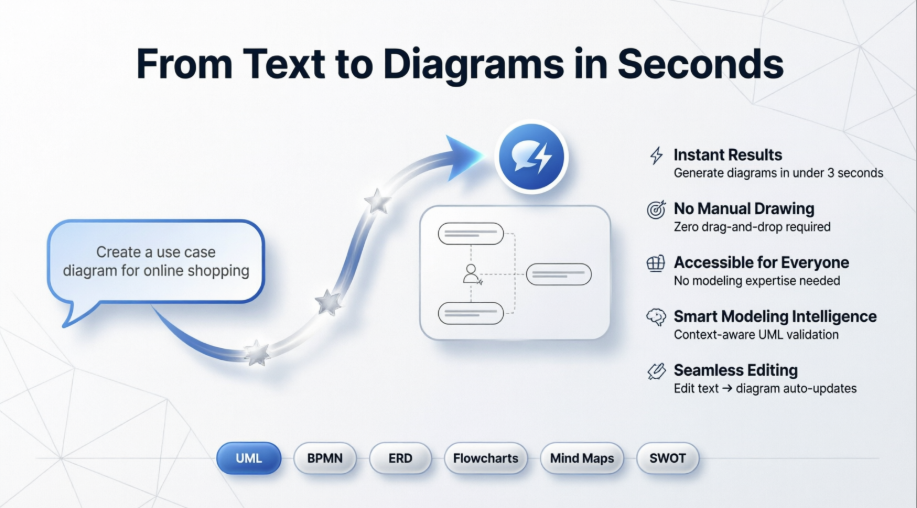
Visual Paradigm’s AI Chatbot represents a paradigm shift in visual modeling. By combining conversational AI with deep domain expertise in industry-standard modeling languages, this intelligent assistant empowers users to transform natural language descriptions into professional-grade diagrams instantly. This case study explores how Visual Paradigm’s AI Chatbot is redefining the diagram creation workflow, reducing technical barriers, and enabling teams to move from ideation to implementation with unprecedented speed and clarity.

What Is Visual Paradigm’s AI Chatbot
The AI Chatbot in Visual Paradigm Online is an advanced assistant that lets you create diagrams using natural language. Instead of manually dragging and connecting shapes, you simply describe what you want — and the chatbot automatically generates a fully structured, presentation-ready diagram.
You can ask it to create UML diagrams, flowcharts, BPMN, ERD, mind maps, SWOT analyses, and many other visual models. It understands modeling concepts and syntax, so you do not need to worry about technical notations or formatting.
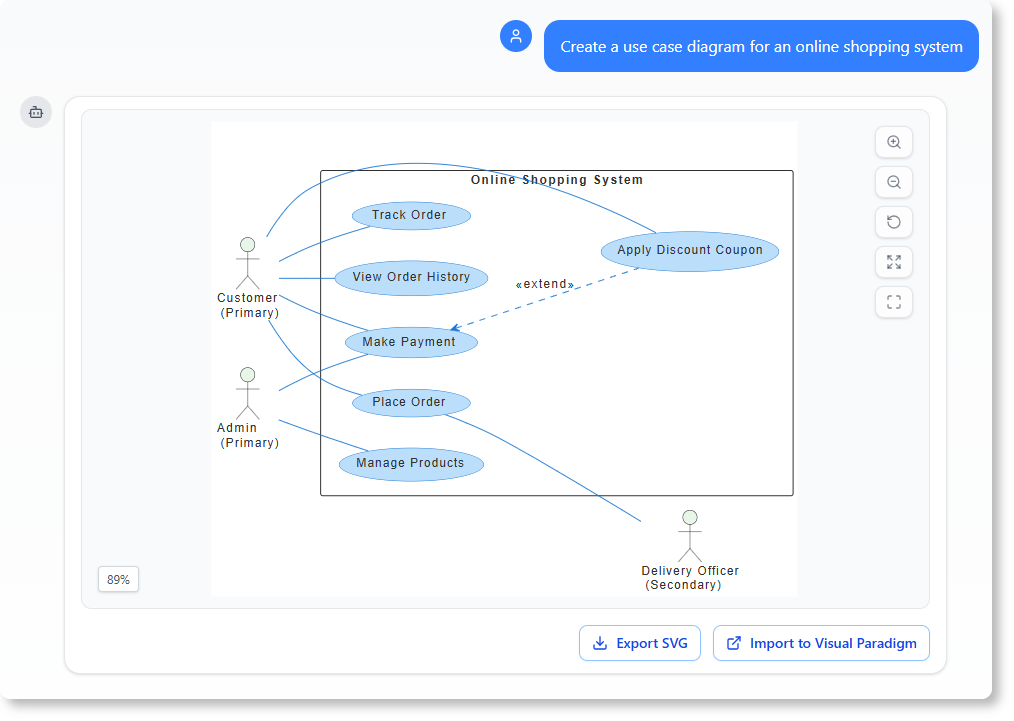
For example, typing “Create a use case diagram for an online shopping system” will instantly produce a clear, accurate diagram, ready for refinement or export.
Why It Benefits You
-
No more manual drawing
Say goodbye to repetitive drag-and-drop work. The AI Chatbot in VP Online automatically arranges elements, relationships, and labels for you. Instead of spending time formatting shapes and connectors, you can concentrate on refining your ideas or discussing them with your team. The chatbot takes care of the structure, ensuring that your diagrams remain clean, readable, and ready for presentation. -
Instant results
Speed is everything in today’s workflow. Whether you are brainstorming a new system, explaining a business process, or documenting a project, the AI Chatbot generates accurate diagrams in just a few seconds. This quick turnaround makes it ideal for design discussions, project proposals, and instant visualization during meetings — helping you move from concept to clarity faster than ever. -
Accessible for everyone
You do not need to be a modeling expert to produce high-quality diagrams. The AI Chatbot is designed for everyone — from software developers and project managers to educators and students. Even if you are unfamiliar with UML, BPMN, or ERD syntax, the chatbot understands what you mean and creates the right diagram type automatically. It simplifies professional modeling, making it approachable and enjoyable for all. -
Smart understanding
What sets this AI apart is its awareness of modeling context. It recognizes different entities, such as classes, actors, or processes, and applies the correct relationships between them. This means your diagram is not just visually correct, but also logically meaningful. You can trust it to capture intent — whether you are describing a use case flow or a system architecture. -
Seamless editing
Modeling does not stop after generation — and neither does the AI Chatbot. You can continue improving your diagram naturally through chat commands. Ask it to “add a payment process,” “connect this with a data store,” or “rename this class,” and the tool updates your diagram instantly. The conversational editing approach saves you from manual adjustments while keeping your flow uninterrupted.
Why You Need It
Many online diagramming tools now use AI, but Visual Paradigm’s AI Chatbot is built by modeling experts for modelers. It is not just a text-to-image generator; it understands diagram semantics and business logic.
Here is what makes it different:
-
True modeling intelligence – It knows the difference between a process and a sub-process, a class and an attribute, a data flow and a control flow.
-
Contextual understanding – It keeps your conversation context, so you can build progressively without starting from scratch each time.
-
Unified workspace – Everything happens inside VP Online — diagram creation, editing, sharing, and documentation.
When to Use It
-
Early project planning – Quickly sketch ideas before formal modeling begins.
-
Team discussions – Turn meeting notes or verbal descriptions into visual workflows instantly.
-
Documentation – Convert textual specifications into ready-to-use diagrams.
-
Learning and teaching – Understand UML or BPMN faster through AI-generated examples.
Core Comparison: Visual Paradigm Chatbot vs General LLMs
| Feature | Visual Paradigm Chatbot | General LLM (e.g., ChatGPT, Claude) |
|---|---|---|
| Primary Output | Accurate visual diagrams, models, and workflows. | Raw text, code snippets, and markdown. |
| Standard Compliance | Enforces strict UML, BPMN, and ArchiMate rules. | Prone to syntax errors in diagramming code. |
| Target Audience | Enterprise architects, software engineers, analysts. | General public, writers, coders, students. |
| Ecosystem Fit | Direct integration into visual modeling suites. | Independent API or chat-based interface. |
Visual Paradigm’s Visual Modeling Chatbot specializes in translating conversational text into structured visual diagrams, whereas a General Large Language Model (LLM) focuses on broad, text-based reasoning and content generation. While General LLMs excel at brainstorming, coding, and writing, they lack native, deterministic capabilities to generate precise, industry-standard visual models like UML, SysML, or BPMN architecture.
Why Choose a Visual Modeling Chatbot?
General LLMs frequently struggle with spatial layout, structural relationships, and strict syntax constraints required by engineering diagrams. The Visual Paradigm Visual Modeling Chatbot bridges this gap by adding a domain-specific layout engine on top of conversational AI.
-
Contextual Awareness: It understands software engineering semantics (e.g., the difference between an “aggregation” and a “composition” relationship in UML).
-
Deterministic Layouts: It automatically arranges nodes, actors, and databases logically, saving hours of manual dragging and dropping.
-
Bi-directional Editing: Changes made via the chat interface update the visual canvas instantly, and vice versa.
Key Benefits
-
Rapid Prototyping: Turn a text-based system description into a complete architecture diagram in seconds.
-
Lower Technical Barrier: Allows non-technical stakeholders to generate complex workflow models using simple language.
-
Instant Error Checking: Automatically validates that your diagrams comply with industry modeling rules.
-
Unified Workspace: Keeps documentation, requirements, and visual models within a single design ecosystem.
The AI Ecosystems Behind Them
[ AI Ecosystem Landscape ]
├── Specialized Design Ecosystems (e.g., Visual Paradigm AI)
│    └── Focused on Domain-Specific Automation (Text-to-Diagram, Model Validation)
│
└── Broad Foundational Ecosystems (e.g., OpenAI, Anthropic, Google Gemini)
     └── Focused on Generalized Knowledge, Multi-modal Inputs, and API Orchestration
Specialized Design Ecosystems
Ecosystems like Visual Paradigm’s focus on domain-specific automation. They embed specialized AI agents into existing productivity pipelines. Instead of replacing the software design process, the AI acts as a co-pilot that directly manipulates metadata, model elements, and enterprise architecture repositories.
Broad Foundational Ecosystems
Ecosystems driven by OpenAI, Anthropic, or Google focus on generalized scale. They act as the underlying “brain” for specialized tools. A General LLM provides the raw linguistic understanding, which a specialized tool like Visual Paradigm then translates into structured visual nodes.
Core Features Deep Dive
Instant Diagram Generation
Users describe a system, workflow, or scenario in natural language to watch the chatbot map out a comprehensive diagram in seconds.
-
Supported Frameworks: Generates UML (Class, Use Case, Sequence, Composite Structure), SysML, BPMN, ArchiMate, C4 Models, Mind Maps, and strategic frameworks like SWOT analyses.
-
Syntax Enforcement: The underlying AI engine automatically applies standard notation and layout rules, ensuring technically sound formatting without human alignment.
Conversational Editing & Refinement
Instead of clicking shapes, users modify the diagram by continuing the chat conversation.
-
Element Manipulation: Commands like “Add an alternative path to handle book damage” or “Add a payment gateway” instantly add nodes or connections.
-
Cascading Updates: Instructing the bot to “Rename Employee to Staff” automatically shifts the class name alongside all related attributes, getter/setter methods, and structural references across the canvas.
-
Localization: The chatbot can translate the entire text layer of a diagram into alternative languages (e.g., “Translate the diagram content to Simplified Chinese”) on command.
“Ask Your Diagram” & Intelligent Analysis
The diagram acts as a semantic knowledge base rather than a flat image file.
-
Architecture Queries: Users can query the model directly, asking questions like “What are the main scenarios in this use case?” or “How should I implement this specific deployment?”.
-
Contextual Nudges: The AI provides proactive, contextual suggestions to help designers uncover missing logic edge cases or deepen structural refinement.
Documentation on Demand
The chatbot bridges visual modeling and technical writing by automatically generating structured documents based on the current canvas.
-
Automatic Reporting: Generates summaries, comprehensive project proposals, or compliance documentation without manual composition.
-
Live Sync: Any report created by the AI pulls directly from the active visual elements, keeping the textual documentation perfectly synchronized with design modifications.
Pro Tool Integration & Shared Workspace
The feature avoids “walled-garden” limitations by cleanly integrating back into production enterprise workflows.
-
VP Desktop Import: A generated diagram can be imported directly into the Visual Paradigm Desktop Application (requires Professional Edition for standard diagrams, Enterprise Edition for ArchiMate).
-
Continuous Refinement: Once imported, users can leverage advanced native toolsets like version control, code engineering, and project repository management.
-
Cloud Syncing: Work is automatically saved to a unified Visual Paradigm Online account, maintaining consistency whether accessing tools via the web browser or a desktop client.
Start Modeling Smarter
Visual Paradigm’s AI Chatbot transforms the way you create diagrams. It eliminates manual work, speeds up brainstorming, and bridges the gap between ideas and visuals — all inside your browser.
If you are ready to see how AI can simplify your modeling workflow, try Visual Paradigm Online and start chatting your way to smarter diagrams today.
Conclusion
Visual Paradigm’s AI Chatbot represents more than just a new feature—it signifies a fundamental evolution in how professionals approach visual communication and system design. By merging the intuitive power of conversational AI with the rigor of industry-standard modeling languages, it democratizes access to professional-grade diagramming while preserving the precision that enterprise projects demand.
For organizations navigating complex digital transformations, the ability to rapidly prototype, iterate, and document system architectures is no longer a luxury—it is a necessity. Visual Paradigm’s AI Chatbot delivers exactly that: a frictionless pathway from abstract idea to actionable visual model. Whether you are a seasoned enterprise architect or a student learning UML for the first time, this tool empowers you to focus on what matters most: the logic, the strategy, and the innovation behind your diagrams.
As AI continues to reshape the tools we use, the true measure of success lies not in automation for automation’s sake, but in augmentation that amplifies human creativity and expertise. Visual Paradigm’s AI Chatbot achieves this balance beautifully—serving not as a replacement for human insight, but as an intelligent partner that accelerates clarity, collaboration, and confidence in every diagram you create.
References
- Visual Paradigm AI Chatbot: Overview of the AI Chatbot feature within Visual Paradigm’s visual modeling suite, highlighting capabilities for text-to-diagram generation and enterprise integration.
- AI Chatbot Tool Portal: Dedicated portal for accessing and learning about Visual Paradigm’s AI-powered diagramming assistant.
- Introducing Visual Paradigm AI Chatbot – User Guide: Official documentation introducing the AI Chatbot, its core functionalities, and getting-started instructions.
- Enhanced AI Activity Diagram Support – Release Notes: Announcement of updated AI capabilities for generating and refining activity diagrams within the chatbot interface.
- AI Deployment Diagram Example – Online Ticketing System: Practical example demonstrating how the AI Chatbot generates a deployment diagram for a real-world scenario.
- Fast-Track Use Case Diagrams with Visual Paradigm AI Chatbot: Third-party tutorial showcasing accelerated use case diagram creation using the AI Chatbot.
- Visual Paradigm Pipeline: The Bridge for AI Modeling Ecosystem: Technical overview of how Visual Paradigm integrates AI capabilities into its broader modeling and enterprise architecture pipeline.
- Comprehensive Tutorial: Visual Paradigm AI-Powered Visual Modeling Chatbot: In-depth walkthrough of the AI Chatbot’s features, workflows, and best practices for diagram generation.
- Visual Paradigm AI Chatbot – Feature Overview: Detailed breakdown of the AI Chatbot’s capabilities, including supported diagram types, editing commands, and collaboration features.
- What Makes Visual Paradigm’s AI Chatbot Different: Comparative analysis highlighting the unique domain expertise and modeling intelligence behind Visual Paradigm’s AI solution.
- Guide to Powered UML Diagram Generation: Step-by-step guidance for leveraging the AI Chatbot to generate UML diagrams efficiently.
- YouTube Demo: AI Chatbot in Action: Video demonstration showcasing real-time diagram creation and refinement using the Visual Paradigm AI Chatbot
This post is also available in Deutsche, Español, فارسی, Français, English, Bahasa Indonesia, 日本語, Polski, Portuguese, Ру́сский, Việt Nam, 简体中文 and 繁體中文.
