



Navigating the Shift: A Practical Guide to Migrating from TOGAF 9.2 to TOGAF 10
Introduction
For over two decades, The Open Group Architecture Framework (TOGAF) has been the de facto standard for Enterprise Architecture (EA). However, the technology landscape has shifted dramatically since the release of TOGAF 9.2. The rise of cloud-native computing, microservices, Agile methodologies, and DevOps has rendered the traditional, monolithic approach to architecture somewhat rigid for modern digital enterprises.
The transition to TOGAF 10 is not merely a version update; it is a fundamental redesign intended to make enterprise architecture more accessible, agile, and relevant. This guide explores the core differences between TOGAF 9.2 and TOGAF 10, providing practical strategies for migration, key concepts, and examples of how to leverage modern tooling like Visual Paradigm and ArchiMate to implement these changes effectively.
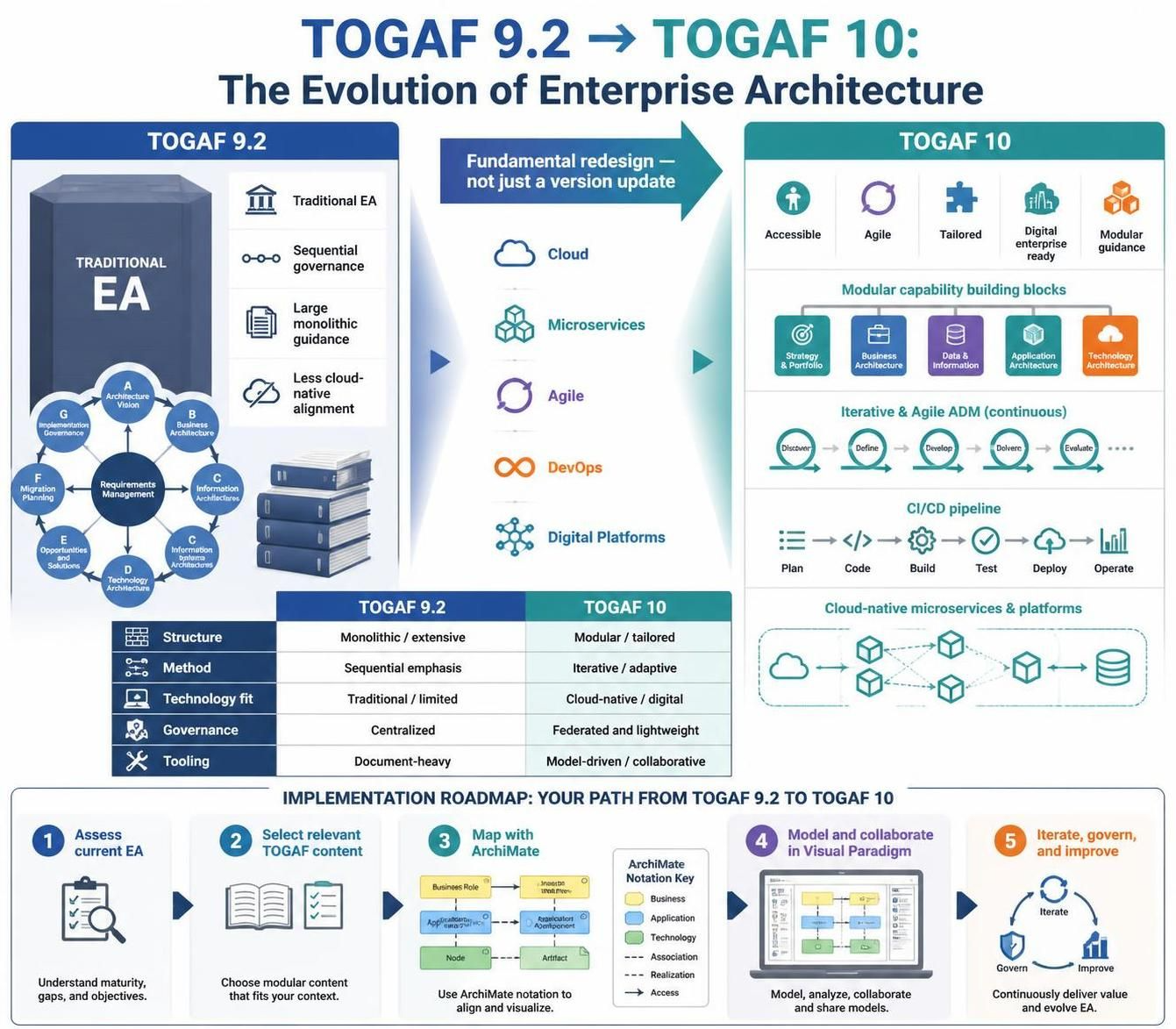
1. Structural Redesign: From Monolith to Modularity
The Challenge with TOGAF 9.2
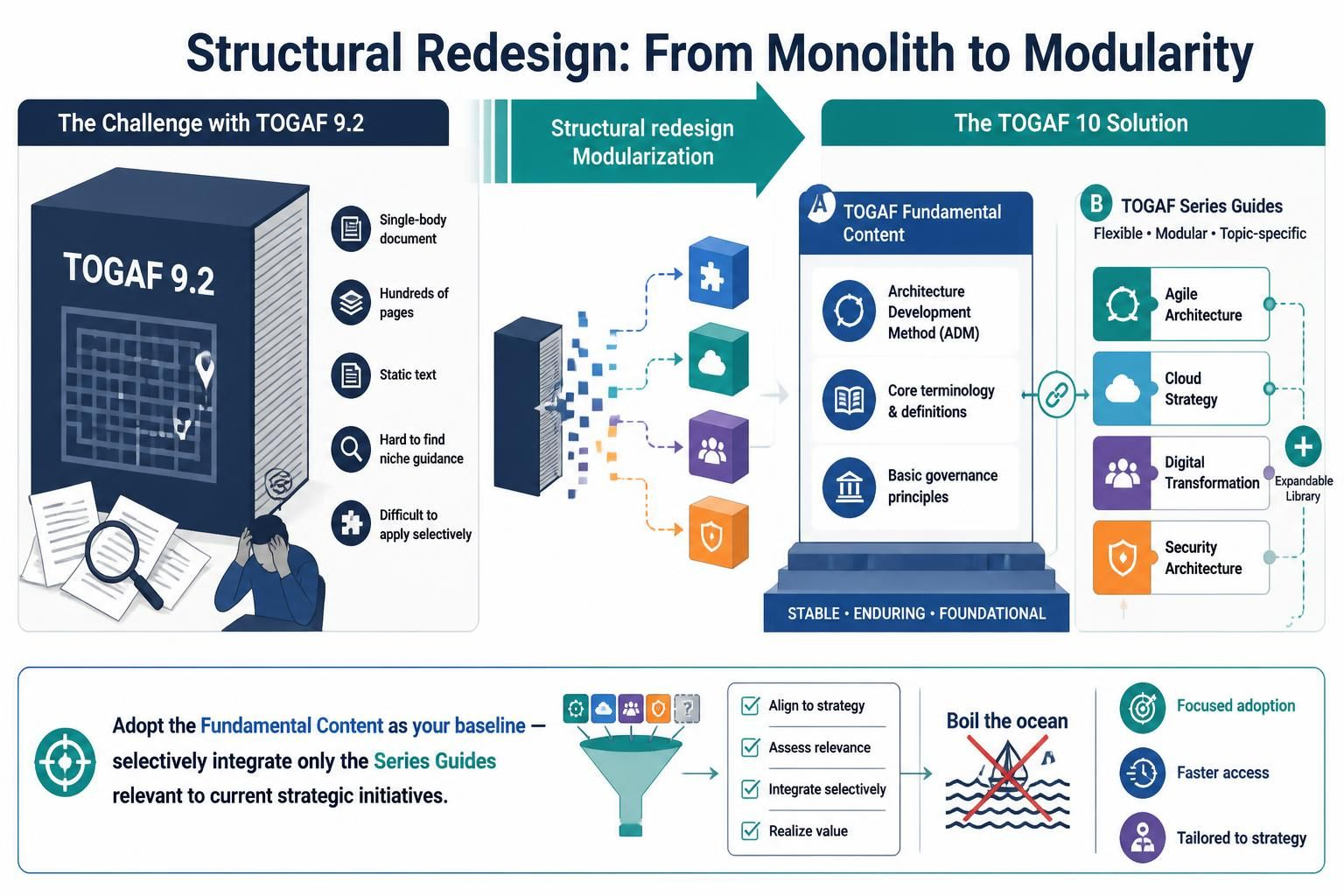
TOGAF 9.2 was delivered as a comprehensive, single-body document. While thorough, its sheer volume often overwhelmed practitioners. Finding specific guidance on niche topics required navigating hundreds of pages of static text, making it difficult to apply selectively in fast-paced environments.
The TOGAF 10 Solution: Modularization
TOGAF 10 splits the framework into two distinct, manageable components:
-
TOGAF Fundamental Content: This contains the core, stable elements that rarely change, such as:
-
The Architecture Development Method (ADM)
-
Core terminology and definitions
-
Basic governance principles
-
-
TOGAF Series Guides: A dynamic library of modular, topic-specific guides. These cover contemporary practices such as:
-
Agile Architecture
-
Cloud Strategy
-
Digital Transformation
-
Security Architecture
-
Practical Implication: Organizations no longer need to “boil the ocean.” You can adopt the Fundamental Content as your baseline and then selectively integrate only the Series Guides relevant to your current strategic initiatives.
2. Adapting the ADM for Agile and DevOps
The Linear Perception of TOGAF 9.2
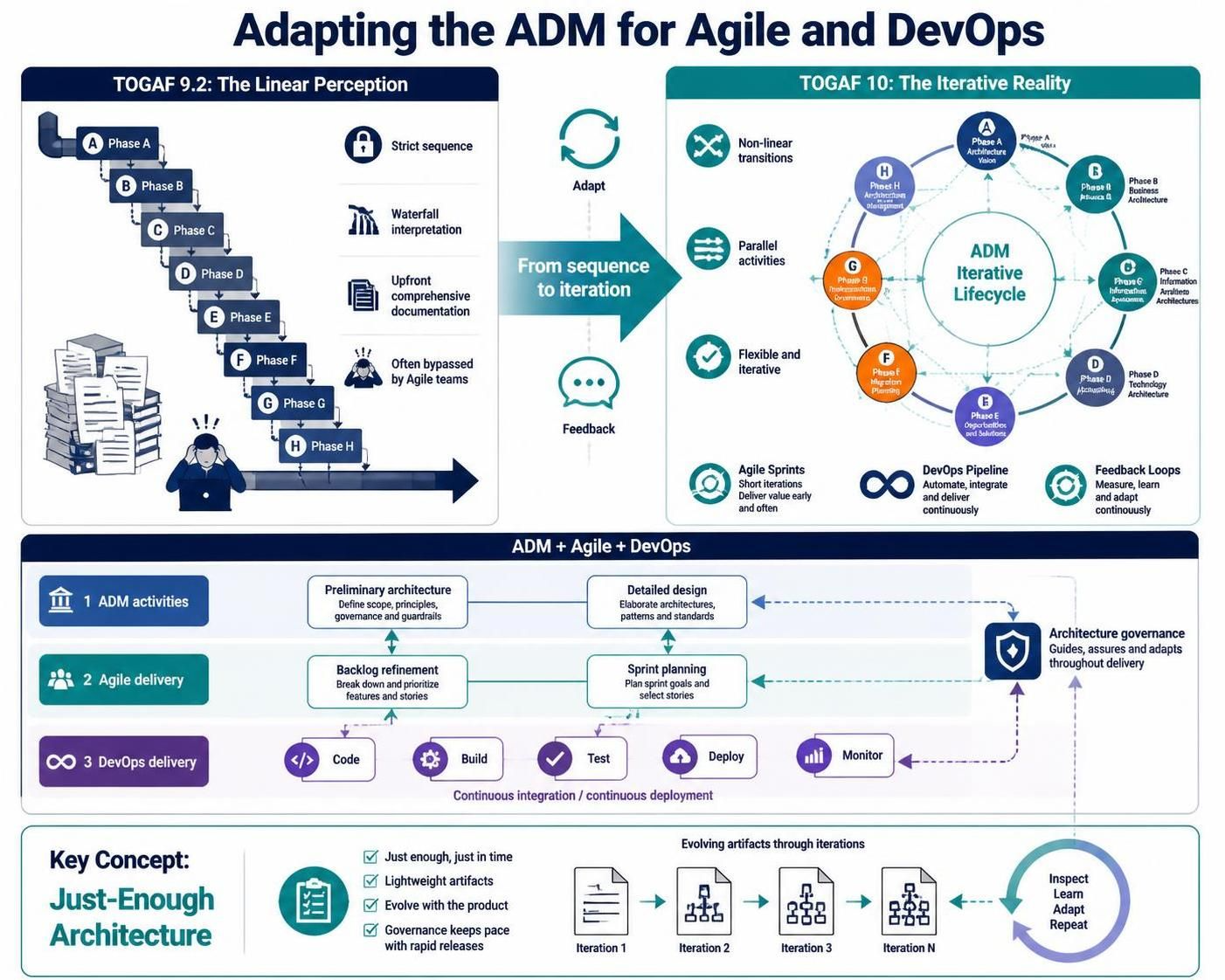
In TOGAF 9.2, the ADM cycle was often interpreted as a strict, sequential waterfall process: Phase A through Phase H, one after another. This perception clashed with the iterative nature of modern software development, leading many organizations to bypass TOGAF entirely in favor of pure Agile frameworks.
The Iterative Reality of TOGAF 10
TOGAF 10 explicitly repositions the ADM as a flexible, iterative cycle. Key changes include:
-
Non-Linear Transitions: The visual representation of the ADM now emphasizes feedback loops and parallel activities rather than strict sequential progression.
-
Agile Integration: Guidance is provided on how to map ADM phases to Agile sprints. For example, preliminary architecture work can occur in backlog refinement, while detailed design aligns with sprint planning.
-
DevOps Alignment: The framework now addresses continuous integration/continuous deployment (CI/CD) pipelines, ensuring that architectural governance keeps pace with rapid release cycles.
Key Concept: Just-Enough Architecture
TOGAF 10 encourages “just-enough, just-in-time” architecture. Instead of upfront, comprehensive documentation, architects deliver lightweight artifacts that evolve with the product.
3. Modernized Terminology and Digital Focus
TOGAF 10 streamlines terminology to align with current corporate and technical lexicons:
| TOGAF 9.2 Term | TOGAF 10 Term | Rationale |
|---|---|---|
| Content Framework & Metamodel | TOGAF Content Framework & Enterprise Metamodel | Emphasizes enterprise-wide applicability. |
| Standards Information Base (SIB) | Standards Library | Simpler, more intuitive naming. |
| Governance Log | Governance Repository | Reflects a more structured, searchable asset. |
Additionally, TOGAF 10 expands guidance on:
-
Data and Information Architecture: Critical for AI and analytics initiatives.
-
Business Security and Risk: Integrated earlier in the ADM cycle.
-
Cloud-Native Patterns: Specific guidance on microservices, serverless, and containerization.
4. Tooling Implementation: Visual Paradigm & ArchiMate
Implementing TOGAF 10 requires tools that support modularity, collaboration, and dynamic modeling. Here’s how Visual Paradigm and ArchiMate fit into this new paradigm.
Why ArchiMate?
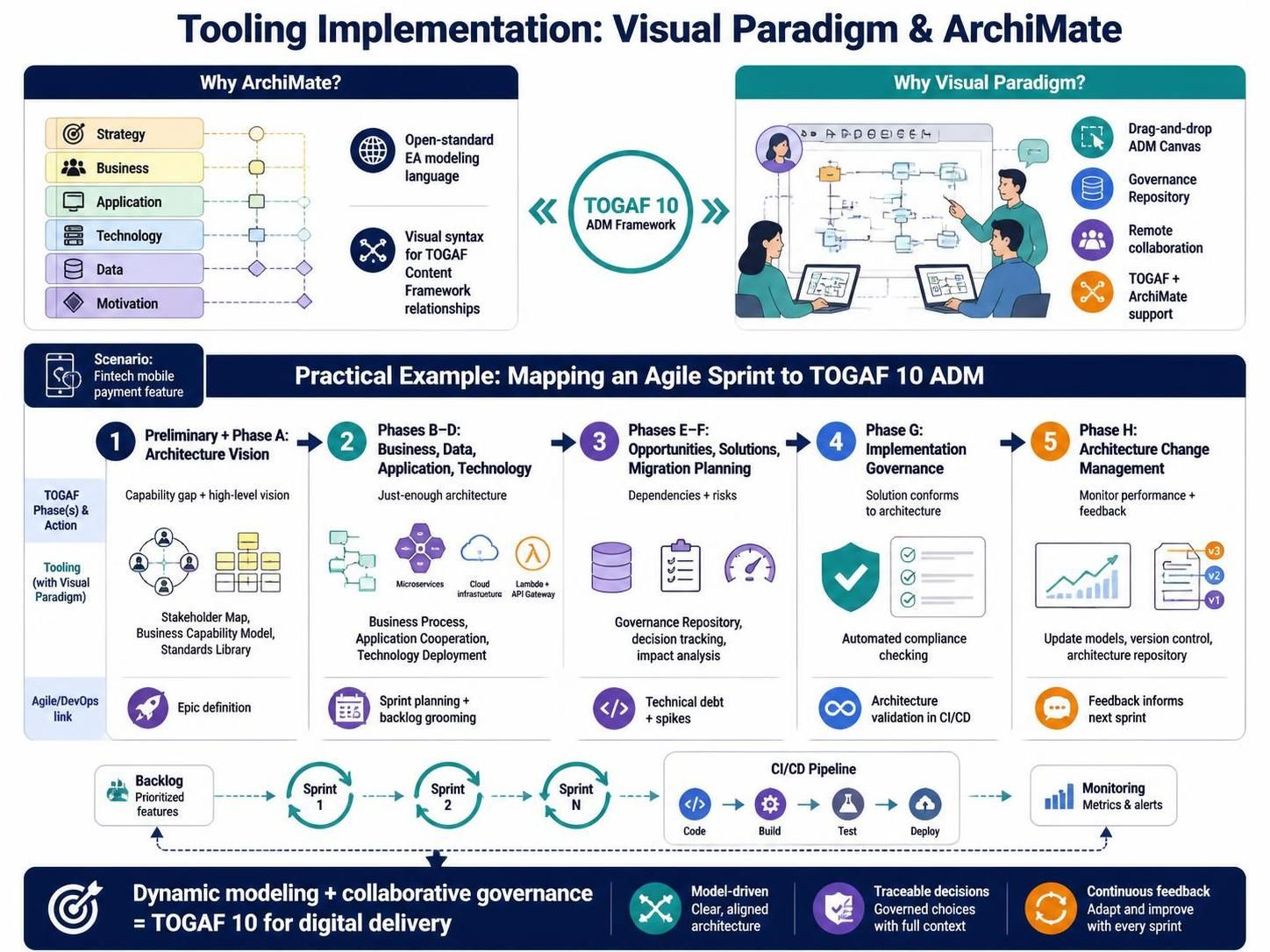
ArchiMate is the open-standard modeling language for enterprise architecture. It provides the visual syntax needed to represent the complex relationships defined in the TOGAF Content Framework.
Why Visual Paradigm?
Visual Paradigm is a robust EA tool that supports both TOGAF and ArchiMate natively. It offers:
-
Drag-and-drop ADM Canvas: Visualize the iterative ADM cycle.
-
Repository Management: Replace the old “Governance Log” with a digital Governance Repository.
-
Collaboration Features: Support for remote teams and stakeholder feedback, aligning with TOGAF 10’s digital-first approach.
Practical Example: Mapping an Agile Sprint to TOGAF 10 ADM
Scenario: A fintech company is launching a new mobile payment feature using Agile sprints.
Step 1: Preliminary Phase & Phase A (Architecture Vision)
-
TOGAF 10 Action: Define the business capability gap and high-level vision.
-
Tooling (Visual Paradigm): Create a Stakeholder Map and Business Capability Model using ArchiMate elements. Store these in the Standards Library.
-
Agile Link: This aligns with Epic definition in the product backlog.
Step 2: Phase B, C, D (Business, Data, Application, Technology)
-
TOGAF 10 Action: Develop “just-enough” architecture for the specific feature.
-
Tooling (Visual Paradigm):
-
Use ArchiMate Business Process diagrams to model the user journey.
-
Use Application Cooperation diagrams to show microservice interactions.
-
Use Technology Deployment diagrams to define cloud infrastructure (e.g., AWS Lambda, API Gateway).
-
-
Agile Link: These models are refined during sprint planning and backlog grooming.
Step 3: Phase E & F (Opportunities & Solutions, Migration Planning)
-
TOGAF 10 Action: Identify implementation dependencies and risks.
-
Tooling (Visual Paradigm): Use the Governance Repository to track architectural decisions and compliance requirements. Generate impact analysis reports to identify affected services.
-
Agile Link: Risks are added to the sprint backlog as technical debt or spikes.
Step 4: Phase G (Implementation Governance)
-
TOGAF 10 Action: Ensure the developed solution adheres to the architecture.
-
Tooling (Visual Paradigm): Use automated compliance checking features to validate that the deployed microservices match the ArchiMate models.
-
DevOps Link: Integrate architectural validation into the CI/CD pipeline.
Step 5: Phase H (Architecture Change Management)
-
TOGAF 10 Action: Monitor performance and gather feedback.
-
Tooling (Visual Paradigm): Update models based on production metrics and user feedback. Use version control to track changes in the architecture repository.
-
Agile Link: Feedback informs the next sprint’s priorities.
5. Key Concepts for Successful Migration
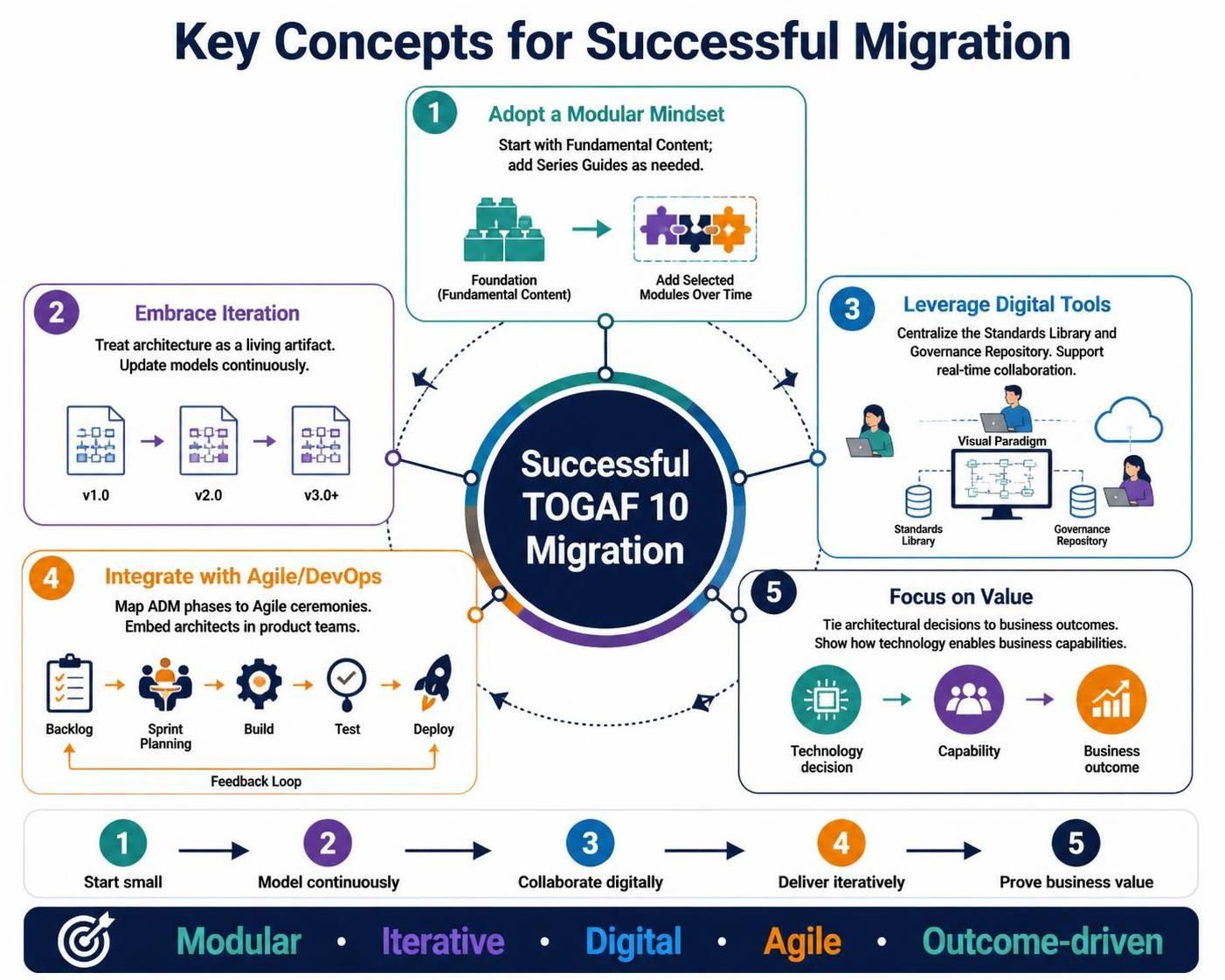
-
Adopt a Modular Mindset: Do not attempt to implement all of TOGAF 10 at once. Start with the Fundamental Content and add Series Guides as needed.
-
Embrace Iteration: Treat architecture as a living artifact. Update models continuously rather than creating large, static documents.
-
Leverage Digital Tools: Use platforms like Visual Paradigm to centralize your Standards Library and Governance Repository. Ensure your tools support real-time collaboration.
-
Integrate with Agile/DevOps: Map ADM phases to your existing Agile ceremonies. Ensure architects are embedded in product teams.
-
Focus on Value: Always tie architectural decisions to business outcomes. Use the TOGAF Content Framework to demonstrate how technology enables business capabilities.
Conclusion
The transition from TOGAF 9.2 to TOGAF 10 marks a maturation of enterprise architecture. By moving away from a monolithic, linear framework toward a modular, agile-friendly body of knowledge, TOGAF 10 empowers organizations to respond rapidly to digital disruption.
For practitioners, this shift requires a change in mindset: from being gatekeepers of comprehensive documentation to becoming enablers of iterative value delivery. By leveraging modern tooling like Visual Paradigm and ArchiMate, architects can implement TOGAF 10’s principles effectively, ensuring that enterprise architecture remains a strategic asset in the cloud-native era.
The future of EA is not about rigid adherence to process, but about flexible application of principles. TOGAF 10 provides the structure; your organization provides the agility.
Reference
-
Mastering TOGAF 10: A Modular Guide to Enterprise Architecture with Visual Paradigm: Comprehensive guide to TOGAF 10’s modular structure and how Visual Paradigm supports ADM phases, techniques, and artifact management.
-
Architecting Agility: Mastering TOGAF 10 with Visual Paradigm’s AI-Powered Toolkit: Explores TOGAF 10’s key concepts—modularity, business outcomes, Agile integration—and demonstrates Visual Paradigm’s BPMN and AI-assisted features.
-
Native AI ArchiMate 4 Generation & Viewpoints | Visual Paradigm Desktop: Announces AI-powered native ArchiMate 4 diagram generation with viewpoint support directly in Visual Paradigm Desktop.
-
AI ArchiMate 4 Generator: New Chatbot Import Support | Visual Paradigm: Details the AI Chatbot enhancement for generating ArchiMate 4 diagrams via natural language and seamless import into Visual Paradigm Desktop.
-
Transforming Enterprise Architecture: A Case Study on Adopting TOGAF 10 with Visual Paradigm: Real-world case study of NexGen Financial Services implementing TOGAF 10 with Visual Paradigm, including measurable outcomes and lessons learned.
-
Comprehensive Guide for Using TOGAF ADM with Visual Paradigm: Practical guidance on applying TOGAF ADM across architecture styles, iteration strategies, partitioning, and using Visual Paradigm’s ADM tools.
-
ArchiMate 4 Specification Official Release | The Open Group: Official announcement of ArchiMate 4 Specification, detailing key changes from version 3.2 including element merges, domain terminology, and relationship multiplicities.
-
The Open Group Announces ArchiMate 4 Specification: Press release emphasizing ArchiMate 4’s continuity, user-level compatibility, and alignment with the TOGAF Standard.
-
The Open Group Announces Launch of the TOGAF Standard, 10th Edition: Official launch announcement highlighting TOGAF 10’s refreshed modular structure, Agile guidance, and expanded “how-to” material.
-
TOGAF Standard Overview | The Open Group: Authoritative overview of the TOGAF Standard, including its Fundamental Content, Series Guides, certification portfolio, and applicability across organization sizes and sectors.
