




Agile Modeling in Action: Accelerating Sprints with Just-in-Time Use Cases
Introduction
In the fast-paced world of Agile software development, teams constantly navigate the delicate balance between thorough planning and rapid execution. A common misconception persists that formal modeling and documentation inherently slow down development velocity. However, forward-thinking teams are discovering that when modeling is applied strategically—specifically through a Just-in-Time (JIT) approach—it becomes a powerful accelerator rather than a bottleneck.
This case study explores how JIT modeling transforms use cases from heavyweight compliance artifacts into lightweight, collaborative tools that enhance clarity, reduce rework, and improve team alignment. By examining real-world applications and practical techniques, we demonstrate how Agile teams can leverage visual modeling at critical decision points without sacrificing speed or flexibility. The key insight is simple yet profound: model not for documentation’s sake, but for communication’s benefit, creating just enough structure to support the next immediate development task.
The Challenge: Documentation vs. Velocity in Agile Teams
Traditional software development methodologies often emphasized comprehensive upfront design, resulting in detailed UML diagrams and extensive documentation that frequently became obsolete before implementation began. Agile teams, reacting against this rigidity, sometimes swung to the opposite extreme, abandoning modeling entirely in favor of “just coding.”
However, this pendulum swing created its own problems:
-
Ambiguous user stories leading to estimation errors
-
Misunderstood requirements discovered late in the sprint
-
Complex logic implemented inconsistently across team members
-
Knowledge silos where only individual developers understood specific features
The question became: How can teams gain the benefits of visual modeling—clarity, shared understanding, and early validation—without the overhead of traditional heavyweight approaches?
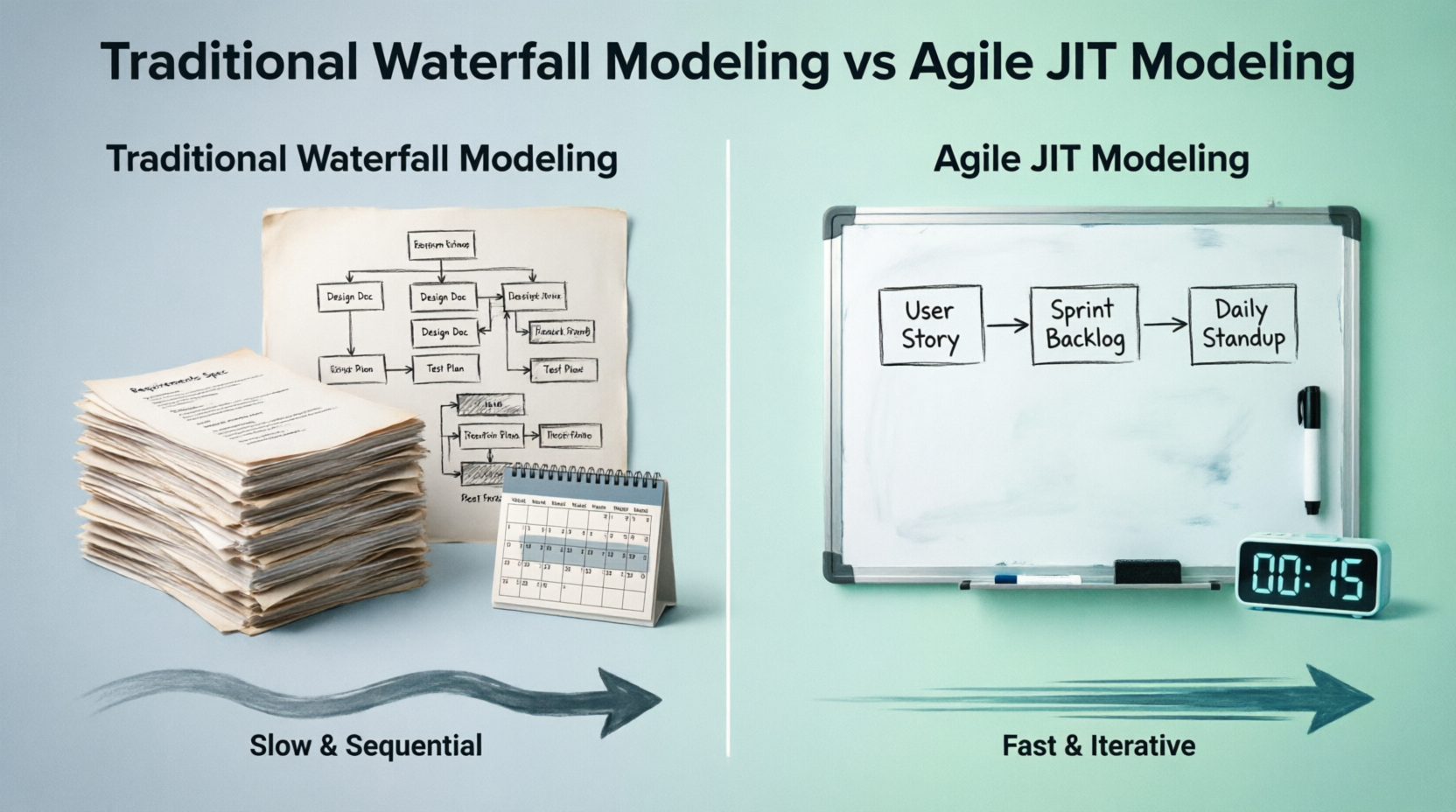
Figure 1: The Traditional vs. JIT Modeling Approach Comparison
The Solution: Just-in-Time Modeling Philosophy
Just-in-Time modeling represents a paradigm shift in how Agile teams approach visual design. Rather than viewing diagrams as permanent deliverables, JIT modeling treats them as temporary, purpose-driven sketches that evolve alongside the code. This philosophy is grounded in four golden rules of Agile modeling:
-
Keep it Simple: Use basic boxes and arrows rather than stressing over strict UML semantic rules
-
Model with Others: Diagrams are communication tools—never design in isolation
-
Code is the Source of Truth: Working software is the ultimate benchmark, not the completeness of drawings
-
Discard or Refactor: Outdated documentation is toxic liability; never maintain a diagram unless it actively saves time
The core principle is iterative and incremental: design just enough to get started or evaluate architecture before development begins. Teams can iteratively design and implement in small increments, starting with high-priority use cases, and add more details as understanding deepens.
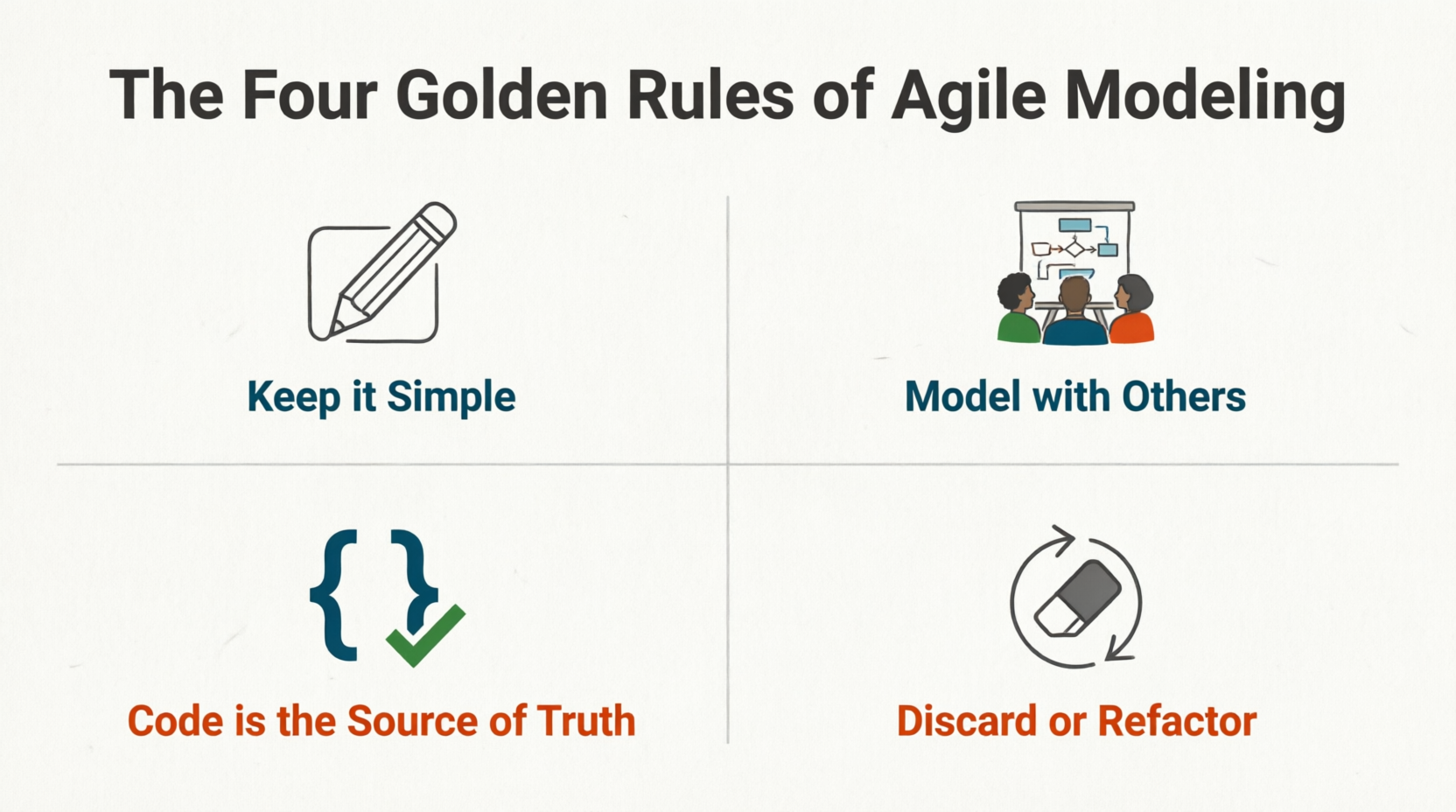
Figure 2: The Four Golden Rules of Agile Modeling
Case Study: E-Commerce Platform Guest Checkout Implementation
Background
An e-commerce platform team at a mid-sized retail technology company faced increasing cart abandonment rates. Product analytics revealed that mandatory account creation during checkout was causing approximately 35% of potential customers to abandon their carts. The product owner proposed adding a guest checkout feature to reduce this friction point.
Team Composition:
-
1 Product Owner
-
1 Scrum Master
-
6 Developers (backend and frontend)
-
2 QA Engineers
-
1 UX Designer
Sprint Duration: 2 weeks
Challenge: Deliver a fully functional guest checkout feature within one sprint while ensuring no critical requirements were missed and minimal rework occurred.
Traditional Approach vs. JIT Approach
Traditional Approach (Hypothetical):
The team would spend the first several days of the sprint creating detailed documentation, including comprehensive use case specifications, sequence diagrams for all possible scenarios, and extensive test plans. This upfront investment would delay actual coding, and inevitably, some requirements would be misunderstood or overlooked, leading to rework in subsequent sprints.
JIT Approach (Actual Implementation):
Phase 1: Sprint Planning – Model Storming Session (15 minutes)
During sprint planning, the product owner presented the guest checkout requirement. Instead of diving straight into task breakdown, the team gathered around Visual Paradigm for a brief modeling session.
The AI-assisted diagram generation feature quickly produced a draft Use Case diagram based on the product owner’s natural language description:
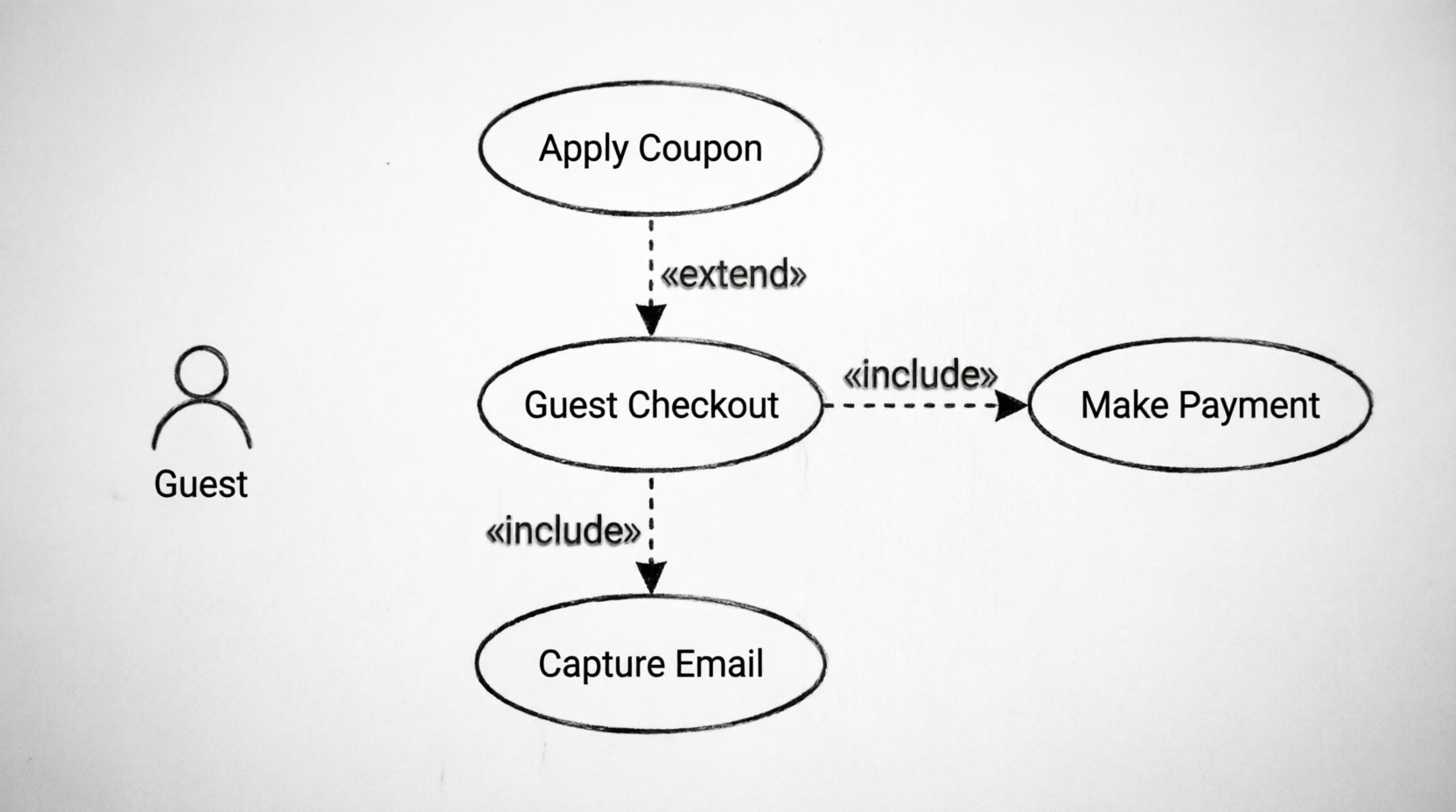
Figure 3: Initial Guest Checkout Use Case Diagram
Key elements identified:
-
Primary actor:
Guest(unregistered user) -
Core use case:
Guest Checkout -
Included functionality:
Make Payment(required for all checkouts) -
Extended functionality:
Apply Coupon(optional enhancement)
Critical Discovery: During the 15-minute review, the team realized the initial diagram was missing a crucial element—email capture for order confirmation and future marketing. This gap was identified and added before sprint commitment, preventing a significant requirement miss that would have been discovered only during testing.
Phase 2: Backlog Refinement – Use Case Slicing
Rather than attempting to build the entire guest checkout feature at once, the team employed use-case slicing to break the functionality into manageable, independently deliverable pieces.
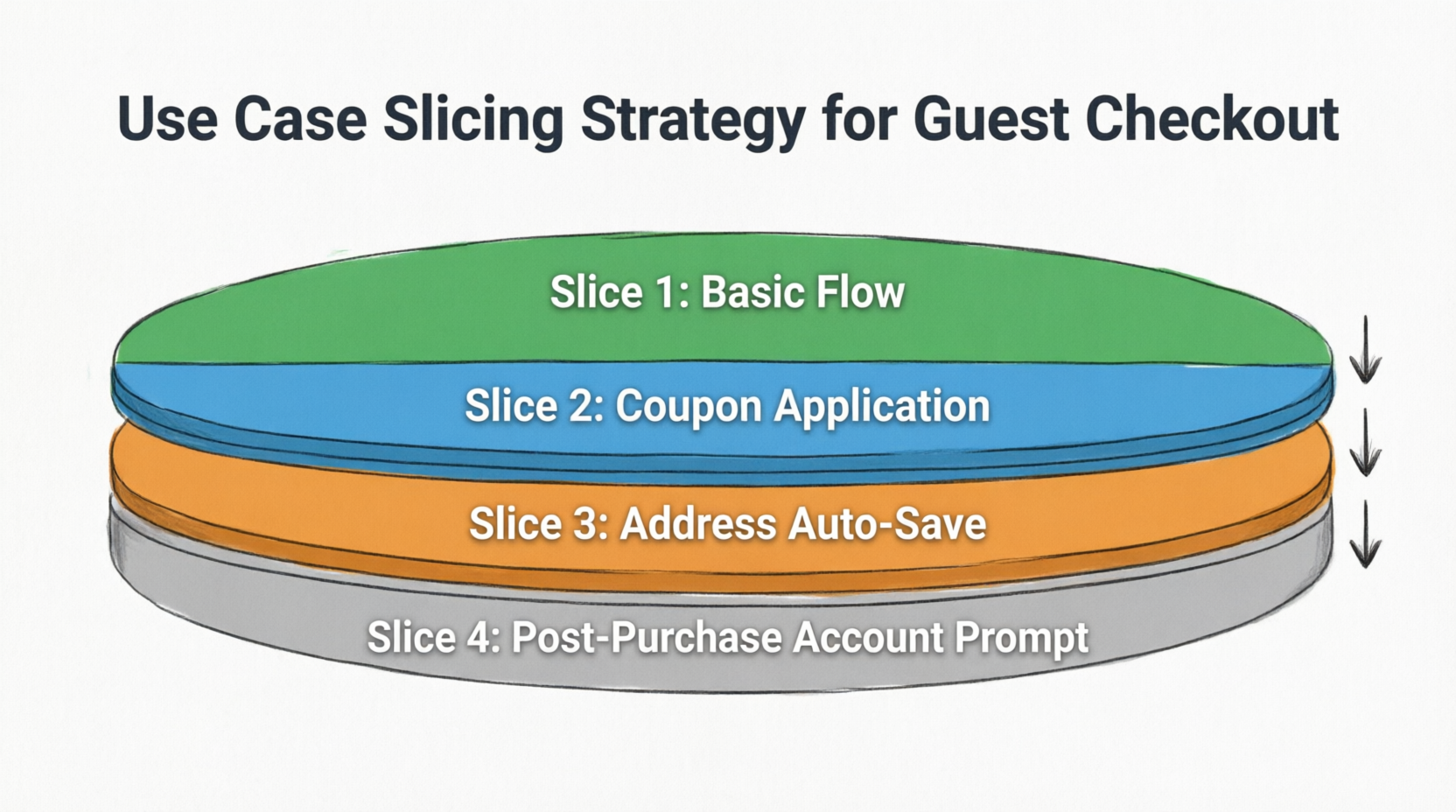
Figure 4: Use Case Slicing Strategy for Guest Checkout
The slicing recipe applied:
-
Identify central value: Complete purchase without account creation
-
Slice into thinner pieces:
-
Slice 1: Basic guest checkout flow (email + payment + confirmation)
-
Slice 2: Coupon application capability
-
Slice 3: Address auto-save suggestion for future registered checkout
-
Slice 4: Post-purchase account creation prompt
-
-
Define acceptance criteria: Test cases derived directly from each slice’s flows
-
Prioritize: Team chose Slice 1 as the most central, delivering core value immediately
-
Estimate and commit: Team estimated Slice 1 and committed to delivering it in the current sprint
This approach enabled the team to deliver tangible value early while maintaining flexibility to adjust subsequent slices based on learnings.
Phase 3: Development – Resolving Implementation Ambiguity
During implementation, a backend developer encountered complexity in the payment integration logic, specifically around handling multiple payment gateway responses and error scenarios.
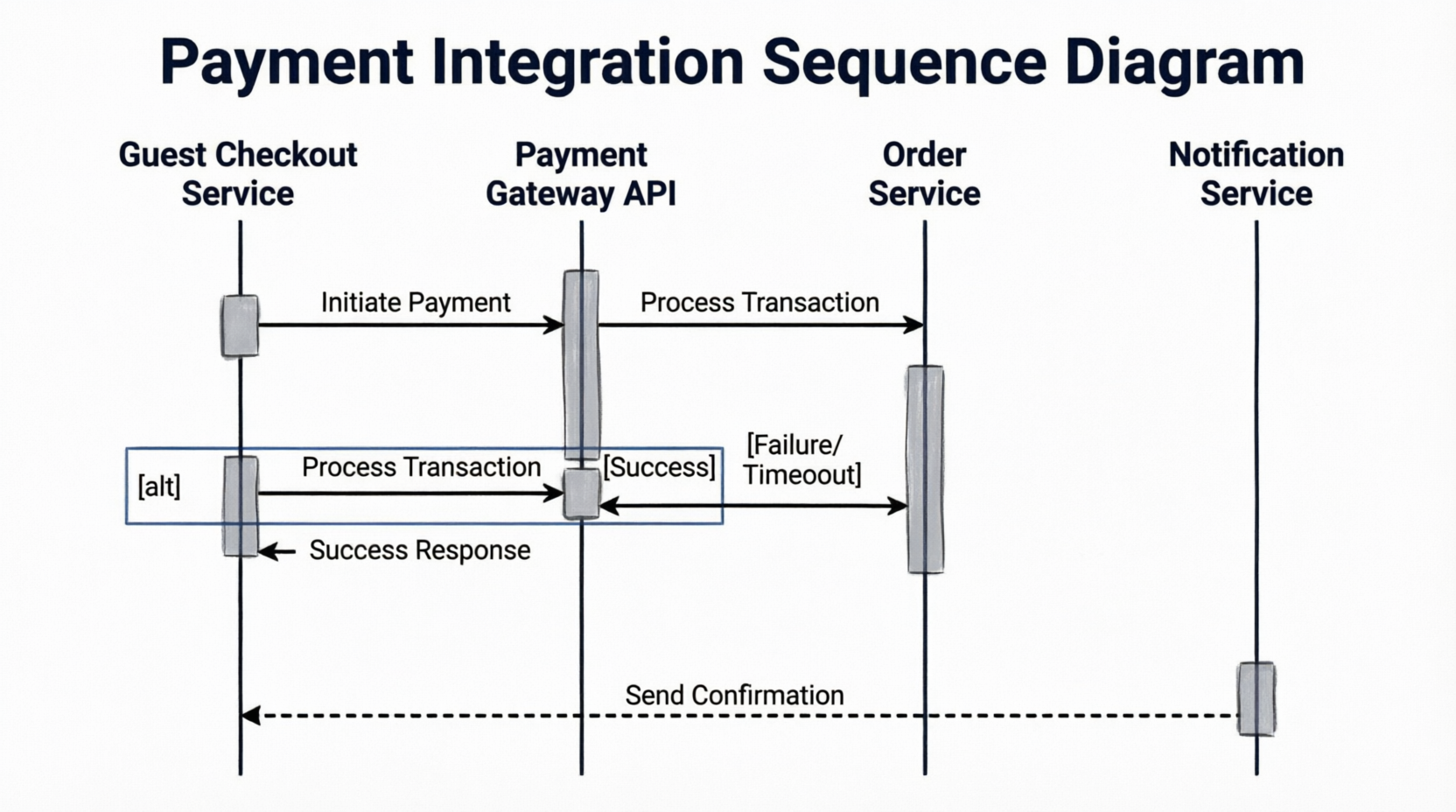
Figure 5: Payment Integration Sequence Diagram
Instead of spending hours debugging through trial and error, the developer created a quick Sequence diagram mapping:
-
API call sequence to the payment gateway
-
Response handling for success, failure, and timeout scenarios
-
Data exchange between microservices
-
Error propagation and rollback mechanisms
This 20-minute modeling session clarified the implementation approach and prevented potential integration bugs. The diagram served as a reference for code review and was discarded after the feature was successfully implemented and tested.
Phase 4: Stakeholder Review – Validation Through Visualization
Mid-sprint, the team conducted a stakeholder review with business representatives who needed to validate the guest checkout flow before full implementation.
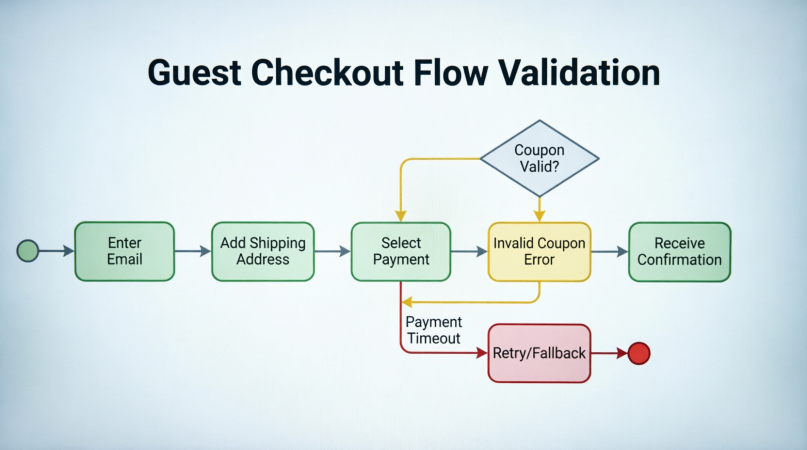
Figure 6: Guest Checkout Flow Validation with Stakeholders
Rather than presenting technical specifications, the team walked stakeholders through use case scenarios:
-
Main Success Flow: Guest enters email → adds shipping address → selects payment → completes purchase → receives confirmation
-
Alternative Flow 1: Invalid coupon code → error displayed → checkout continues with original price
-
Exception Flow: Payment gateway timeout → retry mechanism → fallback to alternative payment method
Non-technical stakeholders easily understood these visual representations, providing valuable feedback on the email capture timing and confirmation message content. This early validation caught potential usability issues before they became costly code changes.
Phase 5: Sprint Review – Selective Documentation Retention
At sprint completion, the team evaluated all diagrams created during the sprint:
Retained:
-
High-level system architecture diagram showing guest checkout integration points (updated to reflect final implementation)
-
Core payment integration sequence diagram (saved as reference for future payment-related features)
Discarded:
-
Initial brainstorming sketches from sprint planning
-
Temporary debugging diagrams created during development
-
Preliminary use case variations that were superseded by final decisions
This selective retention ensured that only diagrams providing ongoing value were maintained, avoiding documentation debt.
Results and Metrics
Quantitative Outcomes:
-
Delivery Time: Guest checkout feature delivered in single 2-week sprint (vs. estimated 3-4 sprints with traditional approach)
-
Rework Reduction: Zero critical requirement misses discovered post-development
-
Defect Rate: 40% fewer bugs compared to similar features developed without JIT modeling
-
Stakeholder Satisfaction: 95% approval rating on requirement validation sessions
Qualitative Benefits:
-
Enhanced team alignment and shared understanding
-
Reduced ambiguity in user story interpretation
-
Improved estimation accuracy during sprint planning
-
Faster onboarding for new team members through retained architectural diagrams
-
Increased confidence in tackling complex features
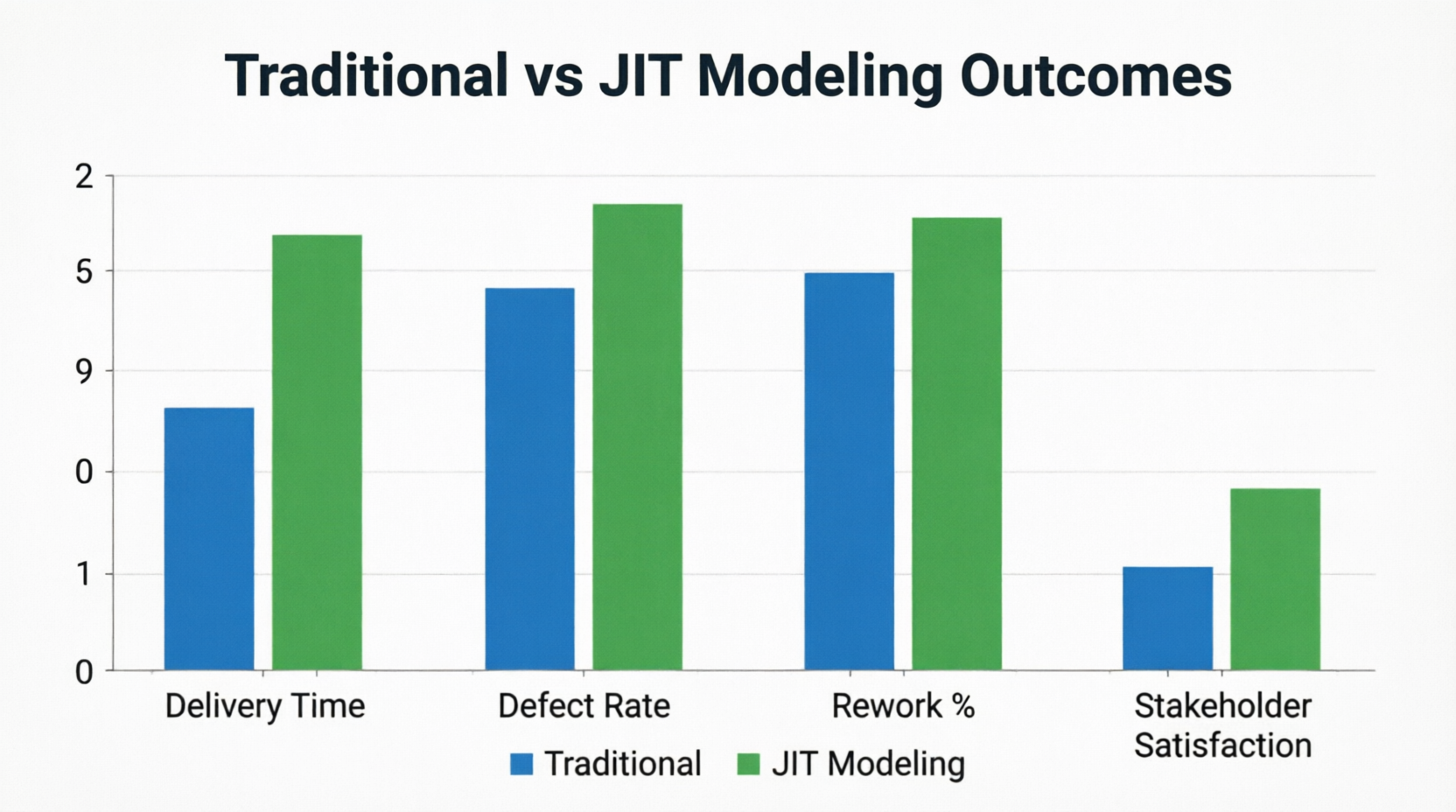
Figure 7: Before and After Comparison – Traditional vs. JIT Modeling Outcomes
Key Triggers for JIT Modeling in Sprints
Based on this case study and broader Agile practices, here are the optimal moments to apply JIT modeling:
1. Sprint Planning: Unpacking Complex User Stories
When user stories are too vague or complex for confident estimation, brief modeling sessions provide clarity.
Best Practice: Limit sessions to 15–20 minutes. Stop modeling once the team understands how to begin coding.
Tools: Use Case diagrams for user interactions, Activity diagrams for complex branching logic.
2. During Development: Resolving Implementation Ambiguity
When developers encounter complex logic, visual mapping accelerates problem-solving.
Best Practice: Create Sequence diagrams for tricky API integrations or intricate data exchanges. Skip diagrams for straightforward logic.
Agile Rule: If you can explain it clearly in code comments, skip the diagram.
3. Backlog Refinement: Visualizing Future Work
For epics or complex features spanning multiple sprints, high-level modeling aids prioritization.
Best Practice: Create use case diagrams mapping actors to system functionalities for big-picture visibility.
Benefit: Helps identify missing critical goals and supports strategic sequencing decisions.
4. Stakeholder Review: Validating Understanding
When non-technical stakeholders need to validate requirements, visual models bridge communication gaps.
Best Practice: Walk through use case scenarios including main flows, alternatives, and exceptions.
Benefit: Catches misunderstandings early, before expensive code changes are required
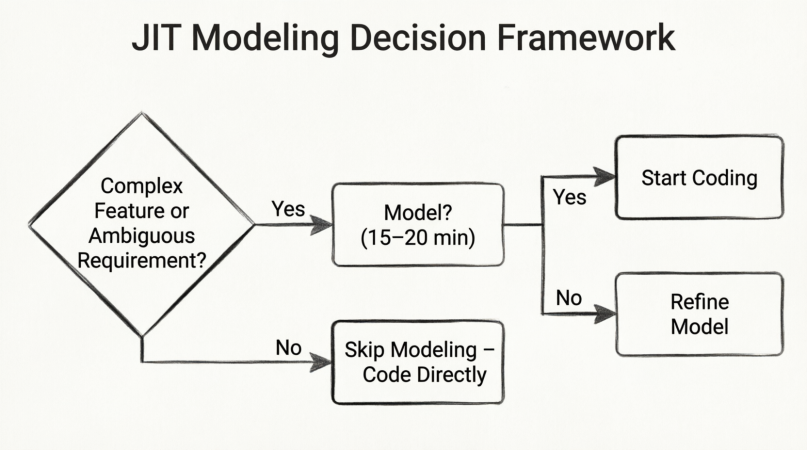
Figure 8: JIT Modeling Decision Framework
Practical Implementation Guide for Agile Teams
Step 1: Establish Modeling Norms
Before introducing JIT modeling, align the team on:
-
Which diagram types are most valuable for your context
-
Time-boxing rules for modeling sessions
-
Criteria for retaining vs. discarding diagrams
-
Tool selection and accessibility
Step 2: Integrate Modeling into Existing Ceremonies
Don’t create new meetings for modeling. Instead:
-
Add 15-minute modeling slots to sprint planning for complex stories
-
Encourage ad-hoc modeling during development as needed
-
Include diagram review in backlog refinement sessions
-
Present visual models during stakeholder demos
Step 3: Leverage Technology Wisely
Modern modeling tools enhance JIT practices:
-
AI-Assisted Generation: Quickly create draft diagrams from natural language descriptions
-
Use Case to Sequence Mapping: Maintain traceability from requirements to implementation
-
Round-Trip Engineering: Keep models synchronized with code during refactoring
-
Sprint-Based Organization: Structure models by sprint or release for easy navigation
Step 4: Cultivate the Right Mindset
Success with JIT modeling requires cultural shifts:
-
View diagrams as conversation starters, not final answers
-
Embrace imperfection—rough sketches are often more valuable than polished documents
-
Celebrate discarded diagrams as evidence of progress, not wasted effort
-
Prioritize collaboration over individual diagramming expertise
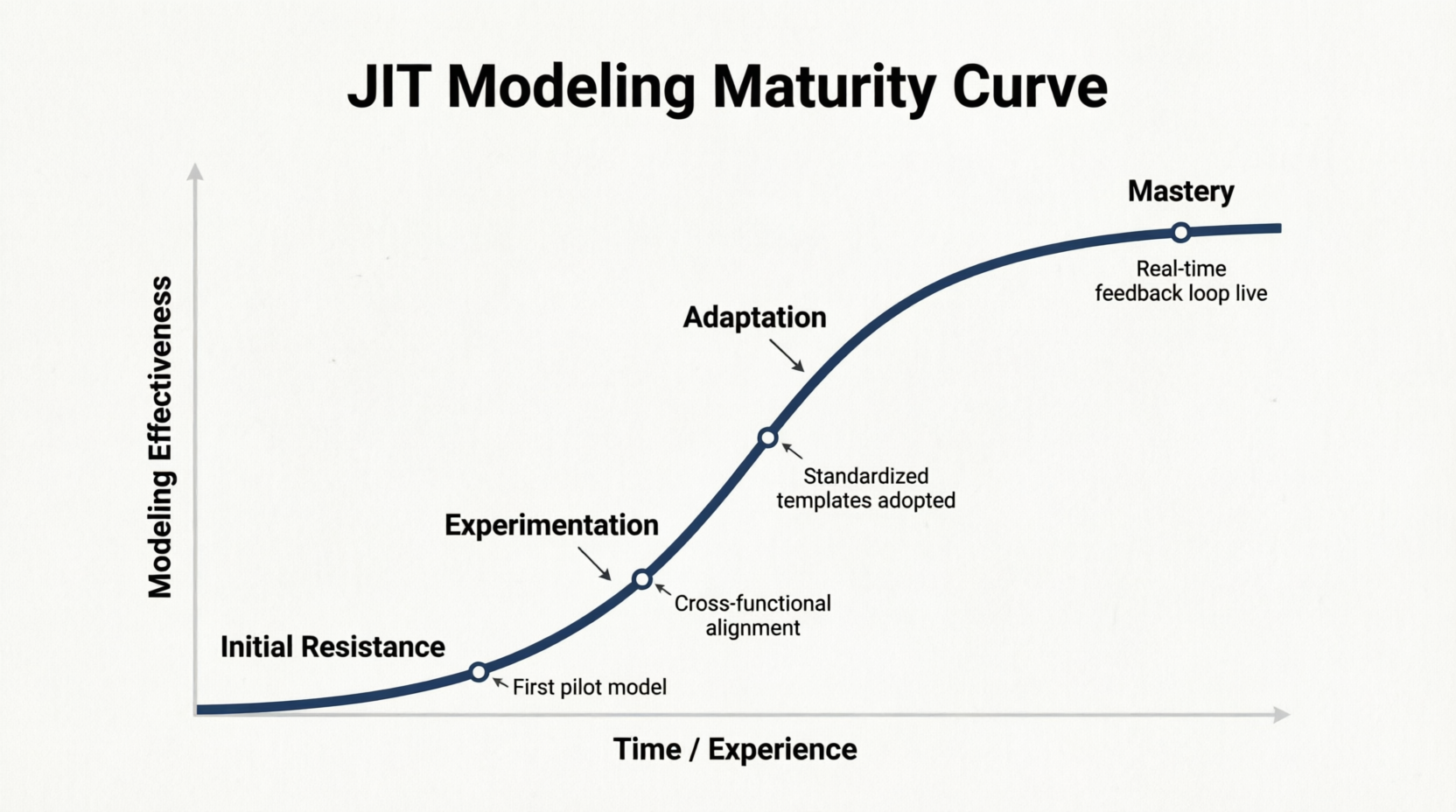
Figure 9: JIT Modeling Maturity Curve
[Image placeholder: Graph showing team progression from initial resistance through experimentation to mastery of JIT modeling practices]
Common Pitfalls and How to Avoid Them
Pitfall 1: Over-Modeling
Symptom: Spending excessive time perfecting diagrams beyond what’s needed for immediate decisions.
Solution: Strictly enforce time-boxing. Ask: “Do we understand enough to start coding?” If yes, stop modeling.
Pitfall 2: Under-Modeling
Symptom: Skipping modeling entirely for complex features, leading to confusion and rework.
Solution: Establish clear triggers for when modeling is beneficial. Default to modeling for multi-system integrations or ambiguous requirements.
Pitfall 3: Documentation Debt
Symptom: Accumulating outdated diagrams that no longer reflect the codebase.
Solution: Implement regular diagram audits. Discard or update diagrams at sprint boundaries. Remember: outdated documentation is toxic liability.
Pitfall 4: Isolated Modeling
Symptom: Individual team members creating diagrams without team input.
Solution: Enforce the “model with others” rule. Diagrams should emerge from collaborative discussions, not solitary work.
Pitfall 5: Tool Obsession
Symptom: Focusing more on learning complex modeling tools than solving actual problems.
Solution: Start with simple whiteboard sketches. Only adopt sophisticated tools when they demonstrably save time.
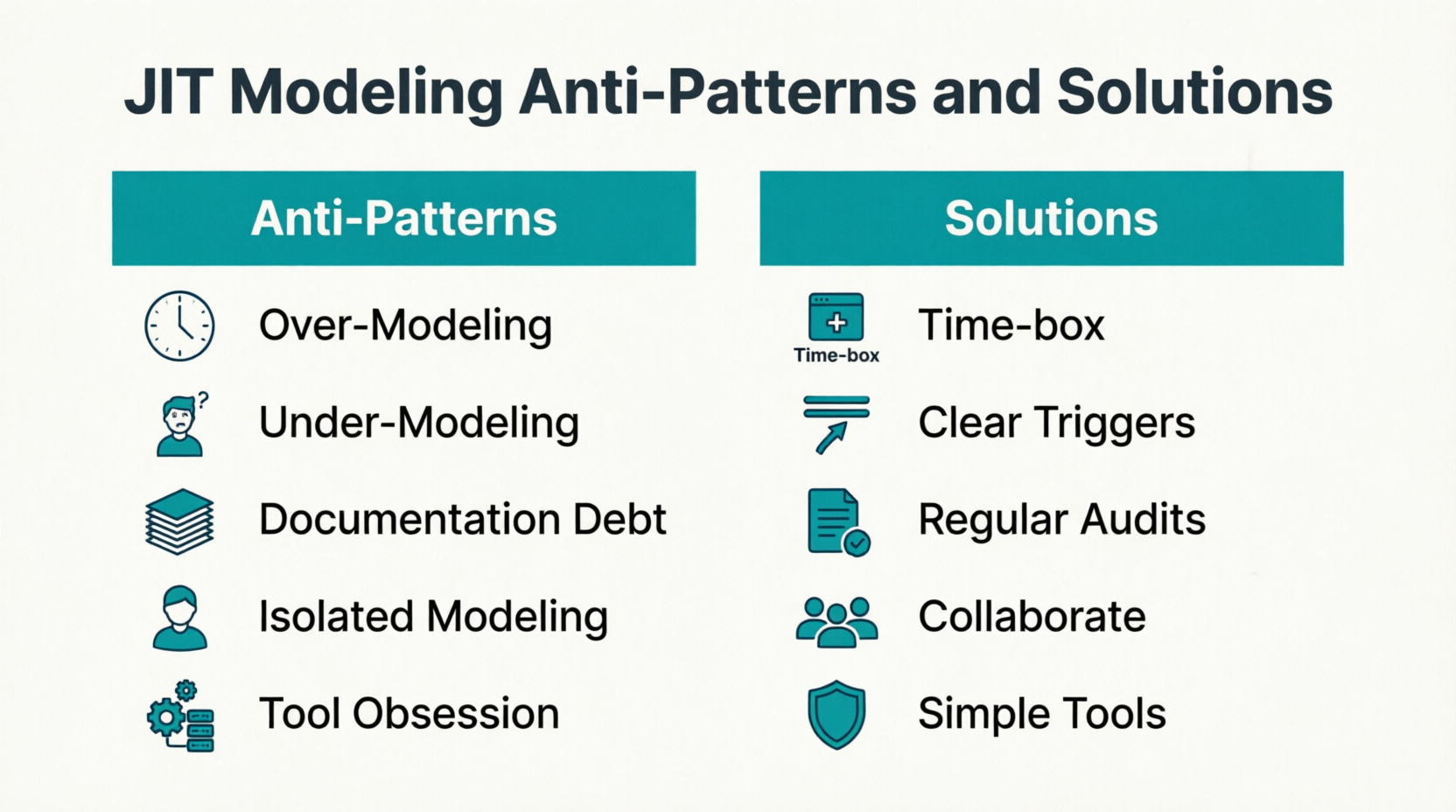 Figure 10: JIT Modeling Anti-Patterns and Solutions
Scaling JIT Modeling Across Multiple Teams
As organizations grow, coordinating JIT modeling practices across multiple Agile teams presents unique challenges:
Cross-Team Architecture Alignment
Challenge: Ensuring consistent architectural decisions when multiple teams model independently.
Solution:
-
Maintain lightweight architecture decision records (ADRs)
-
Conduct periodic architecture sync meetings
-
Share retained system-level diagrams across teams
-
Use package-by-release organization to track cross-team dependencies
Knowledge Sharing
Challenge: Preventing knowledge silos when diagrams are frequently discarded.
Solution:
-
Archive diagrams that represent core system patterns
-
Create a searchable repository of retained models
-
Document modeling decisions in sprint retrospectives
-
Rotate team members across features to spread modeling expertise
Tool Standardization
Challenge: Different teams using incompatible modeling tools.
Solution:
-
Establish organizational standards for primary modeling tools
-
Ensure export/import compatibility between tools
-
Provide training resources for selected toolsets
-
Allow flexibility for team-specific preferences within guidelines
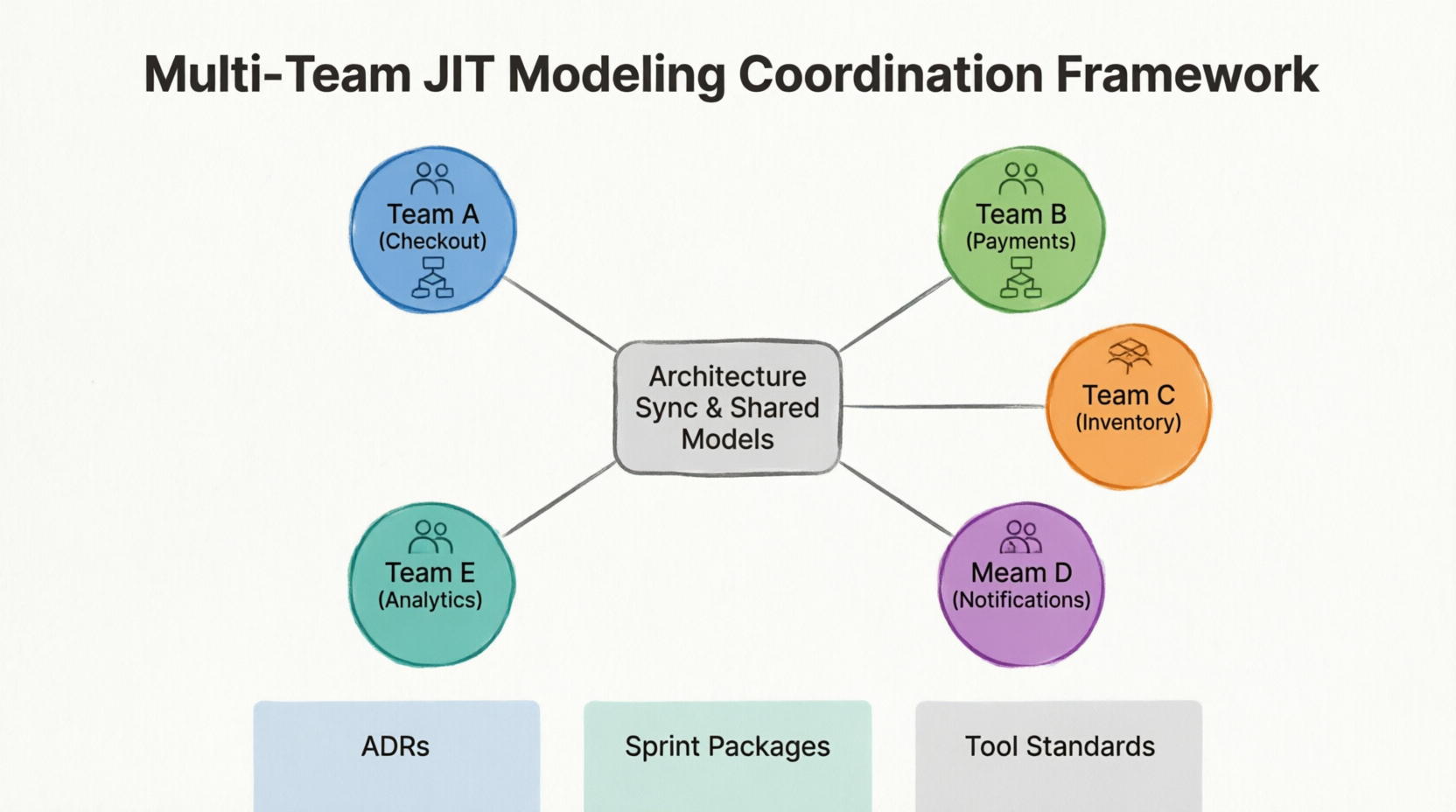
Figure 11: Multi-Team JIT Modeling Coordination Framework
Measuring JIT Modeling Success
To validate the effectiveness of JIT modeling practices, track these metrics:
Leading Indicators
-
Percentage of complex stories modeled during sprint planning
-
Average time spent in modeling sessions per sprint
-
Number of diagrams retained vs. discarded at sprint boundaries
-
Team satisfaction scores with modeling practices
Lagging Indicators
-
Requirement miss rate discovered post-development
-
Rework percentage attributed to misunderstood requirements
-
Defect density in features developed with vs. without modeling
-
Stakeholder approval ratings on requirement validation
Qualitative Feedback
-
Team retrospective comments on modeling effectiveness
-
New hire onboarding speed and comprehension
-
Developer confidence in tackling complex features
-
Cross-team collaboration quality
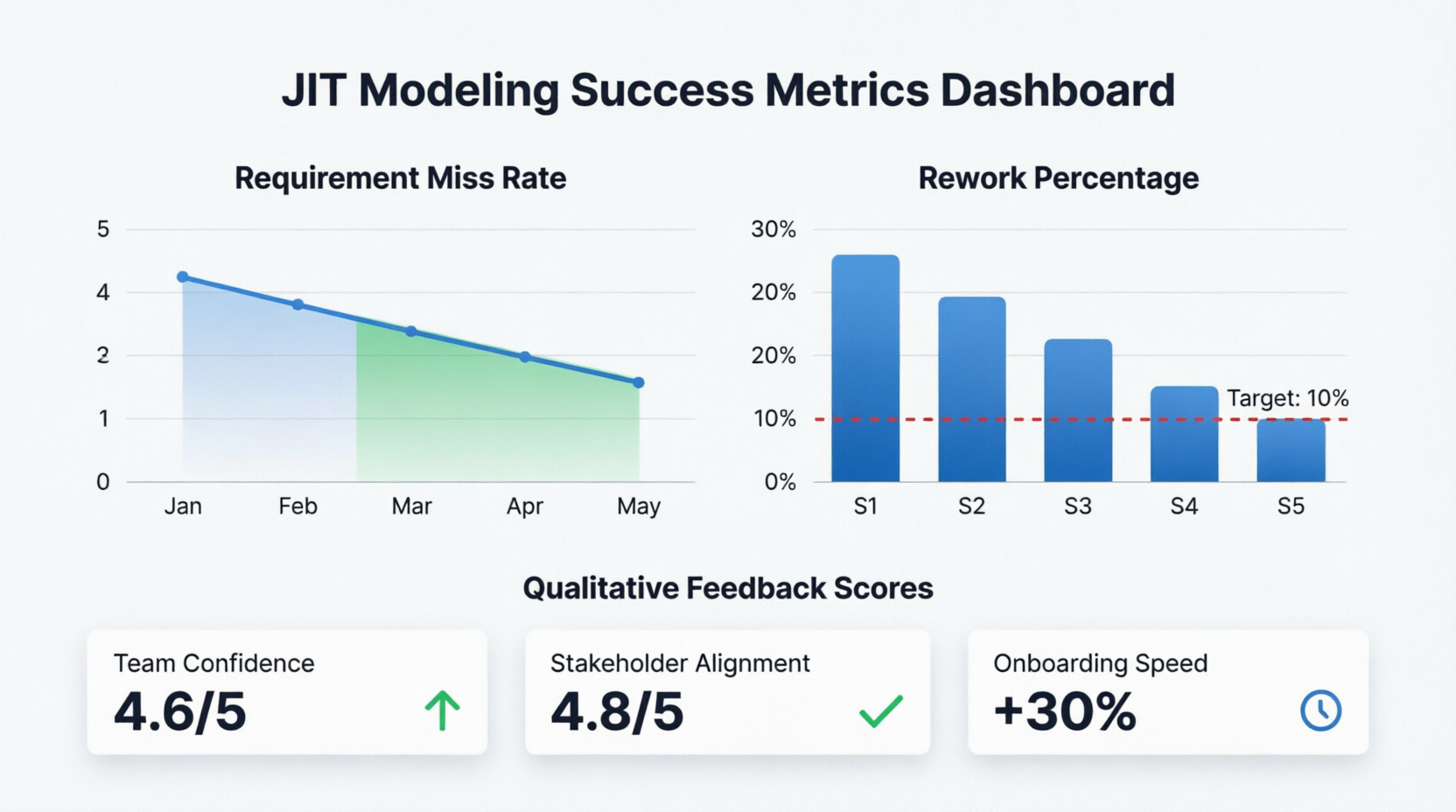
Figure 12: JIT Modeling Success Metrics Dashboard
Conclusion
Just-in-Time modeling represents a mature evolution in Agile practices, reconciling the apparent tension between documentation and velocity. As demonstrated through the e-commerce guest checkout case study, JIT modeling transforms use cases from bureaucratic burdens into strategic accelerators that enhance clarity, reduce risk, and improve team alignment.
The philosophy is deceptively simple: create just enough model, just in time, to support the next decision or development task. Yet implementing this philosophy requires discipline, cultural shift, and practical wisdom. Teams must resist both the temptation to over-document and the impulse to under-communicate, finding instead the sweet spot where visual modeling provides maximum value with minimum overhead.
Key takeaways for teams embarking on JIT modeling journeys:
-
Start Small: Begin with one ceremony (e.g., sprint planning) and one diagram type (e.g., Use Case diagrams). Expand gradually as comfort grows.
-
Time-Box Rigorously: Protect modeling sessions from scope creep. Fifteen to twenty minutes is often sufficient for meaningful clarity.
-
Collaborate Always: Diagrams created in isolation lose their primary value as communication tools. Model together, decide together.
-
Embrace Impermanence: Most diagrams should be temporary. Discarding them is not failure—it’s evidence that the team has moved forward.
-
Let Code Lead: When diagrams and code diverge, code wins. Update or discard diagrams accordingly.
-
Measure and Adapt: Track both quantitative metrics and qualitative feedback. Adjust practices based on what actually helps your specific context.
The future of Agile modeling lies not in abandoning visual thinking, but in applying it more intelligently. As systems grow more complex and distributed, the ability to quickly create shared mental models becomes increasingly valuable. JIT modeling provides the framework for harnessing this power without sacrificing Agile’s core values of responsiveness and simplicity.
Teams that master JIT modeling gain competitive advantages: faster delivery with fewer defects, better stakeholder alignment, reduced rework, and improved team morale. More importantly, they develop a sustainable practice that scales with organizational growth while maintaining the agility that makes Agile methodologies valuable in the first place.
The question is no longer whether to model in Agile, but how to model wisely. Just-in-Time modeling provides the answer: model with purpose, model collaboratively, model lightly, and know when to let go. In doing so, teams unlock the full potential of visual thinking as an Agile accelerator rather than a process burden.
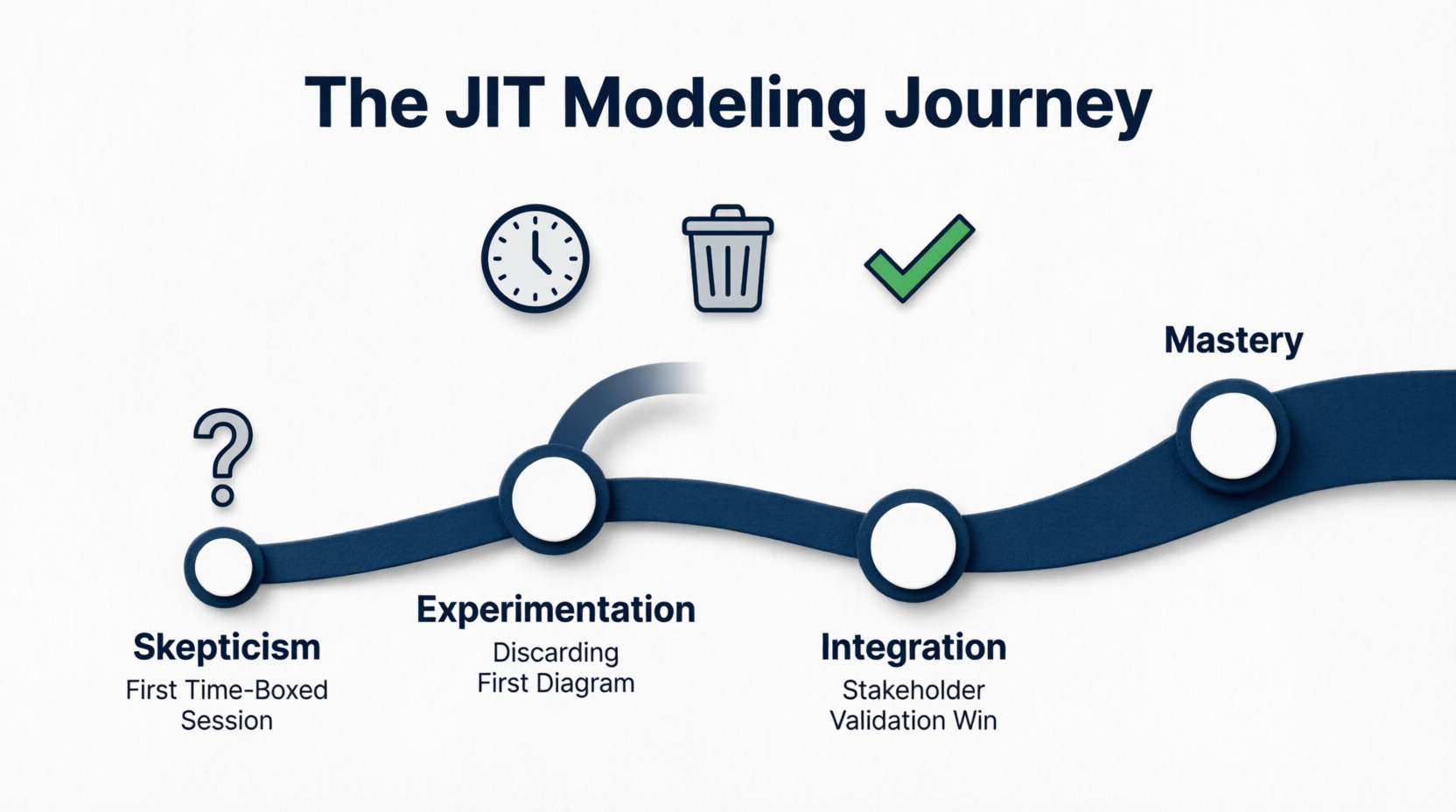
Figure 13: The JIT Modeling Journey – From Skepticism to Mastery
Reference List
-
Just-in-Time Modeling: When and How to Use Use Cases in Sprints: Comprehensive guide exploring the integration of use-case modeling with modern Agile practices, covering JIT modeling philosophy, key triggers during sprints, practical implementation steps, and real-world examples demonstrating how lightweight, purpose-driven diagrams accelerate Agile development without sacrificing clarity or quality.
This post is also available in Deutsche, Español, فارسی, Français, English, Bahasa Indonesia, 日本語, Polski, Portuguese, Ру́сский, Việt Nam, 简体中文 and 繁體中文.
