




The Definitive Guide to ArchiMate: Enterprise Architecture Modeling Framework
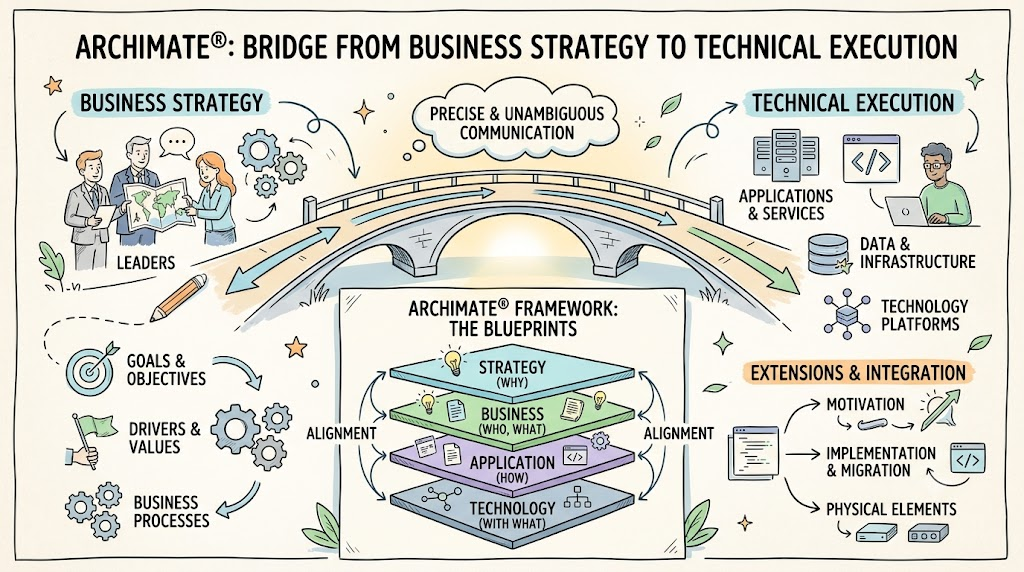
Enterprise architecture requires a precise, unambiguous way to capture, communicate, and align business strategy with technical execution. ArchiMate®, an open and independent modeling standard managed by The Open Group, provides enterprise architects with a structured language—similar to blueprints in civil engineering—to describe, analyze, and visualize relationships across diverse business and IT domains.
This comprehensive guide explores the core principles, structural framework, extensions, and integration patterns of ArchiMate, complete with practical diagrams and PlantUML implementations.
1. Introduction to ArchiMate
Models are essential for understanding complex systems. While organizations traditionally rely on fragmented models—such as separate process flows, database schemas, and infrastructure diagrams—ArchiMate unifies these perspectives into a single high-level structure.
ArchiMate offers a uniform language for modeling the design and operation of:
-
Business processes and organizational roles
-
Information flows and application data
-
IT systems and software components
-
Technical infrastructure and physical assets
By using ArchiMate, stakeholders gain actionable insights to assess risks, design future-state architectures, and evaluate the impact of strategic decisions across organizational boundaries.
2. Why Choose ArchiMate?
Organizations often struggle with “fuzzy pictures” or disconnected architectural views that fail to reflect real-world dependencies.
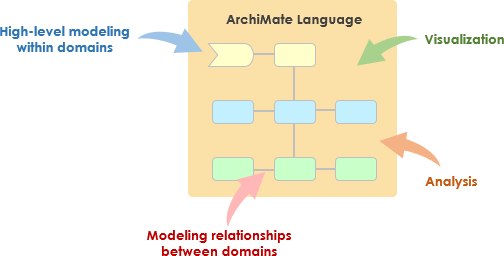
Enterprise architects adopt ArchiMate primarily to:
-
Capture Stakeholder Concerns: Map strategic drivers, goals, and constraints directly to operational structures.
-
Refine Requirements: Translate high-level business concerns into precise functional and technical specifications.
-
Build Integrated EA Models: Maintain a single source of truth for the entire enterprise landscape.
-
Deliver Viewpoints & Manage Trade-offs: Render tailored views for specific audiences while evaluating architectural trade-offs across conflicting goals.
Key Benefits
| Advantage | Business Impact |
|---|---|
| Vendor Independence | Governed by The Open Group, preventing lock-in to proprietary tools or frameworks. |
| Lean & Scalable | Offers just enough concepts without overwhelming users with unnecessary notation complexity. |
| BPMN & UML Alignment | Borrows familiar concepts from standards like UML and BPMN to bridge detailed design with high-level EA. |
| TOGAF® Synergy | Complements TOGAF’s Architecture Development Method (ADM) by providing the standard modeling notation. |
3. The Evolution to ArchiMate 3
The ArchiMate 3 specification introduced critical updates to support modern digital transformation, smart infrastructure, and strategic alignment:
-
Strategic Level Concepts: Elements like Capability, Resource, and Outcome bridge business vision with execution.
-
Physical Modeling: Dedicated elements for physical facilities, machinery, distribution networks, and raw materials.
-
Operational Alignment: Better support for logistics, smart manufacturing, and IoT systems where IT overlaps with physical operations.
-
Framework Harmony: Tighter alignment with other Open Group standards, including the TOGAF Framework.
4. The ArchiMate Structural Framework
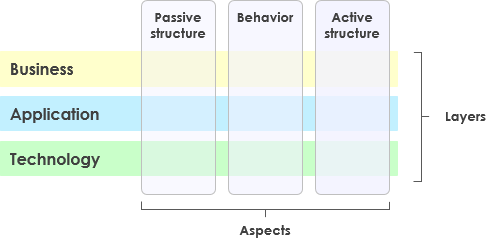
The architecture of ArchiMate is organized around a grid of Layers and Aspects.
Core Framework Dimensions
Aspects (Columns)
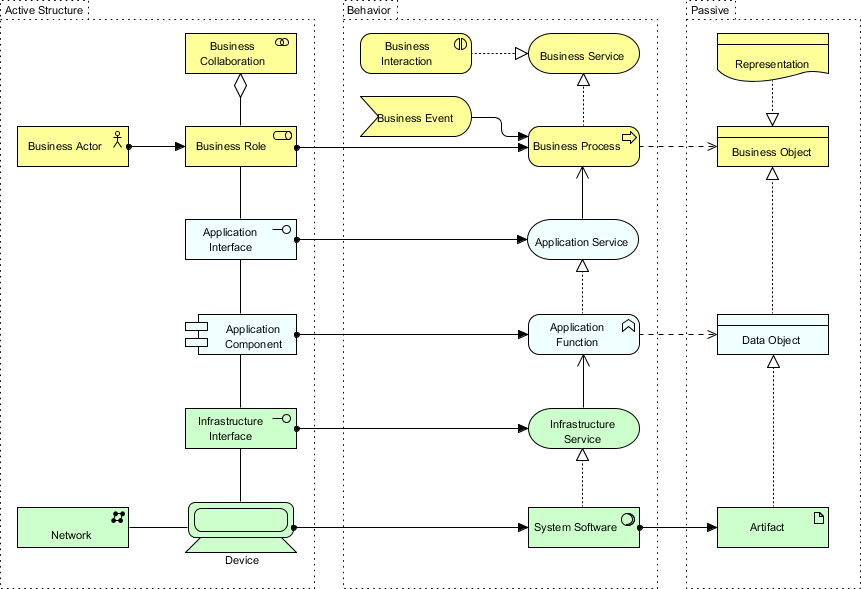
ArchiMate categorizes every domain using three foundational aspects:
-
Active Structure Aspect: Represents the structural entities (actors, application components, devices) that perform behavior (the subjects).
-
Behavior Aspect: Represents the activity (processes, functions, services, events) performed by active elements.
-
Passive Structure Aspect: Represents the objects (data, information objects, physical items) acted upon by behavioral elements.
Layers (Rows)
Higher layers consume services delivered by lower layers:
-
Business Layer: Products, services, business processes, and organizational roles.
-
Application Layer: Software components and application services that support business processes.
-
Technology Layer: Infrastructure services, processing units, storage, networks, and physical devices.
5. The Full ArchiMate Framework & Extensions
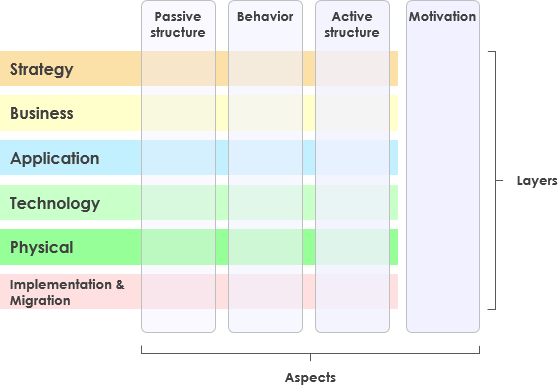
The ArchiMate Full Framework expands beyond the core layers to encompass motivation, strategic direction, physical infrastructure, and migration governance.
Extension Domains
-
Motivation Extension: Captures drivers, goals, principles, requirements, and stakeholder expectations.
-
Implementation & Migration Extension: Supports project portfolio management, gap analysis, work packages, and transition planning.
-
Physical Elements: Extends the technology layer to represent physical environments, equipment, and supply chains.
6. Deep Dive into Layers with Examples
Core Layers Breakdown
1. Business Layer
Focuses on operational structure, roles, and business value delivery.
2. Application Layer
Models software architecture, integration contracts, and application capabilities.
3. Technology Layer
Depicts underlying computing platforms, network topology, and system software.
Extensions Breakdown
Motivation Extension
Tracks why an architecture exists and what business intent drives changes.
Implementation & Migration Extension
Tracks how an enterprise transitions from a baseline architecture to a target architecture.
7. Integrated Architectural Examples
Core Layer Integration
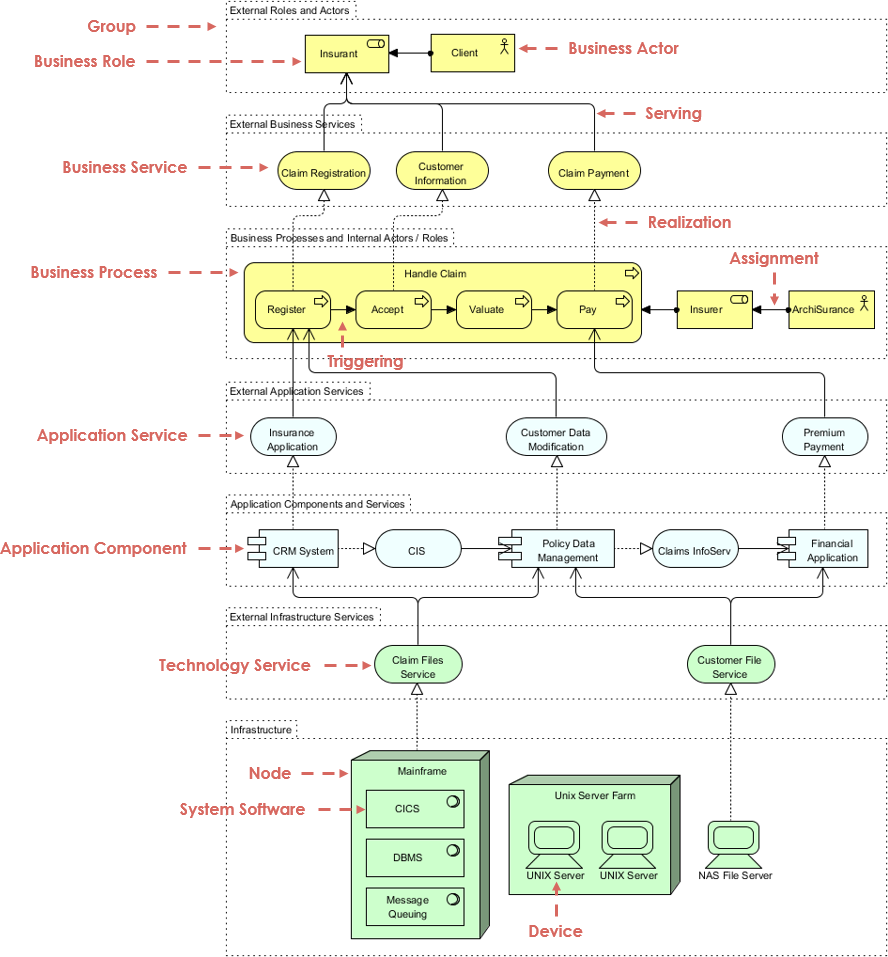
Below is an illustration of how elements across core layers interact:
Complete Layered View
The full power of ArchiMate is realized when connecting strategy down to physical implementation:
8. Practical PlantUML ArchiMate Code Examples
You can render ArchiMate diagrams programmatically using standard diagramming engines like PlantUML. Below are practical code snippets illustrating key architectural views.
Layout Tip: To prevent diagrams from collapsing into long vertical chains, intra-layer elements use horizontal positioning (
-right->or-left->), while inter-layer relationships use vertical connections (-down->).
Example A: Core Layers Interaction (Layer-Grouped & Balanced Layout)
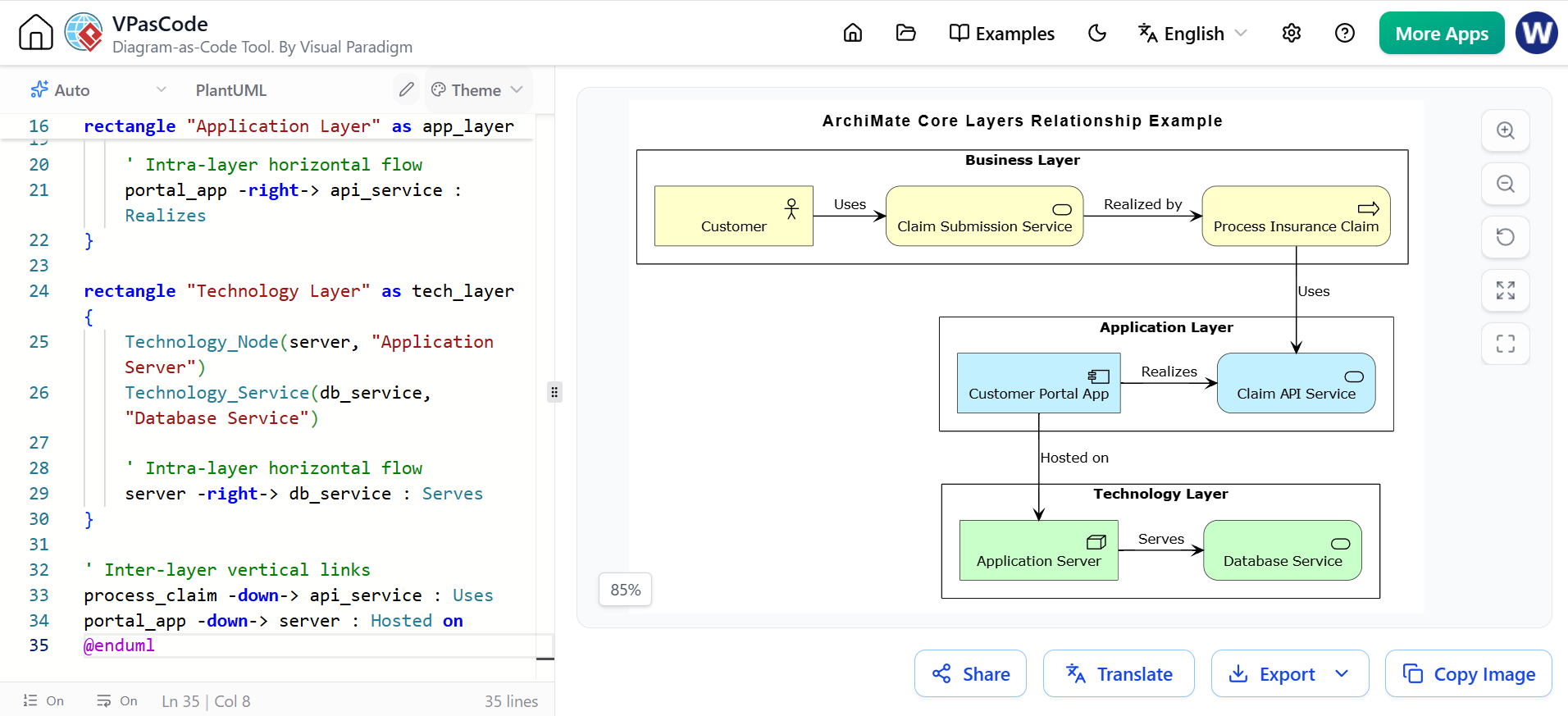
@startuml
!include <archimate/Archimate>

title ArchiMate Core Layers Relationship Example

rectangle "Business Layer" as bus_layer {
    Business_Actor(customer, "Customer")
    Business_Service(claim_service, "Claim Submission Service")
    Business_Process(process_claim, "Process Insurance Claim")

    ' Intra-layer horizontal flow
    customer -right-> claim_service : Uses
    claim_service -right-> process_claim : Realized by
}

rectangle "Application Layer" as app_layer {
    Application_Service(api_service, "Claim API Service")
    Application_Component(portal_app, "Customer Portal App")

    ' Intra-layer horizontal flow
    portal_app -right-> api_service : Realizes
}

rectangle "Technology Layer" as tech_layer {
    Technology_Node(server, "Application Server")
    Technology_Service(db_service, "Database Service")

    ' Intra-layer horizontal flow
    server -right-> db_service : Serves
}

' Inter-layer vertical links
process_claim -down-> api_service : Uses
portal_app -down-> server : Hosted on
@enduml
Example B: Motivation & Strategy Extension (Grid-Aligned Layout)
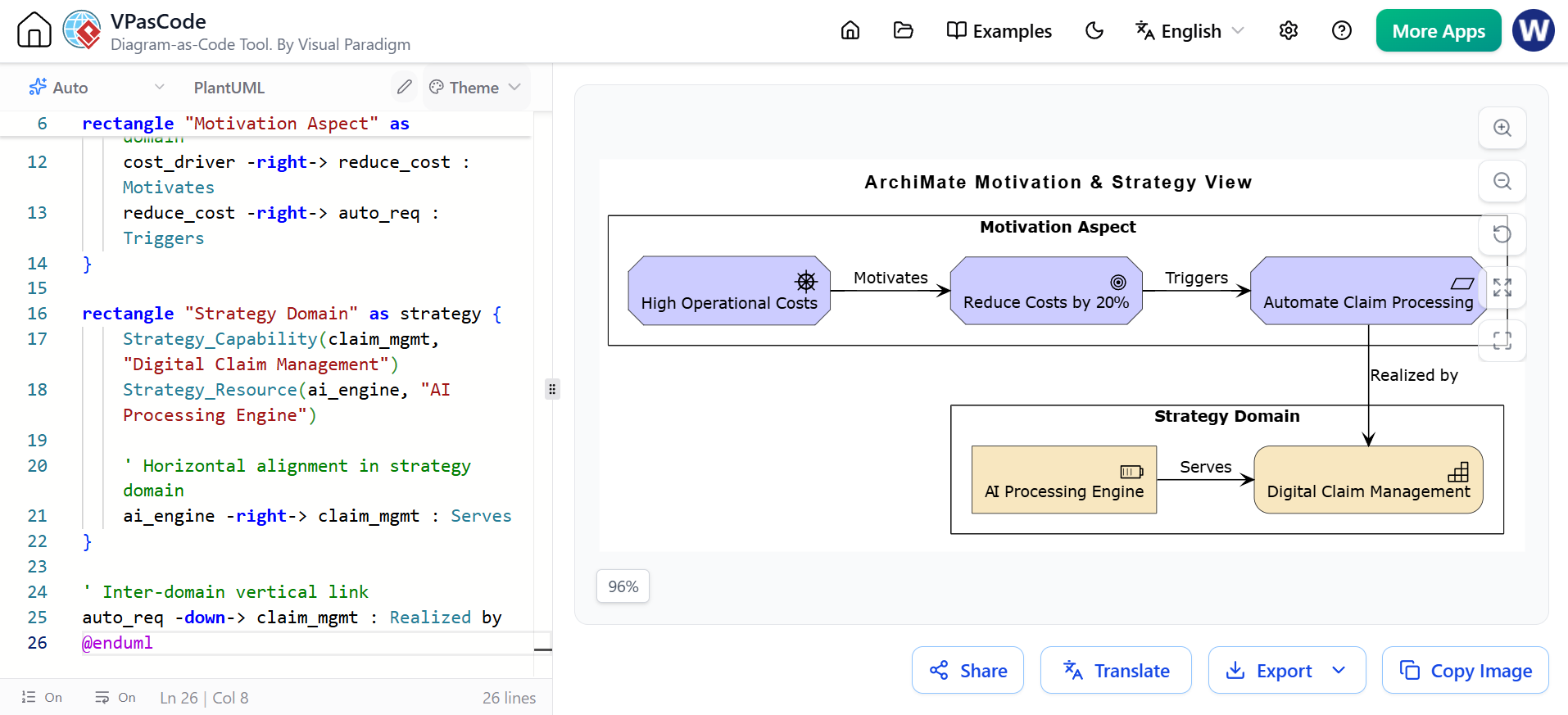
@startuml
!include <archimate/Archimate>

title ArchiMate Motivation & Strategy View

rectangle "Motivation Aspect" as motivation {
    Motivation_Driver(cost_driver, "High Operational Costs")
    Motivation_Goal(reduce_cost, "Reduce Costs by 20%")
    Motivation_Requirement(auto_req, "Automate Claim Processing")

    ' Horizontal alignment in motivation domain
    cost_driver -right-> reduce_cost : Motivates
    reduce_cost -right-> auto_req : Triggers
}

rectangle "Strategy Domain" as strategy {
    Strategy_Capability(claim_mgmt, "Digital Claim Management")
    Strategy_Resource(ai_engine, "AI Processing Engine")

    ' Horizontal alignment in strategy domain
    ai_engine -right-> claim_mgmt : Serves
}

' Inter-domain vertical link
auto_req -down-> claim_mgmt : Realized by
@enduml
9. Alignment with TOGAF ADM
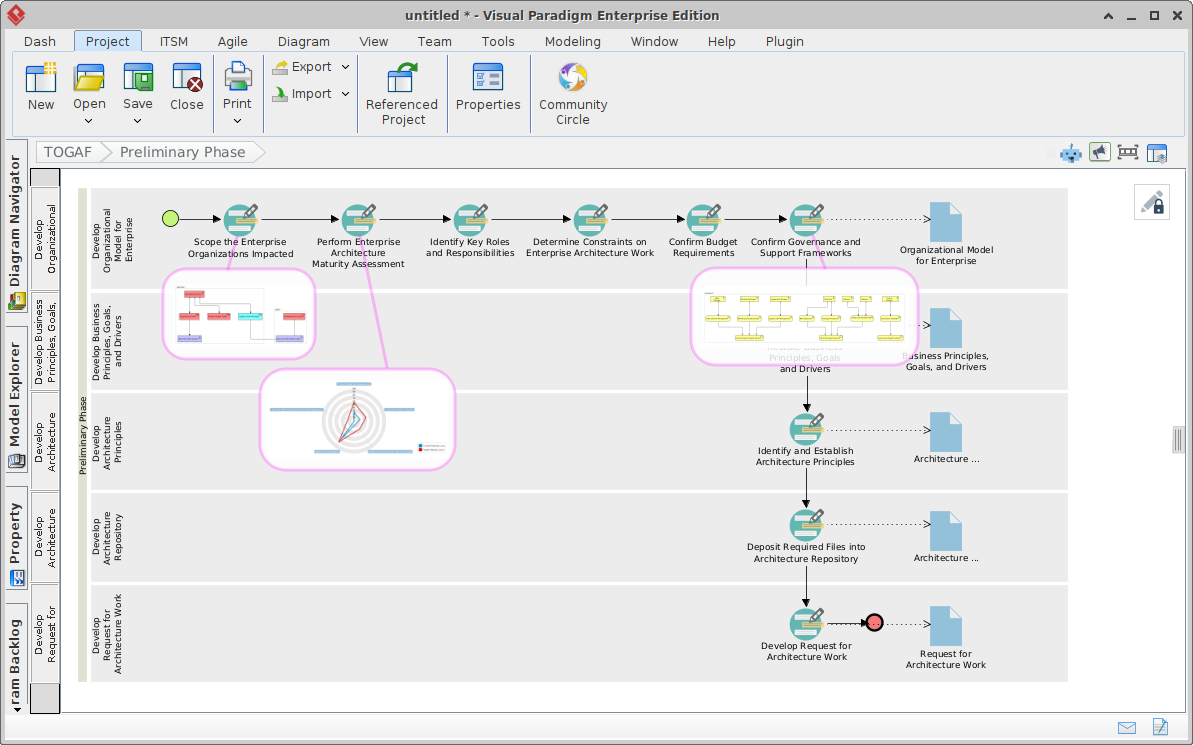
ArchiMate directly complements The Open Group Architecture Framework (TOGAF). While TOGAF provides the process framework (Architecture Development Method – ADM), ArchiMate supplies the standardized graphical modeling notation used to document views across each ADM phase.
10. Modern ArchiMate Tooling & Ecosystem
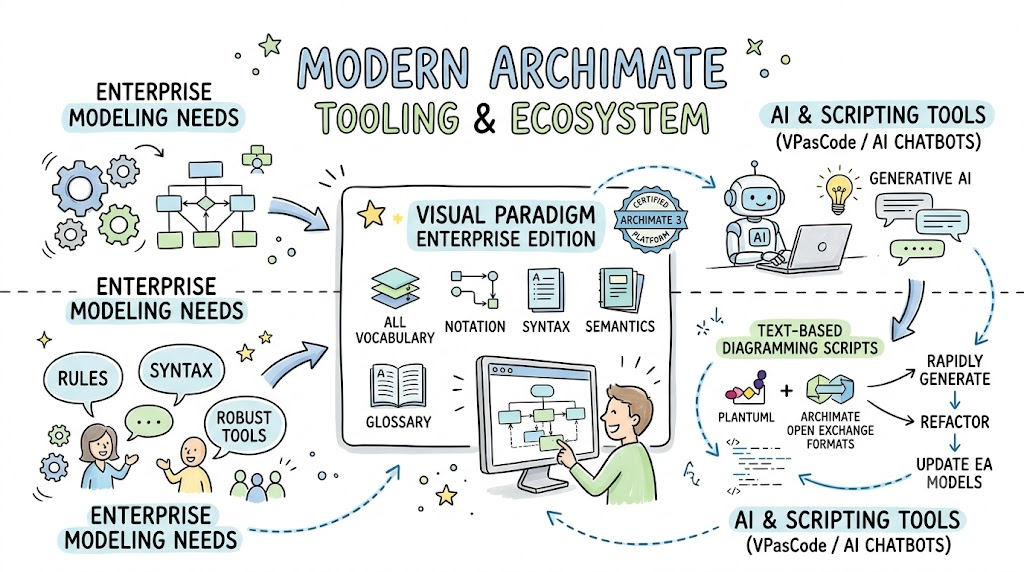
Enterprise modeling requires robust tools that enforce ArchiMate notation rules and syntax.
-
Visual Paradigm Enterprise Edition: A certified ArchiMate 3 enterprise architecture platform supporting all ArchiMate vocabulary, notation, syntax, and semantics.
-
AI & Scripting Tools (VPasCode / AI Chatbots): Modern workflows combine generative AI and text-based diagramming scripts (such as PlantUML or ArchiMate Open Exchange formats) to rapidly generate, refactor, and update enterprise architecture models.
11. Conclusion
ArchiMate offers a structured, lean, and internationally recognized framework for modeling enterprise architecture. By establishing clear distinctions between active structure, behavior, and passive objects across business, application, technology, and strategic layers, it eliminates ambiguity across technical and business teams. Whether mapping strategy with the Motivation extension or executing multi-phase digital transformations with TOGAF, ArchiMate serves as the common language for modern enterprise design.
This post is also available in Deutsche, Español, فارسی, Français, English, Bahasa Indonesia, 日本語, Polski, Portuguese, Ру́сский, Việt Nam, 简体中文 and 繁體中文.
