




From Prompt to Publication: Mastering AI-Driven UML Modeling using Diagram-as-Code with Visual Paradigm
Introduction
In modern software development, documentation often becomes the bottleneck. Traditional diagramming tools require manual drag-and-drop efforts, resulting in static images that quickly become outdated as systems evolve. Meanwhile, engineering teams increasingly prefer code-centric workflows where everything—from infrastructure to application logic—is version-controlled and reproducible.
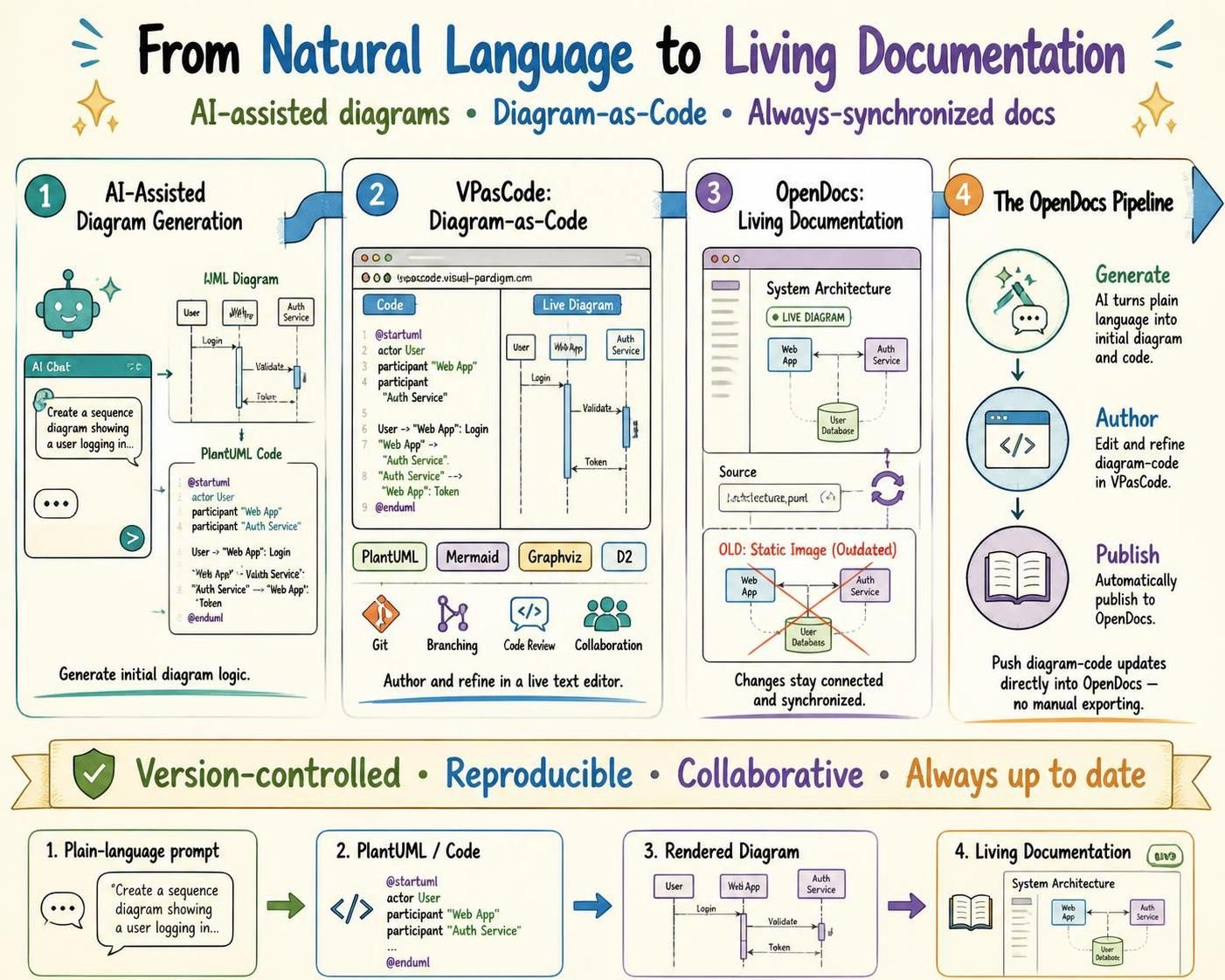
Visual Paradigm bridges this gap by combining three powerful capabilities: AI-assisted diagram generation, VPasCode (Diagram-as-Code), and OpenDocs (Living Documentation). This integrated ecosystem enables teams to generate architecture diagrams from natural language prompts, refine them using text-based syntax like PlantUML, and publish them as living, always-up-to-date documentation.
This guide explores how to leverage this workflow to eliminate manual export friction, keep documentation synchronized with code, and empower both technical and non-technical stakeholders with clear, accessible visualizations.
Key Concepts
1. AI-Assisted Diagram Generation
Visual Paradigm’s built-in AI chatbots transform plain-language descriptions into structured UML or architecture diagrams. This eliminates the initial overhead of manual layout and allows rapid prototyping of system designs.
Example Use Case:
“Create a sequence diagram showing a user logging in, where the frontend sends credentials to an authentication service, which validates against a database and returns a JWT token.”
The AI generates the corresponding PlantUML code instantly, which can then be refined further.
2. VPasCode: Diagram-as-Code Platform
VPasCode is a browser-based editor that combines a live text editor with real-time visual rendering. It supports multiple text-to-diagram syntaxes, including:
-
PlantUML (most common for UML)
-
Mermaid (great for flowcharts and simple diagrams)
-
Graphviz (ideal for complex graph structures)
-
D2 (declarative diagramming)
Because diagrams are represented as text scripts, they integrate seamlessly into Git repositories alongside application source code, enabling version control, code reviews, and collaborative editing.
3. OpenDocs: Living Documentation
OpenDocs replaces static image uploads with live, connected components. When you push updates to your diagram code in VPasCode, those changes automatically reflect in your OpenDocs pages. This ensures documentation remains perpetually synchronized with the actual system architecture.
4. The OpenDocs Pipeline
The pipeline connects code authoring and publishing:
-
Generate: Use AI to create initial diagram logic.
-
Author: Refine syntax, styles, or structure in VPasCode.
-
Publish: Push updates directly into OpenDocs without manual exporting.
Practical Examples Using PlantUML
Below are practical examples demonstrating how to create common diagrams using PlantUML within the Visual Paradigm ecosystem.
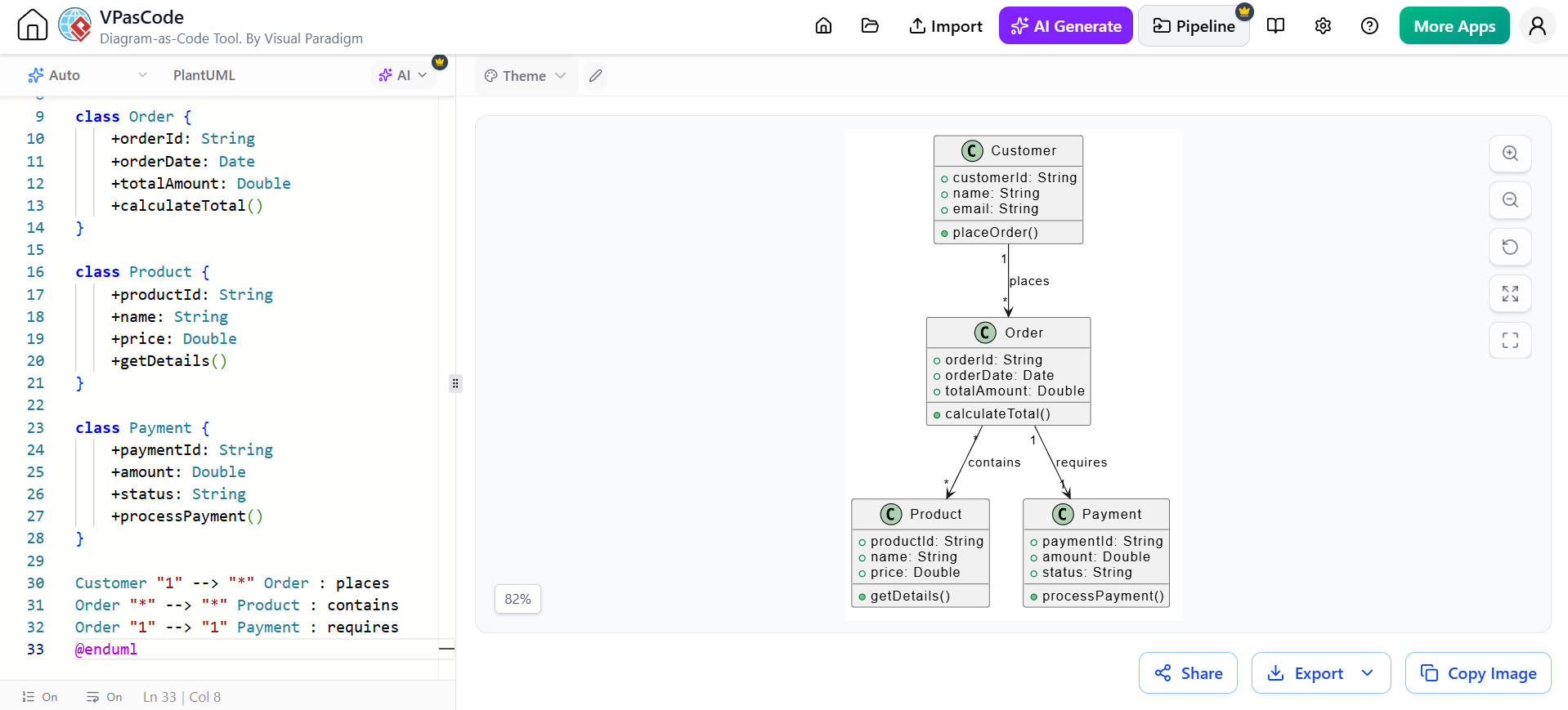
Example 1: Class Diagram for an E-Commerce System
@startuml
class Customer {
    +customerId: String
    +name: String
    +email: String
    +placeOrder()
}

class Order {
    +orderId: String
    +orderDate: Date
    +totalAmount: Double
    +calculateTotal()
}

class Product {
    +productId: String
    +name: String
    +price: Double
    +getDetails()
}

class Payment {
    +paymentId: String
    +amount: Double
    +status: String
    +processPayment()
}

Customer "1" --> "*" Order : places
Order "*" --> "*" Product : contains
Order "1" --> "1" Payment : requires
@enduml
Workflow:
-
Ask the AI assistant: “Create a class diagram for an e-commerce system with Customer, Order, Product, and Payment classes.”
-
Review and refine the generated PlantUML code in VPasCode.
-
Publish to OpenDocs for stakeholder review.
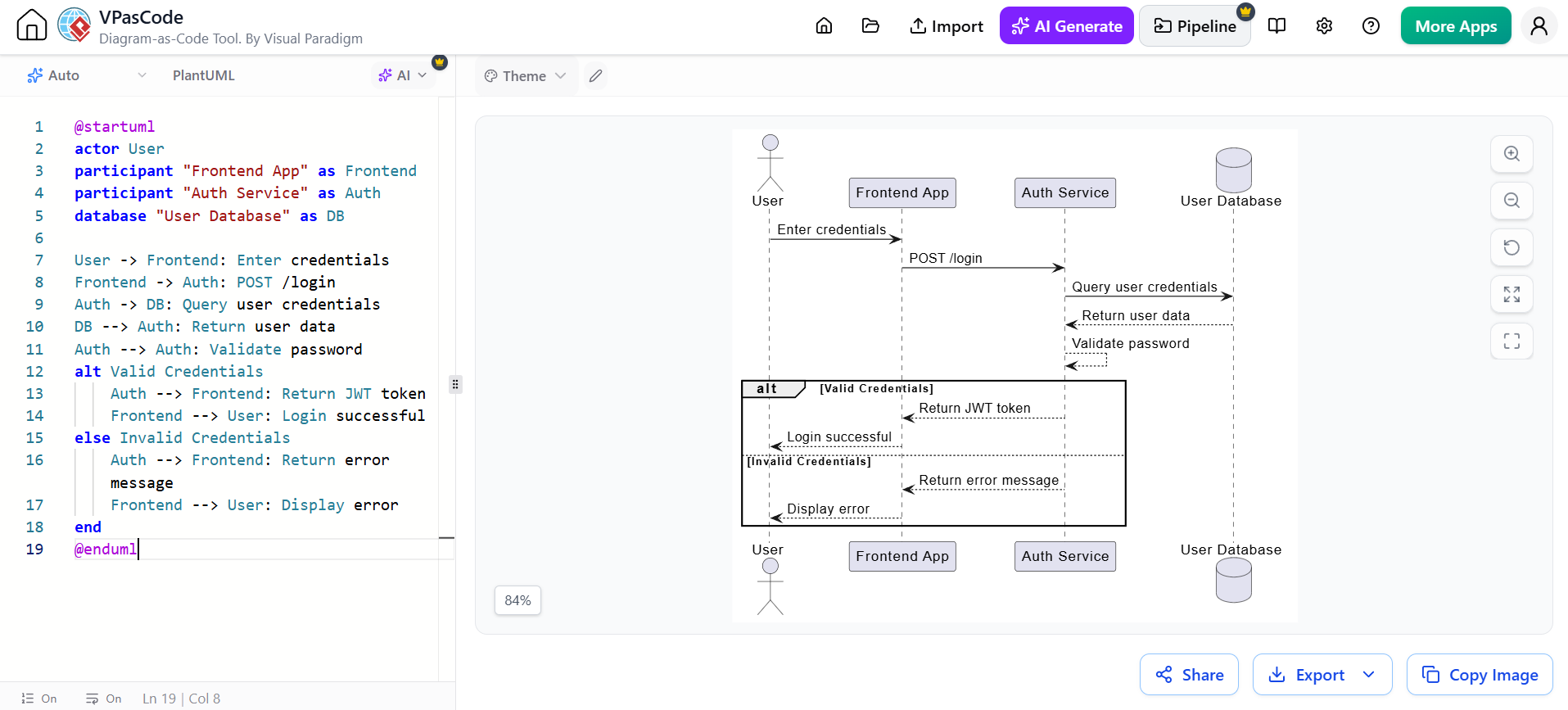
Example 2: Sequence Diagram for User Authentication
@startuml
actor User
participant "Frontend App" as Frontend
participant "Auth Service" as Auth
database "User Database" as DB

User -> Frontend: Enter credentials
Frontend -> Auth: POST /login
Auth -> DB: Query user credentials
DB --> Auth: Return user data
Auth --> Auth: Validate password
alt Valid Credentials
    Auth --> Frontend: Return JWT token
    Frontend --> User: Login successful
else Invalid Credentials
    Auth --> Frontend: Return error message
    Frontend --> User: Display error
end
@enduml
Workflow:
-
Prompt the AI: “Show me a sequence diagram for user login with JWT authentication.”
-
Adjust timing, add error handling, or modify participants in VPasCode.
-
Embed the live diagram in your OpenDocs authentication guide.
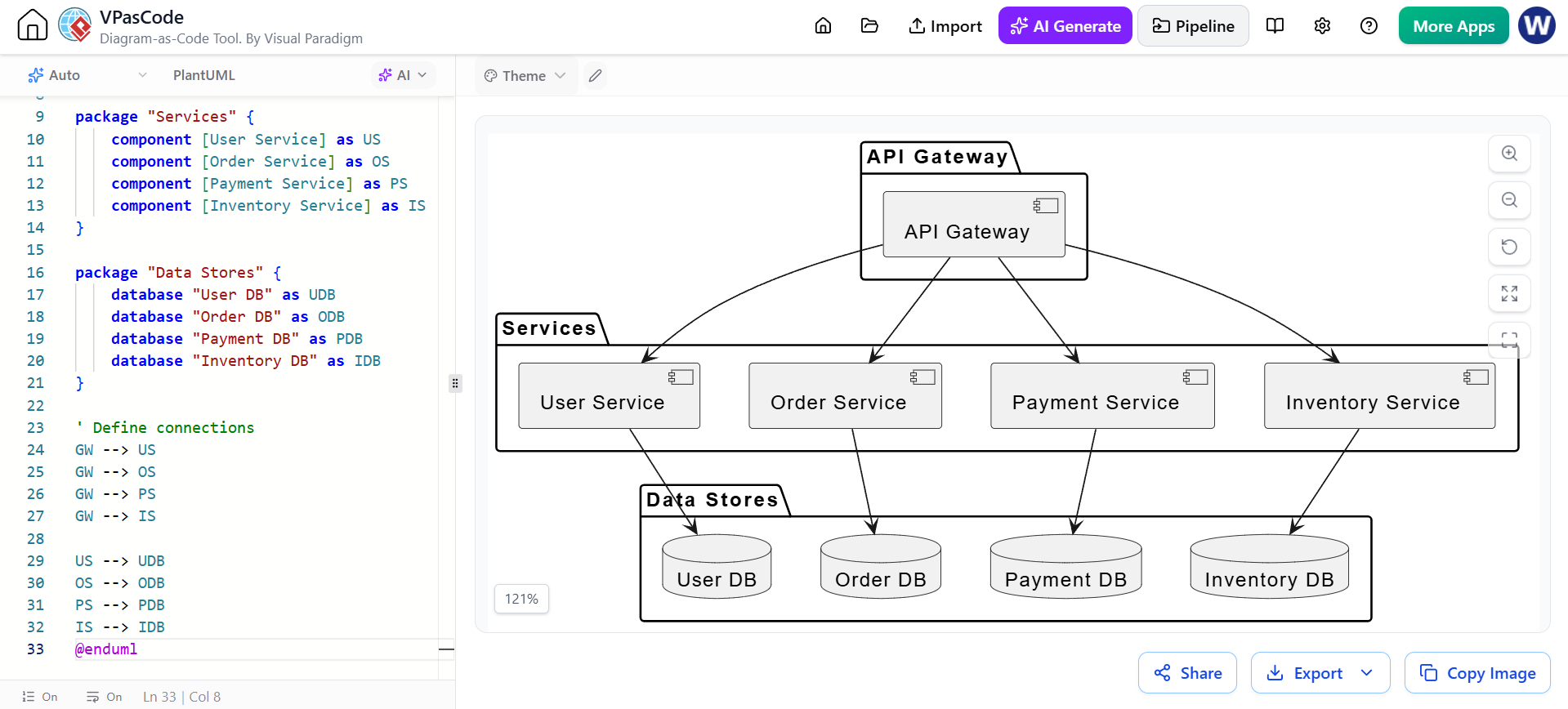
Example 3: Component Diagram for Microservices Architecture
@startuml
package "API Gateway" {
    [API Gateway]
}

package "Services" {
    [User Service]
    [Order Service]
    [Payment Service]
    [Inventory Service]
}

package "Data Stores" {
    database "User DB"
    database "Order DB"
    database "Payment DB"
    database "Inventory DB"
}

[API Gateway] --> [User Service]
[API Gateway] --> [Order Service]
[API Gateway] --> [Payment Service]
[API Gateway] --> [Inventory Service]

[User Service] --> "User DB"
[Order Service] --> "Order DB"
[Payment Service] --> "Payment DB"
[Inventory Service] --> "Inventory DB"
@enduml
Workflow:
-
Describe your microservices topology to the AI assistant.
-
Refine component boundaries and relationships in VPasCode.
-
Publish to OpenDocs as part of your architecture decision records (ADRs).
Example 4: Activity Diagram for Order Processing Workflow
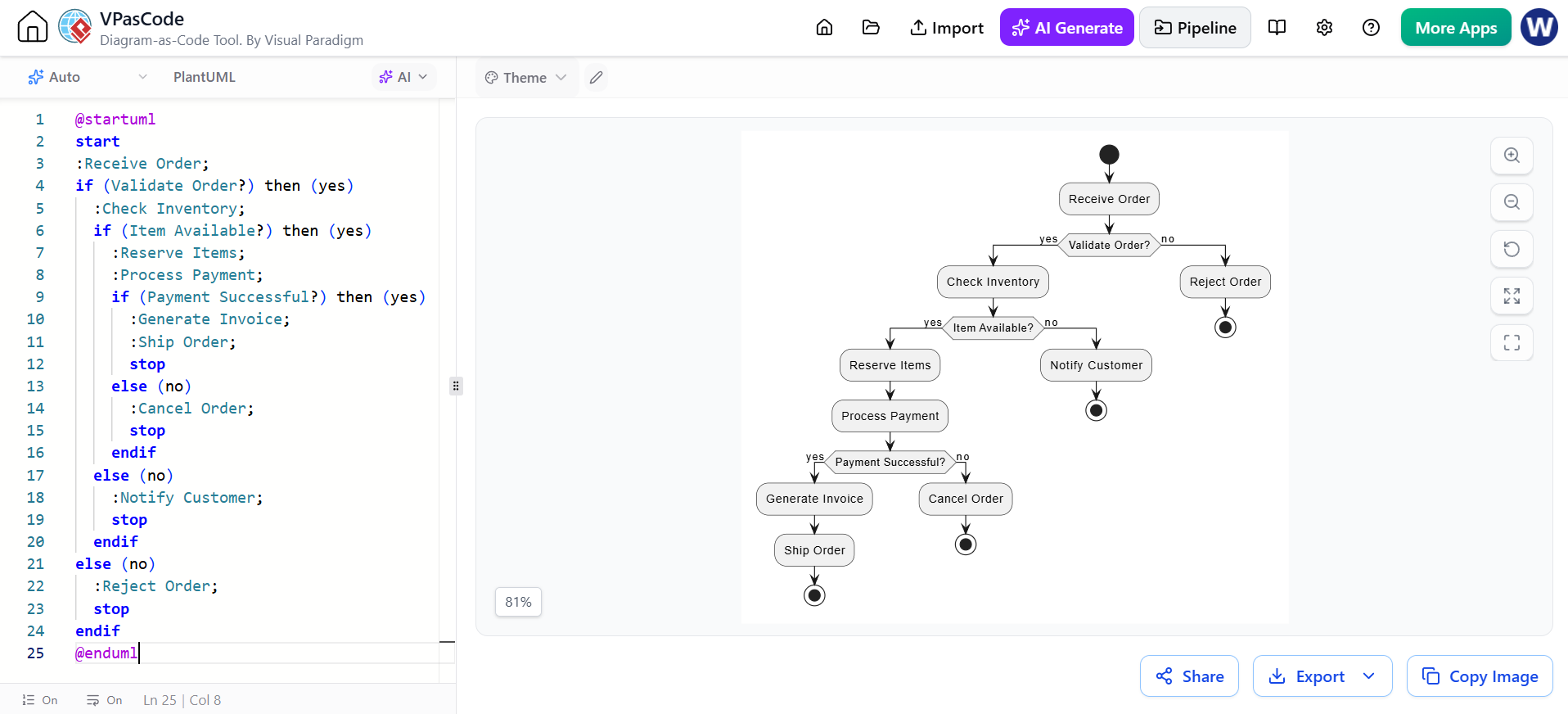
@startuml
start
:Receive Order;
if (Validate Order?) then (yes)
  :Check Inventory;
  if (Item Available?) then (yes)
    :Reserve Items;
    :Process Payment;
    if (Payment Successful?) then (yes)
      :Generate Invoice;
      :Ship Order;
      stop
    else (no)
      :Cancel Order;
      stop
    endif
  else (no)
    :Notify Customer;
    stop
  endif
else (no)
  :Reject Order;
  stop
endif
@enduml
Workflow:
-
Ask AI: “Create an activity diagram for order processing with inventory check and payment validation.”
-
Add decision points and edge cases in VPasCode.
-
Share via OpenDocs with operations and customer support teams.
Best Practices
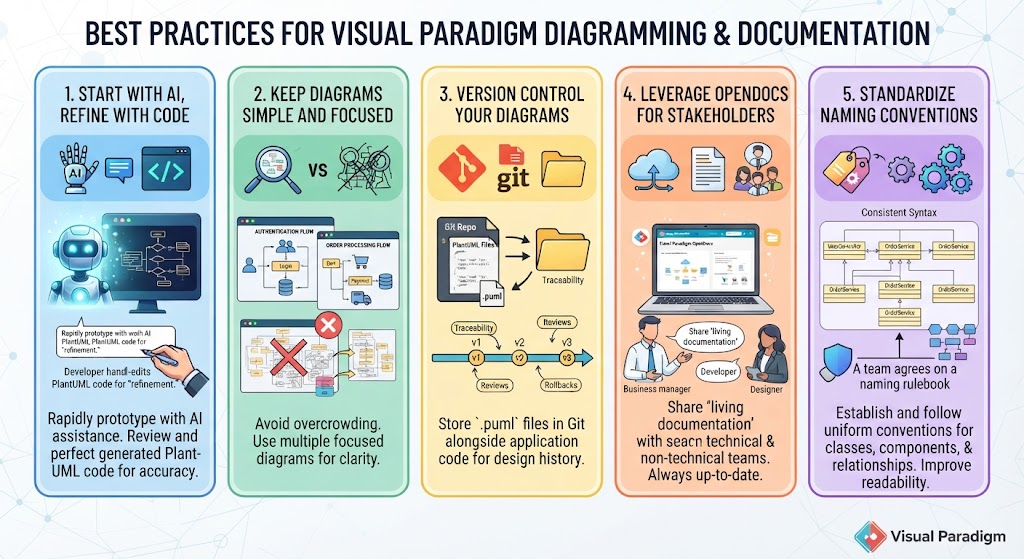
1. Start with AI, Refine with Code
Use AI to rapidly prototype diagrams, but always review and refine the generated PlantUML code. AI provides a strong starting point, but human oversight ensures accuracy and alignment with team standards.
2. Keep Diagrams Simple and Focused
Avoid overcrowding diagrams with excessive detail. Use multiple focused diagrams rather than one massive overview. For example, separate authentication flows from order processing flows.
3. Version Control Your Diagrams
Store all PlantUML files in your Git repository alongside application code. This enables:
-
Traceability of design decisions
-
Collaborative code reviews for architecture changes
-
Rollback capabilities if designs need revision
4. Leverage OpenDocs for Stakeholder Communication
Use OpenDocs to share living documentation with both technical and non-technical stakeholders. Since diagrams update automatically, you eliminate the risk of sharing outdated screenshots.
5. Standardize Naming Conventions
Establish consistent naming conventions for classes, components, and relationships across your team. This improves readability and reduces confusion when multiple engineers contribute to the same diagrams.
Conclusion
Visual Paradigm’s integration of AI-assisted diagram generation, VPasCode’s diagram-as-code platform, and OpenDocs’ living documentation creates a powerful workflow for modern engineering teams. By treating diagrams as code, you gain the benefits of version control, automated publishing, and perpetual synchronization with your systems.
The key takeaway is simplicity: generate with AI, refine with code, publish with confidence. This approach eliminates the friction of manual diagram maintenance and ensures that your documentation evolves alongside your applications. Whether you’re designing microservices architectures, documenting authentication flows, or mapping business processes, this workflow empowers teams to communicate clearly, collaborate efficiently, and maintain accurate, up-to-date visualizations of their systems.
Start experimenting with AI-generated PlantUML diagrams today, and experience the transformation from static, outdated documentation to dynamic, living architecture guides.
This post is also available in Deutsche, Español, فارسی, Français, English, Bahasa Indonesia, 日本語, Polski, Portuguese, Ру́сский, Việt Nam, 简体中文 and 繁體中文.
