




Breaking Down Silos: A Comprehensive Guide to the Visual Paradigm Unified Platform
Introduction
In modern enterprise environments, product managers, architects, and business analysts often find themselves juggling multiple tools. You might design a complex ArchiMate model on your desktop, manage user stories in a cloud-based agile tool, and draft documentation in a separate wiki. This fragmentation creates friction, version control nightmares, and significant context-switching costs.
The Visual Paradigm Unified Platform emerges as the solution to this disjointed workflow. It is not just another tool; it is a central workspace and coordination layer designed to connect fragmented tools, files, and workflows into a cohesive ecosystem. Acting as the “front door” and command center for all Visual Paradigm products, it bridges the gap between heavy local modeling and agile cloud collaboration.
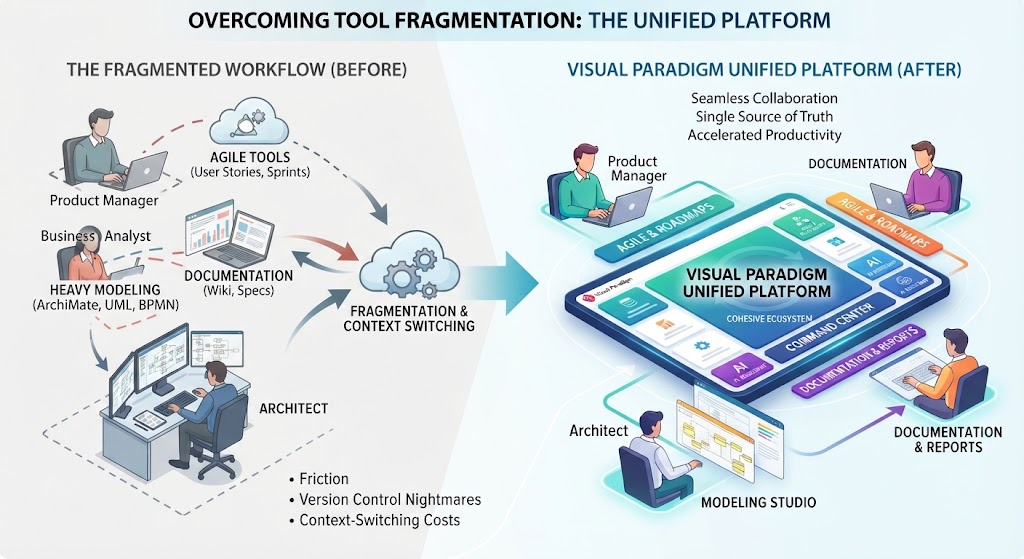
This guide explores how the Unified Platform dissolves historical boundaries, streamlines discovery, and creates a single source of truth for technical and non-technical stakeholders alike.
Key Concepts of the Unified Platform
To fully leverage the Unified Platform, it is essential to understand its core components and how they interact to create a seamless experience.
 \
\
1. The Integration Backbone
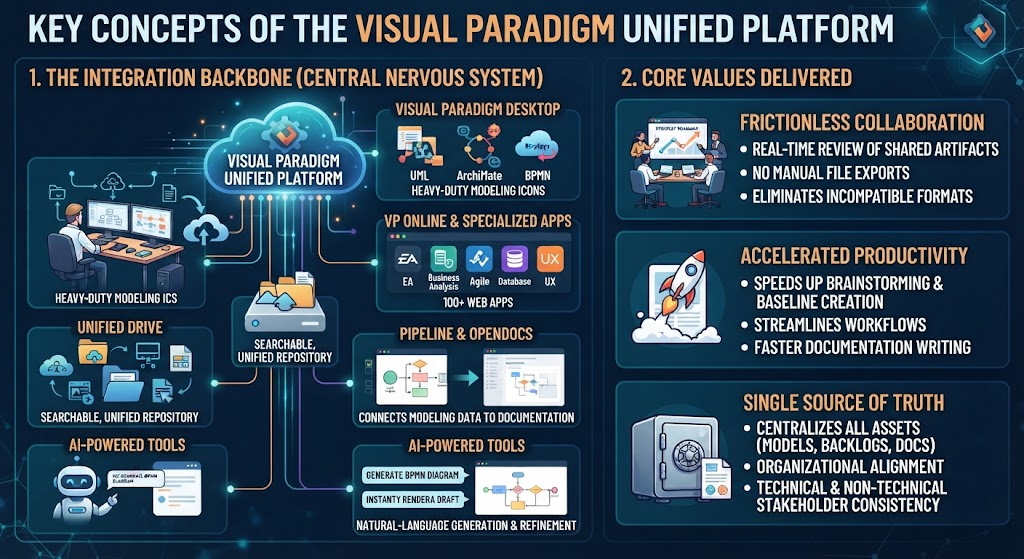
The platform serves as the central nervous system connecting various Visual Paradigm products. It ensures that data flows freely between different environments, eliminating the need for manual exports and imports.
-
Visual Paradigm Desktop: This component bridges local offline enterprise modeling with the cloud. Models created on Desktop (such as UML, ArchiMate, or BPMN diagrams) are automatically indexed and made visible alongside online artifacts. This allows users to leverage the heavy processing power of desktop applications while still accessing cloud apps and AI features seamlessly.
-
VP Online & Specialized Apps: The platform acts as a centralized app launcher and dashboard for an expansive catalog of over 100 web-based tools. These apps span various domains, including enterprise architecture, business analysis, database design, UX wireframing, and agile management.
-
Unified Drive: Think of this as a single, drive-like repository. It automatically indexes and organizes every asset—whether it’s a web design, a cloud diagram, or a desktop project export—into a searchable, unified space. This ensures that no artifact is ever lost in a local folder or an obscure cloud directory.
-
Pipeline & OpenDocs: This feature connects raw modeling data directly to living documentation tools. Users can drag and drop local diagrams directly into web-based documents, turning technical specifications into collaborative web knowledge bases that stay up-to-date with the underlying models.
-
AI-Powered Tools: Natural-language engines, such as the AI Diagramming Chatbot, are integrated directly into the workspace. This allows users to build rapid first-draft models from text prompts, which can then be exported to Desktop for refinement or shared immediately via VP Online.
2. Core Values Delivered
-
Frictionless Collaboration: Teams can review shared artifacts, strategy roadmaps, and architecture blueprints in real time. There is no more dealing with manual file exports, broken import links, or incompatible formats.
-
Accelerated Productivity: Natural-language AI generation and unified creation workflows speed up early-stage brainstorming, baseline diagram creation, and documentation writing.
-
Single Source of Truth: By centralizing enterprise architecture models, agile backlogs, and technical documentation into one overarching ecosystem workspace, the platform ensures total organizational alignment across technical and non-technical stakeholders.
Practical Examples and Use Cases
Here are three common scenarios where the Visual Paradigm Unified Platform significantly enhances workflow efficiency.
Example 1: Bridging Local and Cloud Workflows for Enterprise Architecture
Scenario: An Enterprise Architect uses Visual Paradigm Desktop to create a detailed ArchiMate model of the company’s IT landscape. Meanwhile, the business strategy team uses VP Online to maintain a high-level capability map.
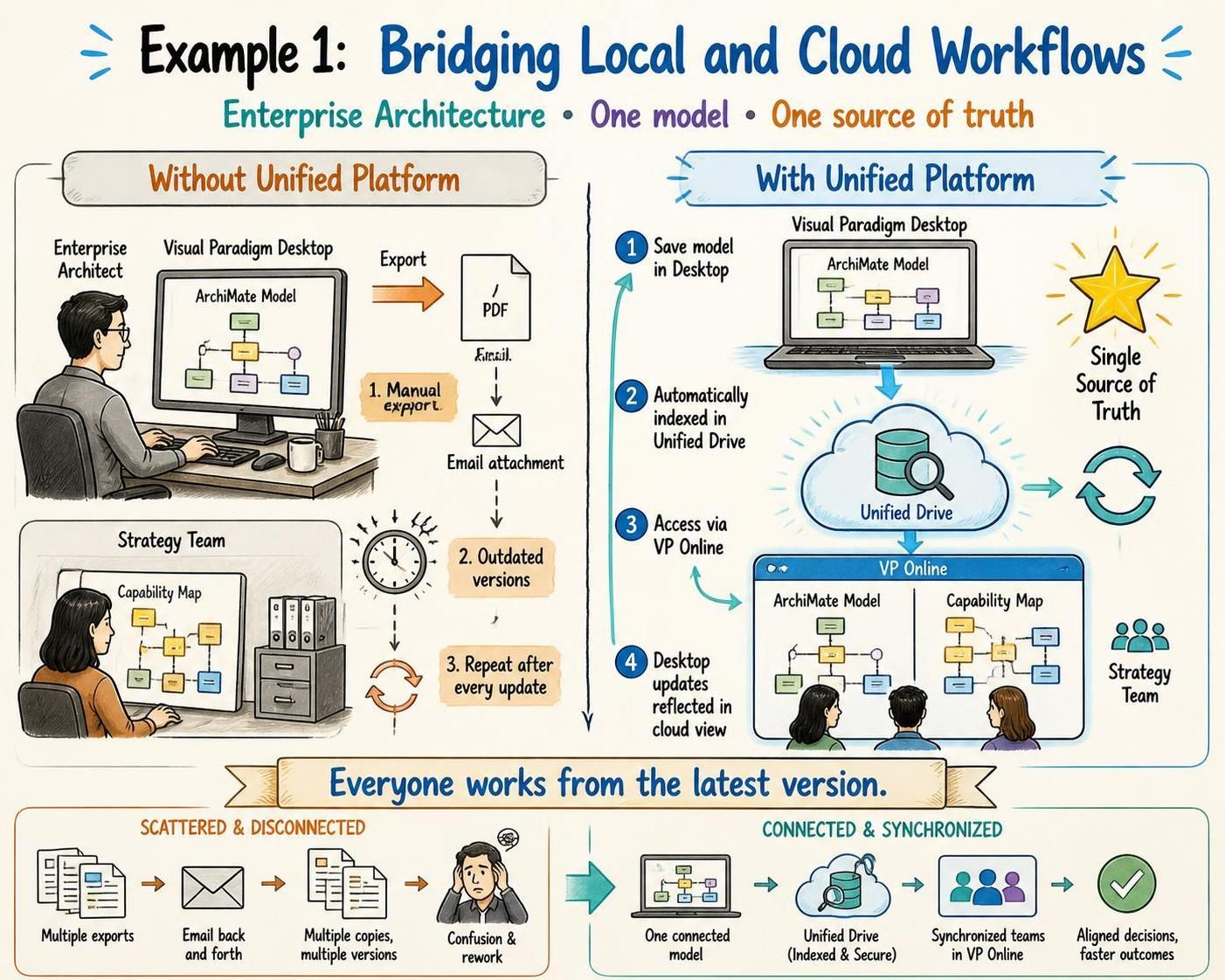
Without Unified Platform: The architect must manually export the desktop model as an image or PDF, email it to the strategy team, and hope they are looking at the latest version. Updates require repeating this process.
With Unified Platform:
-
The architect saves the ArchiMate model in Visual Paradigm Desktop.
-
The model is automatically indexed in the Unified Drive.
-
The strategy team accesses the same model via VP Online, viewing it alongside their capability map.
-
Any updates made in Desktop are reflected in the cloud view, ensuring everyone is working from the Single Source of Truth.
Example 2: Accelerating Documentation with Pipeline & OpenDocs
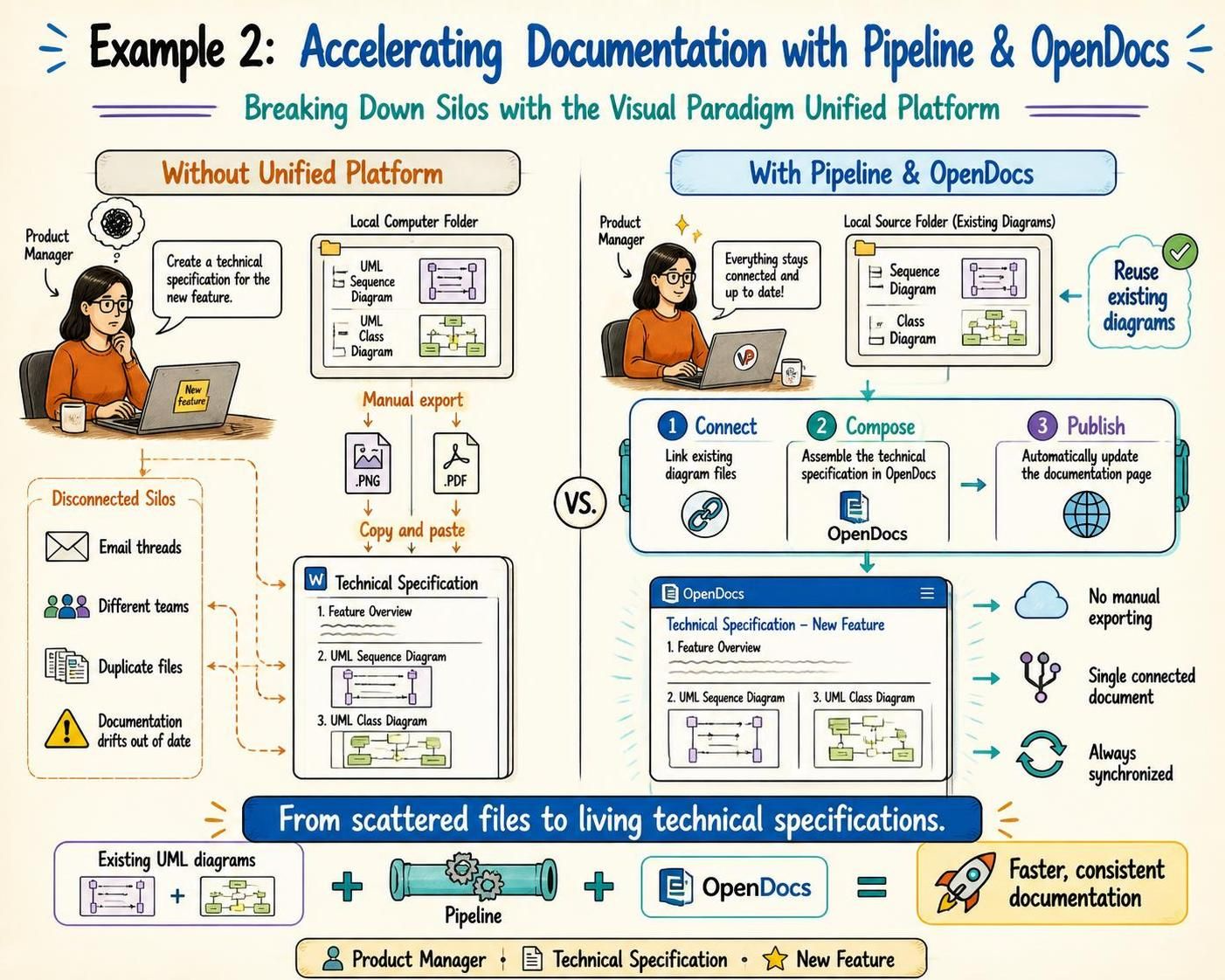
Scenario: A Product Manager needs to create a technical specification document for a new feature. They have existing UML sequence diagrams and class diagrams stored locally.
Without Unified Platform:# Breaking Down Silos: A Comprehensive Guide to the Visual Paradigm Unified Platform
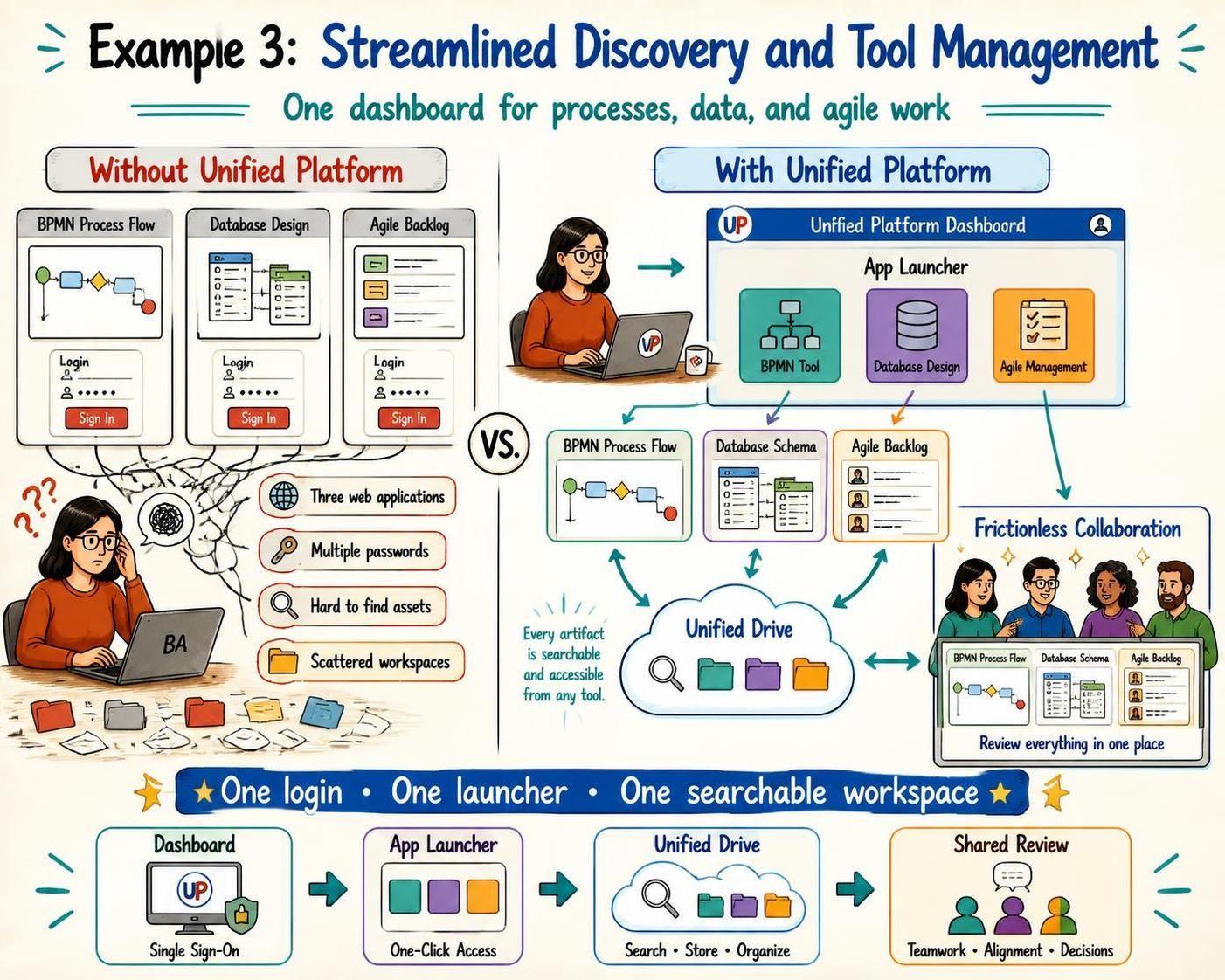
Example 3: Streamlined Discovery and Tool Management
Scenario: A Business Analyst needs to switch between creating a BPMN process flow, designing a database schema, and managing user stories in an agile backlog.
Without Unified Platform: The analyst logs into three different web applications, remembers multiple passwords, and struggles to find where specific assets were saved.
With Unified Platform:
-
The analyst logs into the Unified Platform dashboard.
-
From the centralized app launcher, they instantly access the BPMN tool, the Database Design app, and the Agile Management tool.
-
All artifacts created in these apps are stored in the Unified Drive, making them easily searchable and accessible from any of the tools.
-
The analyst experiences frictionless collaboration as stakeholders can review all these artifacts in one place without needing to navigate multiple systems.
Conclusion
The Visual Paradigm Unified Platform represents a significant shift in how teams approach modeling, collaboration, and documentation. By eliminating tool silos, streamlining discovery, and bridging local and cloud workflows, it empowers organizations to work more efficiently and effectively.
For professionals like product managers, enterprise architects, and business analysts, the platform offers a single source of truth that aligns technical and non-technical stakeholders. Whether you are leveraging heavy desktop modeling capabilities, collaborating in real-time via cloud apps, or generating content with AI, the Unified Platform ensures that your workflows are cohesive, connected, and productive.
As enterprises continue to demand greater agility and alignment, adopting a unified ecosystem like Visual Paradigm’s is no longer just a convenience—it is a strategic necessity.
This post is also available in Deutsche, Español, فارسی, Français, English, Bahasa Indonesia, 日本語, Polski, Portuguese, Ру́сский, Việt Nam, 简体中文 and 繁體中文.
