Guide to the Visual Paradigm Unified Platform
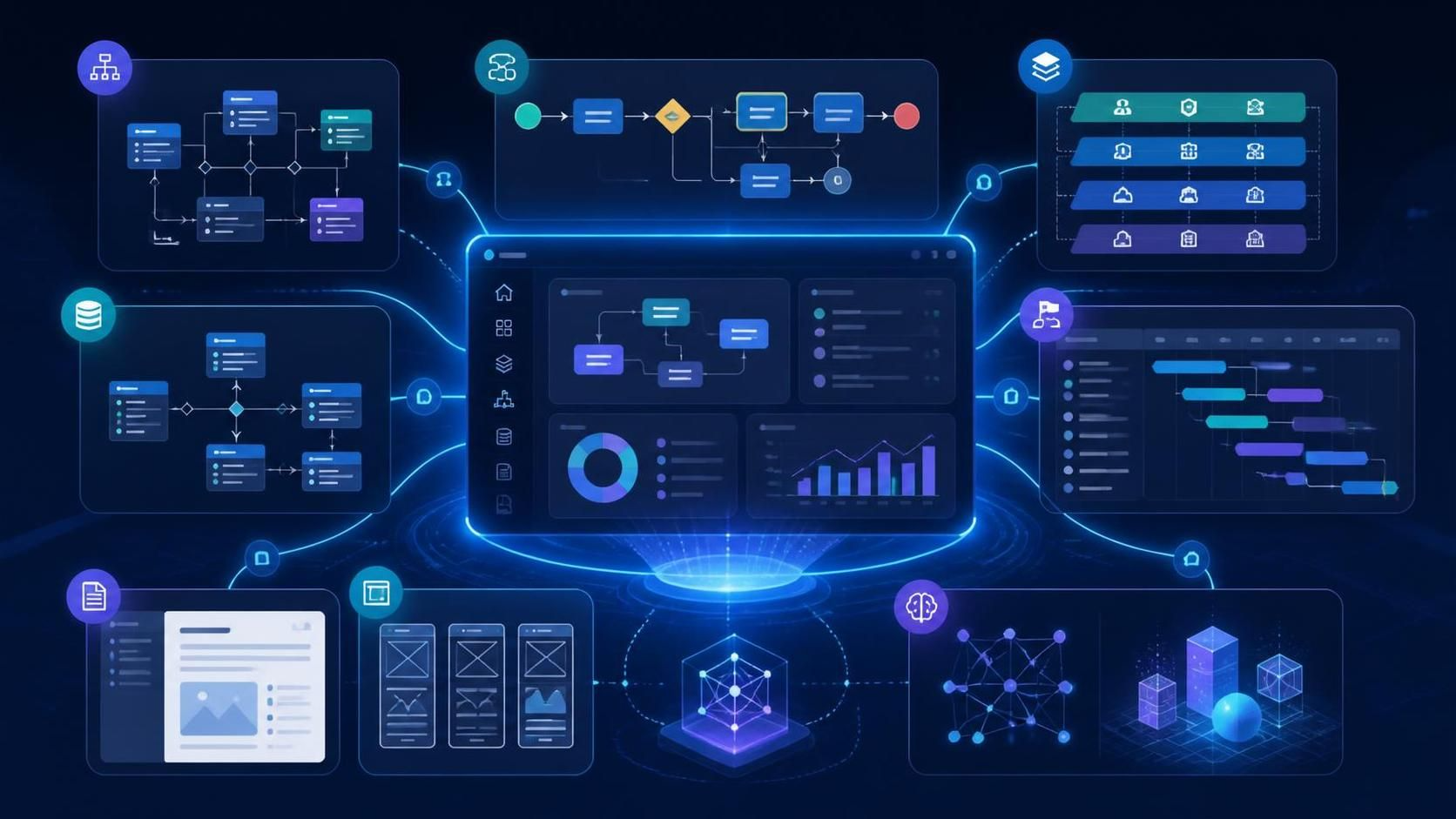
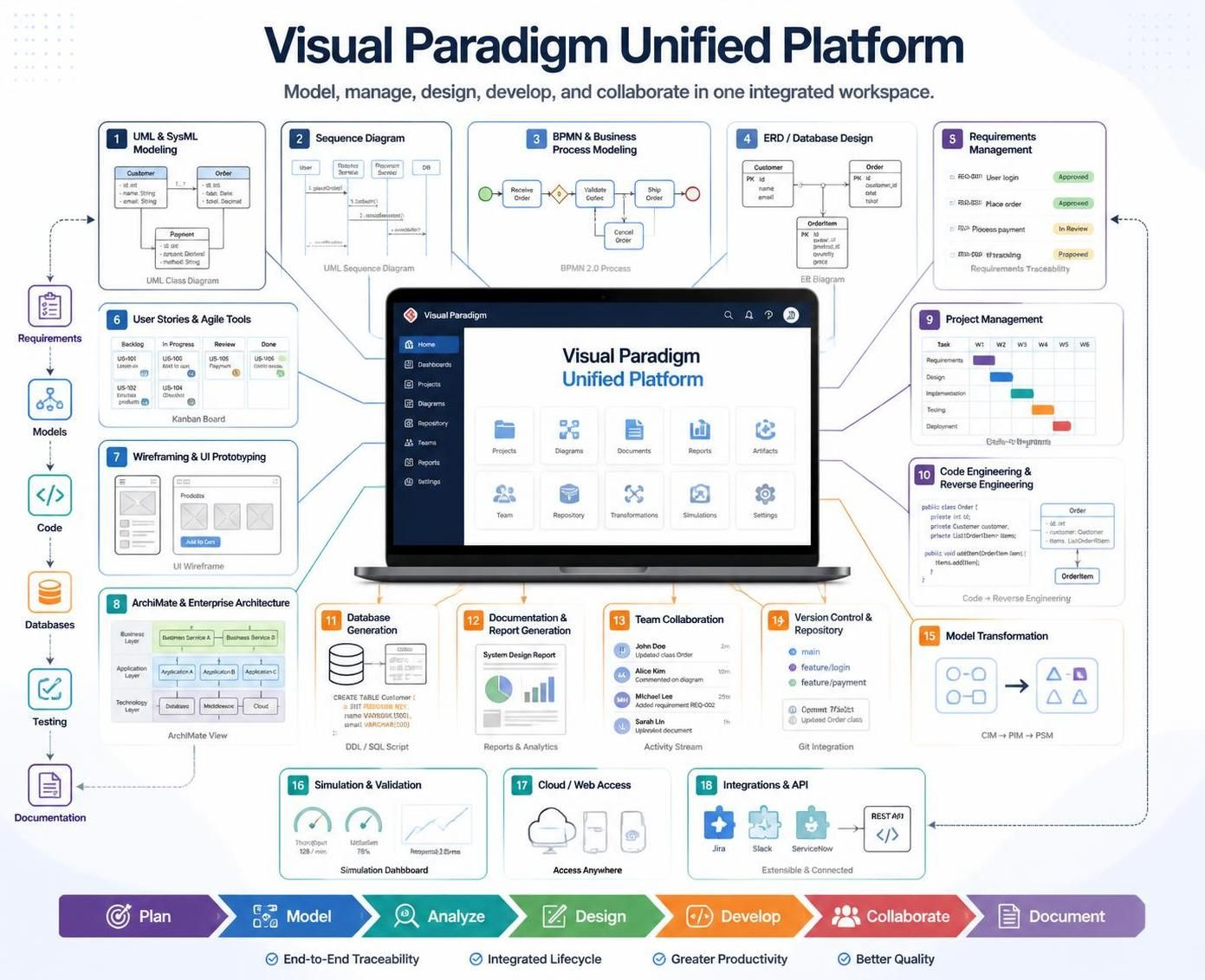
The Figure presents the Visual Paradigm Unified Platform as an integrated environment for managing the complete software and business-analysis lifecycle—from an initial business need through requirements, modeling, design, implementation, and documentation.
Instead of using disconnected tools for each activity, the platform links project information in a shared workspace. This makes it easier for analysts, designers, developers, architects, project managers, and stakeholders to work from the same source of information.
1. Understand the Unified Platform Concept
A unified platform brings related project artifacts into one connected environment. These artifacts may include:
-
Business goals and needs
-
Requirements
-
Use cases and user stories
-
UML and other visual models
-
Process diagrams
-
Database designs
-
User-interface designs
-
Source-code mappings
-
Project documentation
-
Reports and specifications
The important idea is not merely that all these tools are available in one application. The greater benefit is that the artifacts can be related to one another.
For example:
A business objective can be connected to a requirement, the requirement to a use case, the use case to a design model, and the design model to implementation documentation.
This creates a more coherent project structure and reduces the risk of information being lost as the project progresses.
2. Follow the End-to-End Project Lifecycle
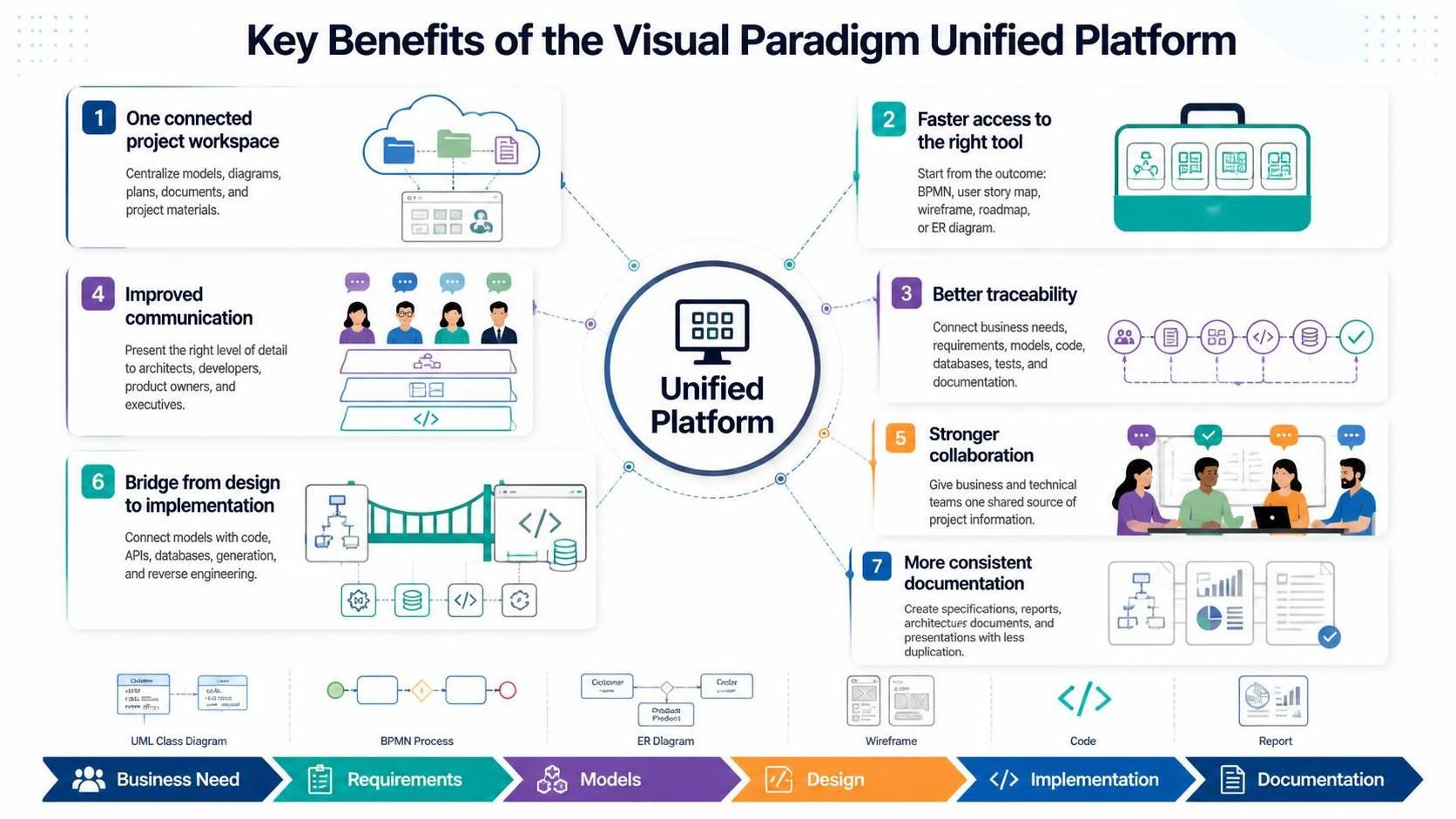
The Figure shows a lifecycle consisting of six connected stages:
-
Business Need
-
Requirements
-
Models
-
Design
-
Implementation
-
Documentation
These stages should not be treated as isolated phases. Information should flow between them continuously.
Stage 1: Business Need
Begin by documenting the business problem, opportunity, or objective.
Examples include:
-
Reducing manual processing time
-
Improving customer self-service
-
Replacing an outdated system
-
Supporting a new business process
-
Meeting regulatory or operational requirements
At this stage, focus on the desired business outcome rather than technical implementation.
Useful outputs may include:
-
Business goals
-
Problem statements
-
Stakeholder descriptions
-
Business objectives
-
Capability maps
-
High-level process diagrams
-
Scope definitions
A clear business need helps ensure that later requirements and technical decisions remain aligned with the reason the project exists.
Stage 2: Requirements
Translate business needs into specific, testable requirements.
Requirements may describe:
-
What users need to do
-
What the system must do
-
Business rules
-
Data requirements
-
Performance expectations
-
Security constraints
-
Regulatory obligations
-
Integration needs
Common requirement artifacts include:
-
User stories
-
Use cases
-
Functional requirements
-
Nonfunctional requirements
-
Acceptance criteria
-
Requirement hierarchies
-
Traceability links
Each requirement should ideally have a clear relationship to one or more business goals. This makes it easier to determine whether the project is delivering meaningful business value.
Stage 3: Models
Models provide visual representations of the system, organization, data, or processes.
Depending on the project, models may include:
-
Use-case diagrams
-
Activity diagrams
-
Class diagrams
-
Sequence diagrams
-
State-machine diagrams
-
Business-process models
-
Entity-relationship diagrams
-
Architecture diagrams
-
Data-flow diagrams
-
Customer journey maps
Models help teams understand complexity more easily than text alone. They also provide a common language for technical and nontechnical stakeholders.
For example:
-
A business stakeholder may understand a process model.
-
A developer may work from a class or sequence diagram.
-
A database designer may use an entity-relationship model.
-
An architect may use a deployment or component diagram.
The unified platform allows these different views to be maintained as parts of the same project.
Stage 4: Design
Design converts requirements and models into a more detailed solution structure.
Design activities may cover:
-
System architecture
-
Application components
-
Database schemas
-
User interfaces
-
APIs and integrations
-
Deployment environments
-
Security architecture
-
Service boundaries
-
Detailed workflows
A strong design should be traceable back to the requirements it satisfies. If a design element cannot be connected to a requirement, the team should determine whether it is necessary, missing from the requirements, or out of scope.
Stage 5: Implementation
Implementation is where the design is translated into working software, configured processes, database structures, or other deliverables.
The platform can help bridge design and implementation through relationships between:
-
Models and source code
-
Database designs and database scripts
-
Requirements and development tasks
-
Components and services
-
APIs and implementation details
-
Diagrams and technical documentation
This connection helps reduce the gap between what was designed and what was actually built.
Stage 6: Documentation
Documentation captures the project’s important knowledge in a form that can be shared, reviewed, maintained, and reused.
Possible documents include:
-
Requirements specifications
-
Software design descriptions
-
Architecture documents
-
User manuals
-
API documentation
-
Test specifications
-
Project reports
-
Compliance records
-
Operational procedures
When documentation is generated or assembled from connected project artifacts, it is less likely to become inconsistent with the underlying models and requirements.
3. Benefit One: Use a Connected Project Workspace
The first benefit in the Figure is a one connected project workspace.
A connected workspace allows project information to be managed in one environment rather than spread across unrelated tools, files, and repositories.
Why this matters
Disconnected tools often create problems such as:
-
Multiple versions of the same requirement
-
Diagrams that no longer match the implementation
-
Duplicate data entry
-
Missing links between business and technical artifacts
-
Difficulty finding the latest project information
-
Conflicting terminology
-
Manual effort when preparing reports
A connected workspace makes project information easier to locate and maintain.
Recommended practice
Create a consistent project structure with areas for:
-
Business analysis
-
Requirements
-
Models
-
Architecture and design
-
Data
-
Implementation references
-
Documentation
-
Reviews and approvals
Use shared naming conventions and link related artifacts rather than copying the same information into multiple places.
4. Benefit Two: Access the Right Tool Faster
The second benefit is faster access to the appropriate tool for each task.
A project may require many different types of work, including:
-
Requirements management
-
Process modeling
-
UML modeling
-
Database design
-
User-interface prototyping
-
Architecture modeling
-
Agile planning
-
Documentation generation
-
Code or database engineering
When these capabilities are available from a unified environment, team members spend less time switching between applications or rebuilding information in another format.
Practical effect
A business analyst can move from a process model to its related requirements. An architect can move from a requirement to the relevant system design. A developer can consult the model and associated technical documentation without searching through unrelated folders.
The aim is to make the next relevant artifact available in context.
5. Benefit Three: Improve Traceability
Traceability is the ability to follow the relationships between project artifacts throughout the development lifecycle. It helps teams understand how business needs are transformed into requirements, designs, implementations, and documented outcomes.
A typical traceability chain may look like this:
Business Need→Requirement→Use Case→Design Element→Implementation→Documentation
Traceability can also extend to testing:
Requirement→Acceptance Criterion→Test Case→Test Result
This connected structure helps teams:
- Understand the origin and purpose of each design decision
- Identify which system elements are affected when requirements change
- Confirm that every requirement has been implemented
- Verify that requirements are covered by acceptance criteria and test cases
- Reduce duplicated or inconsistent project information
- Support audits, reviews, maintenance, and impact analysis
With the Visual Paradigm Unified Platform, teams can connect requirements, models, designs, implementation artifacts, tests, and documentation in a more structured and transparent workflow.
Why traceability is important
Traceability helps answer questions such as:
-
Which business objective does this feature support?
-
Which requirements are affected by a proposed change?
-
Has every requirement been designed and implemented?
-
Which components depend on this requirement?
-
Which documentation needs to be updated?
-
What evidence supports compliance?
-
What tests confirm that the requirement has been met?
Change-impact analysis
Suppose a requirement changes. With connected relationships, the team can identify potentially affected:
-
Use cases
-
Process diagrams
-
Data models
-
Interface designs
-
Architecture components
-
Implementation tasks
-
Test cases
-
Documentation
This is much safer than relying on memory or manually searching through project files.
6. Benefit Four: Improve Communication
The fourth benefit is improved communication among project participants.
Different stakeholders prefer different ways of understanding information. A unified platform supports multiple representations of the same project, including:
-
Plain-language requirements
-
Visual diagrams
-
Tables and matrices
-
Prototypes
-
Architecture views
-
Process flows
-
Generated reports
Communicating with business stakeholders
Business stakeholders may not need to see source code or detailed technical models. They may benefit more from:
-
Goals
-
Process diagrams
-
User journeys
-
Use cases
-
Prototypes
-
Business rules
-
Summary reports
Communicating with technical teams
Developers, architects, and database specialists may need:
-
Detailed requirements
-
Class diagrams
-
Sequence diagrams
-
Component diagrams
-
Data models
-
API definitions
-
Deployment views
-
Implementation mappings
The same connected project can support both audiences without requiring the team to recreate information manually.
Recommended communication practices
-
Use diagrams to explain complex relationships.
-
Use consistent terminology throughout the project.
-
Review models with both technical and business participants.
-
Link decisions to the requirements or problems they address.
-
Generate audience-specific documentation where appropriate.
-
Keep diagrams current as the project changes.
7. Benefit Five: Strengthen Collaboration
The fifth benefit is stronger collaboration between business and technical teams.
Projects often fail when business expectations and technical implementation evolve separately. A unified platform encourages both groups to work with related information.
Collaboration across roles
A typical project may involve:
-
Business analysts
-
Product owners
-
Project managers
-
Subject-matter experts
-
UX designers
-
Solution architects
-
Software developers
-
Database designers
-
Test engineers
-
Technical writers
-
Operations teams
Each role contributes a different perspective. Connecting their work helps the team develop a shared understanding of the solution.
A collaborative review cycle
A practical collaboration cycle is:
-
Capture the business objective.
-
Define and review the requirements.
-
Model the relevant processes and behaviors.
-
Design the proposed solution.
-
Review the design with stakeholders.
-
Implement the approved solution.
-
Update the models and documentation.
-
Validate that the delivered result satisfies the original need.
This cycle reduces the chance that important decisions remain isolated in meetings, emails, or individual documents.
8. Benefit Six: Bridge Design and Implementation
The sixth benefit is bridging the gap between design and implementation.
A common problem in software projects is that design documentation is created early but is not updated when the system changes. Over time, the documentation becomes disconnected from the actual implementation.
A bridge between design and implementation helps teams use models as practical engineering assets rather than purely decorative diagrams.
Examples of design-to-implementation connections
-
A data model can support database generation.
-
A class model can guide object-oriented implementation.
-
A service model can clarify API boundaries.
-
A component diagram can describe application structure.
-
A process model can guide workflow configuration.
-
A user-interface model can support screen development.
-
A deployment model can describe the target environment.
Good implementation discipline
To preserve alignment:
-
Link implementation elements to the models they realize.
-
Record design decisions and assumptions.
-
Update models when significant implementation changes occur.
-
Review whether generated or derived artifacts remain accurate.
-
Avoid treating diagrams as one-time deliverables.
-
Use model reviews as part of development governance.
The goal is not to force every line of code to be represented in a diagram. The goal is to maintain the right level of abstraction for communication, design, analysis, and maintenance.
9. Benefit Seven: Create More Consistent Documentation
The seventh benefit is more consistent documentation.
Documentation becomes inconsistent when multiple teams manually maintain overlapping descriptions of the same system. For example, a requirement may be written one way in a specification, described differently in a diagram, and implemented under another name in the software.
A unified platform can help reduce this duplication by using connected artifacts as the basis for reports and deliverables.
Benefits of consistent documentation
-
Reduced contradictory information
-
Less repeated data entry
-
Faster document preparation
-
Easier review and approval
-
Improved onboarding for new team members
-
Better support for audits and compliance
-
More reliable maintenance documentation
Documentation should have clear ownership
For each important artifact, define:
-
Who creates it
-
Who reviews it
-
Who approves it
-
How changes are managed
-
How often it is updated
-
Which other artifacts it affects
Generated documentation is only useful when its underlying information is maintained properly. Automation can improve consistency, but it does not replace governance and review.
10. Establish a Traceable Working Method
A practical way to use the platform is to define relationships as the project develops.
For each major business goal, identify:
-
The requirements that support it
-
The processes and use cases involved
-
The models that describe the behavior
-
The design elements that implement it
-
The tests that verify it
-
The documentation that explains it
A simple traceability matrix can be used as a control mechanism:
| Business objective | Requirement | Design or model | Implementation reference | Verification |
|---|---|---|---|---|
| Reduce processing time | Automate approval workflow | Activity and process models | Workflow service | Performance and acceptance tests |
| Improve customer access | Provide self-service portal | Use cases and UI design | Portal application | Usability and functional tests |
| Protect sensitive data | Enforce role-based access | Security and deployment models | Authorization service | Security tests |
The exact artifacts will vary by project, but the principle remains the same: every important deliverable should have a clear purpose and relationship to the work around it.
11. Suggested Project Workflow
The following workflow applies the Figure’s ideas in practice.
Step 1: Define the business context
Document the problem, opportunity, objectives, stakeholders, and project boundaries.
Step 2: Capture requirements
Record functional requirements, quality attributes, business rules, constraints, and acceptance criteria.
Step 3: Create appropriate models
Select models that clarify the problem and solution. Avoid producing diagrams that do not support a real decision, explanation, or engineering activity.
Step 4: Link related artifacts
Connect business objectives to requirements, requirements to models, models to design elements, and design elements to implementation or testing references.
Step 5: Review collaboratively
Invite business and technical stakeholders to review the same project information from perspectives appropriate to their roles.
Step 6: Develop the solution
Use the approved requirements and designs to guide implementation.
Step 7: Monitor changes
When requirements, designs, or implementation details change, assess downstream impacts and update affected artifacts.
Step 8: Generate and maintain documentation
Produce specifications, reports, diagrams, and technical documents from the current project information where possible.
Step 9: Validate completeness
Before release, confirm that:
-
Business objectives are addressed.
-
Requirements are satisfied.
-
Important requirements are traceable.
-
Design and implementation are aligned.
-
Tests cover the intended behavior.
-
Documentation reflects the delivered system.
12. Governance Practices That Make the Platform Effective
A unified platform provides the environment, but teams still need clear working practices.
Use naming conventions
Define consistent names for:
-
Requirements
-
Processes
-
Actors
-
Systems
-
Components
-
Data entities
-
Services
-
Documents
Define artifact ownership
Assign responsibility for maintaining each major type of information.
Control versions and changes
Record significant changes and evaluate their effects on related artifacts.
Avoid unnecessary duplication
Prefer linking to a shared artifact instead of copying the same information into several documents.
Use appropriate modeling detail
Create models that are detailed enough to support communication and engineering, but not so detailed that they become difficult to maintain.
Review regularly
Schedule reviews at meaningful milestones, such as:
-
Requirements approval
-
Architecture approval
-
Design completion
-
Pre-release validation
-
Major change requests
Measure project quality
Useful measures may include:
-
Percentage of requirements with traceability links
-
Number of unlinked design elements
-
Number of unresolved review findings
-
Documentation update time
-
Change-impact assessment time
-
Requirements-to-test coverage
-
Number of duplicate or conflicting artifacts
13. Common Mistakes to Avoid
A unified platform does not automatically produce a unified process. Avoid these common problems:
-
Treating the platform as only a diagramming tool
-
Creating models without linking them to requirements
-
Maintaining multiple unofficial versions of the same artifact
-
Failing to update designs after implementation changes
-
Generating documentation from outdated information
-
Involving business stakeholders only at the beginning
-
Over-modeling details that provide little value
-
Assuming traceability exists without reviewing the links
-
Using inconsistent terminology across teams
-
Treating documentation as a final-stage activity only
14. The Overall Value
The Figure central message is that project work becomes more effective when business, requirements, modeling, design, implementation, and documentation are connected.
The unified approach can help organizations:
-
Maintain a clearer view of project goals
-
Reduce information silos
-
Improve communication
-
Strengthen collaboration
-
Identify change impacts earlier
-
Connect design decisions to implementation
-
Produce more reliable documentation
-
Preserve knowledge throughout the project lifecycle
In short, the platform supports a continuous chain from why the project is needed to what must be built, how it should be designed, how it is implemented, and how the result is explained and maintained.