



From Concept to Knowledge Base: Mastering Visual Paradigm OpenDocs for AI-Powered Documentation
Introduction
In the fast-paced world of product management and software development, documentation often becomes the bottleneck. Diagrams live in one tool, requirements in another, and technical specs in a third, leading to version drift and “documentation debt.” Visual Paradigm OpenDocs emerges as a solution to this fragmentation, serving as an AI-powered documentation engine and knowledge management platform integrated into the Visual Paradigm Online ecosystem.
By unifying text editing with live, interactive visual modeling, OpenDocs allows teams to create dynamic, synchronized documentation that evolves alongside their projects. This guide explores how to leverage OpenDocs’ key features—from AI-driven diagramming to seamless pipeline integration—to build a robust, maintainable knowledge base.
Key Concepts
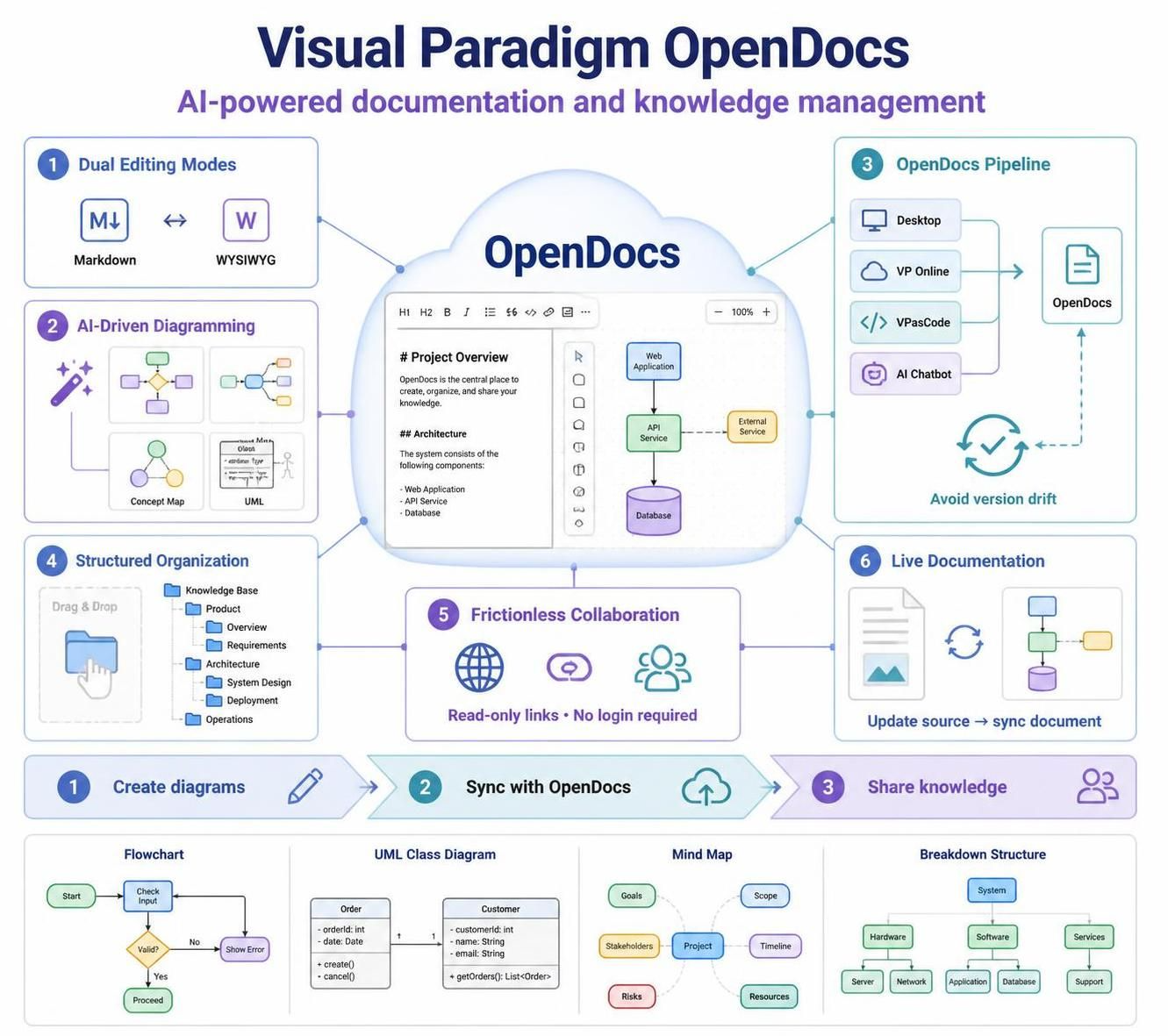
1. Dual Editing Modes: Flexibility for Every Author
OpenDocs recognizes that different users have different preferences. It offers two distinct editing interfaces:
-
Markdown Editor: Ideal for developers and technical writers who prefer speed, keyboard shortcuts, and clean syntax.
-
WYSIWYG Interface: Perfect for stakeholders who want a traditional word-processing experience where formatting is visible in real-time.
This dual-mode approach ensures that both technical and non-technical team members can contribute to documentation without friction.
2. AI-Driven Diagramming: From Text to Visuals
One of OpenDocs’ most powerful features is its ability to generate complex diagrams from natural language prompts. Instead of manually dragging and dropping shapes, users can describe what they need, and the AI engine constructs the visual representation. Supported diagram types include:
-
Flowcharts: For process mapping and workflow visualization.
-
Mind Maps & Concept Maps: For brainstorming and organizing ideas.
-
Breakdown Structures: For project planning and hierarchical decomposition.
-
UML Diagrams: Including deployment and profile diagrams for technical architecture.
Example Prompt:
“Create a UML deployment diagram showing a web server connected to a database server, with a load balancer in front of the web server.”
3. The OpenDocs Pipeline: Eliminating Version Drift
Documentation becomes obsolete the moment it’s written if it’s not linked to its source. The OpenDocs Pipeline connects external components like Visual Paradigm Desktop, VP Online, and VPasCode. When a source diagram is updated, OpenDocs receives a notification, allowing users to synchronize the live document with a single click. This ensures that your documentation always reflects the current state of your models.
4. Structured Organization: Hierarchical File System
OpenDocs uses a drag-and-drop hierarchical file system tree structure. This allows teams to organize documentation logically, creating folders for projects, modules, or teams. This structure is ideal for building complex project repositories and maintaining technical notes in a searchable, navigable format.
5. Frictionless Collaboration: Secure Sharing
Sharing knowledge shouldn’t require onboarding every stakeholder into a new tool. OpenDocs allows entire workspaces to be shared globally through secure, read-only links. Recipients can view the documentation without needing to log in, making it easy to share updates with clients, executives, or cross-functional teams.
Practical Examples
Example 1: Creating a Project Breakdown Structure
Scenario: You are starting a new feature development cycle and need to outline the work breakdown.
Action:
-
Open a new document in OpenDocs.
-
Use the AI prompt: “Generate a work breakdown structure for a mobile app login feature, including UI design, backend API development, and testing phases.”
-
Review and refine the generated chart.
-
Organize the document under the “Feature Development” folder in your tree structure.
Example 2: Synchronizing a UML Diagram
Scenario: Your engineering team has updated the deployment architecture in Visual Paradigm Desktop.
Action:
-
Ensure the diagram is linked to your OpenDocs document via the Pipeline.
-
When the engineer saves changes in VP Desktop, you receive a notification in OpenDocs.
-
Click “Synchronize” to update the embedded diagram in your documentation.
-
Add a brief changelog note in the Markdown editor to explain the architectural change.
Example 3: Sharing a Read-Only Knowledge Base
Scenario: You need to share the latest product requirements with a client.
Action:
-
Navigate to the root folder of your product documentation.
-
Generate a secure, read-only link for the workspace.
-
Email the link to the client. They can view all documents and diagrams without needing a Visual Paradigm account.
Conclusion
Visual Paradigm OpenDocs transforms documentation from a static, burdensome task into a dynamic, integral part of the development lifecycle. By leveraging AI-driven diagramming, dual editing modes, and the powerful OpenDocs Pipeline, teams can ensure their knowledge base remains accurate, organized, and accessible. Whether you are a product manager outlining requirements or a developer documenting architecture, OpenDocs provides the tools to keep your documentation in sync with your work, eliminating version drift and fostering better collaboration.
Recommended Resources
-
A Comprehensive Guide to UML Modeling with Visual Paradigm AI and OpenDocs: Detailed overview of using AI for UML diagram creation within OpenDocs.
-
From Concept to Knowledge Base: How the Visual Paradigm Pipeline Eliminates Documentation Debt: Explains the pipeline integration between VP Desktop, VP Online, and OpenDocs.
-
AI Profile Diagram Generation: OpenDocs UML Support: Release notes on AI capabilities for generating UML profile diagrams.
-
AI Deployment Diagram Generator: OpenDocs: Guide to using AI prompts for creating deployment diagrams.
-
Seamlessly Connect Diagramming to Documentation: VPasCode Integrates with OpenDocs: Details on integrating code-based diagramming with OpenDocs.
-
Visual Paradigm Online to OpenDocs Export: Instructions for exporting diagrams from VP Online to OpenDocs.
-
OpenDocs WYSIWYG Editor Update: AI Knowledge Management Tool: Overview of the WYSIWYG editor features and AI integration.
-
AI Breakdown Structure Chart Maker: OpenDocs: Tutorial on generating breakdown structures using AI prompts.
Related posts:
 From Static Snapshots to Living Knowledge: Unifying Documentation and Modeling with Visual Paradigm OpenDocs
From Code to Clarity: A Beginner’s Guide to Seamless Diagramming with VPasCode and OpenDocs
From Static Snapshots to Living Knowledge: Unifying Documentation and Modeling with Visual Paradigm OpenDocs
From Code to Clarity: A Beginner’s Guide to Seamless Diagramming with VPasCode and OpenDocs
 VPasCode Deep Dive: Unifying Mermaid, PlantUML, and AI in One Platform
Visual Paradigm OpenDocs: Comprehensive Guide
VPasCode Deep Dive: Unifying Mermaid, PlantUML, and AI in One Platform
Visual Paradigm OpenDocs: Comprehensive Guide
