




Foundations of Modeling & UML
1. What Are Models?
A model is a complete description of a system from a particular perspective and acts as a simplified representation of reality. You build models because complex systems cannot be fully comprehended in their entirety.
Four Core Aims of Modeling:
-
Visualize a system as intended.
-
Specify the structure or behavior of a system.
-
Provide a template to guide system construction.
-
Document design decisions.
Four Principles of Modeling
-
The model you choose directly influences how a problem is approached.
-
Every model can be expressed at varying levels of precision.
-
The most effective models remain tightly connected to reality.
-
No single model is sufficient; complex systems require multiple perspectives.
What is UML?
The Unified Modeling Language (UML) is a standardized graphical language managed by the Object Management Group (OMG). It is explicitly not a methodology or procedure, but a technical and graphical specification used to:
“Visualize, specify, construct, and document the artifacts of a software-intensive system.”
UML provides a universal blueprint format for both conceptual elements (business processes, system functions) and concrete implementations (code statements, database schemas, reusable components).
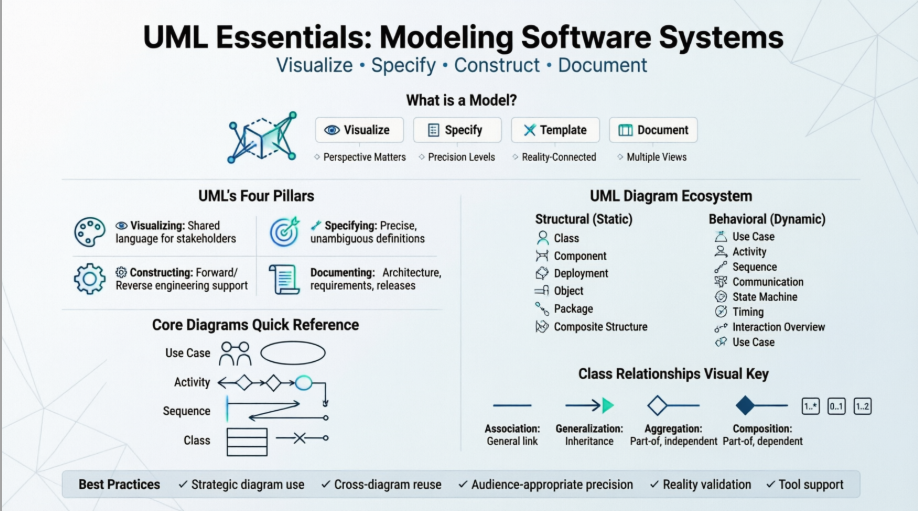
The Four Pillars of UML
| Purpose | Description |
|---|---|
| Visualizing | Ensures all stakeholders speak the same language. Explicit models eliminate communication errors and reveal system aspects invisible without modeling. |
| Specifying | Creates precise, unambiguous, and complete system definitions. |
| Constructing | Directly maps to programming languages (Java, C++, VB), RDBMS tables, or OODBMS stores. Supports forward engineering (model → code) and reverse engineering (code → model). |
| Documenting | Captures system architecture, requirements, test plans, project schedules, and release management. |
2. The UML Diagram Ecosystem
UML 2.2 defines 14 diagram types, categorized into two main groups:
-
Structural Models (Static architecture)
-
Behavior & Interaction Models (Dynamic processes)
Different diagrams serve different stakeholder perspectives:
-
Use-Case View: End-user functionality
-
Logical View: Analysts & Designers (system structure)
-
Process View: Software management (performance, scalability, throughput)
-
Implementation View: Programmers (concrete components)
-
Deployment View: System integrators (topology, installation, communication)
3. Core UML Diagrams Explained
🔹 Use Case Diagram
-
Purpose: Models a system’s intended functions and its environment. Acts as a contract between customers and developers.
-
Components: Actors, Use Cases, and their relationships.
-
Supporting Diagrams: Activity (flow within a use case), Sequence (object collaboration to realize a use case).
🔹 Activity Diagram
-
Purpose: Visualizes the step-by-step flow of events within a process or use case.
-
Key Elements:
-
Action: A discrete step in the workflow. -
Flow: Sequence of activities. -
Decision: Splits flow based on a guard condition[condition]. -
Fork: Begins concurrent threads. -
Join: Ends concurrent threads (synchronization).
-
-
Example: Course registration flow with checks, conflict resolution, and concurrent schedule updates.
🔹 Sequence Diagram
-
Purpose: Shows how objects interact over time to fulfill a use case.
-
Key Elements:
-
Lifeline: Vertical line showing an object’s existence over time. -
Object/Class: Participant in the interaction. -
Message: Data or method calls exchanged between objects. -
Execution Occurrence: Thin rectangle showing when an object is actively processing. -
Combined Fragments:opt(optional execution),loop(repeated execution),ref(references another interaction).
-
🔹 Communication Diagram
-
Purpose: Alternative to sequence diagrams. Emphasizes structural relationships between objects rather than temporal order.
-
Key Elements: Objects linked together, with numbered messages indicating interaction sequence along the links.
🔹 Component Diagram
-
Purpose: Shows the runtime structure at the software component level.
-
Key Elements: Modular system parts hidden behind external interfaces. Often includes classes to show implementation relationships.
🔹 Deployment Diagram
-
Purpose: Maps software artifacts to physical hardware.
-
Key Elements:
-
Node: Represents a physical machine or execution environment. -
Artifact: Represents a physical file or deployable unit. -
Owned Element: Shows nested or contained relationships.
-
4. Mastering Class Diagrams & Relationships
Class diagrams depict the static structure of a system. They are foundational for data specifications (e.g., INSPIRE) and do not show temporal information.
Class Anatomy
| Compartment | Description |
|---|---|
| Name | Identifier of the class (e.g., CadastralParcel). Often includes stereotypes like «FeatureType». |
| Attributes | Named properties with data types (e.g., - Address : char, - TreeAge : int). Supported types: Integer, LongInt, Double, Char, Date, Boolean, String, Geometry, etc. |
| Operations | Class behaviors/methods. Format: + operationName(inputType) : returnType. |
Relationship Types
| Relationship | Symbol | Meaning |
|---|---|---|
| Association | ─────── |
General link between classes. Includes role names, navigation arrows, and cardinality (1..*, 0..*, 1..2, etc.). |
| Generalization | ─────▷ |
Inheritance. The subclass (source) inherits all characteristics of the superclass (target). |
| Aggregation | ◇───── |
“Part-of” relationship. The part can exist independently of the whole. (Hollow diamond) |
| Composition | ◆───── |
Strong “part-of” relationship. The part’s existence depends entirely on the whole. (Filled diamond) |
Example from Training Material:
-
Person→Woodcutter(Generalization: Woodcutter inheritsName,Gender) -
Forest◇─Tree(Aggregation: Trees can exist without a specific forest) -
Woodcutter◆─Employees(Composition: Employees cannot exist independently of the Woodcutter entity in this context)
5. Practical Application: INSPIRE Cadastre Modeling
The training material uses the INSPIRE Data Specification on Cadastre to demonstrate real-world UML application.
Exercise 1: Modeling a Core Class
Task: Create the CadastralParcel class.
Solution Structure:
«featureType» CadastralParcel
- Address : char
- APN (Parcel Number) : char
- Boundary : GM_Surface
- Centroid : GM_Point
- Label : char
- NationalCadastralReference : String
- AreaValue : double (optional)
- ReferencePoint : GM_Point (optional)
Note: Multiple valid solutions exist. Attributes should reflect common real-world characteristics.
Exercise 2: Modeling Relationships
Task: Connect CadastralParcel, CadastralBoundary, and AdministrativeZone.
Key Modeling Decisions:
-
CadastralParcel────CadastralBoundary: Association/Composition (boundary defines the parcel; often1..1or1..*cardinality). Roles:+isBorder/+hasBorder. -
CadastralParcel◇──AdministrativeZone: Aggregation/Association. The zone’s existence does not depend on the parcel. Parcel belongs to multiple hierarchical zones (1..*to0..*). -
Lesson: Choose relationship types based on lifecycle dependency and business rules. Diagrams should reflect reality, not force artificial constraints.
6. Best Practices for Effective UML Modeling
-
Use Diagrams Strategically: Diagrams visualize specific perspectives. No complex system can be understood from a single diagram.
-
Reuse Elements Across Diagrams: A single class may appear on class diagrams, state machines, sequence diagrams, and deployment views, each highlighting a different aspect.
-
Match Precision to Audience: Adjust diagram complexity based on whether the viewer is an end-user, developer, system integrator, or project manager.
-
Validate Against Reality: Continuously verify that model elements, relationships, and cardinalities reflect actual system behavior and domain rules.
-
Leverage Tool Support: Use UML-compliant tools (e.g., Sparx Systems) for forward/reverse engineering, consistency checking, and code generation.
Conclusion
UML is a powerful, standardized language for communicating, designing, and documenting software and data-intensive systems. By mastering core diagrams (especially Class, Sequence, Activity, and Use Case) and understanding relationship semantics (Association, Generalization, Aggregation, Composition), practitioners can create precise, reality-aligned blueprints that bridge the gap between conceptual requirements and technical implementation.
This post is also available in Deutsche, Español, فارسی, Français, English, 日本語, Polski, Portuguese, Ру́сский, Việt Nam, 简体中文 and 繁體中文.
