From Static Blueprints to Agile Intelligence: A Beginner’s Guide to TOGAF, ArchiMate, and AI-Driven Enterprise Architecture
Introduction
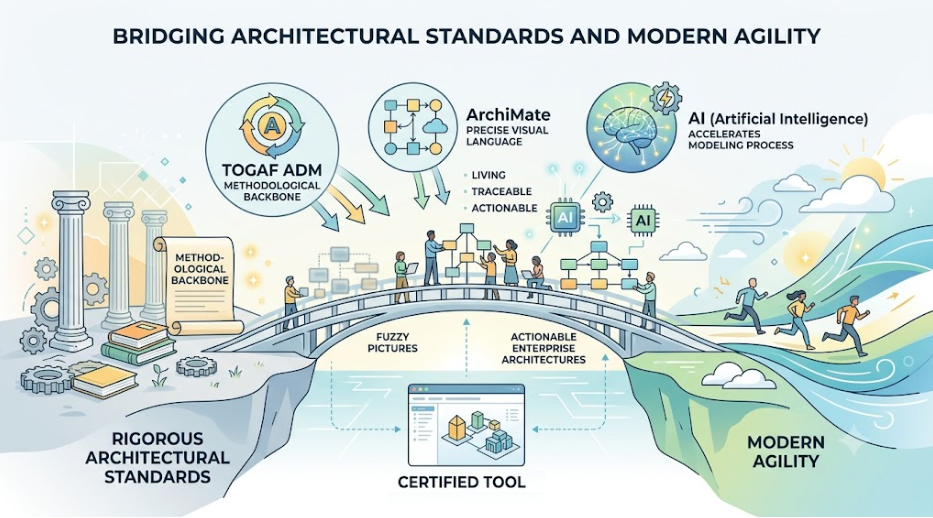
In the rapidly evolving digital landscape, Enterprise Architecture (EA) has shifted from being a static documentation exercise to a dynamic strategic enabler. Traditional EA often suffered from “analysis paralysis,” producing complex, outdated diagrams that rarely influenced actual business outcomes. Today, organizations demand Agile EA—an approach that is iterative, collaborative, and tightly integrated with development cycles.
This tutorial bridges the gap between rigorous architectural standards and modern agility. We will explore how TOGAF ADM provides the methodological backbone, ArchiMate offers the precise visual language, and Artificial Intelligence (AI) accelerates the modeling process. By leveraging certified tools like Visual Paradigm, beginners can move beyond “fuzzy pictures” to create living, traceable, and actionable enterprise architectures.
Part 1: The Foundations – Why ArchiMate and TOGAF?
What is ArchiMate?
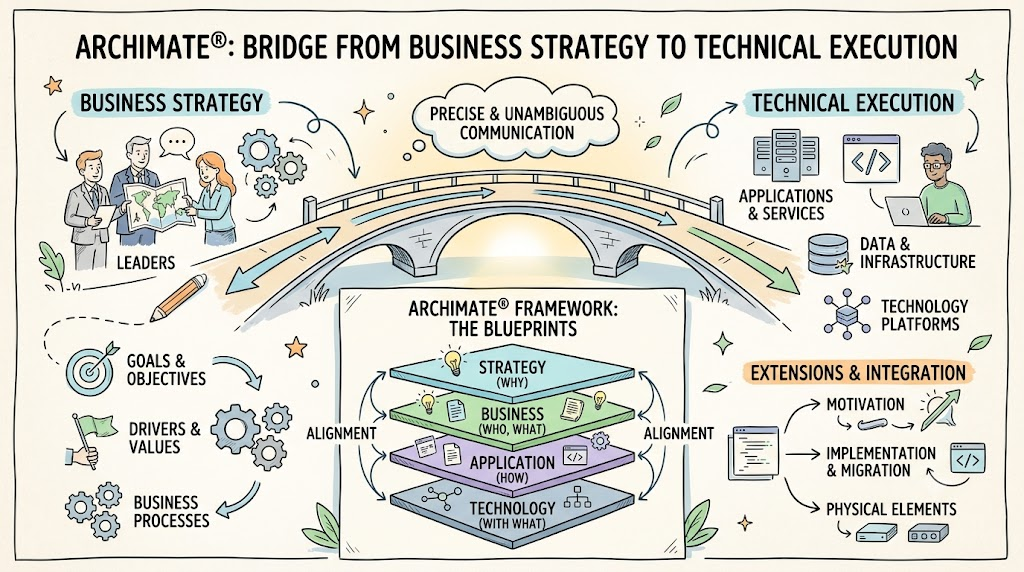
Introduced by The Open Group, ArchiMate is an open, vendor-independent standard for modeling enterprise architecture. Unlike general-purpose drawing tools, ArchiMate provides a structured language with specific concepts for Business, Application, and Technology layers.
Key Benefits:
-
Precision over Ambiguity: Replaces vague boxes-and-lines with standardized semantics.
-
Interoperability: Borrows concepts from UML and BPMN, making it easier to bridge business processes with IT systems.
-
Tool Agnostic but Tool-Enhanced: While you can draw ArchiMate anywhere, certified tools unlock its true power through validation and traceability.
The Role of TOGAF ADM
ArchiMate tells you what to draw; TOGAF (The Open Group Architecture Framework) tells you how and when to draw it. The Architecture Development Method (ADM) is a step-by-step cycle that guides architects from preliminary planning to implementation governance.
Note: ArchiMate does not prescribe a methodology. Integrating it with TOGAF ADM ensures your models are created in the right context, at the right time, for the right stakeholders.
Part 2: Modeling Tools vs. Drawing Tools
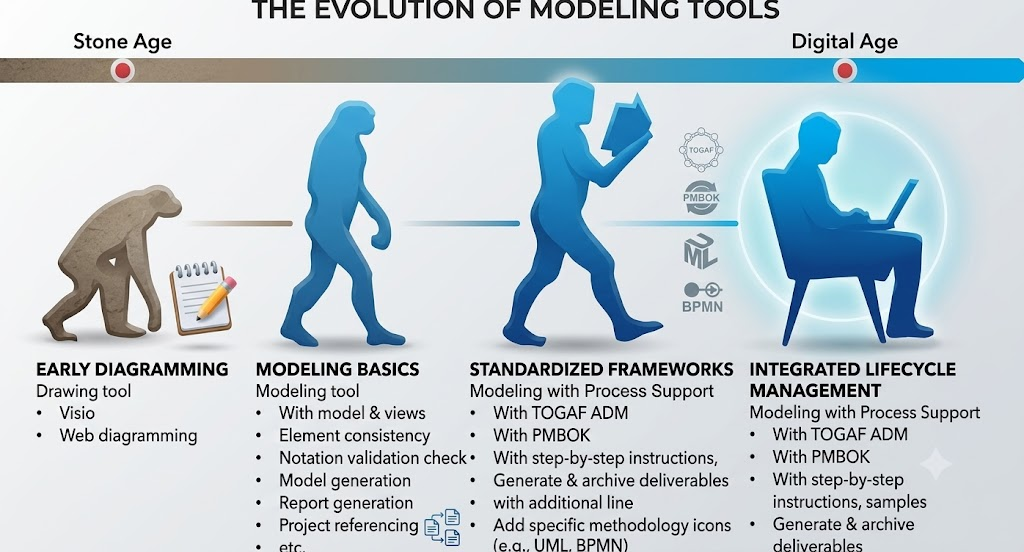
A common mistake beginners make is using generic diagramming tools (like basic Visio or PowerPoint) for EA. While easy to learn, they lack the semantic rigor required for true EA.
| Feature | Drawing Tool (e.g., Visio, PPT) | Modeling Tool (e.g., Visual Paradigm) |
|---|---|---|
| Learning Curve | Easy | Moderate (Requires understanding semantics) |
| Complexity | Simple diagrams only | Handles complex, multi-layered architectures |
| Consistency | Manual checks required | Automatic validation against ArchiMate rules |
| Traceability | None | Links elements across business, app, and tech layers |
| Collaboration | File-based sharing | Real-time collaborative editing & versioning |
| Reporting | Manual export | Auto-generated reports and deliverables |
| Integration | Standalone | Integrates with Agile, Project Management, and AI |
Recommendation: For serious EA work, invest in a certified ArchiMate modeling tool. Visual Paradigm Enterprise Edition is a leading choice because it natively supports ArchiMate 3.1 and integrates directly with the TOGAF ADM process.
Part 3: Getting Started with Visual Paradigm and TOGAF ADM
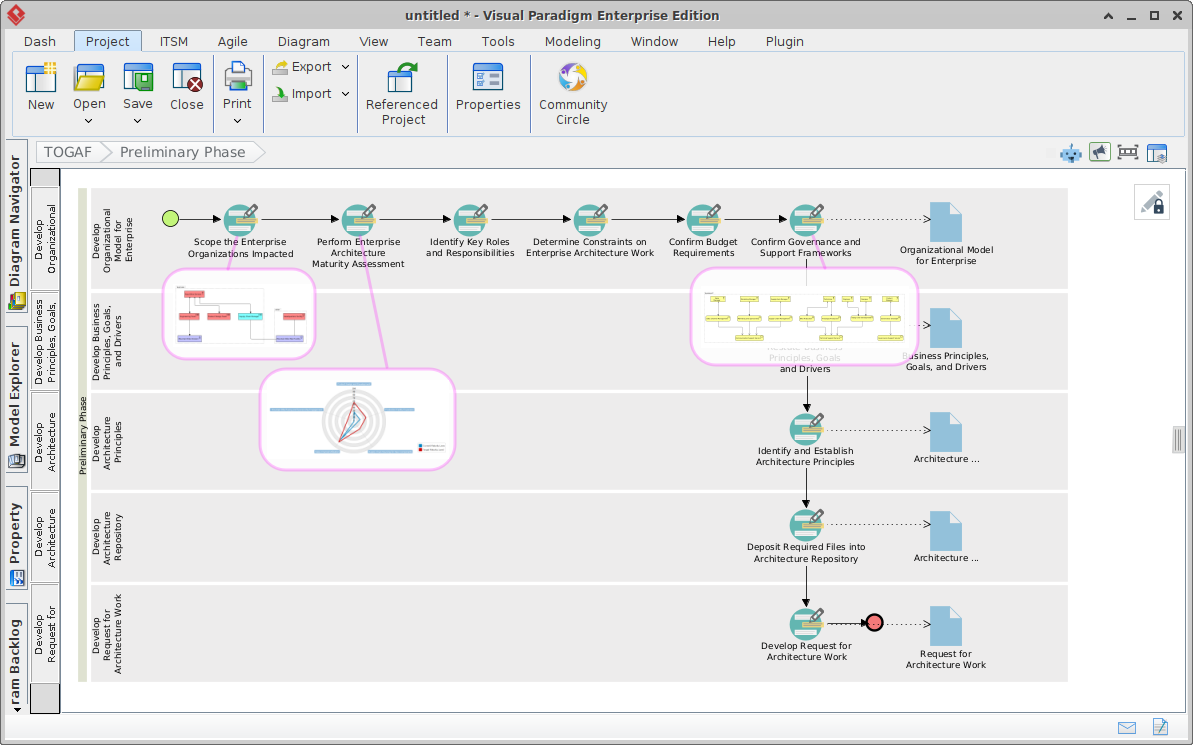
Visual Paradigm simplifies the complexity of TOGAF through its Guide-Through Process feature. Instead of staring at a blank canvas, you are guided through each phase of the ADM.
Step-by-Step Workflow
-
Initialize the Project: Select “TOGAF ADM” as your framework. The tool sets up the Architecture Repository automatically.
-
Follow the Navigator: The interface displays the ADM cycle (Preliminary Phase → Phase A → Phase B, etc.).
-
Create Deliverables: For each phase, the tool provides templates and instructions. For example, in Phase B (Business Architecture), you are prompted to create Business Actor, Role, and Process models.
-
Leverage AI Assistance: Use Visual Paradigm’s AI features to:
-
Generate initial model structures from text descriptions.
-
Suggest missing relationships between elements.
-
Auto-complete repetitive modeling tasks.
-
-
Validate and Archive: The tool checks your diagrams for ArchiMate compliance and archives deliverables in the electronic Architecture Cabinet.
Key Features for Beginners
-
Progress Indicator: Visualizes which phases are complete.
-
Automatic Transcription: Data entered in one phase (e.g., Business Goals) is automatically available in subsequent phases (e.g., Application Services).
-
Sample Models: Pre-built examples help you understand best practices without starting from scratch.
Part 4: ArchiMate Diagram Examples with PlantUML Code
While Visual Paradigm offers a rich GUI, understanding the underlying structure is helpful. Below are three core ArchiMate diagrams rendered using PlantUML syntax. You can use these snippets in any PlantUML-compatible editor or import them into tools that support code-to-diagram generation.
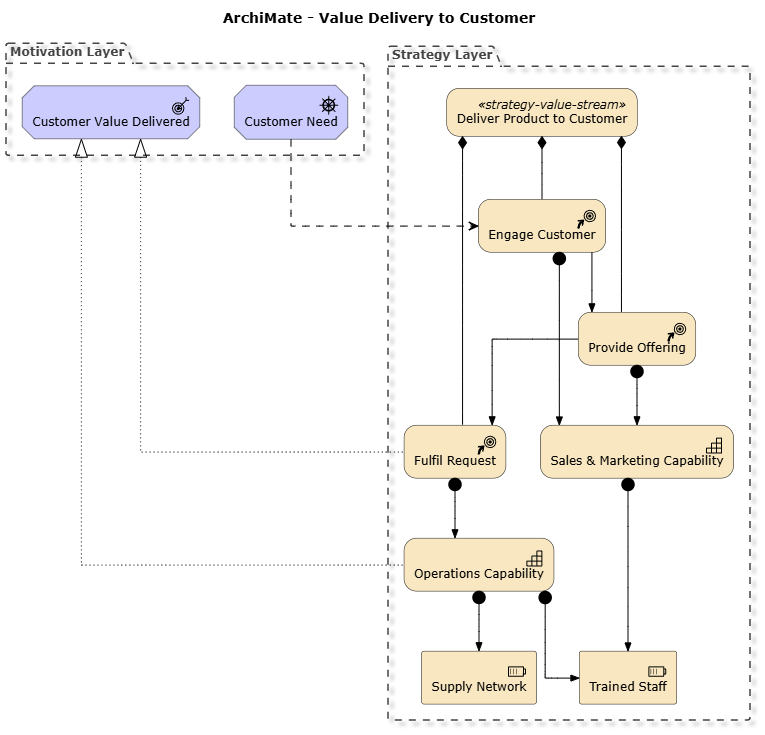
Example 1: Business Layer – Value Stream
This diagram shows how a business delivers value to a customer.
@startuml
skinparam linetype ortho
!include https://static.visual-paradigm.com/plantuml-stdlib/Archimate-PlantUML/master/Archimate.puml
skinparam vpDiagramType ArchiMateDiagram
remove @unlinked
top to bottom direction
title ArchiMate - Value Delivery to Customer

together {
Grouping(motivation_layer, "Motivation Layer") {
  Motivation_Driver(dr_cust, "Customer Need")
  Motivation_Outcome(out_value, "Customer Value Delivered")
}

Grouping(strategy_layer, "Strategy Layer") {
  Strategy_ValueStream(vs_offer, "Deliver Product to Customer")
  Strategy_CourseOfAction(coa_eng, "Engage Customer")
  Strategy_CourseOfAction(coa_prov, "Provide Offering")
  Strategy_CourseOfAction(coa_fulfil, "Fulfil Request")
  Strategy_Capability(cap_sales, "Sales & Marketing Capability")
  Strategy_Capability(cap_ops, "Operations Capability")
  Strategy_Resource(res_staff, "Trained Staff")
  Strategy_Resource(res_supply, "Supply Network")
}
}

' Driver influences course of action
Rel_Influence_Down(dr_cust, coa_eng, "")
' Value stream composed of stages
Rel_Composition_Down(vs_offer, coa_eng, "")
Rel_Composition_Down(vs_offer, coa_prov, "")
Rel_Composition_Down(vs_offer, coa_fulfil, "")
' Triggering between stages
Rel_Triggering_Down(coa_eng, coa_prov, "")
Rel_Triggering_Down(coa_prov, coa_fulfil, "")
' Courses of action realize the outcome
Rel_Realization_Up(coa_fulfil, out_value, "")
' Courses of action produce value through capabilities
Rel_Assignment(coa_eng, cap_sales, "")
Rel_Assignment(coa_prov, cap_sales, "")
Rel_Assignment(coa_fulfil, cap_ops, "")
' Capabilities require resources
Rel_Assignment(cap_sales, res_staff, "")
Rel_Assignment(cap_ops, res_staff, "")
Rel_Assignment(cap_ops, res_supply, "")
' Capability realizes outcome
Rel_Realization_Up(cap_ops, out_value, "")

@enduml
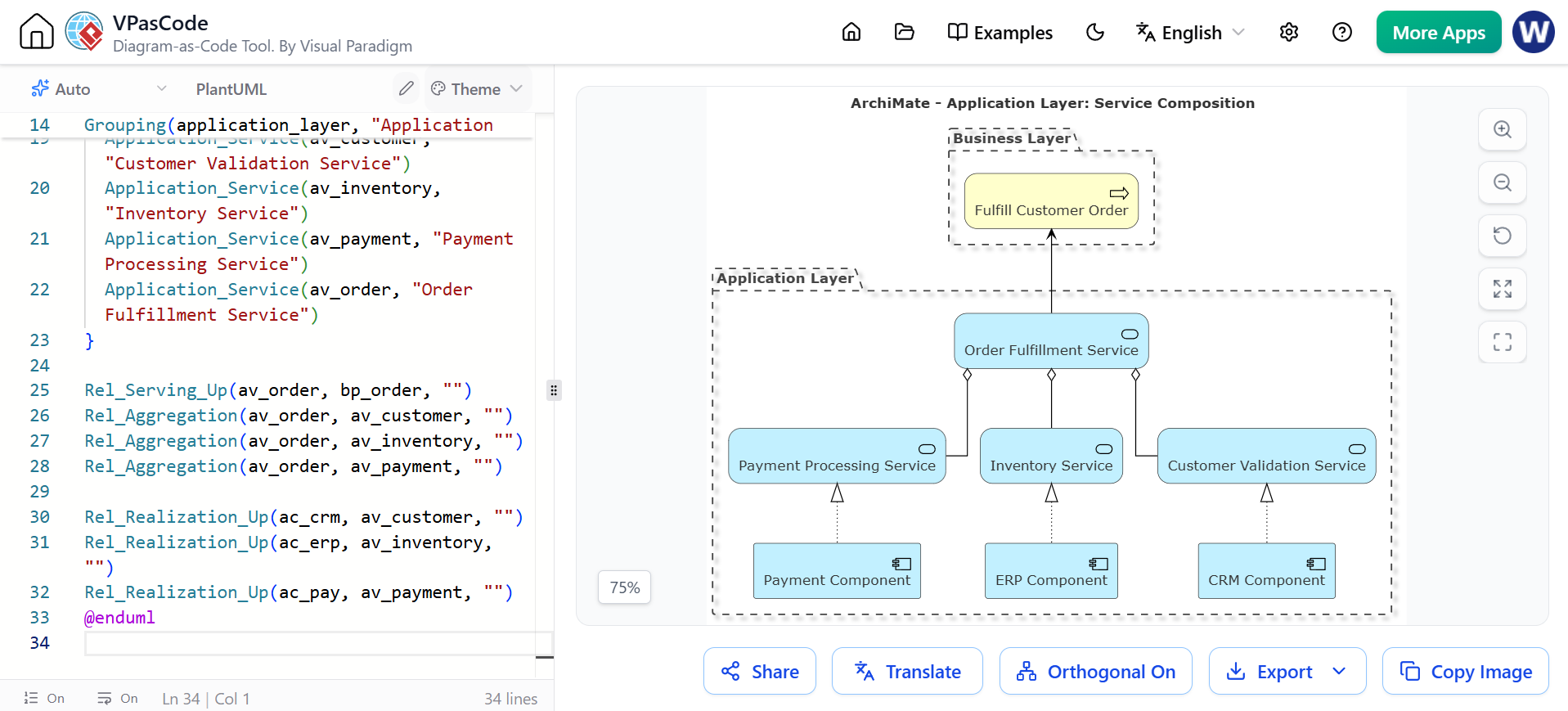
Example 2: Application Layer – Service Composition
This diagram illustrates how application services support business processes.
@startuml
skinparam linetype ortho
!include https://static.visual-paradigm.com/plantuml-stdlib/Archimate-PlantUML/master/Archimate.puml
title ArchiMate - Application Layer: Service Composition
skinparam vpDiagramType ArchiMateDiagram
skinparam defaultFontSize 14
skinparam defaultFontColor #333333
top to bottom direction

Grouping(business_layer, "Business Layer") {
  Business_Process(bp_order, "Fulfill Customer Order")
}

Grouping(application_layer, "Application Layer") {
  Application_Component(ac_crm, "CRM Component")
  Application_Component(ac_erp, "ERP Component")
  Application_Component(ac_pay, "Payment Component")

  Application_Service(av_customer, "Customer Validation Service")
  Application_Service(av_inventory, "Inventory Service")
  Application_Service(av_payment, "Payment Processing Service")
  Application_Service(av_order, "Order Fulfillment Service")
}

Rel_Serving_Up(av_order, bp_order, "")
Rel_Aggregation(av_order, av_customer, "")
Rel_Aggregation(av_order, av_inventory, "")
Rel_Aggregation(av_order, av_payment, "")

Rel_Realization_Up(ac_crm, av_customer, "")
Rel_Realization_Up(ac_erp, av_inventory, "")
Rel_Realization_Up(ac_pay, av_payment, "")
@enduml
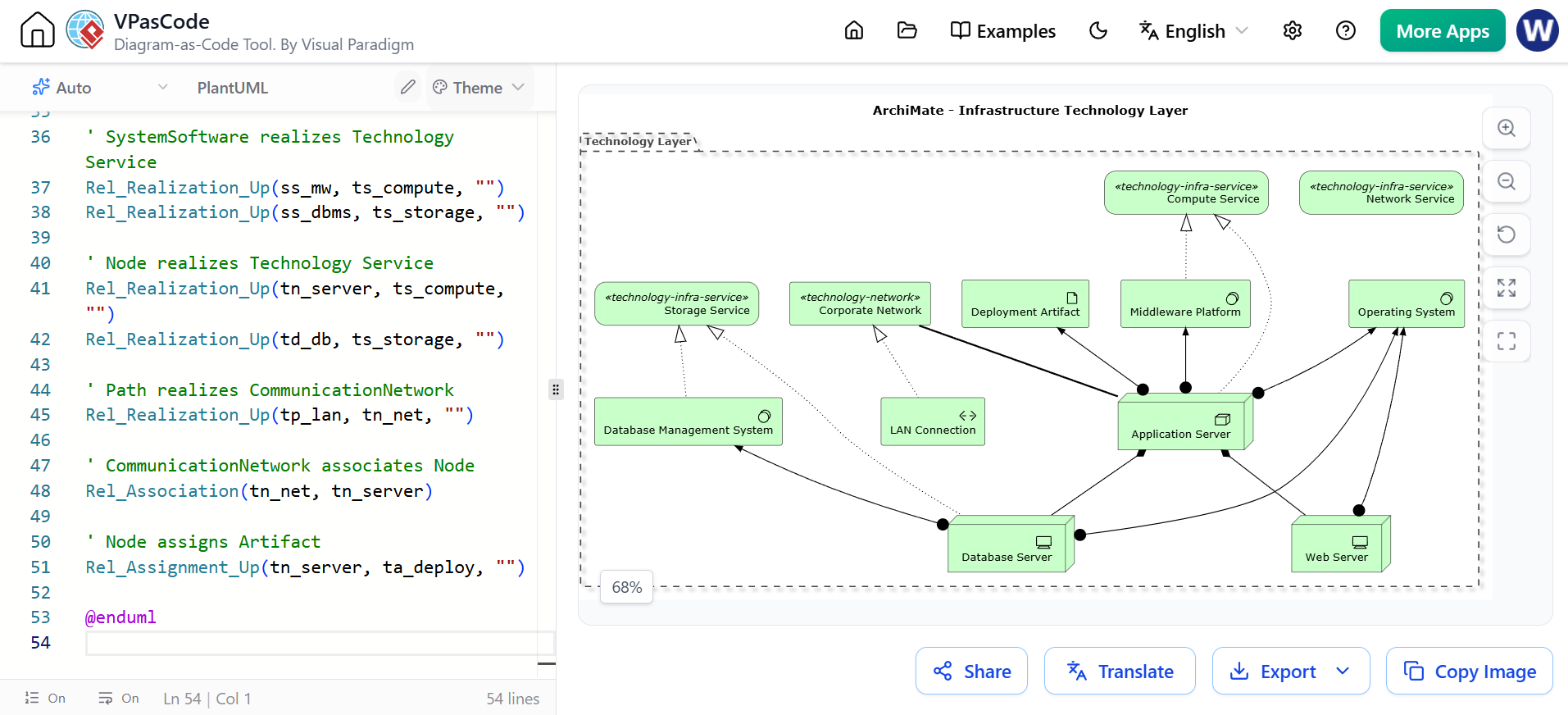
Example 3: Technology Layer – Infrastructure
This diagram shows the physical infrastructure supporting applications.
@startuml
!include https://static.visual-paradigm.com/plantuml-stdlib/Archimate-PlantUML/master/Archimate.puml

title ArchiMate - Infrastructure Technology Layer

Grouping(technology_layer, "Technology Layer") {
  Technology_Service(ts_storage, "Storage Service")
  Technology_Service(ts_compute, "Compute Service")
  Technology_Service(ts_network, "Network Service")

  Technology_Node(tn_server, "Application Server")
  Technology_Device(td_db, "Database Server")
  Technology_Device(td_web, "Web Server")

  Technology_SystemSoftware(ss_os, "Operating System")
  Technology_SystemSoftware(ss_mw, "Middleware Platform")
  Technology_SystemSoftware(ss_dbms, "Database Management System")

  Technology_CommunicationNetwork(tn_net, "Corporate Network")
  Technology_Path(tp_lan, "LAN Connection")

  Technology_Artifact(ta_deploy, "Deployment Artifact")
}

' Technology_Node composes Technology_Device
Rel_Composition_Down(tn_server, td_db, "")
Rel_Composition_Down(tn_server, td_web, "")

' Technology_Node assigns SystemSoftware
Rel_Assignment_Up(tn_server, ss_os, "")
Rel_Assignment_Up(td_db, ss_os, "")
Rel_Assignment_Up(td_web, ss_os, "")
Rel_Assignment_Up(td_db, ss_dbms, "")
Rel_Assignment_Up(tn_server, ss_mw, "")

' SystemSoftware realizes Technology Service
Rel_Realization_Up(ss_mw, ts_compute, "")
Rel_Realization_Up(ss_dbms, ts_storage, "")

' Node realizes Technology Service
Rel_Realization_Up(tn_server, ts_compute, "")
Rel_Realization_Up(td_db, ts_storage, "")

' Path realizes CommunicationNetwork
Rel_Realization_Up(tp_lan, tn_net, "")

' CommunicationNetwork associates Node
Rel_Association(tn_net, tn_server)

' Node assigns Artifact
Rel_Assignment_Up(tn_server, ta_deploy, "")

@enduml
Part 5: Integrating AI for Agile EA
The future of EA is AI-Augmented. Here’s how AI transforms the traditional TOGAF/ArchiMate workflow:
-
Natural Language to Model: Describe a business capability in plain English (e.g., “We need a service that allows users to reset passwords via email”), and AI can suggest the corresponding ArchiMate elements (Application Service, Business Process, Technology Component).
-
Gap Analysis Automation: AI can compare current-state and target-state models to identify missing components or redundant services.
-
Impact Simulation: When a change is proposed (e.g., retiring a legacy server), AI can trace dependencies across all layers to predict business impact.
-
Documentation Generation: Automatically generate narrative reports from your ArchiMate models, saving hours of manual writing.
Visual Paradigm’s AI Features specifically help in:
-
Generating initial diagram structures from prompts.
-
Suggesting best-practice connections between elements.
-
Automating the creation of standard TOGAF deliverables.
Checklist for Choosing Your ArchiMate Tool
Before committing to a tool, ensure it meets these criteria:
-
Certification: Is it officially certified for ArchiMate 3.1?
-
TOGAF Integration: Does it support the full ADM cycle with guided steps?
-
Modeling vs. Drawing: Does it enforce semantic rules and traceability?
-
Collaboration: Can multiple architects work on the same model simultaneously?
-
AI Capabilities: Does it offer AI-assisted modeling or documentation?
-
Reporting: Can it auto-generate stakeholder-specific views and reports?
-
Ease of Use: Does it provide samples, templates, and embedded instructions?
Conclusion
Enterprise Architecture no longer needs to be a bottleneck. By combining the structural rigor of TOGAF ADM, the precise visualization of ArchiMate, and the speed of AI-powered tools like Visual Paradigm, organizations can achieve Agile EA. This approach ensures that architecture is not just a document on a shelf, but a living asset that drives business value, supports rapid decision-making, and adapts to change.
For beginners, the key is to start small: pick one phase of TOGAF, model it with ArchiMate in a certified tool, and leverage AI to accelerate the learning curve. As you gain confidence, expand your models across the enterprise, always keeping the end goal in mind: clarity, alignment, and agility.