




Visual Paradigm OpenDocs: Comprehensive Guide
Visual Paradigm OpenDocs is a documentation and knowledge-management workspace within the Visual Paradigm ecosystem. Its purpose is to turn diagrams, models, project information, and written explanations into structured, shareable, maintainable documentation.
Rather than treating diagrams as isolated images, OpenDocs provides a place where diagrams can be organized with context: descriptions, requirements, decisions, procedures, architecture explanations, project notes, and other supporting material. It is especially useful for teams that need documentation to remain connected to the analysis and design work from which it was created.
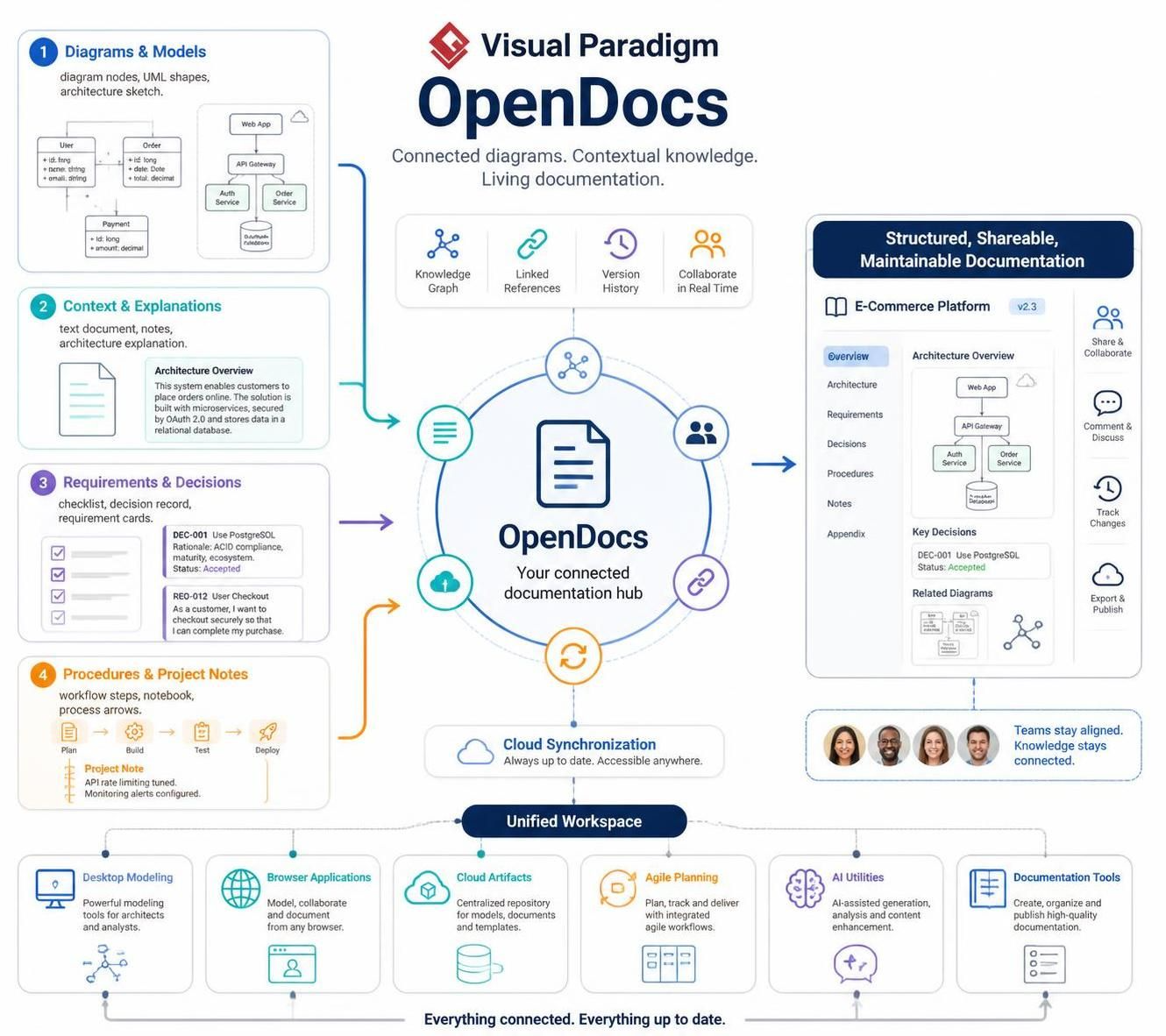
Visual Paradigm positions OpenDocs as part of a broader ecosystem that connects desktop modeling, browser-based applications, cloud artifacts, agile planning, AI-assisted utilities, and documentation tools through a unified workspace.
1. What problem does OpenDocs solve?
Many organizations create diagrams in one tool, write explanations in another, store files in a shared drive, and track implementation work somewhere else. This often causes:
-
Diagrams without sufficient explanation
-
Out-of-date screenshots in documents
-
Requirements disconnected from designs
-
Architecture decisions difficult to find
-
Repeated copying and pasting between tools
-
Inconsistent terminology across project artifacts
-
Documentation that becomes stale after the original project ends
-
Knowledge trapped in individual employees’ files or conversations
OpenDocs addresses this problem by providing a documentation layer around visual and analytical artifacts.
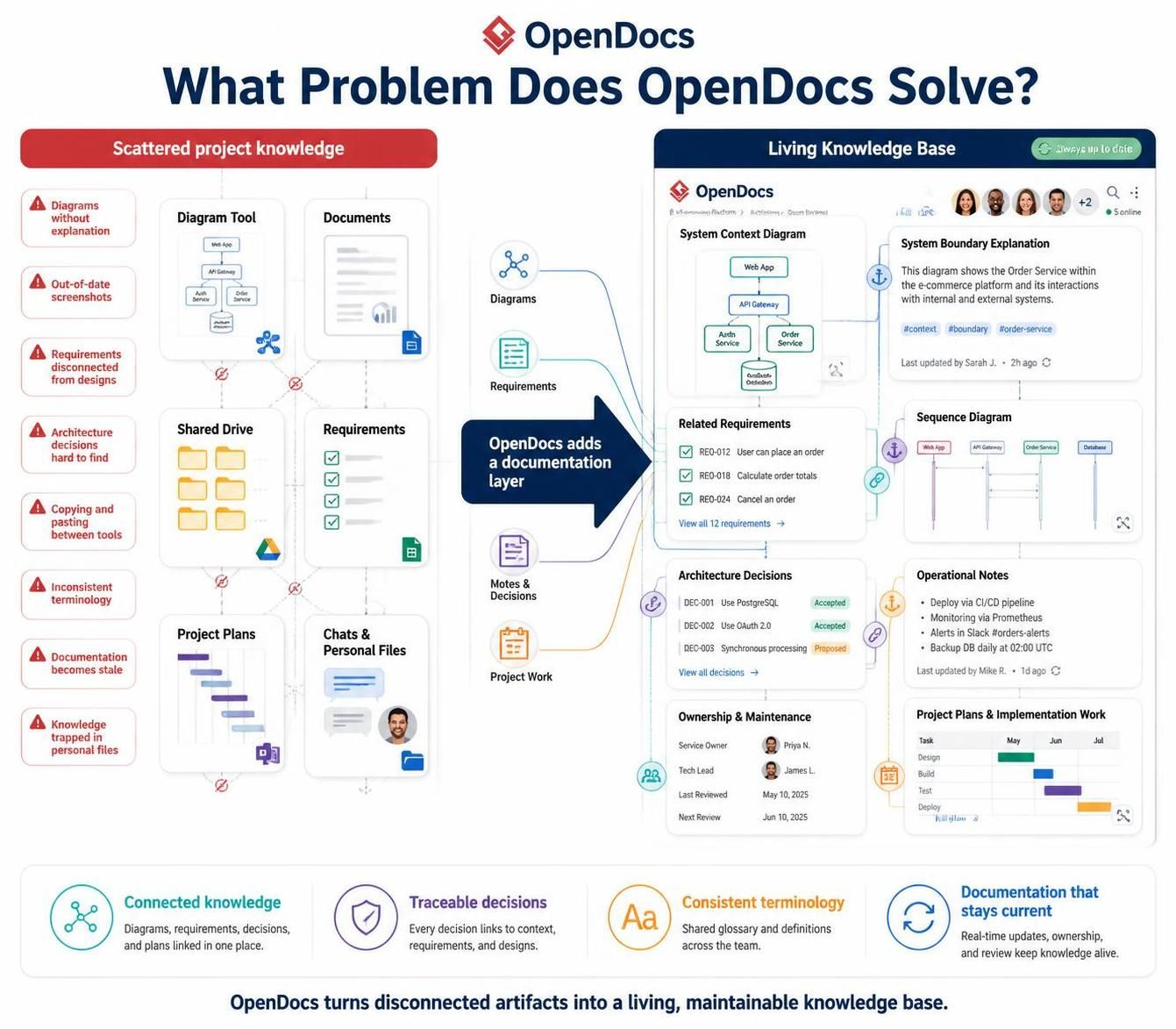
A typical OpenDocs page might combine:
-
A system context diagram
-
A written explanation of the system boundary
-
Links to related requirements
-
A sequence diagram for an important interaction
-
Architecture decisions
-
Operational notes
-
Ownership and maintenance information
-
References to project plans or implementation work
The result is closer to a living knowledge base than a conventional static report.
2. OpenDocs’ role in the Visual Paradigm ecosystem
Visual Paradigm provides a wide range of tools for visual modeling, enterprise architecture, business analysis, agile planning, project management, database design, code engineering, user-experience design, and documentation. Its newer unified-platform approach is intended to provide a central home for tools, applications, projects, and artifacts rather than making users work across disconnected silos.
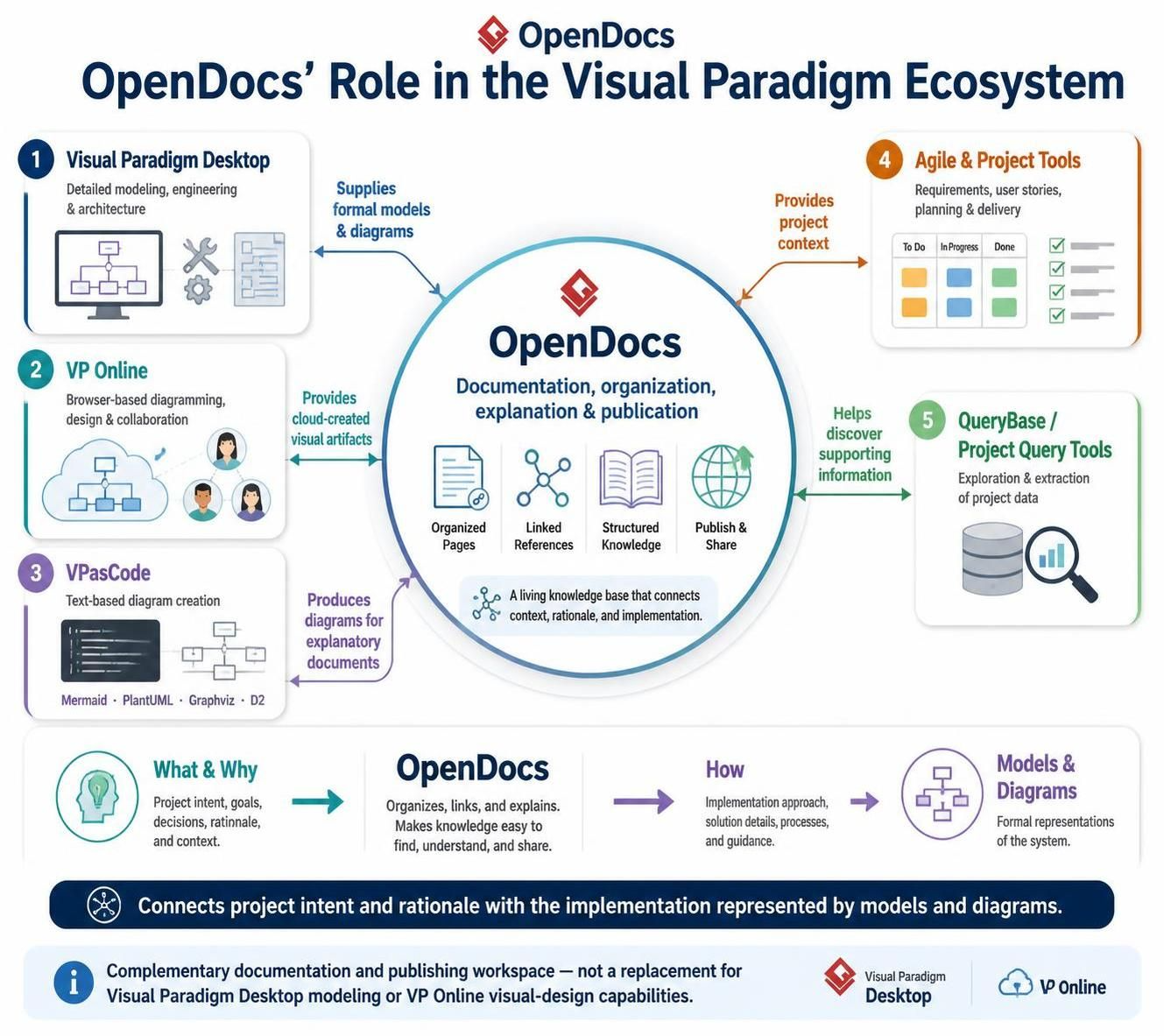
Within that ecosystem, the major roles can be understood as follows:
| Ecosystem area | Primary role | Relationship to OpenDocs |
|---|---|---|
| Visual Paradigm Desktop | Detailed modeling, engineering, and architecture work | Supplies formal models and diagrams that can be documented |
| VP Online | Browser-based diagramming, design, and collaboration | Provides cloud-created visual artifacts for documentation |
| VPasCode | Text-based diagram creation using formats such as Mermaid, PlantUML, Graphviz, and D2 | Produces diagrams that can be placed into explanatory documents |
| Agile and project tools | Requirements, user stories, planning, and delivery coordination | Provides project context that can be explained and referenced |
| QueryBase or project-query tools | Exploration and extraction of project data | Helps users discover information that can support documentation |
| OpenDocs | Documentation, organization, explanation, and publication | Converts project knowledge into accessible, structured documentation |
OpenDocs should therefore be viewed as a complementary documentation and publishing workspace—not as a replacement for Visual Paradigm Desktop’s modeling capabilities or VP Online’s broader visual-design capabilities.
Its role is to connect the “what” and “why” of a project with the “how” represented by models and diagrams.
3. Core capabilities
The exact feature set can vary as the product develops, but OpenDocs is centered around several important capabilities.
Documentation built around diagrams
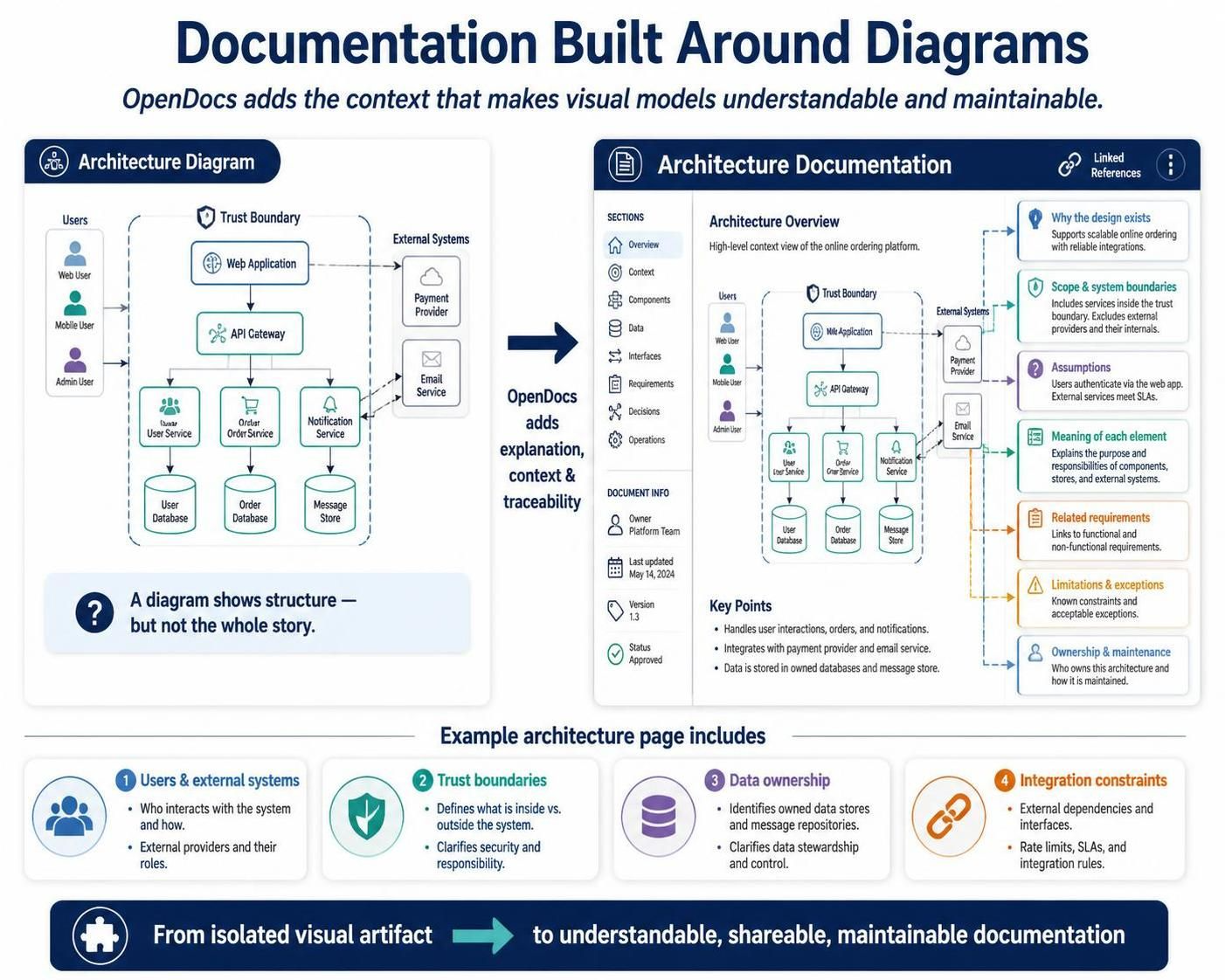
OpenDocs allows diagrams to be presented together with explanatory text. This is important because a diagram alone usually does not explain:
-
Why the design exists
-
Which parts are in scope
-
What assumptions were made
-
What each element means
-
Which requirements led to the design
-
What limitations or exceptions apply
-
Who is responsible for maintaining it
For example, an architecture page could include a context diagram followed by sections describing users, external systems, trust boundaries, data ownership, and integration constraints.
Structured knowledge organization
Instead of keeping every document as an unrelated file, users can organize content into a logical documentation space. Possible structures include:
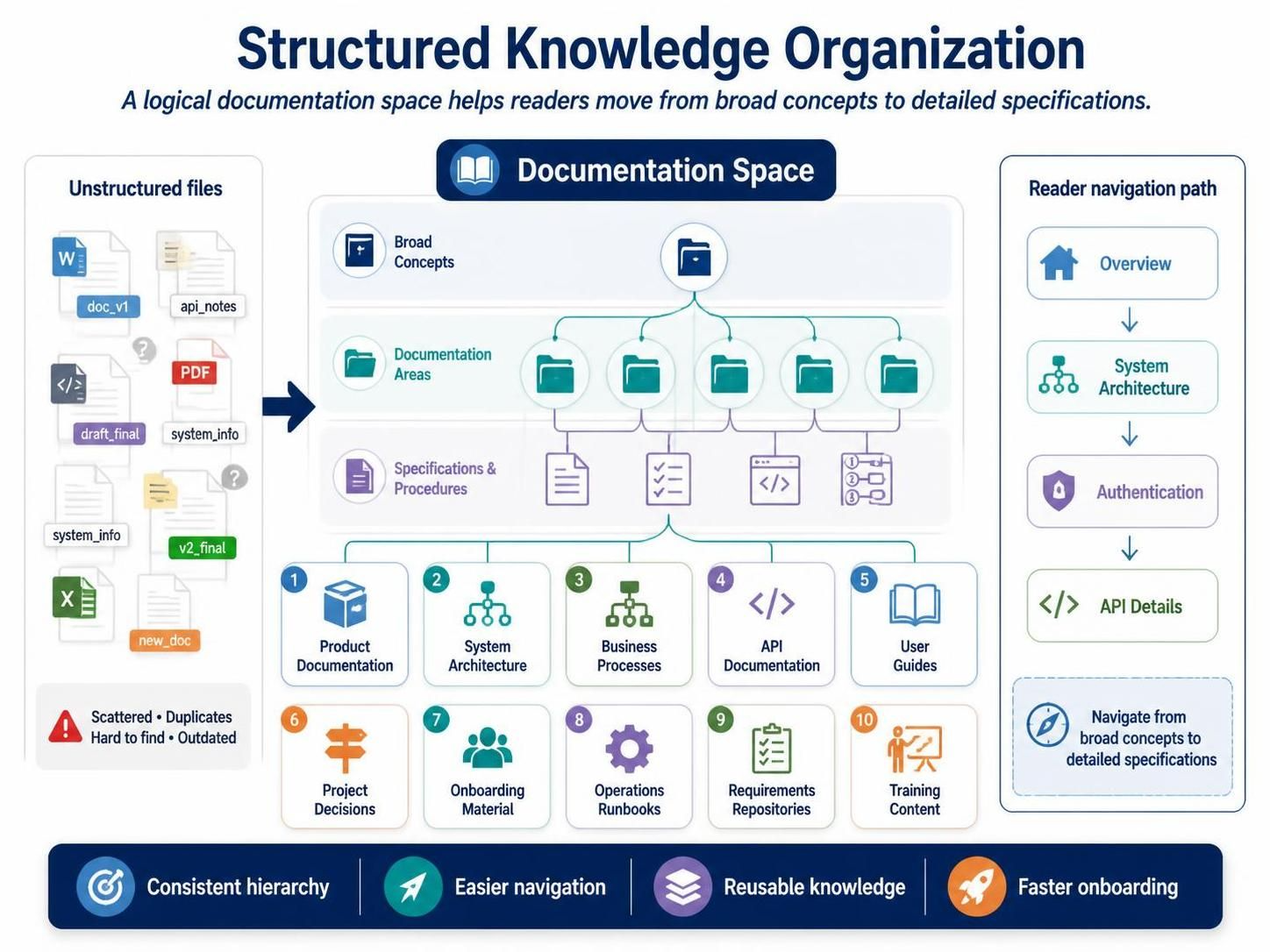
-
Product documentation
-
System architecture
-
Business processes
-
API documentation
-
User guides
-
Project decisions
-
Onboarding material
-
Operations runbooks
-
Requirements repositories
-
Training content
A consistent hierarchy makes it easier for readers to navigate from broad concepts to detailed specifications.
Integration with visual artifacts
One of OpenDocs’ most important distinctions is its relationship with Visual Paradigm diagrams and models. The documentation process can connect visual artifacts with narrative content instead of requiring users to export every diagram as a static image.
The VPasCode workflow, for example, is described as allowing users to create a text-based diagram, preview and refine it, send it through the OpenDocs pipeline, insert it into an OpenDocs page, and publish a living document. This reduces the need to manually download and re-upload diagram images.
Support for living documentation
Traditional documentation is often produced at the end of a project. OpenDocs is better suited to documentation that evolves during the project.
Teams can use it to record:
-
Current architecture
-
Accepted design decisions
-
Known constraints
-
Process changes
-
Release-specific information
-
Frequently asked questions
-
Operational procedures
-
Design rationale
This makes documentation useful during development rather than only after implementation.
Publishing and sharing
OpenDocs can be used to turn internal project knowledge into documentation that can be shared with selected audiences. Depending on the project and platform configuration, the audience might include:
-
Internal engineering teams
-
Business stakeholders
-
Product managers
-
Customers
-
Support staff
-
Auditors
-
Implementation partners
-
Students or training participants
The same underlying information can be presented differently for different audiences. A technical architecture page may be appropriate for developers, while a simplified process overview may be more useful to business users.
AI-assisted documentation workflows
Visual Paradigm’s broader ecosystem includes AI-assisted capabilities for generating diagrams, explaining models, and creating software-development content. The platform describes AI functions that can convert textual descriptions into sequence diagrams, generate code, and document architecture.
In an OpenDocs-oriented workflow, AI can help with tasks such as:
-
Creating an initial explanation of a diagram
-
Summarizing a model
-
Drafting a system overview
-
Converting requirements into documentation sections
-
Generating questions about missing information
-
Producing a first draft of an API or process description
-
Identifying inconsistencies between a diagram and its narrative
AI-generated content should be reviewed by a subject-matter expert, particularly for security, compliance, architecture, and operational documentation.
4. Typical OpenDocs usage cases
Software architecture documentation
A software team can create an architecture space containing:
-
System overview
-
Context diagram
-
Container or component descriptions
-
Deployment architecture
-
Data-flow explanations
-
Integration specifications
-
Security considerations
-
Architecture decision records
-
Operational dependencies
For example, a payment platform page might explain:
-
The web application
-
Payment-service integration
-
Fraud-detection service
-
Order database
-
Message queue
-
Reporting system
-
External payment provider
Each component can be documented with its responsibilities, interfaces, dependencies, failure behavior, and owner.
Business-process documentation
Business analysts can combine BPMN diagrams with written procedures. A process page might include:
-
Process purpose
-
Trigger and expected outcome
-
Participants
-
BPMN diagram
-
Business rules
-
Exception paths
-
Required data
-
Performance targets
-
Compliance requirements
-
Related procedures
This is more useful than distributing a BPMN diagram without explaining how the process operates in practice.
Requirements and solution traceability
OpenDocs can provide a readable front end for requirements-related information.
A feature page could contain:
-
Business problem
-
User story
-
Acceptance criteria
-
Use-case diagram
-
Main success scenario
-
Alternative flows
-
Sequence diagram
-
Data requirements
-
Test considerations
-
Implementation status
This helps different audiences understand the same feature without forcing everyone to inspect the underlying model directly.
API and integration documentation
Development teams can document an API by combining:
-
Service overview
-
Authentication method
-
Endpoint list
-
Request and response examples
-
Sequence diagrams
-
Error handling
-
Retry behavior
-
Rate limits
-
Versioning policy
-
Ownership and support contacts
A sequence diagram can explain the interaction between a client, gateway, service, identity provider, and database, while the surrounding text explains the operational rules.
Project onboarding
New developers, analysts, or consultants often spend significant time learning a system’s vocabulary and structure. An OpenDocs space can act as an onboarding hub containing:
-
Product overview
-
Glossary
-
Repository map
-
Development workflow
-
Architecture principles
-
Local setup instructions
-
Deployment process
-
Common troubleshooting steps
-
Links to important diagrams and decisions
Architecture decision records
Important design choices should include not only the final decision but also its reasoning.
A useful decision page can contain:
-
Decision title
-
Date
-
Status
-
Context
-
Problem
-
Options considered
-
Decision
-
Consequences
-
Related diagrams
-
Revisit conditions
-
Decision owner
For example, a team might document why it selected asynchronous messaging instead of synchronous REST calls for a particular integration.
Technical training and education
Instructors can use OpenDocs to combine explanations, diagrams, exercises, and examples. It is suitable for:
-
UML lessons
-
BPMN training
-
Software architecture courses
-
Database design tutorials
-
System-analysis exercises
-
Internal engineering academies
The combination of visual models and explanatory prose is useful for learners who need more context than a diagramming canvas alone provides.
Customer and stakeholder communication
OpenDocs can help technical teams prepare audience-appropriate material for stakeholders. For instance, a project team might publish:
-
A high-level solution overview
-
Business-process changes
-
System boundaries
-
Integration responsibilities
-
Release notes
-
Frequently asked questions
The technical model remains available for specialists, while the written documentation provides an easier entry point for nontechnical readers.
5. Example: documenting an order-management system
Suppose a company is building an order-management platform.
An OpenDocs documentation space could be organized like this:
Order Management Platform
├── 1. Overview
│   ├── Purpose and scope
│   ├── Business capabilities
│   └── Glossary
├── 2. System Context
│   ├── Context diagram
│   ├── External actors
│   └── External systems
├── 3. Business Processes
│   ├── Place an order
│   ├── Cancel an order
│   ├── Process a refund
│   └── Handle failed payment
├── 4. Architecture
│   ├── Container architecture
│   ├── Component architecture
│   ├── Deployment architecture
│   └── Security architecture
├── 5. Integrations
│   ├── Payment provider
│   ├── Inventory service
│   ├── Shipping provider
│   └── Notification service
├── 6. Data
│   ├── Entity relationship model
│   ├── Order data
│   └── Data-retention rules
├── 7. Decisions
│   ├── Use asynchronous order events
│   ├── Select relational storage
│   └── Introduce an API gateway
└── 8. Operations
    ├── Deployment procedure
    ├── Monitoring
    ├── Incident response
    └── Troubleshooting
The “Place an order” page might contain:
-
A plain-language description
-
A use-case diagram
-
A BPMN process
-
A sequence diagram
-
Business rules
-
Validation requirements
-
Failure scenarios
-
Related API endpoints
-
Relevant architecture decisions
This arrangement lets a business analyst, developer, tester, operator, and project manager approach the same capability from their own perspective.
6. Example: using VPasCode with OpenDocs
A developer or architect can create a diagram as text. For example, a Mermaid sequence diagram might describe an order flow:
sequenceDiagram
    participant Customer
    participant WebApp
    participant OrderService
    participant PaymentService
    participant InventoryService

    Customer->>WebApp: Submit order
    WebApp->>OrderService: Create order
    OrderService->>PaymentService: Authorize payment
    PaymentService-->>OrderService: Payment approved
    OrderService->>InventoryService: Reserve stock
    InventoryService-->>OrderService: Stock reserved
    OrderService-->>WebApp: Order confirmed
    WebApp-->>Customer: Display confirmation
A practical workflow would be:
-
Write or generate the diagram source.
-
Preview the rendered diagram.
-
Correct names, relationships, and sequence logic.
-
Transfer the diagram into an OpenDocs page.
-
Add explanatory sections around it.
-
Link the page to related requirements, APIs, and decisions.
-
Publish or share the resulting documentation.
This workflow is valuable because the diagram’s source can remain editable. When the process changes, the team can revise the diagram rather than recreate it manually from a screenshot.
7. What makes OpenDocs stand out?
It connects models with explanations
Many documentation systems are primarily text repositories, while many modeling tools are primarily diagramming environments. OpenDocs occupies the space between them by making diagrams part of a broader explanatory document.
It supports a model-centered way of working
Visual Paradigm users often create related artifacts: requirements, UML diagrams, BPMN models, database designs, architecture views, and project plans. OpenDocs provides a natural place to present those artifacts as a coherent story.
It is suited to different levels of abstraction
The same documentation space can explain:
-
Business goals
-
User journeys
-
Processes
-
System architecture
-
Software components
-
Data structures
-
Deployment environments
-
Operational procedures
This supports communication across business and technical roles.
It fits diagram-as-code workflows
The VPasCode connection is particularly useful for teams that prefer text-based diagrams, versionable sources, and rapid iteration. OpenDocs can act as the publishing and explanatory layer for those diagrams.
It can reduce documentation fragmentation
When diagrams, written explanations, decisions, and project artifacts are brought into one ecosystem, teams have fewer reasons to maintain separate, disconnected copies.
It supports documentation as an ongoing activity
The most valuable documentation is often created while decisions are being made. OpenDocs is well suited to capturing knowledge during analysis, design, implementation, and operations instead of waiting until project completion.
8. OpenDocs compared with conventional documentation tools
OpenDocs is not simply a word processor and should not be evaluated only as a replacement for one.
| Capability | Traditional document editor | General wiki | Diagramming tool | OpenDocs |
|---|---|---|---|---|
| Long-form writing | Strong | Strong | Limited | Strong |
| Structured knowledge pages | Limited | Strong | Limited | Strong |
| Native visual modeling connection | Limited | Varies | Strong | Strong |
| Diagram explanation | Manual | Usually manual | Limited | Central purpose |
| Architecture documentation | Possible | Possible | Partial | Strong |
| Business-process documentation | Possible | Possible | Strong for diagrams | Strong |
| Diagram-as-code workflow | Usually external | Usually external | Varies | Supported through ecosystem integration |
| Project artifact context | Often disconnected | Varies | Strong within model | Designed for ecosystem connection |
| Stakeholder-friendly publishing | Strong | Strong | Varies | Strong use case |
| Living documentation | Weak to moderate | Strong | Moderate | Strong |
The main value is not that OpenDocs necessarily replaces every existing tool. Its value is that it brings visual models and documentation closer together.
9. Recommended documentation workflow
A disciplined workflow helps prevent OpenDocs from becoming another unstructured content repository.
Start with the audience
Before creating pages, identify who will read them:
-
Executives need scope, outcomes, and risks.
-
Business users need processes and responsibilities.
-
Developers need components, interfaces, and behavior.
-
Testers need scenarios and acceptance rules.
-
Operators need deployment and troubleshooting information.
-
Auditors need evidence, controls, and ownership.
Define a documentation hierarchy
Use a predictable structure. A common pattern is:
-
Overview
-
Scope and glossary
-
Requirements
-
Processes
-
Architecture
-
Data
-
Integrations
-
Decisions
-
Operations
-
Change history
Use diagrams to answer specific questions
A diagram should have a purpose. Examples include:
-
What is inside and outside the system?
-
Which components communicate?
-
How does a business process flow?
-
Where does data move?
-
How is a system deployed?
-
Which actor performs each action?
-
What happens when an error occurs?
Avoid adding diagrams merely because a diagram type is available.
Add explanatory text
For each important diagram, document:
-
Purpose
-
Scope
-
Legend
-
Assumptions
-
Main flow
-
Exceptions
-
Key decisions
-
Ownership
-
Related pages
Link related artifacts
A page becomes much more useful when readers can move from:
-
Requirement to use case
-
Use case to sequence diagram
-
Sequence diagram to API
-
API to component
-
Component to deployment
-
Decision to the architecture it affects
Establish ownership
Every important page should have an owner or responsible team. Also record:
-
Last review date
-
Review frequency
-
Status
-
Applicable product version
-
Change triggers
Keep diagrams and text synchronized
When a model changes, update the explanation. When a requirement changes, review affected diagrams. A documentation page is only valuable when its narrative and visuals agree.
10. Who should use OpenDocs?
Software architects
Architects can use OpenDocs to publish system views, architecture principles, design decisions, technology constraints, and deployment models.
Business analysts
Business analysts can document requirements, processes, actors, business rules, use cases, and stakeholder decisions in a format that combines models and prose.
Product managers
Product managers can create feature documentation, capability maps, user journeys, release context, and stakeholder-friendly product explanations.
Developers
Developers benefit from accessible architecture, API, integration, data, and operational documentation that is connected to diagrams rather than scattered across files.
Technical writers
Technical writers can use OpenDocs as a source for structured, visual technical content, particularly when documentation depends heavily on system models.
Project and delivery teams
Project managers and delivery leads can use it to organize scope, decisions, process descriptions, and project knowledge.
Operations and support teams
Operations staff can maintain runbooks, deployment diagrams, incident procedures, dependencies, and troubleshooting guidance.
Educators and students
OpenDocs is suitable for teaching modeling, architecture, requirements engineering, BPMN, UML, and system analysis because it combines concepts with visual examples.
11. Who may not need it?
OpenDocs may be unnecessary for:
-
A small personal project with minimal documentation
-
Teams that only need occasional diagrams
-
Projects with no requirement for structured knowledge sharing
-
Organizations that already have a fully integrated documentation system and do not need Visual Paradigm artifacts included
-
Users looking solely for a simple whiteboard or lightweight note-taking tool
Its benefits become more apparent as the number of artifacts, contributors, stakeholders, and system dependencies increases.
12. Best practices
-
Write for a named audience rather than “everyone.”
-
Put the most important explanation near the relevant diagram.
-
Use a consistent glossary across pages.
-
Prefer several focused diagrams over one enormous diagram.
-
Record the rationale behind major design decisions.
-
Identify owners and review dates.
-
Separate current design from historical or rejected alternatives.
-
Link requirements, models, code-related information, and operational procedures.
-
Use AI for drafting and exploration, but review technical claims manually.
-
Keep page titles specific and searchable.
-
Avoid duplicating the same definition in many places.
-
Mark incomplete content clearly so gaps are visible.
-
Review documentation when requirements, architecture, or processes change.
13. Bottom line
Visual Paradigm OpenDocs is best understood as the documentation and knowledge-management layer of the Visual Paradigm ecosystem. It helps teams turn models and project artifacts into coherent, readable, maintainable documentation.
Its strongest use cases are architecture documentation, business-process explanation, requirements traceability, API and integration documentation, decision recording, onboarding, operations, and technical education. It stands out because it is designed around the connection between visual modeling and written knowledge—especially when used alongside Visual Paradigm Desktop, VP Online, and VPasCode.
Organizations should consider OpenDocs when their challenge is not simply “where can we write documents?” but rather:
How can we keep diagrams, requirements, decisions, processes, architecture, and operational knowledge connected and understandable over time?
This post is also available in Deutsche, Español, فارسی, Français, English, Bahasa Indonesia, 日本語, Polski, Portuguese, Ру́сский and Việt Nam.
