




A Comprehensive Guide to CRC (Class Responsibility Collaborator) Modeling
Based on the foundational principles of object-oriented (OO) analysis, this guide outlines the CRC modeling process. CRC modeling is a highly effective, low-tech methodology designed to bridge the communication gap between developers and users, ensuring that business requirements are accurately identified and understood before code is written.
1. Key Concepts: The Anatomy of a CRC Card
CRC modeling relies on standard index cards divided into three distinct sections. Each section represents a core concept in object-oriented design.
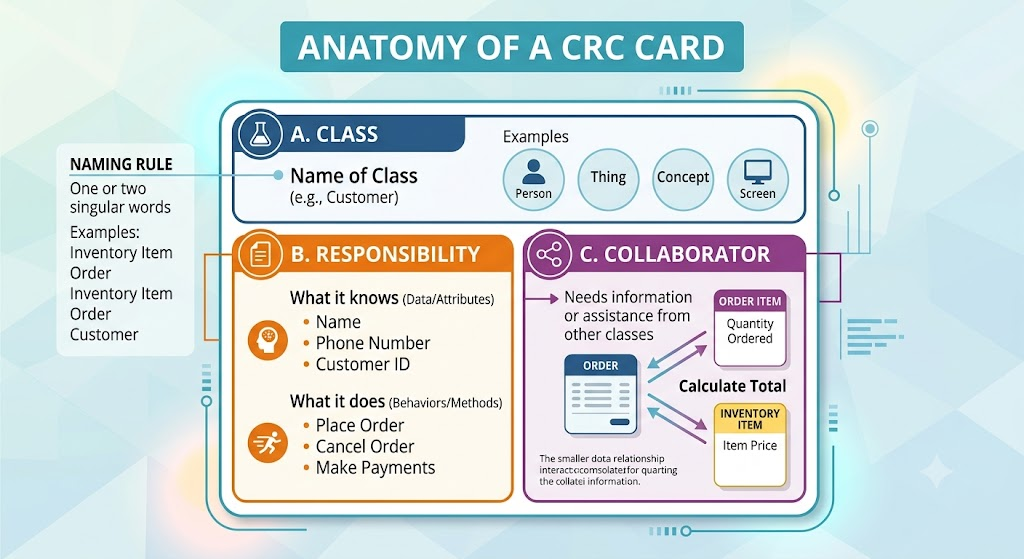
A. Class (Top of the Card)
A class represents a collection of similar objects. An object can be a person, place, thing, event, concept, screen, or report relevant to the system.
-
Naming Rule: Use one or two singular words (e.g., Customer, not Customers).
-
Example: In a shipping/inventory system, classes include Inventory Item, Order, Order Item, Customer, and Surface Address.
B. Responsibility (Left Column)
A responsibility is anything a class knows or does.
-
What it knows (Data/Attributes): Example: A Customer class knows its name, customer number, and phone number.
-
What it does (Behaviors/Methods): Example: A Customer class can order products, cancel orders, and make payments.
C. Collaborator (Right Column)
Collaboration occurs when a class needs information or assistance from another class to fulfill a responsibility.
-
Example: An Order object has the responsibility to “calculate total.” However, it doesn’t know the price of the items or the quantity ordered. Therefore, it must collaborate with Order Item (which knows the quantity) and Inventory Item (which knows the price) to calculate the final total.
2. The CRC Modeling Team
A successful CRC session requires specific roles to ensure the process runs smoothly and accurately captures business logic.
-
Business Domain Experts (BDEs): The actual users of the system (typically 4 to 5 front-line staff). They possess the day-to-day business knowledge. Note: Executives are generally not ideal for CRC; they are better suited for high-level Use Cases.
-
Facilitator: Runs the session, explains the technique, asks pertinent questions, ensures cards are filled out correctly, and leads the scenario testing.
-
Scribe(s): 1 or 2 people who sit in the back/sides. They do not actively model but record the detailed business logic and rules that cannot fit on the small index cards.
-
Observers: Trainees or stakeholders who sit in the back and watch without participating.
3. The 6-Step CRC Modeling Process
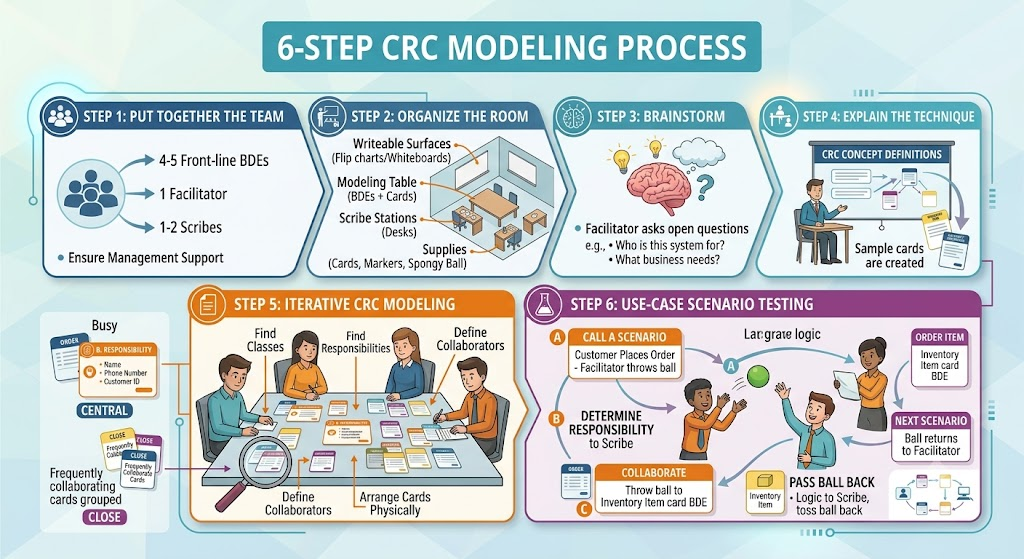
Step 1: Put Together the Team
Gather 4-5 front-line BDEs, a facilitator, and 1-2 scribes. Ensure management support so participants can dedicate the necessary time.
Step 2: Organize the Room
-
Writeable surfaces: Flip charts or whiteboards for brainstorming and prototyping.
-
Modeling table: A large, central table for the BDEs to place and move cards.
-
Scribe stations: Desks placed out of the way but with a clear view.
-
Supplies: Index cards, markers, and a soft, spongy ball (used later for scenario testing).
Step 3: Brainstorm
Generate ideas without evaluating them. The facilitator asks open-ended questions to understand the business needs.
-
Example Questions: “Who is this system for?”, “What business needs does it support?”, “How can we do this faster/cheaper/better?”, “Are there trivial tasks we can automate?”
Step 4: Explain the Technique
The facilitator spends 10–15 minutes explaining CRC concepts, prominently displaying definitions on the wall, and guiding the team through creating a few example cards.
Step 5: Iterative CRC Modeling
The BDEs stand or sit around the table and iteratively build the model:
-
Find Classes: Follow the money, look for reports/screens, and identify the 3-5 main classes immediately.
-
Find Responsibilities: Ask what the class knows and does.
-
Define Collaborators: Identify who holds the missing information needed to fulfill a responsibility.
-
Arrange the Cards: Crucial Step. Cards that collaborate frequently are placed close together on the table. “Busy” cards go in the center. Moving cards physically helps the team visualize relationships and associations.
Step 6: Use-Case Scenario Testing (The “Ball Toss” Exercise)
This is a validation exercise where the team “acts out” the system’s workflows to ensure the model is accurate.
-
Call a Scenario: The facilitator describes a use-case (e.g., “Customer places an order”) and throws the soft ball to the BDE holding the initial responsible card (e.g., Order).
-
Determine Responsibility: The group confirms the card handles the task. If not, they update or create a new card.
-
Describe Logic: The BDE holding the ball describes the step-by-step business logic (pseudo-code) to the scribe.
-
Collaborate: If the BDE needs info from another class (e.g., Inventory Item), they throw the ball to the BDE holding that card. That BDE then describes their part of the logic.
-
Pass the Ball Back: Once a task is done, the ball is thrown back to the previous person, eventually returning to the facilitator to start the next scenario.
4. How CRC Fits into the SDLC
CRC modeling does not exist in a vacuum; it is part of a broader Object-Oriented modeling process that is serial in the large (moving from requirements to design to code) and iterative in the small (bouncing between models).
-
Level of Detail: CRC sits in the middle. You start simple with Use Cases and UI Prototypes, move to the medium detail of CRC Models, and finish with the high detail of Class Diagrams.
-
Deliverables Drive Deliverables: Use-case diagrams are documented by use cases, which are documented by sequence diagrams, which eventually drive source code. CRC models feed directly into class diagramming.
5. Best Practices & Tips for Success
-
Send an Agenda: Distribute an agenda a few days prior so BDEs can prepare.
-
Display Definitions: Tape a large CRC card layout and definitions to the front of the room.
-
Use Domain Terminology: Avoid technical jargon; use the exact words the BDEs use in their daily jobs.
-
Keep it Low-Tech: Tools for CRC is only optional. Index cards are cheap, portable, and highly effective.
-
Expect to Prototype: Sketching screens and reports on flip-charts during the session helps users visualize the system.
-
Plan for Multiple Days: Large systems require several sessions. This is normal and necessary.
-
Get Management Support: Ensure leadership understands the value of modeling before coding.
-
Target Front-Line Staff: CRC is highly detailed and works best with daily users, not high-level executives.
6. Advantages and Disadvantages
The Advantages
-
Experts do the analysis: The people who actually do the work build the model.
-
High User Buy-in: Active participation increases user satisfaction and ownership.
-
Breaks down barriers: Users and developers work side-by-side.
-
Simple and Non-threatening: It’s just index cards. Users aren’t intimidated by complex software tools, and they don’t feel their jobs are being automated away by a “machine.”
-
Inexpensive and Portable: Costs a few dollars and fits in a briefcase.
-
Seamless Transition: Pairs perfectly with prototyping and leads directly into formal class diagrams.
The Disadvantages
-
Threatening to some developers: Some developers mistakenly believe their technical knowledge supersedes the users’ business knowledge.
-
Scheduling is difficult: Getting 4-5 key users in a room at the same time requires advance planning.
-
Cards are limited: A stack of index cards is not an acceptable formal deliverable for most organizations. CRC must be supplemented with formal use cases, prototypes, and class diagrams.
Conclusion
The ultimate goal of application development is to solve business problems, not to satisfy a developer’s intellectual curiosity with new technology. CRC modeling forces developers to work with users rather than against them. By utilizing a low-tech, highly collaborative environment, teams can accurately capture, validate, and refine business requirements before a single line of code is written.
This post is also available in Deutsche, Español, Français, English, Bahasa Indonesia, 日本語, Polski, Portuguese, Ру́сский, Việt Nam and 简体中文.
