




BPMN Tutorial: Visual Paradigm Tooling, AI Chatbot & Ecosystem
This guide provides a comprehensive overview of Business Process Model and Notation (BPMN), focusing on the Visual Paradigm ecosystem, its AI-powered chatbot capabilities, and practical modeling techniques.
Key Concepts
1. BPMN Basics and Core Elements
BPMN is a graphical standard for specifying business processes, developed by the Business Process Management Initiative (BPMI) and later adopted by the Object Management Group (OMG) [1]. Its primary goal is to provide a notation understandable by business users while supporting complex technical implementation [2].
The core elements of BPMN are categorized into four groups:
-
Flow Objects: Events, Activities, and Gateways.
-
Connecting Objects: Sequence flows, Message flows, and Associations.
-
Swimlanes: Pools (participants) and Lanes (sub-partitions).
-
Artifacts: Data objects, Data stores, and Groups [6].
Event Types:
Events are represented by circles and define when something happens in a process.
-
Start Event: Thin border circle (e.g., a message arrives).
-
Intermediate Event: Double border circle (occurs during the process).
-
End Event: Thick border circle (process termination) [2].

Gateways:
Gateways control the divergence and convergence of sequence flows.
-
Exclusive Gateway: Diamond with an “X” (only one path taken).
-
Parallel Gateway: Diamond with a “+” (multiple paths taken simultaneously).
-
Inclusive Gateway: Diamond with a circle (one or more paths taken) [1].

2. Swimlanes and Process Organization
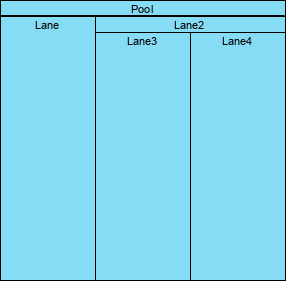
Swimlanes organize activities to illustrate different functional capabilities or responsibilities.
-
Pool: Represents a participant (often an organization or system) and acts as a graphical container.
-
Lane: A sub-partition within a Pool used to categorize activities (e.g., by department or role) [3].
In BPMN 2.0, Level 1 (Descriptive) processes use basic swimlanes for “happy path” modeling, while Level 2 (Analytic) processes add detailed constraints and exception handling [10].
3. Visual Paradigm Tooling Ecosystem
Visual Paradigm provides a unified platform for BPMN modeling, integrating desktop applications, web-based editors, and AI capabilities.
Key Features:
-
Drag-and-Drop Modeling: Create shapes and connect them using a resource catalog.
-
Expandable Sub-Processes: Collapse or expand complex sub-processes to simplify high-level views or drill down into details [9].
-
Nested Pools and Lanes: Support for multiple levels of organizational hierarchy [9].
-
As-Is vs. To-Be Analysis: Tools to model current processes and design future states with gap analysis [9].
4. AI Chatbot and Generative Modeling
The Visual Paradigm AI Chatbot is a domain-specialized assistant trained on modeling standards like BPMN, UML, and ArchiMate. It transforms natural language descriptions into professional diagrams instantly.
Capabilities:
-
Instant Generation: Type a process description (e.g., “An employee onboarding process with IT setup”) and the AI generates a BPMN diagram.
-
Conversational Refinement: Users can modify diagrams via chat commands (e.g., “Add a parallel gateway,” “Rename the task to ‘Review Documents'”).
-
Cross-Platform: Works in the web chatbot interface and integrates directly into Visual Paradigm Desktop [4].
5. Text-to-BPMN Workflow
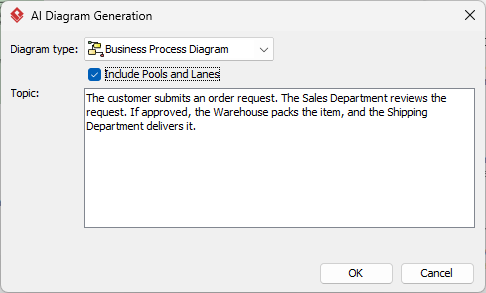
To generate a BPMN diagram using AI in Visual Paradigm:
-
Open Tools > AI Diagram Generation in the desktop application.
-
Select Business Process Diagram.
-
Check Include Pools and Lanes to organize roles automatically.
-
Enter a detailed topic description (e.g., “A patient appointment scheduling process”).
-
Click OK to generate the draft [5].
The AI uses Natural Language Processing (NLP) to extract entities (roles) and actions (tasks), mapping them to appropriate BPMN symbols like gateways and sequence flows [6].
6. Ecosystem and Collaboration
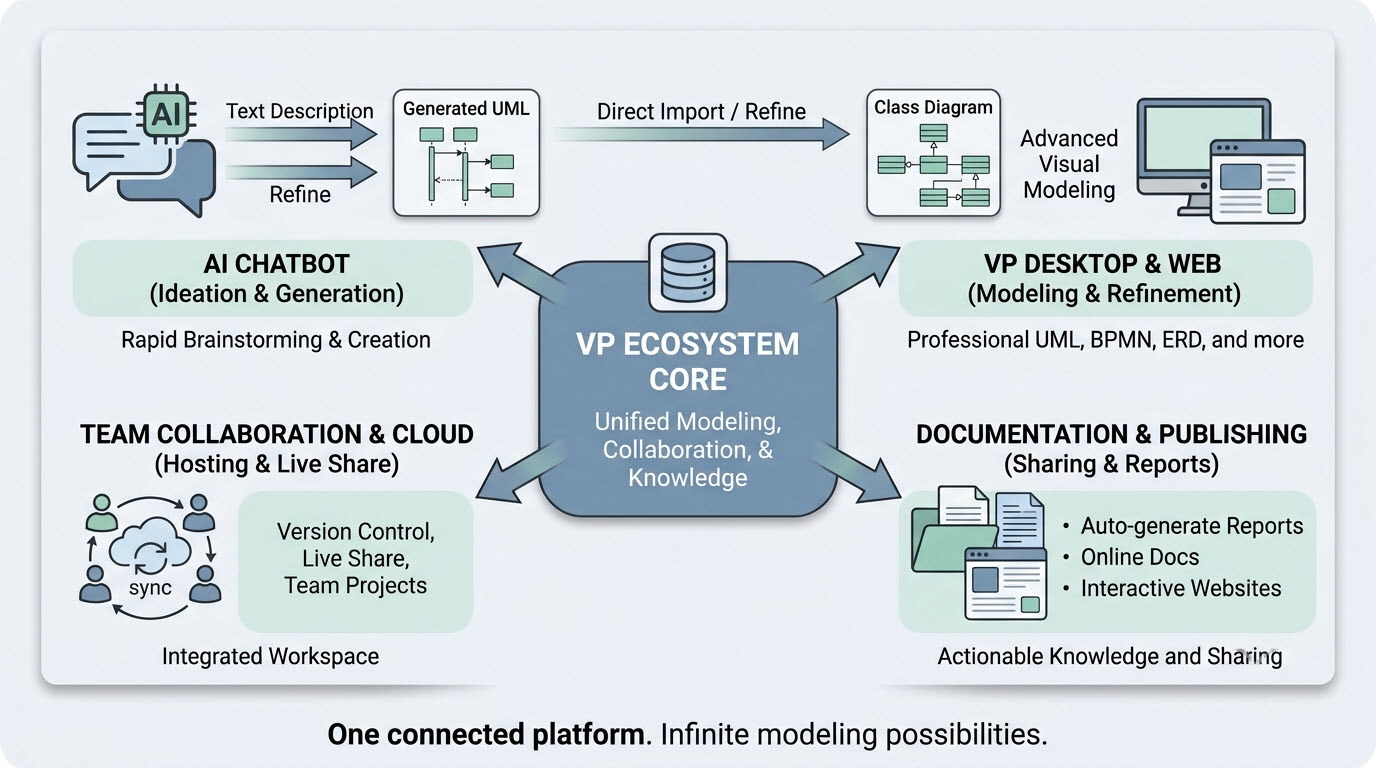
The Visual Paradigm ecosystem supports the entire process lifecycle from ideation to documentation.
-
Unified Modeling: One platform for diagrams, code engineering, and data modeling.
-
Team Collaboration: Real-time sharing, version control, and cloud hosting [7].
-
Documentation: Auto-generate reports and interactive websites from models [8].
Examples
Example 1: Employee Onboarding Process (AI Generated)
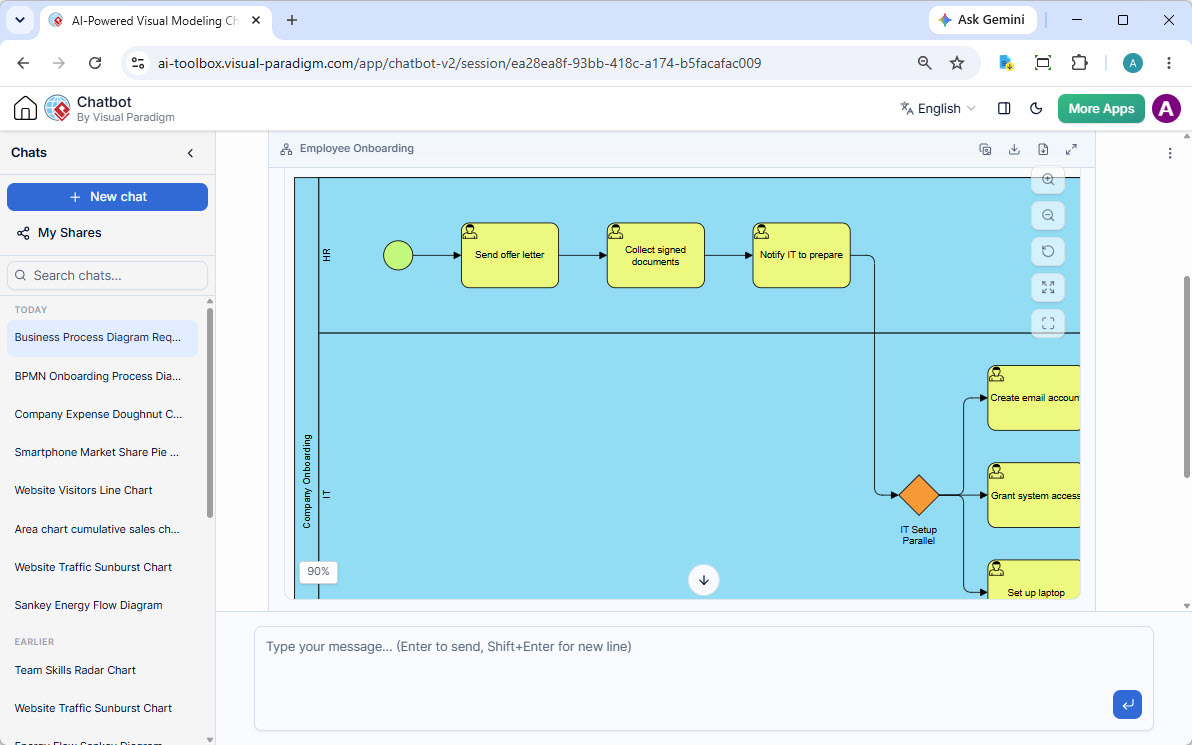
This example demonstrates an onboarding workflow generated by the AI Chatbot, organized into HR and IT swimlanes.
-
HR Lane: Start Event → Send Offer Letter → Collect Documents → Notify IT.
-
IT Lane: Parallel Gateway → Create Email Account, Grant Access, Set up Laptop.
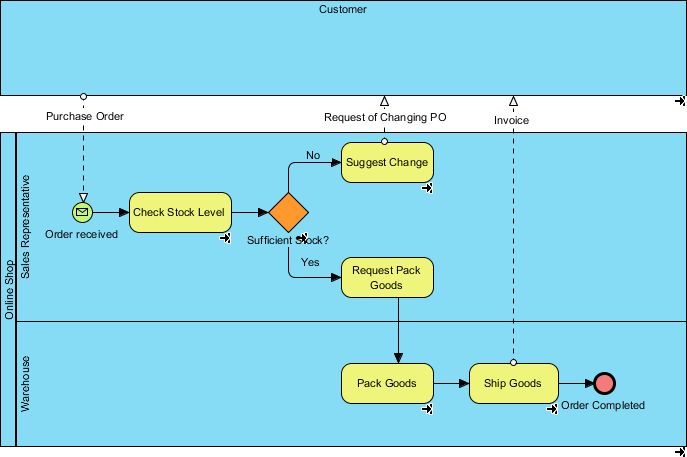
Example 2: Order Fulfillment Process (As-Is/To-Be)
A classic BPMN example showing a flow between Customer, Sales, and Warehouse.
-
Customer: Sends Purchase Order.
-
Sales: Receives Order, Checks Stock (Gateway: “Sufficient Stock?”).
-
Warehouse: Packs and Ships goods if stock is sufficient.
-
Outcome: Order Completed or Suggest Change.
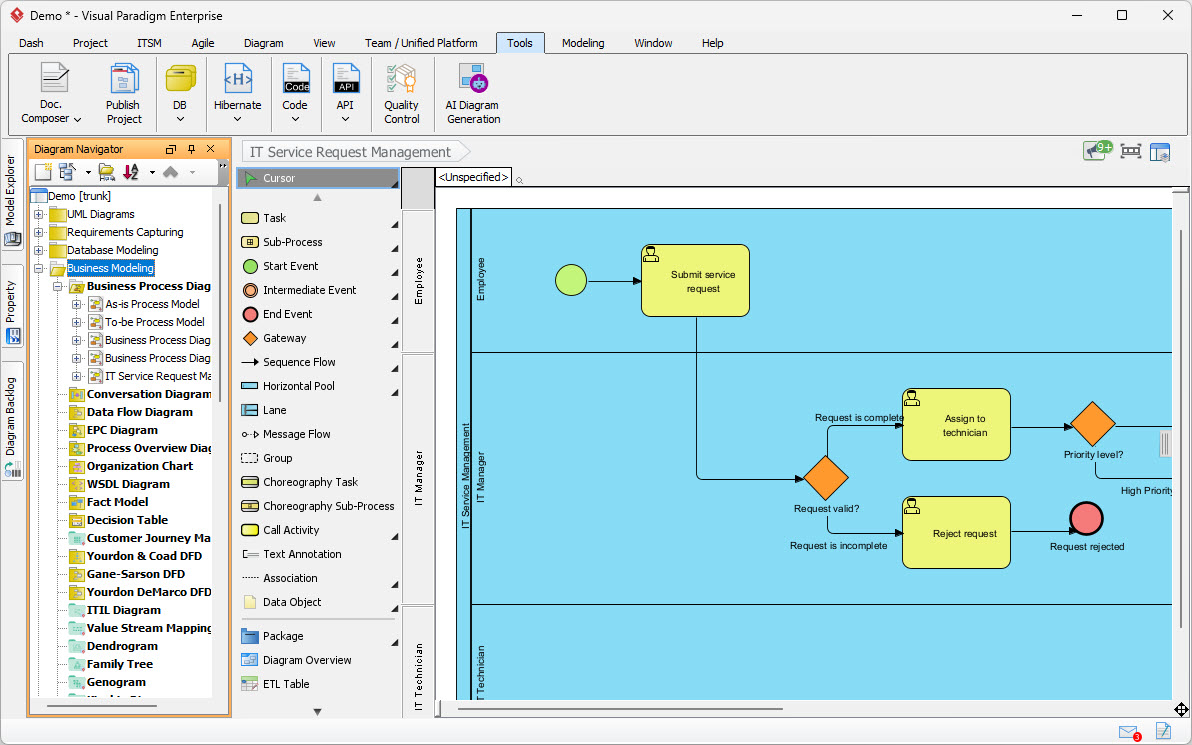
Example 3: IT Service Request Management
A multi-lane process demonstrating decision logic and role-based responsibilities.
-
Employee: Submits Service Request.
-
IT Manager: Validates Request (Gateway) → Assigns to Technician or Rejects.
-
Technician: Handles based on Priority Level.
Example 4: Conversational Refinement
Using the AI Chatbot to modify a diagram.
-
Input: “Add a parallel gateway after the Review step.”
-
Output: The AI inserts a parallel gateway and splits the flow into two concurrent tasks.
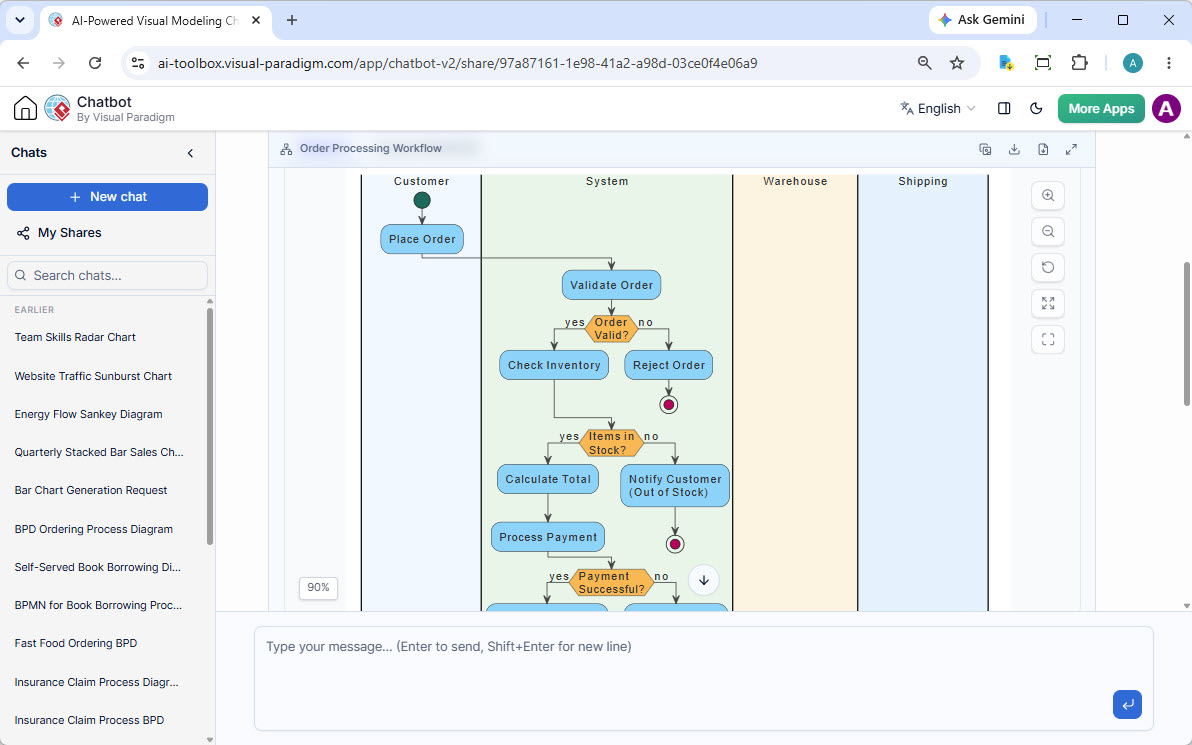
Example 5: Order Processing Workflow
A detailed order processing flow with multiple participants (Customer, System, Warehouse, Shipping).
-
System: Validates order, checks stock, calculates total.
-
Warehouse: Picks and packs items.
-
Shipping: Delivers order.
BPMN Reference List
-
BPMN for Beginners – A Complete Guide to Business Process Modeling Notation
-
How AI-Powered NLP is Revolutionizing Text-to-BPMN Generation for Enterprise Process Modeling
This post is also available in Deutsche, Español, فارسی, Français, English, Bahasa Indonesia, 日本語, Polski, Portuguese, Ру́сский, Việt Nam, 简体中文 and 繁體中文.
