




Comprehensive Guide to BPMN, Visual Paradigm Tooling, AI, and Ecosystem
This guide provides a complete overview of Business Process Model and Notation (BPMN) within the Visual Paradigm ecosystem. It covers fundamental concepts, practical examples of AI-driven generation, and the tools available for modeling, collaboration, and optimization.
1. Introduction to BPMN and the Visual Paradigm Ecosystem
BPMN (Business Process Model and Notation) 2.0 is the global standard for visualizing, documenting, and analyzing business processes. It serves as a universal language that bridges the gap between business strategy and technical implementation.
Visual Paradigm offers a comprehensive ecosystem that integrates BPMN with advanced AI capabilities, allowing users to move from text descriptions to production-ready models instantly. This ecosystem is not just a diagramming tool but a collaborative platform for end-to-end process engineering.
The Four Pillars of the Visual Paradigm AI Ecosystem
The platform unifies four key modeling environments:
- VP Desktop (Visual Model): The flagship application for deep, offline modeling of complex projects, integrating AI generation with advanced editing and version control.
- OpenDocs: A knowledge management platform that embeds live, AI-assisted diagrams directly into documents.
- Conversational Co-Pilot (AI Chatbot): An interactive tool for rapid ideation, allowing users to generate and refine diagrams through natural language conversation.
- Web Apps (Guided Tools): Browser-based tools for step-by-step modeling and collaboration without desktop installation.
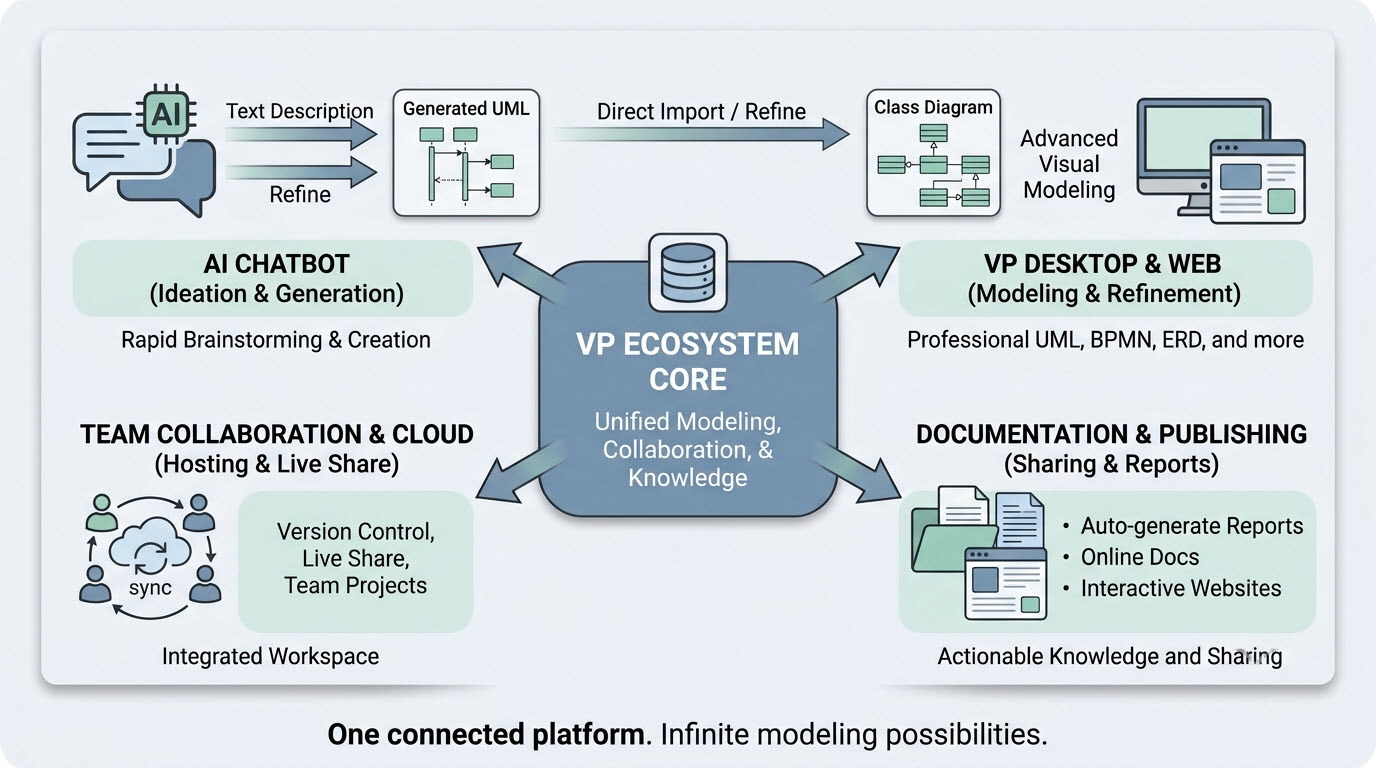
Diagram Example: The Visual Paradigm AI Ecosystem connects an “AI Chatbot” for rapid ideation, “VP Desktop & Web” for advanced modeling, “Documentation & Publishing” for reports, and “Team Collaboration & Cloud” for live sharing, all unified under a “VP Ecosystem Core.”
2. Key Concepts in BPMN and AI Integration
2.1 The Challenge of Traditional BPMN Modeling
Traditional BPMN diagramming requires manual effort to drag and drop elements, align swimlanes, and connect sequence flows. This process is often slow, prone to inconsistencies, and requires significant expertise to ensure compliance with BPMN 2.0 standards. Standard text-to-diagram tools (like Mermaid) often fail with BPMN because they cannot handle the complex geometric constraints of swimlanes and the strict matrix routing required for enterprise-grade processes.
2.2 AI-Powered Text-to-BPMN Generation
Visual Paradigm’s AI engine uses Natural Language Processing (NLP) to overcome these barriers. Instead of learning a complex declarative syntax, users provide plain-English procedural descriptions. The AI then:
- Extracts Semantics: Identifies organizational entities (pools/lanes), actions (tasks), and decisions (gateways).
- Generates Objects: Instantiates explicit modeling objects within the editor rather than drawing flat shapes.
- Optimizes Layout: Applies smart routing rules to minimize line crossings and ensure swimlanes are geometrically contained.
- Creates Interactive Models: The output is a fully editable BPMN 2.0 diagram, not just a static image.
3. Practical Examples
Example 1: Employee Onboarding Process
Prompt: An employee onboarding process in a mid-sized company.
Generated Workflow:
- HR Lane: The process starts with “Onboarding initiated.” HR sends an onboarding package and waits for signed documents.
- New Employee Lane: The employee signs and returns documents.
- IT Lane: Upon verification, a parallel gateway triggers “Set up email account” and “Create network access” simultaneously.
- Collaboration: IT and HR lanes interact to prepare workstations and schedule orientation.
- Final Steps: A decision gate checks if training is needed. The process concludes with “Onboarding complete.”
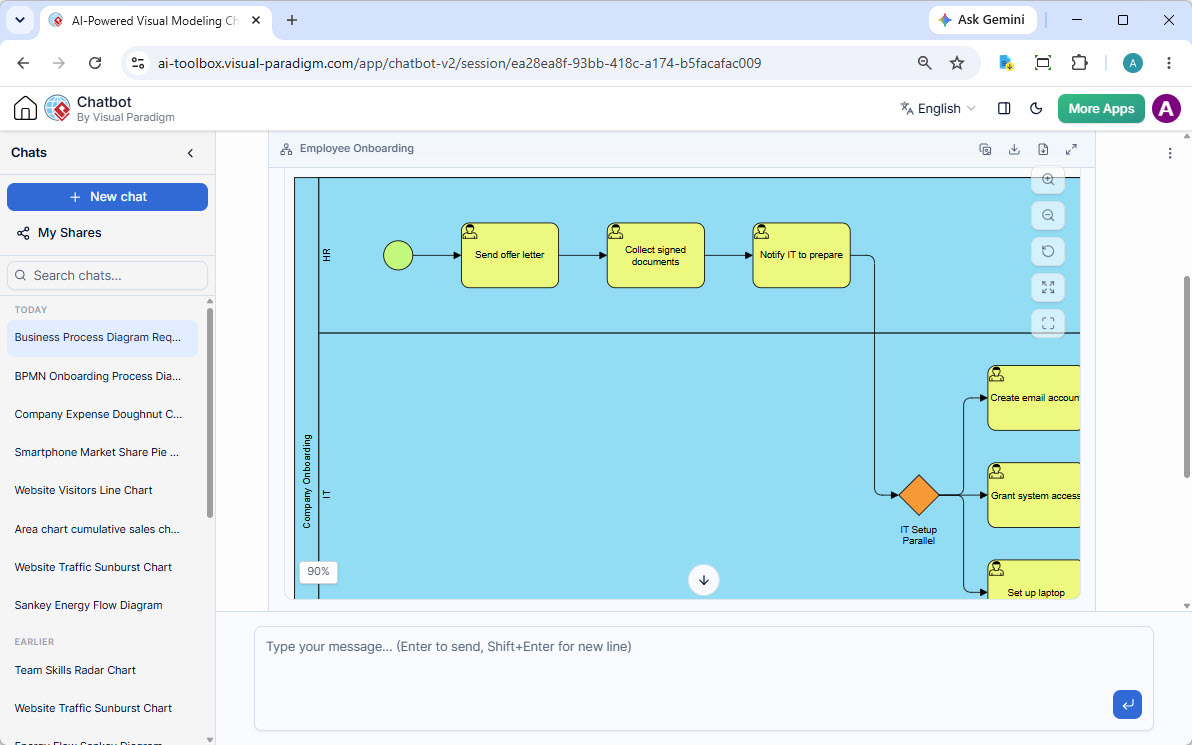
Diagram Example: This diagram shows the HR lane handling initial onboarding steps, followed by an IT lane executing parallel setup tasks (email, access, laptop) triggered by a gateway. It illustrates how the AI automatically structures swimlanes and parallel flows.
Example 2: Order Fulfillment Process
Prompt: The customer submits an order request. The Sales Department reviews the request. If approved, the Warehouse packs the item, and the Shipping Department delivers it.
Generated Workflow:
- Start: “Submit order request” (Customer).
- Sales: “Review request” leads to a decision gateway “Approved?”.
- No: “Order rejected.”
- Yes: Proceeds to Warehouse.
- Warehouse: “Pack item.”
- Shipping: “Deliver item” leads to “Order delivered.”
This example demonstrates the AI’s ability to handle conditional logic (Exclusive Gateways) and cross-departmental handoffs (Message Flows) automatically.
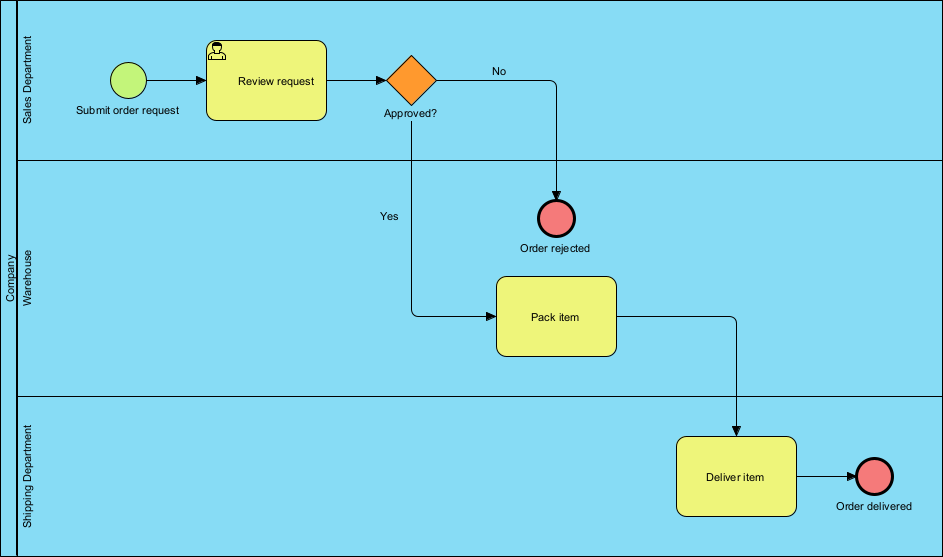
Diagram Example: A three-lane BPMN diagram showing the flow from Customer request through Sales approval, Warehouse packing, and Shipping delivery, with a clear “Approved?” decision diamond controlling the path.
Example 3: IT Service Request Management
Prompt: A service request process where employees submit requests, IT managers validate them, and technicians execute tasks.
Generated Workflow:
- Employee: Submits a “Submit service request.”
- IT Manager: Validates the request (“Request valid?”).
- Invalid: “Reject request.”
- Valid: “Assign to technician.”
- Technician: Handles the task based on priority levels.
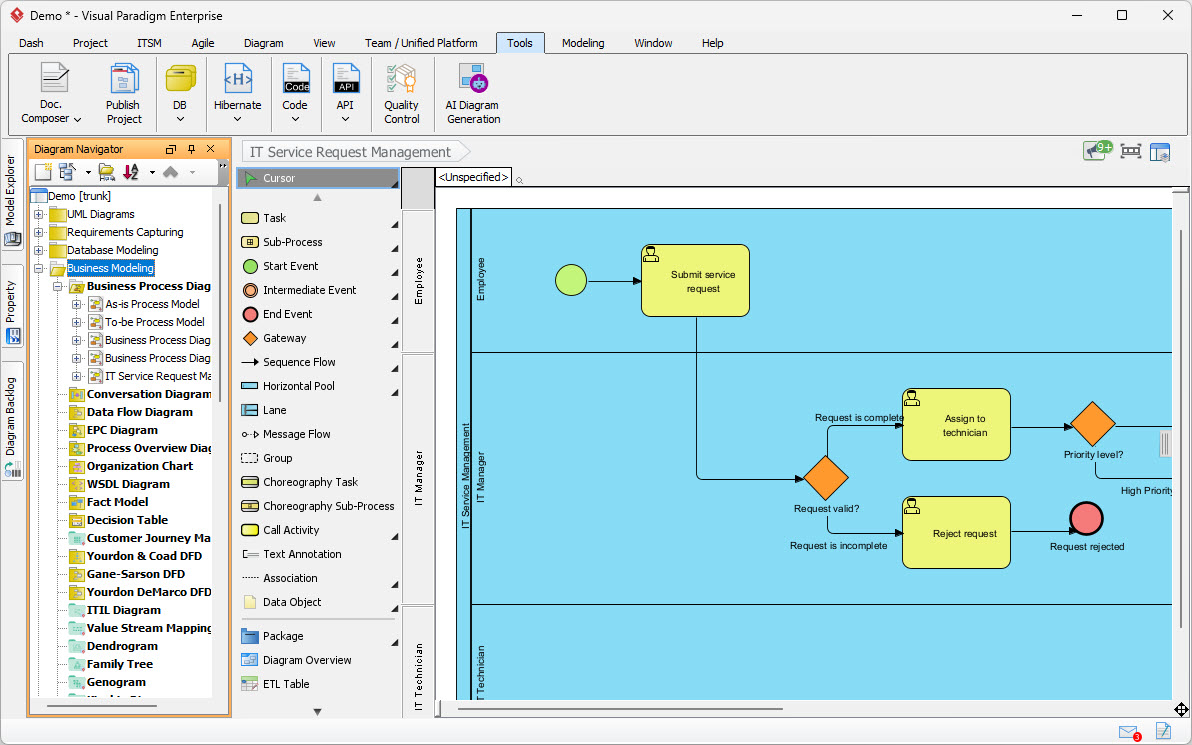
Diagram Example: A three-lane diagram (Employee, IT Manager, Technician) showing a validation step that can lead to rejection or assignment, highlighting the decision logic handled by the AI.
Example 4: Customer Support Ticket Resolution
Prompt: A customer support ticket resolution process for a SaaS company.
Generated Workflow:
- Customer: Submits a ticket.
- Support Team: Acknowledges the ticket and categorizes it.
- Decision: “Is it a bug?”
- Yes: Routes to “Engineering Team” via a message flow.
- No: Resolves ticket directly.
- Engineering: Assigns and fixes the bug, notifying support upon completion.
- Support: Verifies the fix and closes the ticket.
This example illustrates complex multi-lane interactions and message flows between different teams.
Example 5: National Digital Payment Infrastructure
Prompt: An enterprise architecture model for a digital payment system.
Generated Model:
- Layers: The AI can generate complex diagrams with distinct layers (Application, Business, Network).
- Components: Includes entities like “Payment Gateway,” “Identity Verification System,” and “Regional Processing Node.”
- Connections: Distinguishes between direct flows (solid lines) and dependencies (dashed lines).
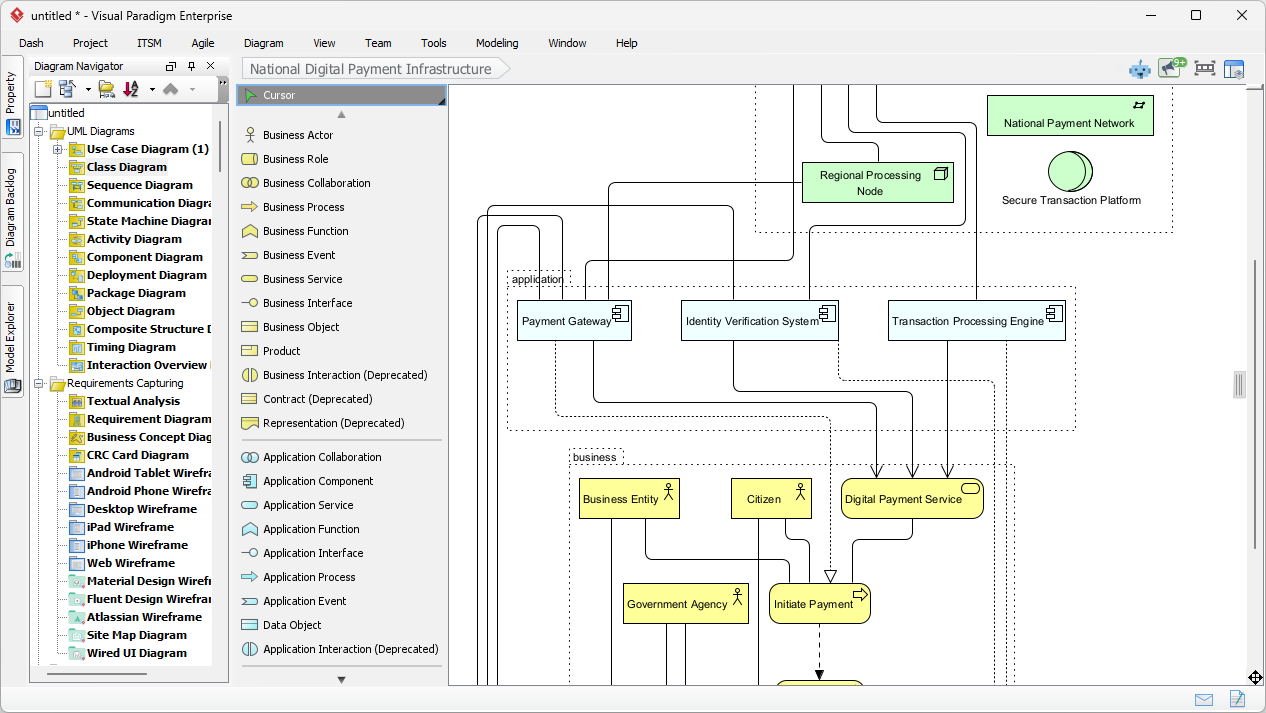
Diagram Example: A complex layered diagram showing the interaction between Citizens, Government Agencies, and Business Entities with Application systems and National Payment Networks.
Example 6: Supplier Qualification Process
Prompt: A process for qualifying new suppliers.
Generated Workflow:
- Supplier: Submits qualification data.
- Procurement Team: Reviews and validates data.
- Finance Team: Performs financial checks.
- Decision: Approval or rejection based on combined criteria.
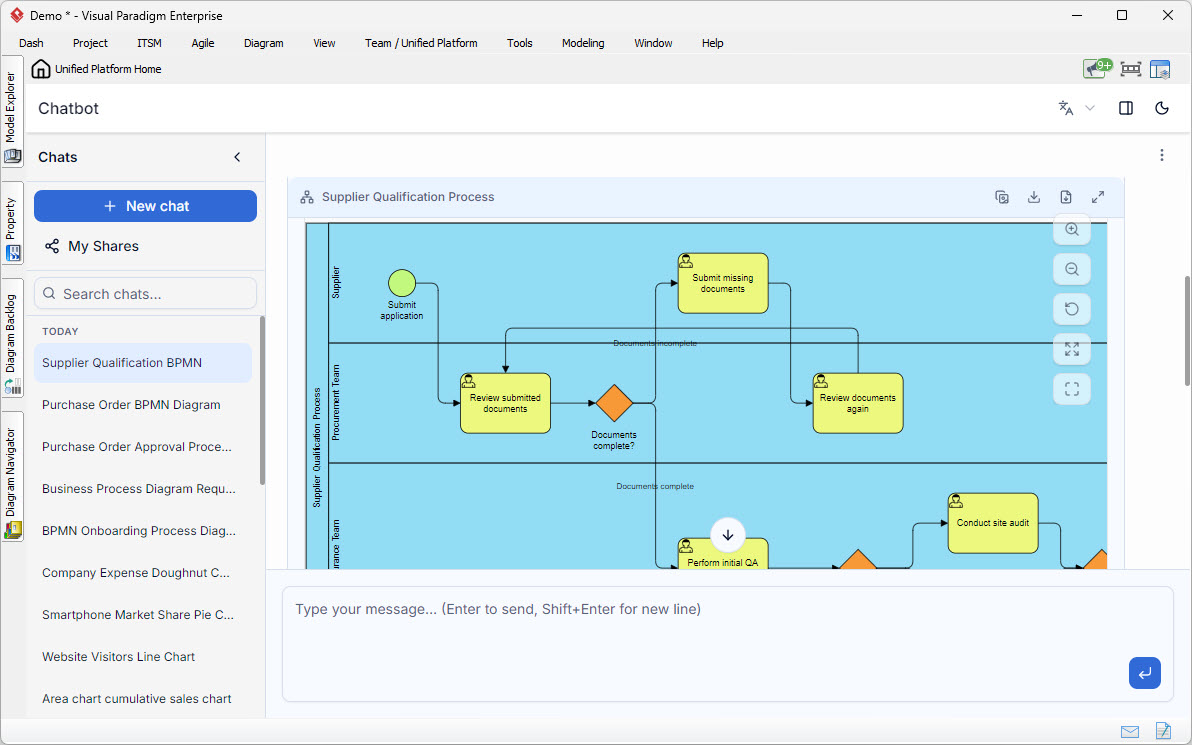
Diagram Example: A swimlane diagram involving Supplier, Procurement, and Finance teams, demonstrating how the AI handles sequential and parallel checks across different organizational units.
4. How to Use the AI BPMN Generator in Visual Paradigm
Step 1: Access the Tool
Open the Visual Paradigm Desktop application. Navigate to the top menu and select Tools > AI Diagram Generation .
Step 2: Configure Settings
In the dialog box that appears:
- Diagram Type: Select Business Process Diagram.
- Include Pools and Lanes: Check this box if you want the AI to organize the process into departments or roles.
- Topic/Description: Enter a detailed, chronological narrative of the process.
Step 3: Input the Narrative
Provide a clear, step-by-step description. For example:
“The Customer places an online purchase order. The Sales Department reviews the inventory availability. If the item is out of stock, Sales cancels the order. If the item is in stock, the Warehouse packs the item, and the Shipping Department delivers it.”
Step 4: Generate and Refine
Click OK. The AI will instantly generate the BPMN diagram. You can then:
- Edit Manually: Drag and drop elements or adjust layout.
- Conversational Refinement: Use the AI Chatbot to request changes (e.g., “Add a parallel gateway for packing and labeling”).
- Deep Modeling: Import the diagram into the desktop suite for advanced features like simulation, report generation, and version control.
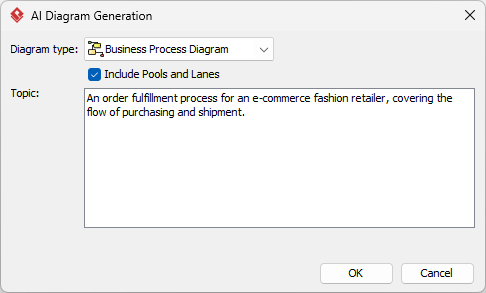
Diagram Example: A screenshot of the “AI Diagram Generation” dialog showing the “Business Process Diagram” type selected, “Include Pools and Lanes” checked, and a sample text prompt entered.
5. Advanced Capabilities and Ecosystem Integration
Beyond simple diagram generation, the Visual Paradigm ecosystem offers:
- As-Is vs. To-Be Analysis: Duplicate a generated baseline to create a target optimization model, maintaining traceability between versions.
- Process Simulation: Run simulations on the generated diagrams to identify bottlenecks and calculate KPIs.
- Collaboration: Share models via the cloud for real-time team collaboration, version control, and live editing.
- Documentation: Auto-generate reports and embed diagrams in OpenDocs for dynamic documentation.
- Code & Data Generation: Convert models directly into code skeletons or database schemas.
Conclusion
Visual Paradigm’s AI BPMN tools transform the way organizations document and optimize workflows. By leveraging Natural Language Processing, the platform allows users to bypass the tedious manual drafting of BPMN diagrams, focusing instead on analysis, strategy, and optimization. The integrated ecosystem ensures that generated models are not just static images but living assets that support collaboration, simulation, and enterprise-grade governance.
BPMN, Visual Paradigm, AI & Ecosystem Reference List
- BPMN for Beginners – A Complete Guide to Business Process Modeling Notation: Introductory tutorial on BPMN fundamentals.
- From Narrative to Diagram: How Visual Paradigm’s AI BPMN Generator Transforms Process Modeling Workflows: Case study on AI BPMN generation.
- BPMN Tutorial 1: Comprehensive tutorial on BPMN 2.0 notations.
- How AI-Powered NLP is Revolutionizing Text-to-BPMN Generation: In-depth guide on the technical foundations of AI BPMN.
- AI BPMN Business Process Diagram Generator Update: Official release notes for the AI generator.
- AI Diagram Generation Feature Page: Overview of Visual Paradigm’s AI capabilities.
- Intelligent BPM and Analysis Suite: Advanced toolset for process analysis and optimization.
- Visual Paradigm AI x BPMN Demonstration: Video walkthrough of the AI workflow.
- BPMN Diagram and Tools: Overview of BPMN modeling features.
- What is BPMN? Guide to Business Process Model and Notation: Foundational resource on BPMN 2.0 standards.
- AI Diagramming Chatbot: Try the AI chatbot for rapid ideation.
- Download Visual Paradigm Desktop: Download the professional modeling application.
This post is also available in Deutsche, Español, فارسی, Français, English, Bahasa Indonesia, 日本語, Polski, Portuguese, Ру́сский, Việt Nam, 简体中文 and 繁體中文.
