




A Comprehensive Guide to Using OCL in UML with PlantUML Examples
Introduction
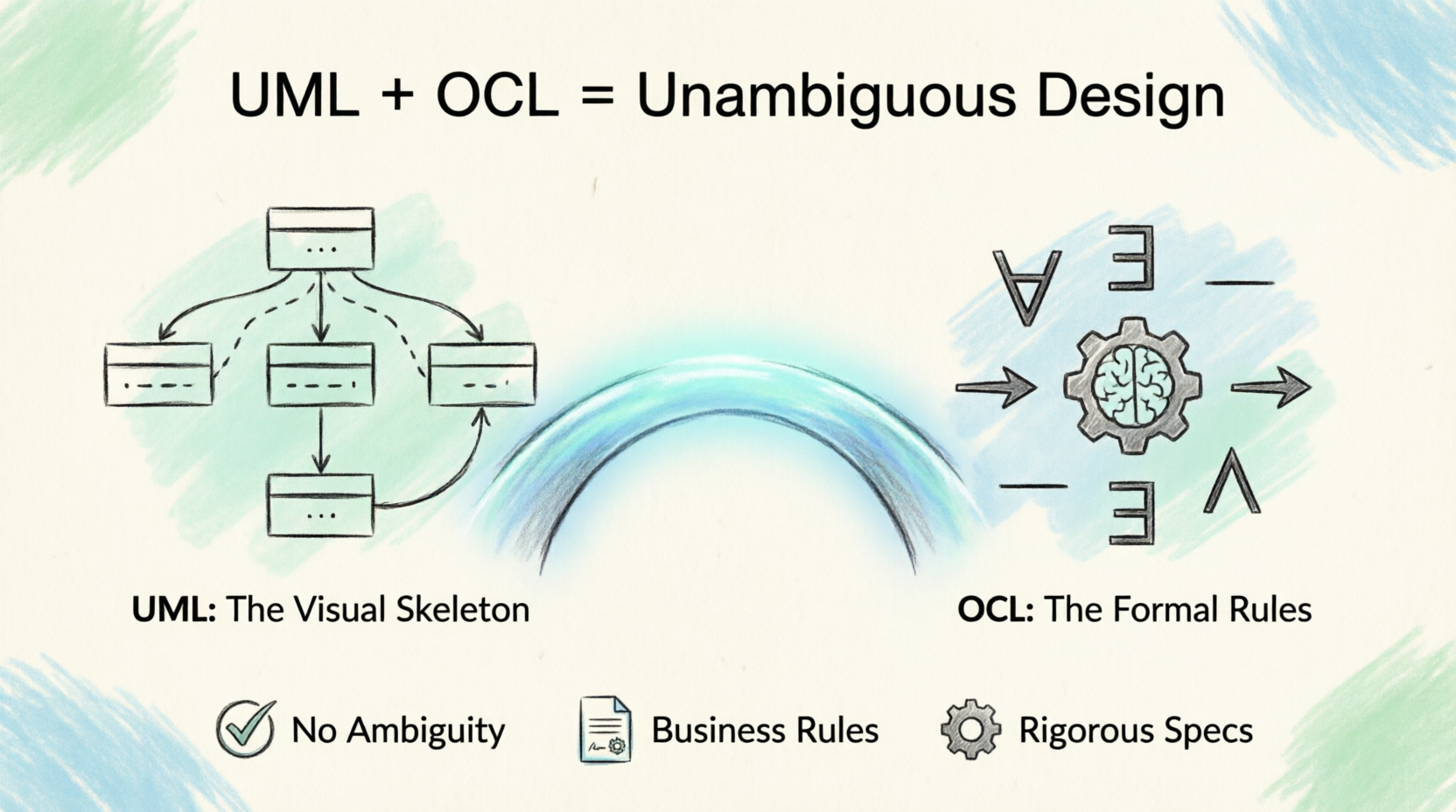
While UML (Unified Modeling Language) is exceptional for visualizing the structure of a system, it lacks the precision to express complex business rules and semantics. This is where the Object Constraint Language (OCL) comes in. OCL acts as the formal “glue” that binds UML diagrams to strict, unambiguous business logic.
This guide explains how OCL integrates with UML, the key concepts you need to know, and provides practical PlantUML examples to visualize these constraints.
1. The Synergy: How OCL Complements UML
Think of UML as the “skeleton” of your system (classes, associations, states) and OCL as the “nervous system” (the rules, conditions, and logic that govern how the skeleton behaves).
Visual Representation in UML
In standard UML, OCL constraints are typically represented using Notes attached to the relevant model elements (classes, operations, or states).
-
Stereotype: Often, notes containing OCL are given the
{constraint}stereotype. -
Context: Every OCL expression starts with a
contextkeyword, declaring which UML element the rule applies to.
2. Key Concepts of OCL in UML
A. Class Invariants (inv)
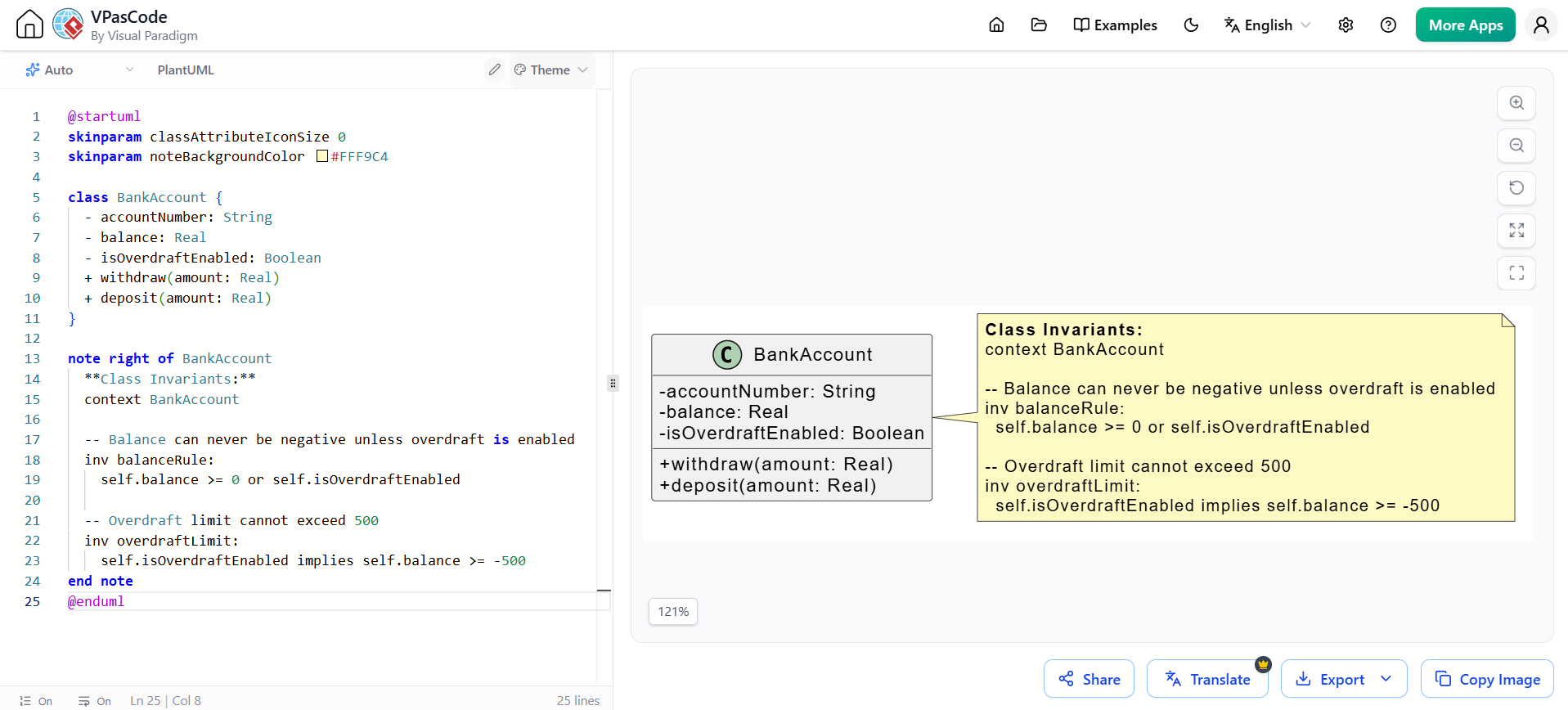
Invariants are conditions that must always be true for every instance of a class, regardless of what operations are called.
Key Concept: If an invariant is violated, the system is in an invalid state.
@startuml
skinparam classAttributeIconSize 0
skinparam noteBackgroundColor #FFF9C4

class BankAccount {
  - accountNumber: String
  - balance: Real
  - isOverdraftEnabled: Boolean
  + withdraw(amount: Real)
  + deposit(amount: Real)
}

note right of BankAccount
  **Class Invariants:**
  context BankAccount

  -- Balance can never be negative unless overdraft is enabled
  inv balanceRule:
    self.balance >= 0 or self.isOverdraftEnabled

  -- Overdraft limit cannot exceed 500
  inv overdraftLimit:
    self.isOverdraftEnabled implies self.balance >= -500
end note
@enduml
B. Operation Contracts (pre, post, body)
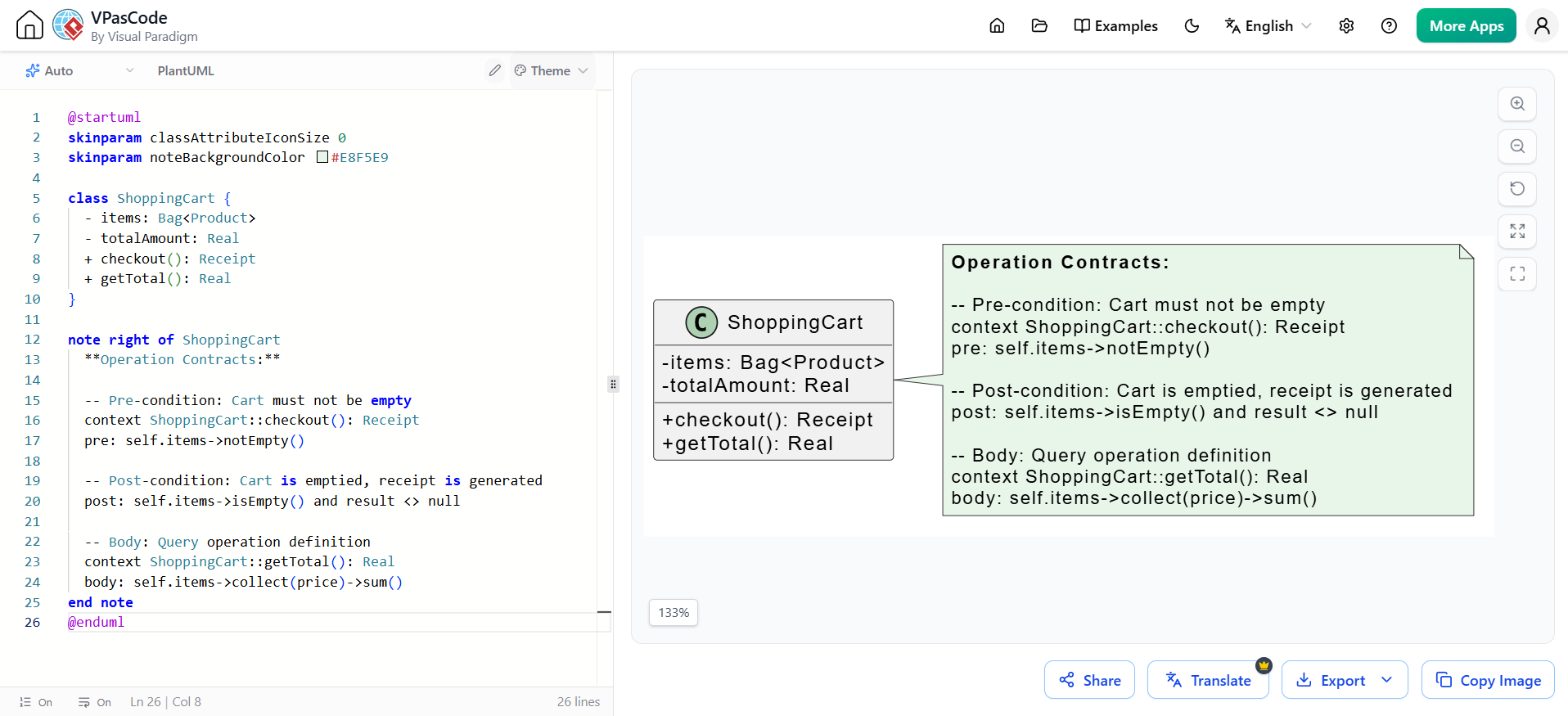
Operations (methods) can have constraints that define their behavior before and after execution.
-
Pre-condition (
pre): What must be true before the operation starts. (The caller’s responsibility). -
Post-condition (
post): What will be true after the operation finishes. (The operation’s guarantee). -
Body (
body): Defines the exact return value for query operations.
@startuml
skinparam classAttributeIconSize 0
skinparam noteBackgroundColor #E8F5E9

class ShoppingCart {
  - items: Bag<Product>
  - totalAmount: Real
  + checkout(): Receipt
  + getTotal(): Real
}

note right of ShoppingCart
  **Operation Contracts:**

  -- Pre-condition: Cart must not be empty
  context ShoppingCart::checkout(): Receipt
  pre: self.items->notEmpty()

  -- Post-condition: Cart is emptied, receipt is generated
  post: self.items->isEmpty() and result <> null

  -- Body: Query operation definition
  context ShoppingCart::getTotal(): Real
  body: self.items->collect(price)->sum()
end note
@enduml
C. Derived and Initial Values (derive, init)
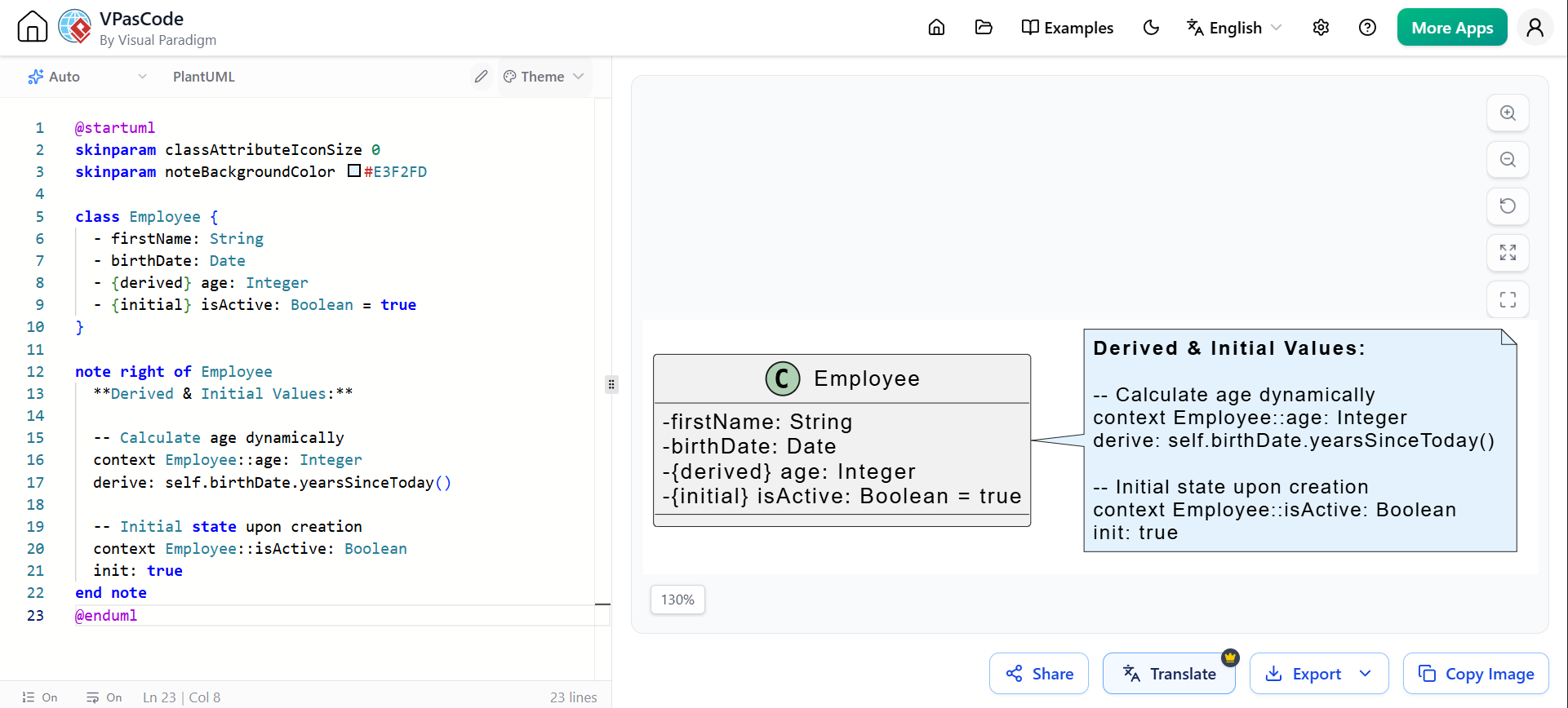
Instead of storing redundant data, UML allows attributes to be marked as {derived} or {initial}, with OCL defining their exact value.
@startuml
skinparam classAttributeIconSize 0
skinparam noteBackgroundColor #E3F2FD

class Employee {
  - firstName: String
  - birthDate: Date
  - {derived} age: Integer
  - {initial} isActive: Boolean = true
}

note right of Employee
  **Derived & Initial Values:**

  -- Calculate age dynamically
  context Employee::age: Integer
  derive: self.birthDate.yearsSinceToday()

  -- Initial state upon creation
  context Employee::isActive: Boolean
  init: true
end note
@enduml
D. State Machine Guards
In State Machine diagrams, transitions can have guards—boolean expressions that must evaluate to true for the transition to occur. OCL is the standard language for writing these guards.
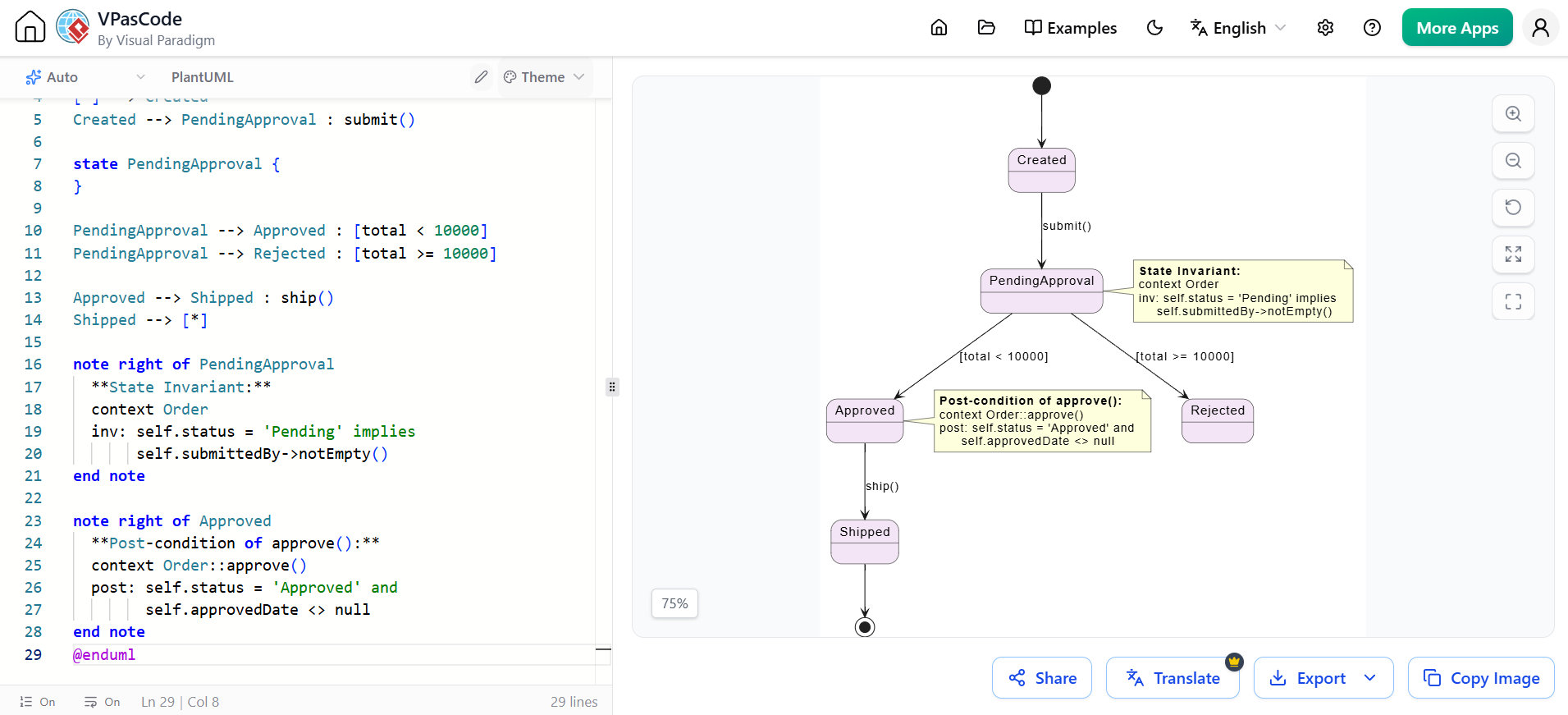
@startuml
skinparam stateBackgroundColor #F3E5F5

[*] --> Created
Created --> PendingApproval : submit()

state PendingApproval {
}

PendingApproval --> Approved : [total < 10000]
PendingApproval --> Rejected : [total >= 10000]

Approved --> Shipped : ship()
Shipped --> [*]

note right of PendingApproval
  **State Invariant:**
  context Order
  inv: self.status = 'Pending' implies
       self.submittedBy->notEmpty()
end note

note right of Approved
  **Post-condition of approve():**
  context Order::approve()
  post: self.status = 'Approved' and
        self.approvedDate <> null
end note
@enduml
3. Comprehensive Case Study: The Company Model
Let’s apply OCL to a complex UML Class Diagram involving Employee, Department, and Project. This demonstrates how OCL navigates associations and uses collection iterators (select, forAll, size).
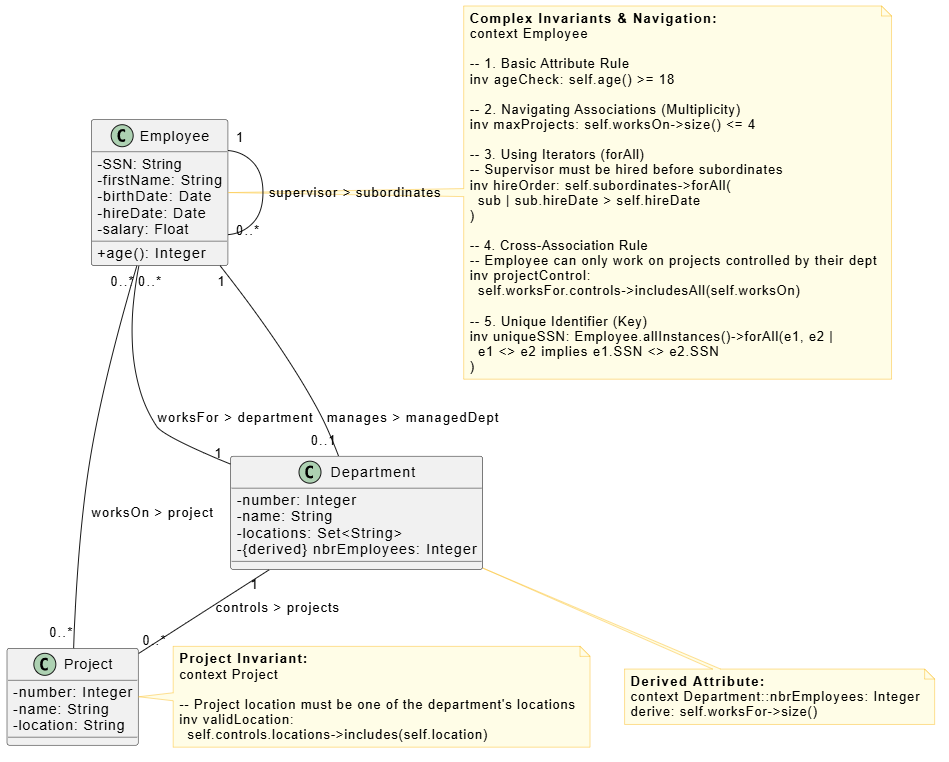
@startuml
skinparam classAttributeIconSize 0
skinparam noteBackgroundColor #FFFDE7
skinparam noteBorderColor #FBC02D

class Employee {
  - SSN: String
  - firstName: String
  - birthDate: Date
  - hireDate: Date
  - salary: Float
  + age(): Integer
}

class Department {
  - number: Integer
  - name: String
  - locations: Set<String>
  - {derived} nbrEmployees: Integer
}

class Project {
  - number: Integer
  - name: String
  - location: String
}

Employee "0..*" -- "1" Department : worksFor > department
Employee "0..*" -- "0..*" Project : worksOn > project
Employee "1" -- "0..1" Department : manages > managedDept
Department "1" -- "0..*" Project : controls > projects
Employee "1" -- "0..*" Employee : supervisor > subordinates

note right of Employee
  **Complex Invariants & Navigation:**
  context Employee

  -- 1. Basic Attribute Rule
  inv ageCheck: self.age() >= 18

  -- 2. Navigating Associations (Multiplicity)
  inv maxProjects: self.worksOn->size() <= 4

  -- 3. Using Iterators (forAll)
  -- Supervisor must be hired before subordinates
  inv hireOrder: self.subordinates->forAll(
    sub | sub.hireDate > self.hireDate
  )

  -- 4. Cross-Association Rule
  -- Employee can only work on projects controlled by their dept
  inv projectControl:
    self.worksFor.controls->includesAll(self.worksOn)

  -- 5. Unique Identifier (Key)
  inv uniqueSSN: Employee.allInstances()->forAll(e1, e2 |
    e1 <> e2 implies e1.SSN <> e2.SSN
  )
end note

note bottom of Department
  **Derived Attribute:**
  context Department::nbrEmployees: Integer
  derive: self.worksFor->size()
end note

note right of Project
  **Project Invariant:**
  context Project

  -- Project location must be one of the department's locations
  inv validLocation:
    self.controls.locations->includes(self.location)
end note

@enduml
4. Advanced OCL Techniques in UML
A. Using let for Readability
When an OCL expression becomes too complex, use the let keyword to define local variables within the constraint. This makes the UML note much easier to read.
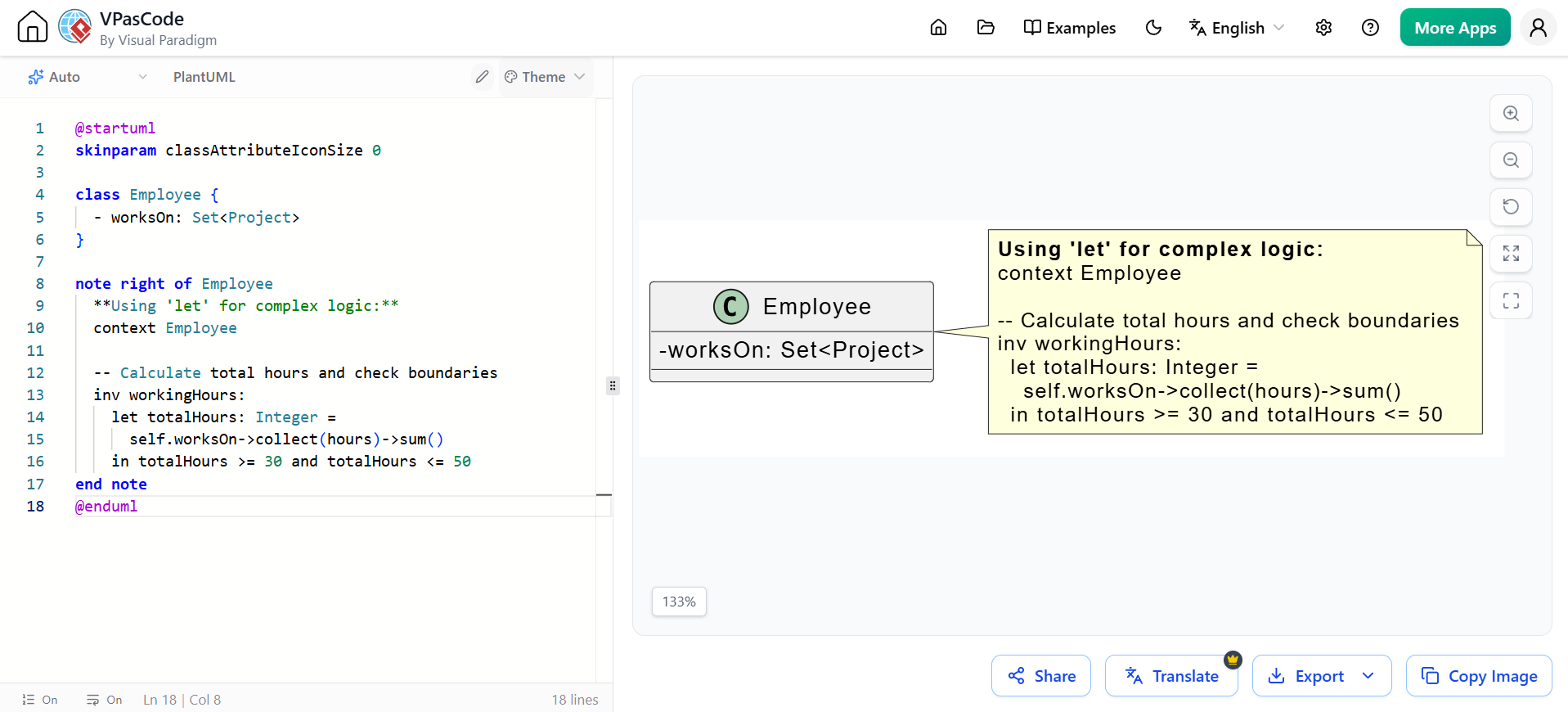
@startuml
skinparam classAttributeIconSize 0

class Employee {
  - worksOn: Set<Project>
}

note right of Employee
  **Using 'let' for complex logic:**
  context Employee

  -- Calculate total hours and check boundaries
  inv workingHours:
    let totalHours: Integer =
      self.worksOn->collect(hours)->sum()
    in totalHours >= 30 and totalHours <= 50
end note
@enduml
B. Handling Previous Values in Post-conditions (@pre)
When defining a post-condition, you often need to compare the new state with the old state. OCL uses the @pre postfix to access the value of a property exactly as it was before the operation started.
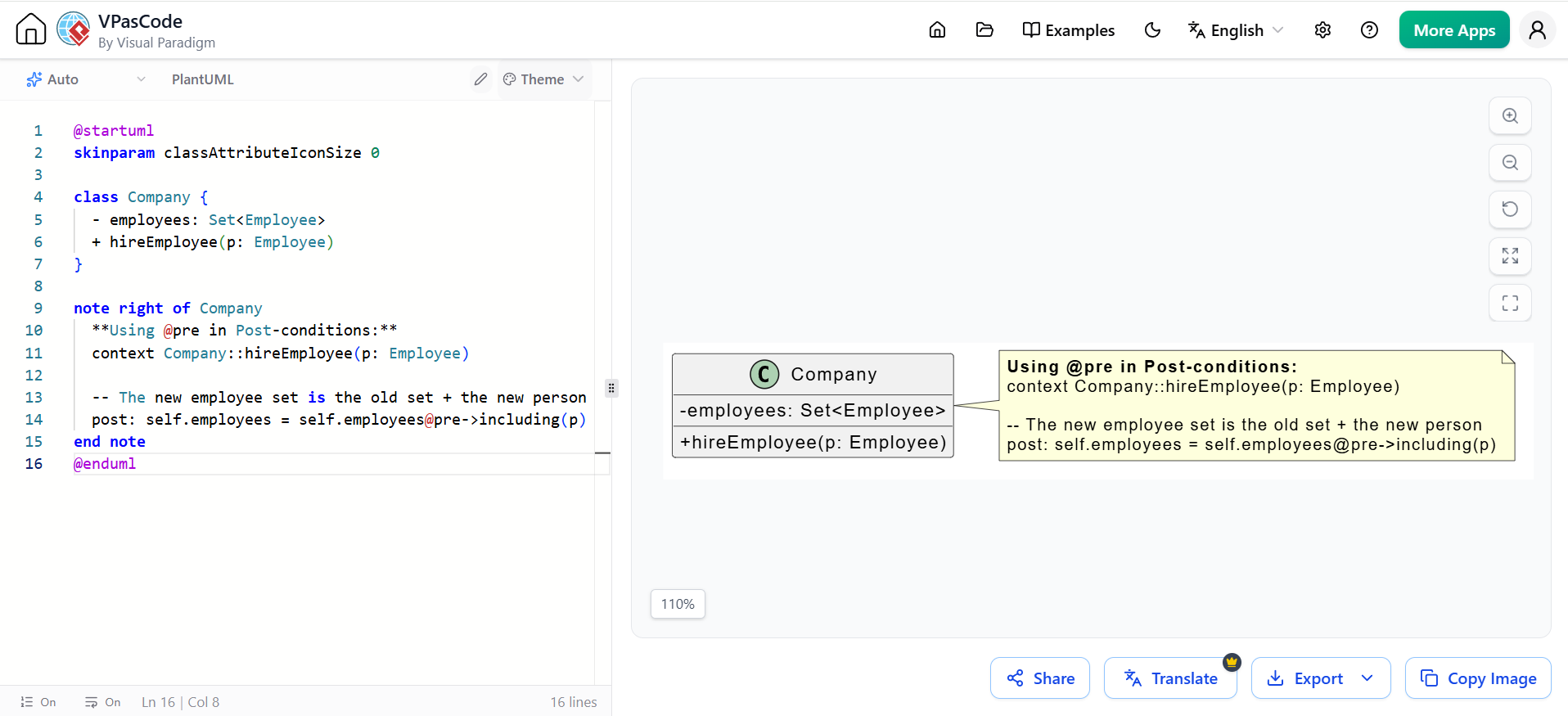
@startuml
skinparam classAttributeIconSize 0

class Company {
  - employees: Set<Employee>
  + hireEmployee(p: Employee)
}

note right of Company
  **Using @pre in Post-conditions:**
  context Company::hireEmployee(p: Employee)

  -- The new employee set is the old set + the new person
  post: self.employees = self.employees@pre->including(p)
end note
@enduml
5. Best Practices for OCL in UML
-
Name Your Constraints: Always give your invariants and conditions a name (e.g.,
inv maxProjects:). This makes it easier to reference them in documentation or traceability matrices. -
Use Notes Strategically: In PlantUML and visual UML tools, don’t clutter the class box with OCL. Put the OCL in adjacent notes. It keeps the diagram clean and readable.
-
Don’t Over-Constrain: Only write OCL for rules that cannot be easily expressed via UML multiplicities (e.g.,
0..1,1..*) or basic types. If a rule can be shown visually, show it visually. -
Leverage Collection Iterators: Master
->select(),->forAll(),->exists(), and->collect(). They are the most powerful tools for navigating UML associations in OCL. -
Check for Nulls/Empty Sets: When navigating optional associations (multiplicity
0..1or0..*), always use->notEmpty()or->isEmpty()before accessing properties to avoid undefined evaluation errors.
Conclusion
This post is also available in Deutsche, Español, فارسی, Français, English, Bahasa Indonesia, 日本語, Polski, Portuguese, Ру́сский, Việt Nam, 简体中文 and 繁體中文.
