




Case Study: Accelerating Software Architecture Documentation with VPasCode – A Diagram-as-Code Revolution
Suggested Article Title: “From Text to Vision: How VPasCode Transforms Diagram-as-Code Workflows for Modern Engineering Teams”
Introduction: The Documentation Gap in Modern Software Development
In today’s fast-paced engineering environments, software architecture evolves at the same velocity as source code. Yet, a persistent challenge remains: keeping architectural documentation synchronized with implementation. Traditional visual modeling tools, while powerful, often create friction—they live outside the codebase, require manual updates, and struggle to integrate with version control and CI/CD pipelines.
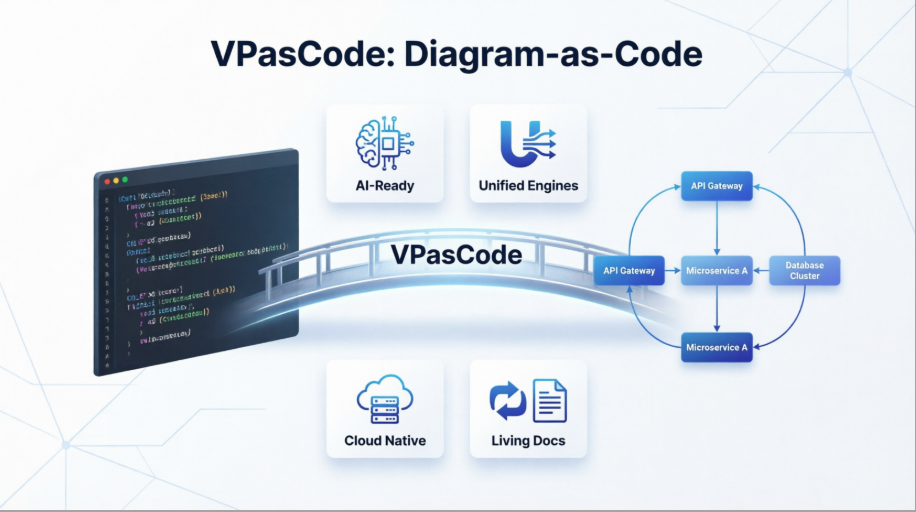
Enter VPasCode, Visual Paradigm’s unified Diagram-as-Code (DaC) platform. By shifting diagram creation into the text editor—where developers already spend their time—VPasCode bridges the gap between code and visualization. This case study explores how VPasCode empowers engineering teams to produce accurate, maintainable, and AI-ready architectural diagrams using plain-text syntax, while seamlessly integrating with modern development workflows.
The VPasCode Value Proposition: Why Diagram-as-Code Matters
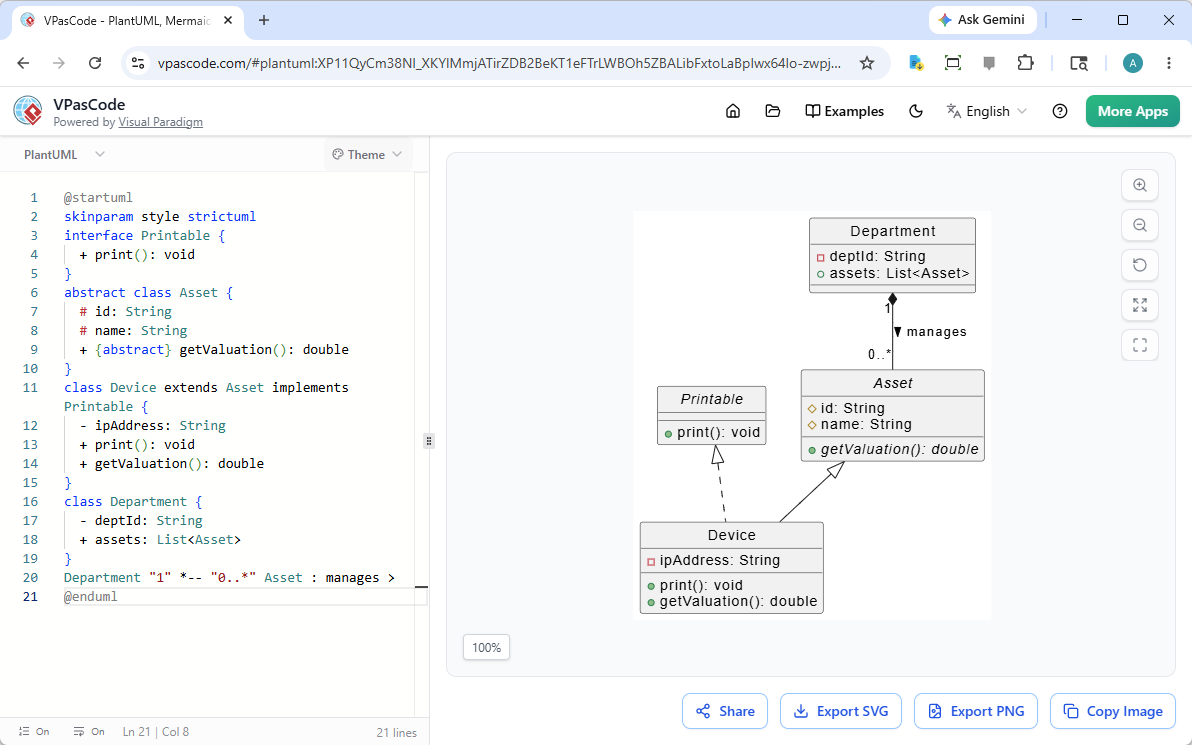
The VPasCode all-in-one text-to-diagram editor provides a dual-panel workspace for real-time rendering.
Software architecture documentation is most valuable when it is living, versioned, and collaborative. VPasCode delivers this through three core advantages:
✅ Automated Layout Engineering
Developers define what connects to what; VPasCode handles where and how. The platform’s rendering engines automatically calculate spatial distribution, padding, and grid scaling—freeing engineers from manual alignment tasks and ensuring professional, consistent output every time.
✅ Uniform Design Consistency
Text-driven scripts enforce aesthetic standards across teams. Layouts inherit structured styling rules automatically, guaranteeing that every diagram—whether created by a junior developer or a principal architect—maintains visual coherence without manual formatting overhead.
The AI Frontier: Natural Language to Architecture Diagrams
One of VPasCode‘s most transformative capabilities is its native compatibility with Artificial Intelligence. While large language models struggle to manipulate complex visual canvases, they excel at generating and interpreting structured text.
Because DaC tools rely on semantic scripts, AI can effortlessly bridge natural language descriptions and visual architecture. For example:
“Create a microservice pipeline where an API gateway routes requests to a user service with a Redis cache”
An AI assistant can instantly generate the precise PlantUML or Mermaid syntax required to render this workflow:
graph TD
    A[Client Request] --> B{API Gateway}
    B --> |Valid Token| C[Auth Service]
    B --> |Invalid Token| D[Access Denied]
    C --> E[(User Database)]
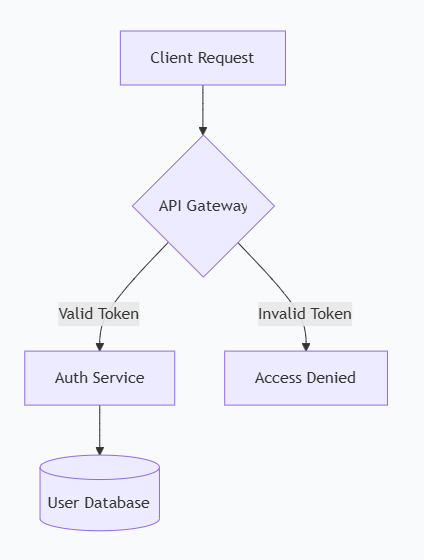
Example: A Mermaid.js flowchart rendered instantly in VPasCode from plain-text syntax.
This synergy makes DaC a future-proof foundation for AI-assisted engineering, automated documentation generation, and conversational architecture design.
Unified Engine Ecosystem: One Platform, Multiple Syntaxes
The developer community has organically adopted powerful open-source diagramming engines:
-
PlantUML: Rich enterprise styling and UML compliance
-
Mermaid.js: Agile, markdown-friendly syntax for web documentation
-
Graphviz: Advanced network topology and pipeline visualization
Historically, leveraging these engines meant managing fragmented local environments, installing dependencies, or switching between disconnected web tools. VPasCode eliminates this friction by unifying them under a single, cloud-native workspace.
VPasCode provides a centralized editing canvas that auto-detects and instantly parses Mermaid, PlantUML, and Graphviz syntax—simultaneously. No local setup required. Just pure, high-fidelity rendering, seamless URL sharing, and vector exports.
PlantUML Class Diagram Example: E-Commerce Domain Model
@startuml
class User {
    - String userId
    - String hashedSecret
    + Boolean verifyLogin(String input)
}

class Order {
    + String orderId
    + Date timestamp
    - Double calculateTotal()
}

User "1" --> "0..*" Order : "places and owns"
@enduml
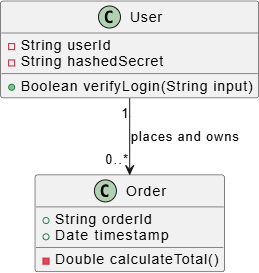
Example: A PlantUML class diagram demonstrating visibility modifiers and multiplicity relationships.
Advanced Example: Payment Gateway Architecture
@startuml
interface IPaymentProcessor {
    + Boolean authorizeAmount(Double cash)
    + void captureFunds()
}

abstract class BaseGateway {
    # String merchantApiKey
    # String endpointUrl
    + void logTransaction(String payload)
}

class StripeGateway {
    - String stripeToken
    + Boolean authorizeAmount(Double cash)
    + void captureFunds()
}

class PayPalGateway {
    - String paypalEmail
    + Boolean authorizeAmount(Double cash)
    + void captureFunds()
}

class ShoppingCart {
    - List items
    + void checkout(IPaymentProcessor engine)
}

BaseGateway ..|> IPaymentProcessor
StripeGateway --|> BaseGateway
PayPalGateway --|> BaseGateway
ShoppingCart *-- IPaymentProcessor
@enduml
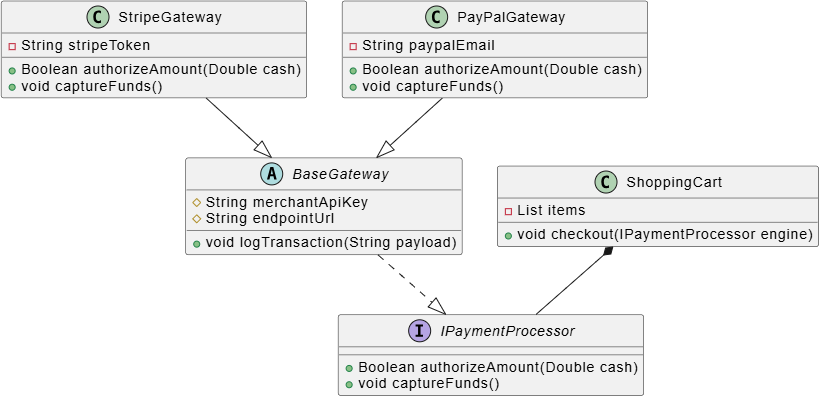
Example: Complex inheritance, interface implementation, and composition relationships in a payment system.
60-Second Quickstart: From Zero to Diagram in Three Steps
VPasCode is entirely cloud-native—no Java runtimes, Node.js modules, or IDE extensions required. Here’s how to create your first diagram:
Step 1: Open the Live Editor
Navigate to the VPasCode Playground. You’ll see a dual-panel interface:
-
Left Panel: Syntax-highlighted code editor with error detection
-
Right Panel: Real-time diagram renderer that updates as you type
Step 2: Choose Your Engine and Paste a Blueprint
VPasCode auto-detects syntax. Try one of these examples:
Option A: Mermaid Flowchart
graph TD
    A[Client Request] --> B{API Gateway}
    B --> |Valid Token| C[Auth Service]
    B --> |Invalid Token| D[Access Denied]
    C --> E[(User Database)]
Option B: PlantUML Component Diagram
@startuml
package "Application Tier" {
    [Web App] -right-> [API Gateway]
}
database "Data Storage" {
    [API Gateway] --> [SQL Main]
    [API Gateway] ..> [Redis Cache] : "Read optimization"
}
@enduml
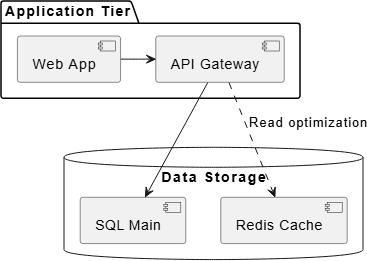
Example: PlantUML component diagram with package and database boundaries.
Step 3: Export and Share
Use the workspace control bar to:
-
Copy Shareable URL: Your diagram text is compressed into the URL hash—zero database storage required.
-
Export SVG: Download scalable vector graphics for Git repos, wikis, or markdown docs.
-
Export PNG: Get high-resolution snapshots for Slack, Teams, or presentations.
Best Practices for Production-Ready Diagrams
To maximize the value of your DaC workflows, consider these proven practices:
🔹 Separate Concerns with Abstract Classes: Use abstract class or interface keywords to visually distinguish structural boundaries from concrete implementations.
🔹 Label Multiplicities Early: Always add cardinality markers ("1", "0..*") on relationship arrows to make data constraints explicit for developers and reviewers.
🔹 Control Layout Density: For wide diagrams, replace -- with - in relationship arrows to force horizontal alignment and reduce vertical sprawl.
🔹 Embed Diagrams in Documentation: Use exported SVGs or direct VPasCode links in README files, Confluence pages, or engineering wikis to keep documentation living and interactive.
🔹 Leverage AI Prompting: Train your team to describe architectures in natural language, then use AI assistants to generate initial DaC syntax—accelerating onboarding and reducing boilerplate.
Conclusion: The Future of Architecture Documentation is Text-Driven
VPasCode represents more than a new tool—it embodies a paradigm shift in how engineering teams conceptualize, communicate, and maintain system architecture. By embracing Diagram-as-Code, organizations gain:
✅ Agility: Diagrams evolve alongside code, with no manual synchronization overhead
✅ Consistency: Automated layout and styling eliminate visual debt across documentation
✅ AI-Readiness: Structured syntax unlocks the full potential of LLMs for architecture generation and analysis
✅ Accessibility: Cloud-native, zero-install deployment lowers barriers to adoption across roles and locations
As software systems grow increasingly distributed and complex, the ability to rapidly visualize, iterate, and share architectural decisions becomes a strategic advantage. VPasCode empowers teams to meet this challenge—not by replacing visual thinking, but by grounding it in the text-driven workflows that power modern software delivery.
The message is clear: When architecture lives as code, it becomes versioned, reviewable, automatable, and AI-friendly. VPasCode doesn’t just draw diagrams—it future-proofs your engineering documentation.
Ready to transform your documentation workflow?
👉 Try VPasCode Free | 📚 Explore the Full Documentation
Pronunciation note: VPasCode = “V-P-as-code” (Visual Paradigm as Code) 🗣️
This post is also available in Deutsche, Español, فارسی, Français, English, Bahasa Indonesia, 日本語, Polski, Portuguese, Ру́сский, Việt Nam, 简体中文 and 繁體中文.
