How to convert MS Word document to ePub format

How to convert MS Word document to ePub format

MS Word is a word processing application developed by Microsoft that is commonly used to create and edit text files. EPUB is an electronic book or eBook file format designed to be reflowable, meaning that text and images can be optimized for different screen sizes and orientations. In case we want to convert MS Word to ePub, VP Online will be a useful tool for you. When do we need to convert MS Word document to EPub There are several situations where it may be necessary to convert an MS Word document to…continue reading →
How to convert MP4 to Animated GIF for Free

How to convert MP4 to Animated GIF for Free

GIF animation is an image format that supports transparent backgrounds and animations, usually used for many advertising purposes and company websites. Although GIF animation does not contain sound, it is a well-known format when we do creative work. VP Online file converter supports converting MP4 to GIF animation. Let's learn more in this article! How to convert MP4 to Animated GIF for Free In VP Online, enter the File Converter page under Explore. After that, click Image Converters and select MP4 to GIF Converter. Upload our MP4 to the web, set the Frame…continue reading →
How to compress PDF

How to compress PDF

Maximize PDF File Storage with Convenient Online Compression - Introducing VP Online as Your Solution! If there is a limit to upload PDF files or we need to store a large number of files, it is important for us to have a convenient tool to compress PDF. VP Online is one of your best choices to support online PDF compression in a few steps. Let's see how to do it in this article! What is PDF compression? PDF compression refers to the process of reducing the size of a PDF document. The goal…continue reading →
Define the Max value in a Radar chart

Define the Max value in a Radar chart

An In-Depth Guide to Editing Radar Charts Radar charts are a powerful visualization tool that allows you to display data in a circular format, making it easy to compare multiple variables at once. When working with radar charts, it's important to have control over various aspects of the chart, such as the maximum value for each discipline. In this article, we will explore how to edit radar charts and specifically focus on specifying the maximum value using the format panel chart. Understanding Radar Charts Before we dive into editing radar charts, let's briefly…continue reading →
Create A Grouped Column And Line Chart

Create A Grouped Column And Line Chart

What Is A Grouped Column And Line Chart Grouped column And Line chart is a kind of combined chart consisted in grouped column chart and line chart. A line chart is placed on the top of a grouped column chart to show 2 sets of data together with widely difference. When To Use Grouped Column And Line Chart In a grouped column and line chart, Y-axis on both 2 sides are representing the value of the 2 sets of data. In this case, the difference between the ranges of their data are usually…continue reading →
Create Your First Explainer Video

Create Your First Explainer Video

Visual Paradigm Online Animated Explainer offers a rich library of customizable templates that allow you to effortlessly produce professional, engaging videos in a fraction of the time it would normally take. Whether you want to simplify complex concepts, engage your audience with dynamic visuals, or enhance storytelling, Visual Paradigm Online Animated Explainer gives you the tools and flexibility you need to bring your ideas to life. Let's follow the structure here to create your first explainer video! Create Your First Explainer Video https://www.youtube.com/watch?v=iho3X2hzyfM After login to Animated Explainer workspace, press the Create New…continue reading →
Customize a Character from Template

Customize a Character from Template

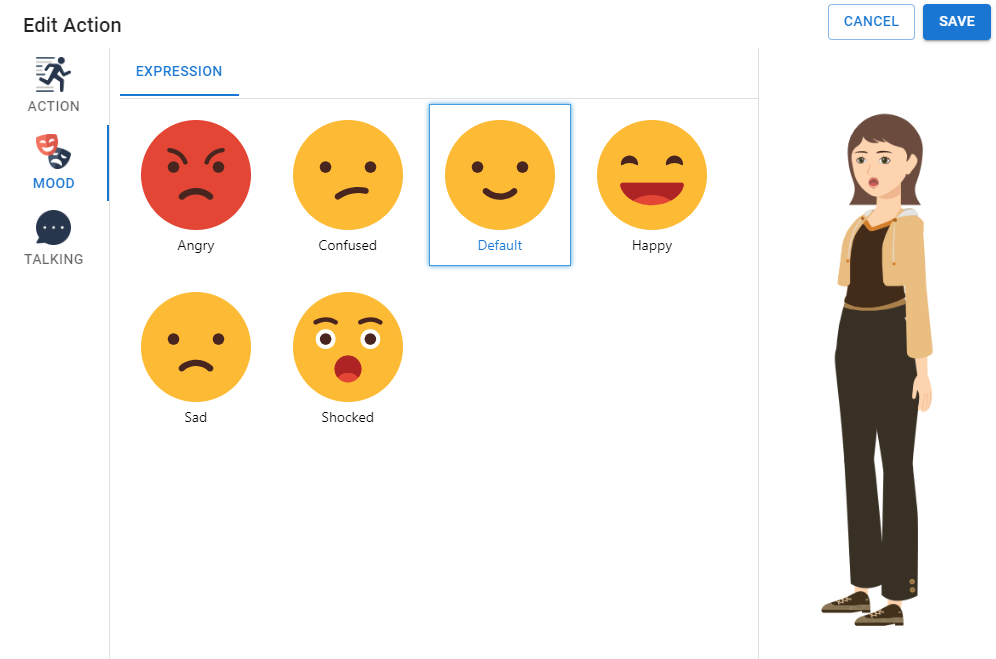
Choosing the ideal character for your video is pivotal in effectively communicating your message. In this article, we will explore the process of customizing these characters to seamlessly match the tone and content of your video in Visual Paradigm Online Animated Explainer. Explore a Variety of Character Families Visual Paradigm Online offers a wide selection of character types, ensuring that you find the perfect match for your video project. Whether you're aiming for a professional look, a touch of whimsy, or a specific cultural context, there's a character family that fits your needs.…continue reading →
Quick and Efficient: Automating Video Creation with Visual Paradigm’s Animated Explainer

Quick and Efficient: Automating Video Creation with Visual Paradigm’s Animated Explainer

Visual Paradigm's Animated Explainer is an efficient and user-friendly online animation video maker that offers a wide range of time-saving features and versatile templates. With Animated Explainer, users can create captivating videos quickly and easily, whether it's a business presentation, explainer video, marketing video, or product demo. Try it out today and start creating professional-grade animation videos with ease!
How to Organize PowerPoint Slideshows with Folders

How to Organize PowerPoint Slideshows with Folders

Visual Paradigm Online is a versatile and user-friendly tool that allows you to efficiently create and manage PowerPoint presentations. One of the key aspects of an effective presentation is organizing your slides in a logical and structured manner. In this article, we will explore how to organize PowerPoint slideshows using folders in Visual Paradigm Online. Watch the below video for a tutorial! https://www.youtube.com/watch?v=5S1iJiViv0M Accessing Visual Paradigm Online To begin, open Visual Paradigm Online and sign in to your account. If you don't have an account, create one for free. Once you're logged in,…continue reading →