




BPMN for Beginners: A Practical Guide to Business Process Modeling
Business processes often involve many people, decisions, activities, and communication steps. Without a clear way to represent these elements, it can be difficult to understand how work moves through an organization.
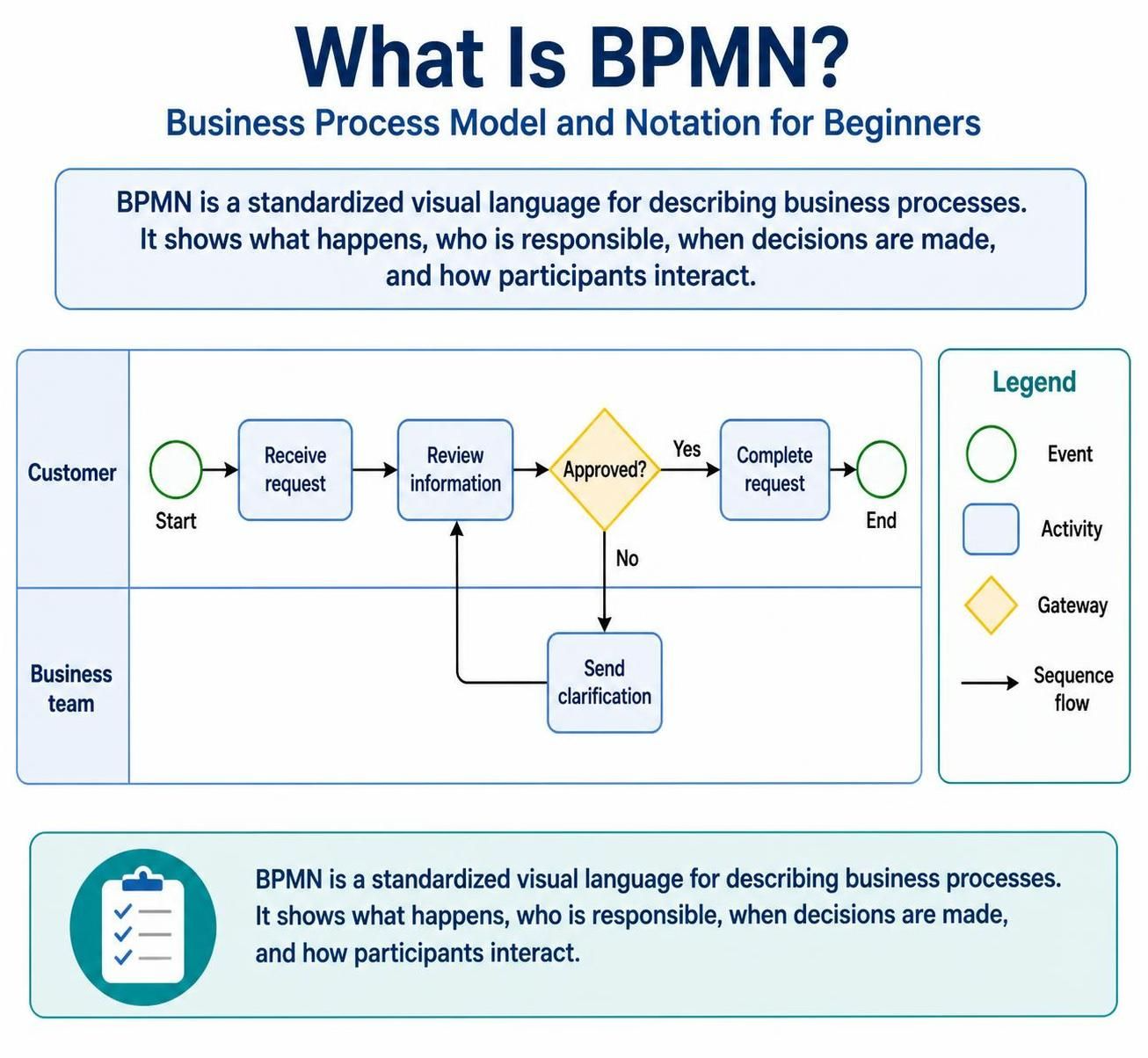
Business Process Model and Notation, commonly called BPMN, provides a standardized visual language for describing business processes. It uses familiar diagram symbols to show what happens, who is responsible, when decisions are made, and how different participants interact.
What Is BPMN?
BPMN is a graphical notation used to represent the logic and sequence of activities in a business process. A BPMN diagram works much like a flowchart, but it uses standardized symbols and rules that make the diagram understandable to business analysts, managers, developers, and other stakeholders.
For example, a company might use BPMN to model:
-
Processing a customer order
-
Approving a loan application
-
Handling an employee leave request
-
Responding to a customer complaint
-
Paying an invoice
-
Onboarding a new employee
BPMN is currently associated with BPMN 2.0, which defines both the visual symbols used in diagrams and the meaning of those symbols. This common language helps organizations document processes consistently and communicate them more effectively.
Why Is BPMN Important?
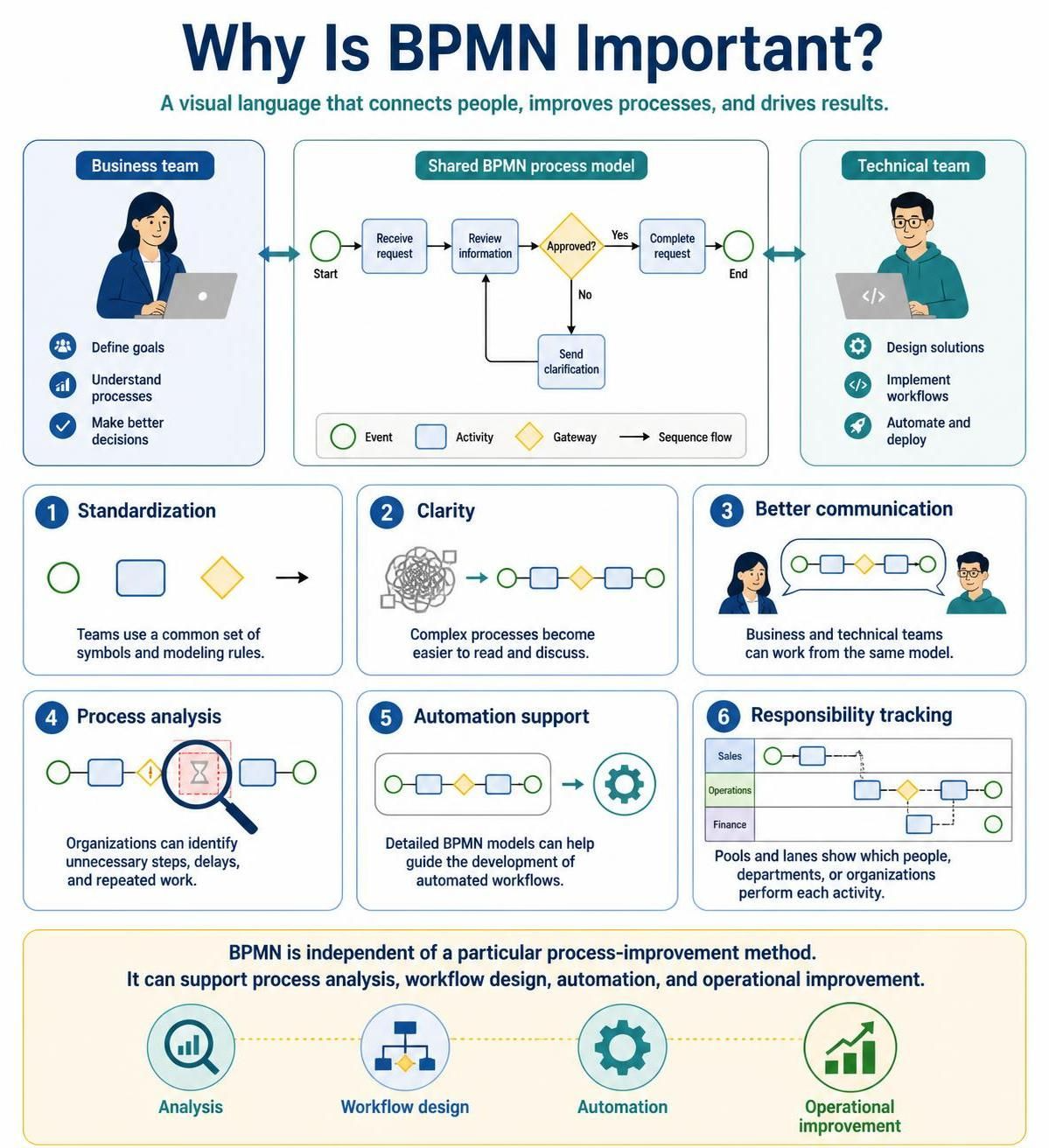
BPMN is useful because it creates a shared understanding of how a process works. A business manager can use the diagram to discuss responsibilities and bottlenecks, while a technical team can use the same diagram as a starting point for workflow automation.
The main benefits of BPMN include:
-
Standardization: Teams use a common set of symbols and modeling rules.
-
Clarity: Complex processes become easier to read and discuss.
-
Better communication: Business and technical teams can work from the same model.
-
Process analysis: Organizations can identify unnecessary steps, delays, and repeated work.
-
Automation support: Detailed BPMN models can help guide the development of automated workflows.
-
Responsibility tracking: Pools and lanes show which people, departments, or organizations perform each activity.
BPMN is also independent of a particular process-improvement method. It can be used with different approaches, including process analysis, workflow design, automation, and operational improvement.
The Main Elements of a BPMN Diagram
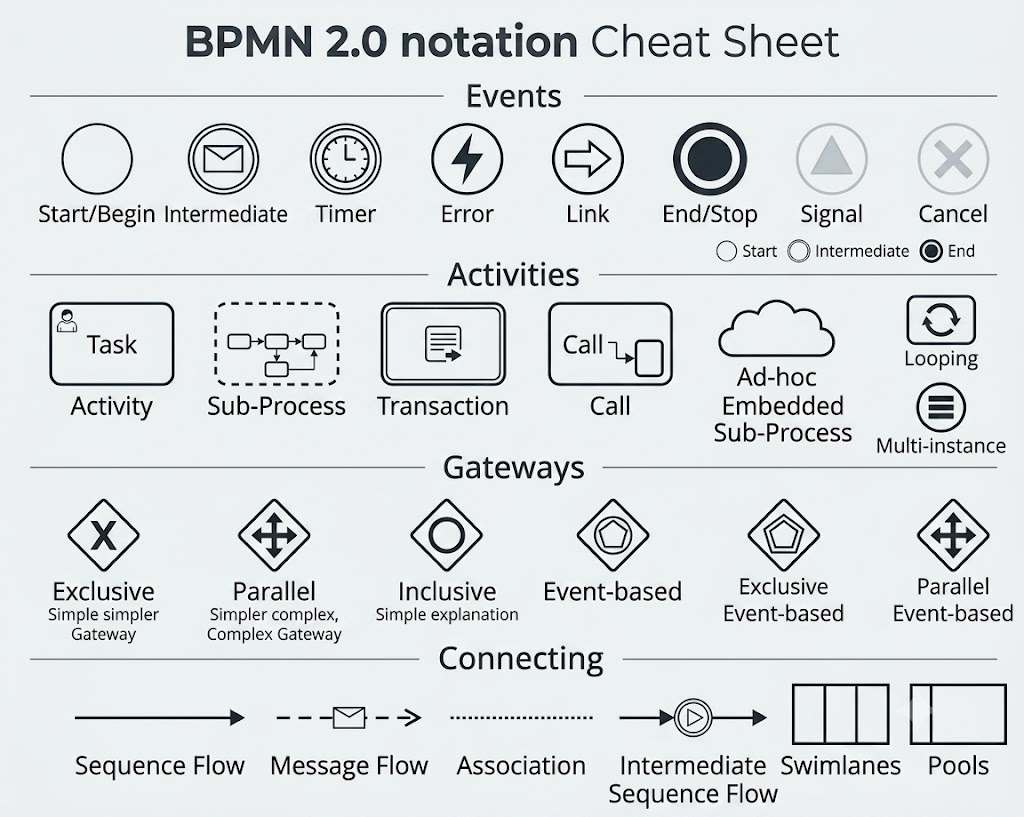
BPMN contains several categories of elements. Beginners should first learn four essential components: events, activities, gateways, and connecting objects.
1. Events
An event represents something that happens during a process. Events can start a process, influence the process while it is running, or bring the process to an end.
Events are usually drawn as circles.
Common examples include:
-
A customer submits an application
-
A message is received
-
A timer expires
-
A payment is completed
-
A process is cancelled
The three basic event categories are:
-
Start event: Shows where a process begins.
-
Intermediate event: Occurs between the start and end of a process.
-
End event: Shows where the process finishes.
For example, a customer submitting an order could trigger a start event. A waiting period for payment could be represented by an intermediate timer event. The successful shipment of the order could lead to an end event.
2. Activities
An activity represents work performed during a process. Activities are usually shown as rounded rectangles.
Examples include:
-
Enter customer information
-
Review an application
-
Send an email
-
Verify payment
-
Approve a request
-
Ship an order
The most common activity is a task, which represents a single unit of work. A group of related activities can be represented as a sub-process.
For example, “Process loan application” might be a sub-process containing these tasks:
-
Check the applicant’s identity.
-
Review financial documents.
-
Assess credit history.
-
Calculate eligibility.
-
Prepare a recommendation.
BPMN can also identify how a task is performed. A task may be manual, completed by a person, performed automatically by a system, or completed by a user through an application.
3. Gateways
A gateway represents a decision or controls how the process flow divides and joins. Gateways are drawn as diamond shapes.
Suppose an employee submits a leave request. After a manager reviews it, the process may follow one of two paths:
-
If the request is approved, record the leave.
-
If the request is rejected, notify the employee.
This decision can be modeled with an exclusive gateway, because only one path is selected.
Important gateway types include:
-
Exclusive gateway: Selects one possible path.
-
Parallel gateway: Activates multiple paths at the same time.
-
Inclusive gateway: Activates one or more paths depending on conditions.
-
Event-based gateway: Selects a path based on whichever event occurs first.
A gateway should normally have clearly defined conditions. Labels such as “Approved,” “Rejected,” or “Payment received” help readers understand why a particular path is followed.
4. Sequence Flows
A sequence flow is an arrow that shows the order in which activities, events, and gateways occur.
For example:
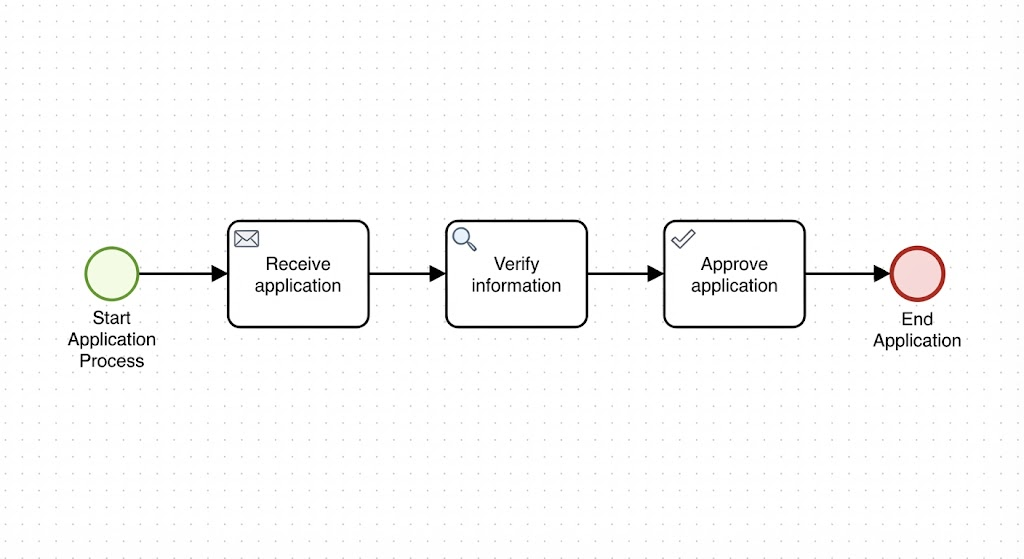
Start → Receive application → Verify information → Approve application → End
The arrows show the direction of the process. Without sequence flows, the reader cannot determine which activity happens first or what happens next.
Pools and Lanes
BPMN uses pools and lanes to show responsibility.
A pool represents a participant or process. This participant could be:
-
A company
-
A customer
-
A supplier
-
A government agency
-
A particular business process
A lane divides a pool into areas that represent different roles, departments, or teams.
For example, a loan-approval process might contain one pool called “Loan Request” with lanes for:
-
Bank branch
-
Credit department
-
Back office
Each task is placed in the lane belonging to the person or department responsible for completing it. This makes ownership visible and helps identify handoffs between teams.
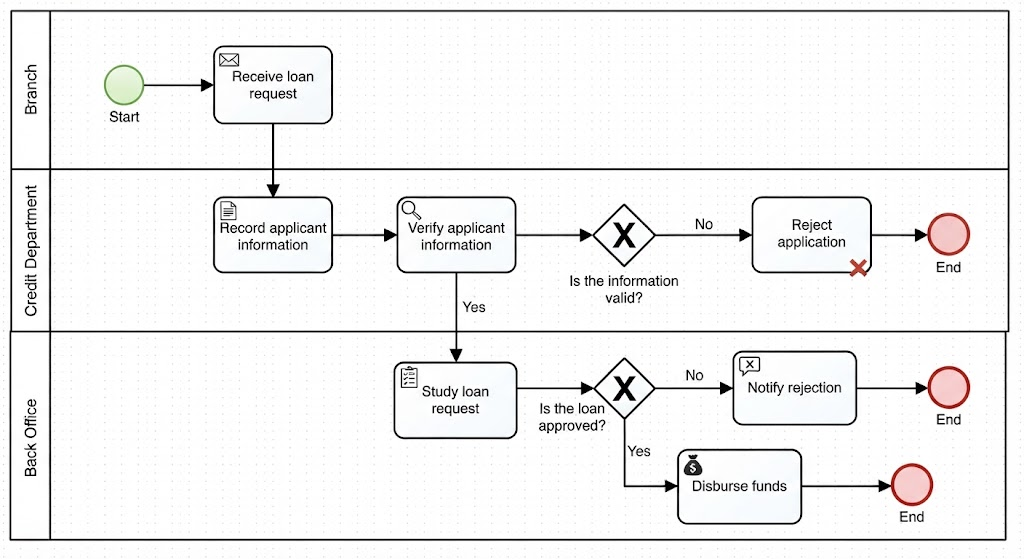
A Simple BPMN Example: Loan Request Process
Consider a simplified loan-request process.
A customer submits a loan application and provides the required documents. The organization records the request, verifies the information, and studies the application. The loan is then either approved or rejected.
The process can be described as follows:
Start
  ↓
Receive loan request
  ↓
Record applicant information
  ↓
Verify applicant information
  ↓
Is the information valid?
  ├── No → Reject application → End
  └── Yes
          ↓
     Study loan request
          ↓
     Is the loan approved?
          ├── No → Notify rejection → End
          └── Yes → Disburse funds → End
This process contains several important BPMN concepts:
-
The start event shows that a loan request has been received.
-
The tasks represent recording, verifying, studying, and disbursing the loan.
-
The exclusive gateways represent decisions about valid information and loan approval.
-
The end events show the possible outcomes.
-
Lanes can identify whether the branch, credit department, or back office performs each activity.
The example demonstrates how BPMN can make a process easier to understand without describing every technical detail.
How to Read a BPMN Diagram
When reading a BPMN diagram, follow these steps:
-
Find the start event.
Determine what triggers the process. -
Follow the arrows.
Trace the sequence flow from left to right or from the start toward the end. -
Identify the activities.
Look for the work performed at each stage. -
Look for gateways.
At each diamond, check the conditions that determine which path is followed. -
Check the lanes.
Identify who performs each task. -
Find the end event.
Determine the possible results of the process.
A useful question to ask at every step is: What happens next, and who is responsible for it?
Beginner Modeling Tips
When creating your first BPMN diagram, keep the model simple.
-
Begin with the process objective and end result.
-
Identify the event that starts the process.
-
List the major activities in their normal sequence.
-
Add gateways only where a real decision or parallel activity exists.
-
Use clear, action-oriented task names, such as “Review application” rather than “Application.”
-
Assign each activity to a responsible role or department.
-
Label decision paths clearly.
-
Avoid adding advanced symbols before they are necessary.
-
Make sure every process path can reach an end event.
-
Review the diagram with the people who perform the process.
A beginner’s diagram does not need to represent every exception immediately. It is often better to create a simple version first and add details after the main flow is understood.
Common Mistakes to Avoid
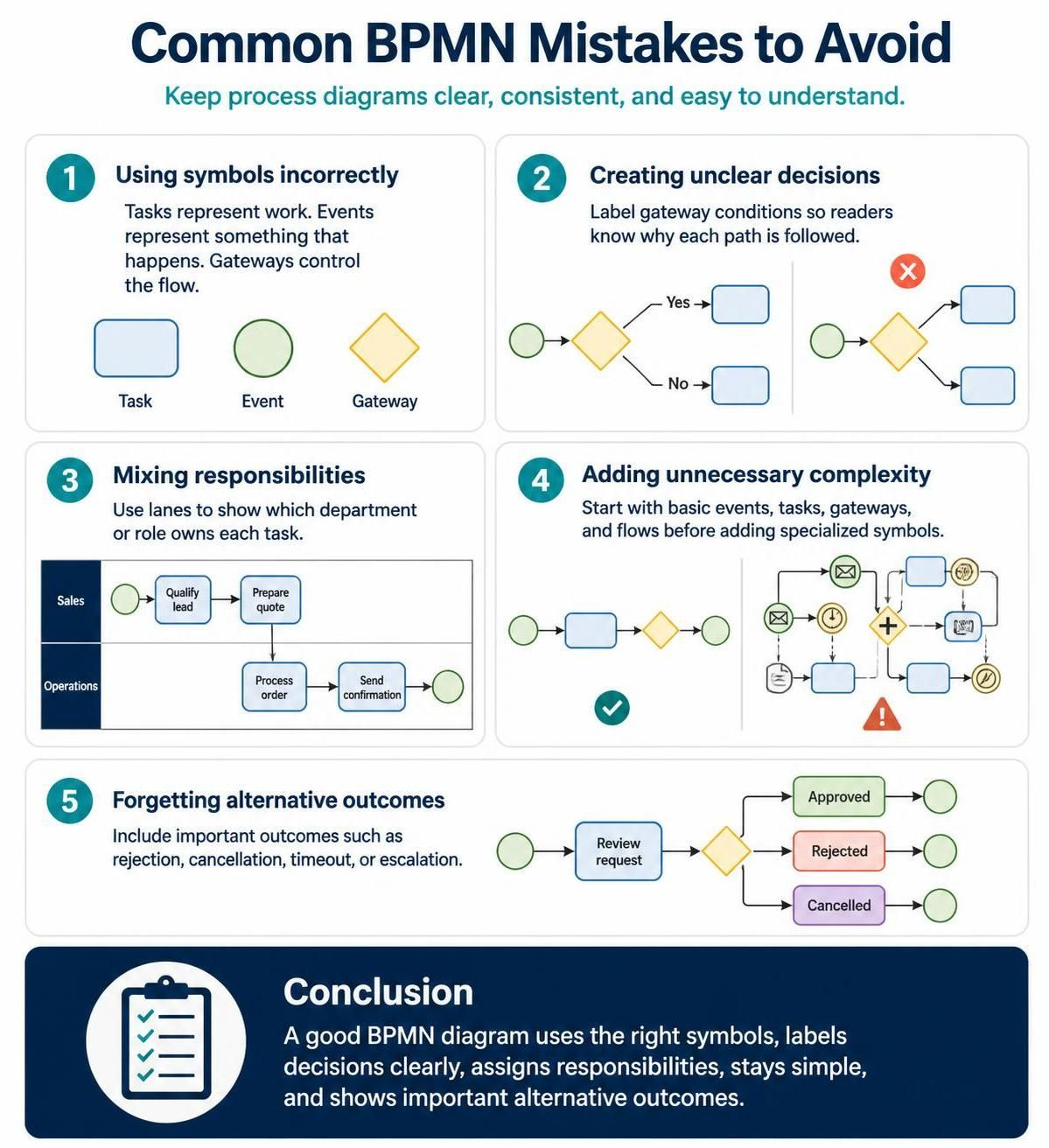
Several mistakes can make a BPMN diagram confusing:
Using symbols incorrectly
A task, event, and gateway have different meanings. A task represents work, an event represents something that happens, and a gateway controls the flow.
Creating unclear decisions
A gateway without labeled conditions forces readers to guess why the process takes one path instead of another.
Mixing responsibilities
If all tasks appear in one undivided area, it may be difficult to see which department owns each activity. Lanes can make responsibilities clearer.
Adding unnecessary complexity
BPMN provides many specialized symbols, but using too many of them can make a beginner diagram difficult to understand. Start with basic events, tasks, gateways, and flows.
Forgetting alternative outcomes
Processes rarely have only one successful path. Include outcomes such as rejection, cancellation, timeout, or escalation when they are important to the process.
Conclusion
BPMN is a standardized way to visualize business processes. Its basic elements—events, activities, gateways, sequence flows, pools, and lanes—are enough to model many everyday workflows.
The best way to learn BPMN is to begin with a familiar process, such as ordering a product or approving a leave request. Identify what starts the process, list the activities, mark the decisions, assign responsibilities, and show the possible outcomes. Once these fundamentals are clear, you can gradually learn more advanced BPMN symbols and use the notation for detailed process analysis and automation.
This post is also available in Deutsche, Español, فارسی, Français, English, Bahasa Indonesia, 日本語, Polski, Portuguese, Việt Nam, 简体中文 and 繁體中文.
