How to merge PDFs

How to merge PDFs for Free

Online PDF merge tool is a web-based software that allows users to combine multiple PDF files into a single document. With an online PDF merge tool, users can easily merge PDFs without having to download any software, making it a convenient and efficient solution for anyone who needs to merge PDFs on the go. In this article, we will show you how to do it with VP Online PDF tool. When do you need to Merge PDF There are several situations that you may need to merge PDF files: you have multiple PDF…continue reading →
How to Edit PDF as a Document?

How to Edit PDF as a Document?

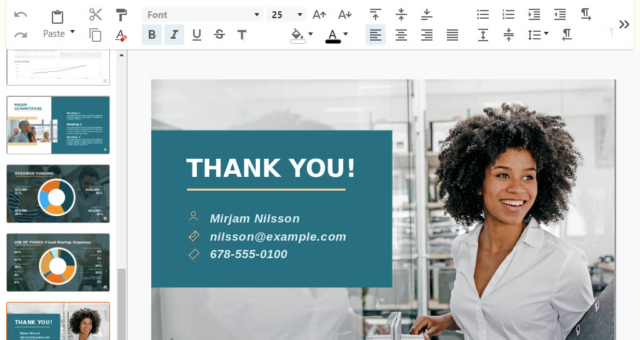
Want to edit your PDF with a Word processor like Microsoft Word? In this article, we will guide you through different methods to edit your PDF using a word processor like Word. Editing PDF in Word: Common Challenges When it comes to editing PDFs in Word, there are some common issues you might encounter: Lack of suitable PDF editor: Many PDF editing tools do not support content editing functionality, let alone a text-based editing experience like Word. Although some tools offer PDF to Word conversion, they do not come with a document editor.…continue reading →
How to Convert PowerPoint to PDF

How to Convert PowerPoint to PDF for Free

PowerPoint is an essential tool for creating presentations, but when it comes to sharing those presentations with others, it is better to convert them to PDF. PDF is a widely used file format that ensures your presentations look the same on all device, no matter what software is used to view them. Visual Paradigm Online is a multi unified platform that allows you to create, manage and share presentations and other types of diagrams easily. In this article, we will show you how to convert PowerPoint to PDF with it Convert PowerPoint to…continue reading →
9 Reasons Why You Should Use Visual Paradigm Online for Diagram Editing

9 Reasons Why You Should Use Visual Paradigm Online for Diagram Editing

In order to visualize complex information and concepts in a simple and intuitive way, diagrams will be what we need. Visual Paradigm Online is a cloud-based diagram tool that provides a wealth of features and functionality for creating and editing diagrams. Here are reasons why you should consider using VP Online for your next project. Collaboration Visual Paradigm Online allows multiple team members to work on the same diagram together in real-time, making it easy to collaborate and stay on the same page. User-friendly Interface Intuitive and user-friendly interface of VP Online makes…continue reading →
Ultimate PDF Tool: Edit, Convert & Secure PDF with VP Online

Ultimate PDF Tool: Edit, Convert & Secure PDF with VP Online

PDF (Portable Document Format) has become the standard file format for exchanging and sharing documents across the internet. This format is known for its ability to preserve the original layout, graphics, and text of a document, regardless of the device or software used to view it. With the increasing use of PDFs in both personal and professional settings, it's important to know how to perform basic tasks such as viewing, editing, converting, and protecting them. In this article, we will walk you through each of these tasks, providing step-by-step instructions and helpful tips…continue reading →
Going Paperless: The Benefits of a PDF-Based Office

Going Paperless: The Benefits of a PDF-Based Office

In a fast-paced, technology-driven world, companies are looking for different ways to streamline processes and reduce their carbon footprint in order to be environmentally friendly and reduce costs. One solution that has gained popularity in recent years is the paperless office. By using digital technologies and tools, businesses can reduce their reliance on paper and increase their efficiency. A key tool to achieve this shift is the Portable Document Format (PDF). In this article, we will explore the benefits of using PDF to achieve a paperless office. Benefits of a PDF-Based Office The…continue reading →
How to Edit Text in a PDF Online [Full Guide]

How to Edit Text in a PDF Online [Full Guide]

PDF stands for Portable Document Format and is a file format commonly used for exchanging and sharing documents. PDFs have become a popular choice for sharing information because they preserve the original format and layout of the document, making it easy for the recipient to view the document exactly as intended, regardless of the device or operating system being used. There are many reasons why you might need to edit text to a PDF. Perhaps you need to correct a typo or error in the document, or you need to add additional information…continue reading →
Online PDF Editing: Get More Done in Less Time

Online PDF Editing: Get More Done in Less Time

Online PDF editing is a modern and effective way to manage PDF files. With the advancement of technology, PDF editing no longer limited by using desktop software. Instead, you can now edit PDF files online with a variety of tools and applications, which can provide greater convenience and accessibility, and also offer different benefits that can help you to save time and raise working efficiency. In this article, we will tell you more about the benefits of editing PDF files with online tools instead of desktop PDF editors. Overview of Online PDF Editing…continue reading →
How to use PDF/A validator?

How to use PDF/A validator?

Get your PDFs in tip-top shape with Visual Paradigm Online's PDF/A Validator! Say goodbye to those pesky compatibility issues and hello to seamless document sharing.  So why wait? Start validating your PDFs like a pro and experience the ultimate in PDF perfection with Visual Paradigm Online's PDF/A Validator!
How to edit PDF online

How to edit PDF online

PDF is one of the most commonly used file formats today. It is suitable for different devices or applications. Sometimes, if we find some mistakes and want to improve our PDF files, a PDF editor is needed. VP online' s Free PDF editor is one of the best editors for you! https://www.youtube.com/watch?v=MxjPH4gdamU&width=854&height=480 Upload PDF to your workspace After login your workspace, click PDF under Apps, then press "import" button to upload your PDF. Instant PDF conversion is provided that only 5 seconds are needed to upload a PDF with 6,000 pages. We can…continue reading →