Share My Flipbook Via Twitter

Share My Flipbook Via Twitter

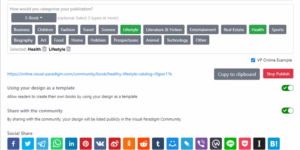
After finishing our flipbook, it is time for us to share it with others! We can share it through email and other social media. In this article, we will show you how to share the flipbook via X! https://www.youtube.com/watch?v=2nUMmNeF4b0&width=854&height=480 How To Share The Flipbook Via X After publishing the book, you can go to the workspace under "My Books", there are 4 buttons for each of the books, including, Edit, Share, Setting and More. Click " Share ", then you will see the following browser. In stead of sharing through URL and email, you can…continue reading →
How to Use Your Own Brand Logo in the Flipbook Invite Email?

How to Use Your Own Brand Logo in the Flipbook Invite Email?

In Fliplify, you can easily create your flipbooks with various pages. Sometimes you may want to share your designed flipbook with others so that they can read your book via different channels. With Fliplify, you are allowed to share your design flipbook via Email. People who receive your email can open your designed flipbook on the website. You can freely edit the content of the email for your flipbook. You can even apply your brand logo on the email for inviting someone to read your book online. Here is a tutorial for you…continue reading →
Embed A Flipbook In Blogger

Embed A Flipbook In Blogger

After creating a flipbook in the flipbook maker, do you want to share it in other social media? If we leave the website, can we still show it as a Flipbook? Yes, we can. Fliplify support embedding the flipbook as coding. We can embed it in other website including blogger. https://www.youtube.com/watch?v=tHUCNsE9oag&width=854&height=480 How To Embed A Flipbook In Blogger What is Blogger Blogger is a online content management system for blogs. It is now owned by Google, providing hosting of the blogs, then users can create and manage their own blogs through Blogger. Blogger…continue reading →
Add A Popup Book In Blogger

Add A Popup Book In Blogger

Blog writing is a way to keep track of what's going on in your life. It's also a way for people to see what you've been up to in the past, and what you're up to now. Fliplify's flipbook maker allows you to create your own ebook, and integrate it into your posts written in Blogger.  There are mainly two ways of integration. Other than embedding the flipbook in Blogger, you can also choose to add a popup book in the post. This article will show you how you can do it, and also…continue reading →
Upload PDF file to become a flipbook

Upload PDF file to become a flipbook

Have you ever wondered how to convert a PDF into an eBook? Or how to read a PDF document as if you are reading a flipbook? These are the flipbook examples that show you how to turn PDF into a digital flipbook with an amazing reading experience. You can also make use of Fliplify's flipbook maker to convert and share your document privately with specific people, or publicly with everyone. This video will show you how to upload PDF files to become a flipbook in VP Online. https://www.youtube.com/watch?v=H0FLHR4ZQ6Q&width=854&height=480 Follow these 3 simple steps…continue reading →
Animate The Text And Object Of A Flipbook

Animate The Text And Object Of A Flipbook

After finishing a flipbook, consider adding animation to make it even more engaging and visually appealing. With Fliplify, you have the ability to animate both the text and objects within your flipbook, creating a dynamic and interactive reading experience for your audience. Animations can help highlight key points, guide readers through your content, and add a layer of excitement to your work. https://www.youtube.com/watch?v=tdBth3umj0U&width=854&height=480 How To Animate The Text And Object Of A Flipbook First of all, open the animation timeline by clicking the icon at the bottom. After that, select the elements you…continue reading →
The Enduring Relevance of UML: Leveraging Modeling for Agile Success

The Enduring Relevance of UML: Leveraging Modeling for Agile Success

The Unified Modeling Language (UML) has long been a fundamental tool in the software development arsenal, providing a standardized visual language for modeling the structure and behavior of complex systems. As the software industry has shifted towards more iterative, flexible Agile methodologies, there have been questions about the ongoing relevance of UML. However, a closer examination reveals that UML remains a valuable asset, particularly when leveraged appropriately within an Agile context. The Core Value of UML At its core, UML provides a common vocabulary and set of diagramming techniques that allow software teams…continue reading →
How to Update Document's Changes to Flipbook?

How to Update Document’s Changes to Flipbook?

In Fliplify, you can publish your own designed flipbook online for reading. Sometimes you may want to make changes and update your flipbook after it has been published. With flipbook maker, you are allowed to update your design of a published flipbook in a fast way. You do not have to republish your designed flipbook again for reading. Here is a tutorial for guiding you to update the changes of the flipbook with a few steps. You can watch the attached video or read the guide below. https://www.youtube.com/watch?v=9yys2HeI4Kk&width=854&height=480 Make changes to your flipbook…continue reading →
Show the name of books on the bookshelf

Show the name of books on the bookshelf

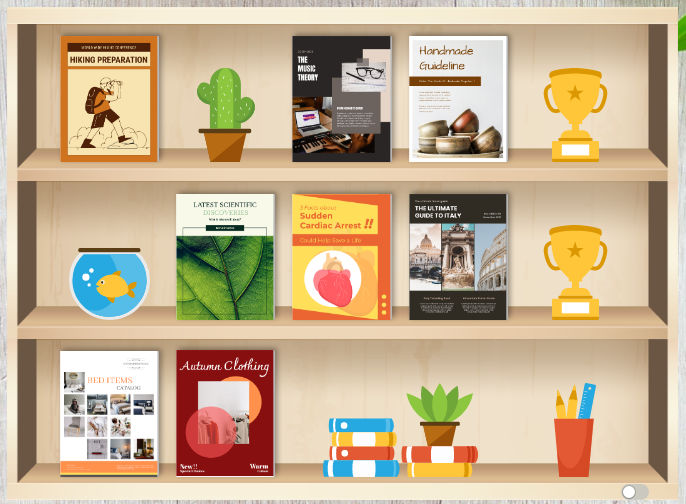
In Visual Paradigm Online, you can create online flipbooks with Fliplify Flipbook Maker, and design, publish and share your flipbooks online. After you create a flipbook, you can also create bookshelves to organize your publications. This video will show you how to show the name of the book on the bookshelf. https://www.youtube.com/watch?v=xvmyV7t9WVA&width=854&height=480 In Fliplify, you can create bookshelves to organize your publications after you create a flipbook. Catalog your publications with beautiful bookshelves. You can personalize the shelf with a custom theme and style. How to create a bookshelf In VP Online, you…continue reading →
Upload an MS Word file to Become a Flipbook

Upload an MS Word file to Become a Flipbook

Have you ever wondered how to convert a Word document into an eBook? Or how to read a Word document as if you are reading a flipbook? In Fliplify, you can convert Microsoft Word documents into flipbooks. Publish and share any digital flipbooks online. This video will show you how to upload an MS Word file to become a flipbook. https://www.youtube.com/watch?v=6KkP76OZXtA&width=854&height=480 In VP Online, you can go to My Flipbooks, and press the Choose File button under Flipbook Converter, to convert your Microsoft Word document into a flipbook. The digital documents and eBooks…continue reading →